
Mac下的UI自动化测试 (二)
下面讲一下Sikuli的重要概念,就是region,所谓region就是Sikuli在进行图像识别的时候的一个区域,默认是整个屏幕。
当然,如果region选得太大的话,并且UI上存在相似的控件,那么就会造成图像识别的错误。而且region选得过大也会使得代码运行速度下降。
我在实际应用中,region选的是屏幕中间的工作区域,也就是除了最上方的global menu 和 system tray区域,和下方的dock区域,并且在被测程序启动后,将其最大化,以占满中间的工作区,防止其他应用的UI干扰测试运行。
下面的代码就是根据AppleScript获取当前屏幕大小,与dock大小,然后用这些值构造Region对象:
from sikuli import *

import helper

# Get width and heigth of screen by applescripts

width_of_screen = helper.get_bounds_of_screen()[0]

height_of_screen = helper.get_bounds_of_screen()[1]

# Height of top menu bar

height_of_top_menu_bar = 24

# Get height of dock by applescripts

height_of_dock = helper.get_height_of_dock()

# Region of screen, without top menu bar and dock

region = Region(0, height_of_top_menu_bar, width_of_screen,

                height_of_screen - height_of_top_menu_bar - height_of_dock)

print "region size is ({0}, {1}, {2}, {3})".format(region.x, region.y, region.w, region.h)
其中get_bounds_of_screen获取屏幕大小,使用的是下面的AppleScript:
tell app "Finder" to get bounds of window of desktop
获取dock的高度get_height_of_height_of_dock使用的是这个AppleScript:
tell application "System Events" to tell process "Dock"

    set dock_dimensions to size in list 1

    set dock_height to item 2 of dock_dimensions

end tell
然后计算出工作区大小,构造region对象:
region = Region(0, height_of_top_menu_bar, width_of_screen,

                height_of_screen - height_of_top_menu_bar - height_of_dock)
当然测试system tray的功能也是必不可少的,那么就需要再准备一个对应最上方global menu区域的region:
# Height of top menu bar

height_of_top_menu_bar = 24

# Region for top menu bar region

top_menu_bar_region = Region(

    0, 0, helper.get_bounds_of_screen()[0], height_of_top_menu_bar)
region构造完成之后,就可以使用它来进行click,doubleclick,drag&drop的操作了,传递的参数就是一个截图:

在我的实际应用中,是将所有的截图都放到一个统一的screenshots的sikuli文件中,其他模块再去导入它:

这样的好处是它就像一个描述UI的ID,Name或者是父子关系的一个xml文件一样,当有UI变化的时候,不必牵连到其他模块的修改,只需将screenshots模块中对应的image更改即可。
另外,sikuli的图像识别是有一个相似度的,如果不满意,可以在sikuli IDE上点击图片进行修改:


下面的红色高亮表示的就是识别到得区域:

由于sikuli的IDE的功能简单,稳定性差,我在实际工作中是不会使用它来coding的,当你需要一个sikuli文件时,打开sikuli的IDE并new一个空文件并保存,这个文件就可以通过右键的“show package contents”打开它,看到它就是一个包含py文件和html文件的一个文件夹:

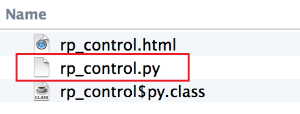
其中html文件的内容才是sikuli IDE中显示的内容,但是实际运行时与这个html没关系,使用的是py文件编译后的java字节码文件。
所以我们可以用任何编辑器编辑py文件,而不管html文件是什么内容,除非你想用这个IDE来方便的截图与修改图像匹配度。
下面的截图是我用sublime text打开的一个项目,可以看到sikuli文件就是一个文件夹:

下面是一些我常用的AppleScript脚本:
1. 最大化(非全屏)一个app,需要用到dock的高度:
tell application "Finder"

    set screenResolution to bounds of window of desktop

end tell

set screenWidth to item 3 of screenResolution

set screenHeight to item 4 of screenResolution

tell application "System Events" to tell process "Dock"

    set dock_dimensions to size in list 1

    set dock_height to item 2 of dock_dimensions

end tell

tell application "System Events" to tell process "RealTimes"

    activate

    set position of window 1 to {0, 24}

    set size of window 1 to {screenWidth, screenHeight - dock_height - 24}

end tell
2. 通过AppleScript将Finder定位到一个路径上去,并且将Finder窗口放到屏幕工作区域的右半边:
#! /usr/bin/osascript

on run(arguments)

    set myDocumentFolder to POSIX path of (first item of arguments)

    tell application "Finder"

        close every window

        activate

        make new Finder window

        set toolbar visible of the front Finder window to false

        set statusbar visible of the front Finder window to false

        set the current view of front Finder window to icon view

        set the target of the front Finder window to (POSIX file myDocumentFolder)

        set screenResolution to bounds of window of desktop

    end tell

    set screenWidth to item 3 of screenResolution

    set screenHeight to item 4 of screenResolution

    tell application "System Events" to tell process "Dock"

        set dock_dimensions to size in list 1

        set dock_height to item 2 of dock_dimensions

    end tell

    tell application "Finder"

        activate

        set frontmost to true

        set bounds of the front Finder window to {screenWidth / 2, 24, screenWidth, screenHeight - dock_height}

    end tell

end run
当要从一个Finder中选择一个文件拖放到某个App中的时候,这个脚本就很有用了。
Mac下的UI自动化测试 (二)的更多相关文章
- Mac下的UI自动化测试 (一)
在我看来,实现UI自动化测试的过程一向都是令人快乐的事情,而维护它们就是跟噩梦一样了,尤其是对每次CI产生的build进行BVT测试,由于开发不会告诉你任何UI的变化,那么你拿到的测试结果就势必会一片 ...
- Mac下的UI自动化测试 (三)
使用sikuli进行UI自动化测试固然是方便很多,不用一切都使用AppleScript那烦人的语法,只要界面的UI没有变化,结构的变化不会影响到基于sikuli的自动化,但是基于AppleScript ...
- Mac下的UI自动化测试 (四)
在实际写testcase的时候会使用unittest框架,但是在sikuli中需要使用它提供的command来运行,位于/Applications/SikuliX.app/run,使用-r参数指定要运 ...
- Mac 下纯lua(二)
Lua库 基本函数 assert(v,[,message]) 当v时false时,返回message assert(money >0,"error -1001"); coll ...
- 使用phantomjs进行无界面UI自动化测试
PhantomJS(http://phantomjs.org/) 是一个基于WebKit的服务器端JavaScript API.它全面支持web而不需浏览器支持,其快速.原生支持各种Web标准:DOM ...
- Jenkins下构建UI自动化之初体验
一.缘 起 笔者之前一直在Windows环境下编写UI自动化测试脚本,近日在看<京东系统质量保障技术实战>一书中,萌生出在jenkins下构建UI自动化测试的想法 二.思 路 首先,在Li ...
- [原创]浅谈Web UI自动化测试
[原创]浅谈Web UI自动化测试 Web UI自动化测试相信大家都不陌生,今天来谈谈这个,我最早接触自动化测试时大约是在2004年,2006年当时在腾讯财付通算是开始正式接触自动化测试,之所以是正式 ...
- 【Mac + Appium + Python3.6学习(二)】之Android自动化测试,appium-desktop配置和简易自动化测试脚本
上一篇文章介绍安装appium测试环境,这一片研究介绍如何测试Android自动化. 上一篇地址:<[Mac + Appium学习(一)]之安装Appium环境> 这一篇参考:<Ma ...
- RF+Appium框架自动化测试系列一之(Mac下Appium环境搭建)万事开头难
消失了3个月,有一段时间没来园子更新博客了,各位看官见谅哈哈,消失是因为刚换了工作环境没外网,好多笔记没能及时的记录分享,以后有时间慢慢补上吧,这段时间主要接触了移动端app的自动化测试,公司为了快速 ...
随机推荐
- TP上传图片
//更新 更新中的话,一定要写那一个if判断 public function update(){ $model = M('link'); $upload = new \Think\Upload();/ ...
- 2、配置Selenium RC
1.相关Jar包:链接: https://pan.baidu.com/s/1YLp-_5t7heyzPg550BWTGg 密码: w7ne 2.启动Selenium的方法 (1)cmd命令进入sele ...
- (转)C# 特性(Attribute)详细介绍
本文转载自:http://www.cnblogs.com/luckdv/articles/1682488.html 1.什么是Atrribute 首先,我们肯定Attribute是一个类,下面是msd ...
- binlog之一:binary log初探
MySQL Binary Log也就是常说的bin-log,是mysql执行改动产生的二进制日志文件,其主要作用有两个: Replication(主从数据库):在master端开启binary log ...
- Python操作Excel,并结合unittest单元测试框架
第一步:写Excel操作方法 excel_operate.py文件 from openpyxl import load_workbook #引入模块 class MyExcel: def __init ...
- 原生的ado.net(访问sql server数据库)
本文介绍原生的ado.net(访问sql server数据库) 写在前面 数据库连接字符串 过时的写法 string str = "server=localhost;database=my_ ...
- 【SymmetricDS】SymmetricDS是如何工作的
2018-04-20 by 安静的下雪天 http://www.cnblogs.com/quiet-snowy-day/p/8890785.html 本文翻译自SymmetricDS官方文档 ...
- numpy.percentile
http://docs.scipy.org/doc/numpy/reference/generated/numpy.percentile.html numpy.percentile(a, q, axi ...
- Java之——java.lang.NoSuchMethodException: [org.springframework.web.multipart.MultipartFile;.()
转自:https://blog.csdn.net/l1028386804/article/details/65449355 ava.lang.NoSuchMethodException: [org.s ...
- lineNumber: 8; columnNumber: 128; cvc-elt.1: 找不到元素 'beans' 的声明
转自:https://blog.csdn.net/java_yejun/article/details/51036638 spring和mybatis整合时出现了lineNumber: 8; colu ...