
JAVAWeb SSH框架 利用POI 导出EXCEL,弹出保存框
导入包这一些不多说,直接贴出关键代码,JSP只要点一个Action链接就行。
poi包我是用:poi-3.11-20141221.jar
亲测有效:
效果:
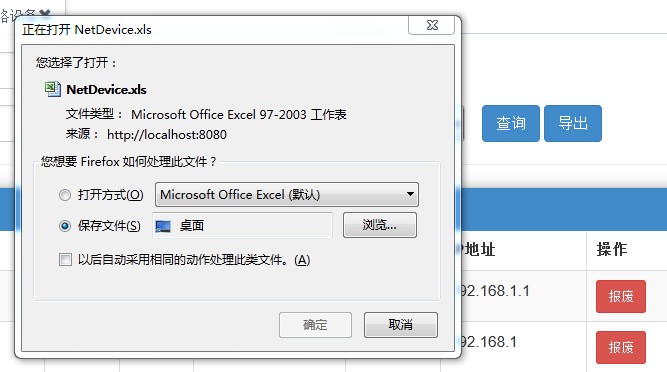

Action 类代码:
private InputStream inputStream; //(get,set方法省略)定义一个输入流,用于接住在Service类生成的含有EXCEL的输入流
public String exportNetworkDeviceList() throws Exception {
setInputStream(networkDeviceService.exportNetworkDeviceList(NET_STATUS, NET_MODEL_NUMBER, NET_BUILDING, NET_FLOOR, NET_LOCATION));
return "getNetworkDeviceExportList";
}
Service类代码:(生成EXCEL表格代码在Service类写)
public InputStream exportNetworkDeviceList(String netStatus,
String netModelNumber, String netBuilding, String netFloor,
String netLocation) {
HSSFWorkbook wb = new HSSFWorkbook();
// 第二步,在webbook中添加一个sheet,对应Excel文件中的sheet
HSSFSheet sheet = wb.createSheet("表一");
// 第三步,在sheet中添加表头第0行,注意老版本poi对Excel的行数列数有限制short
HSSFRow row = sheet.createRow((int) 0);
// 第四步,创建单元格,并设置值表头 设置表头居中
HSSFCellStyle style = wb.createCellStyle();
style.setAlignment(HSSFCellStyle.ALIGN_CENTER); // 创建一个居中格式
//写列名,视自己的需求而定
HSSFCell cell = row.createCell(0);
cell.setCellValue("设备型号");
cell.setCellStyle(style);
cell = row.createCell(1);
cell.setCellValue("端口数");
cell.setCellStyle(style);
cell = row.createCell(2);
cell.setCellValue("设备名称");
cell.setCellStyle(style);
cell = row.createCell(3);
cell.setCellValue("状态");
cell.setCellStyle(style);
cell = row.createCell(4);
cell.setCellValue("楼宇");
cell.setCellStyle(style);
cell = row.createCell(5);
cell.setCellValue("楼层");
cell.setCellStyle(style);
cell = row.createCell(6);
cell.setCellValue("位置");
cell.setCellStyle(style);
cell = row.createCell(7);
cell.setCellValue("接口");
cell.setCellStyle(style);
cell = row.createCell(8);
cell.setCellValue("IP地址");
cell.setCellStyle(style);
cell = row.createCell(9);
cell.setCellValue("网关");
cell.setCellStyle(style);
cell = row.createCell(10);
cell.setCellValue("备注");
cell.setCellStyle(style);
//构造数据库查询语句,待会我用与从DAO类取数据,视自己的需求而定,个人建议将这一部分写在另一个方法里面
String hql = "from NetworkDevice ";
if (netStatus == null) {
} else {
if (netStatus.equalsIgnoreCase("00")) {
hql += "n where n.NET_STATUS!=null ";
} else {
hql += "n where n.NET_STATUS='" + netStatus + "' ";
}
;
if (!netModelNumber.isEmpty()) {
hql += "AND n.NET_MODEL_NUMBER = '" + netModelNumber + "' ";
}
;
if (!netBuilding.isEmpty()) {
hql += "AND n.NET_BUILDING = '" + netBuilding + "' ";
}
;
if (!netFloor.isEmpty()) {
hql += "AND n.NET_FLOOR = '" + netFloor + "' ";
}
;
if (!netLocation.isEmpty()) {
hql += "AND n.NET_LOCATION = '" + netLocation + "' ";
}
;
}
hql += "order by 1 DESC";
// 第五步,写入实体数据 实际应用中这些数据从数据库得到,
List<NetworkDevice> exportList = networkDeviceDaoImpl.exportNetworkDeviceList(hql);
for (int i = 0; i < exportList.size(); i++) {
row = sheet.createRow((int) i + 1);
NetworkDevice netDevice = exportList.get(i);
// 第四步,创建单元格,并设置值
row.createCell(0).setCellValue(netDevice.getNET_MODEL_NUMBER());
row.createCell(1).setCellValue(netDevice.getNET_DEVICE_PORT());
row.createCell(2).setCellValue(netDevice.getNET_DEVICE_NAME());
row.createCell(3).setCellValue(netDevice.getNET_STATUS());
row.createCell(4).setCellValue(netDevice.getNET_BUILDING());
row.createCell(5).setCellValue(netDevice.getNET_FLOOR());
row.createCell(6).setCellValue(netDevice.getNET_LOCATION());
row.createCell(7).setCellValue(netDevice.getNET_INTERFACE());
row.createCell(8).setCellValue(netDevice.getNET_IP());
row.createCell(9).setCellValue(netDevice.getNET_GATEWAY());
row.createCell(10).setCellValue(netDevice.getNET_REMARK());
}
//自动设置EXCEL的列宽,视自己的需求而定,也可以用sheet.setDefaultColumnWidth(13);为全部列的列宽设置默认值
sheet.autoSizeColumn((short)0);
sheet.autoSizeColumn((short)2);
sheet.autoSizeColumn((short)6);
sheet.autoSizeColumn((short)7);
sheet.autoSizeColumn((short)8);
sheet.autoSizeColumn((short)9);
sheet.autoSizeColumn((short)10);
//设置文件名,用格式化日期来生成一个ID
String filePath="";
Date dt = new Date();
DateFormat df = new SimpleDateFormat("yyyyMMddHHmmss");
String date = df.format(dt).toString();
filePath = "NetDevice" + date + ".xls";
File file=new File(filePath);
try{
OutputStream out=new FileOutputStream(file);
wb.write(out);
out.close();
}catch(Exception e){
e.printStackTrace();
}
InputStream in=null;
try{
in=new FileInputStream(file);
}catch(Exception e)
{
e.printStackTrace();
}
return in;
}
strust2代码:
<action name="ExportNetworkDeviceList" class="com.javaweb.action.NetworkDeviceAction"
method="exportNetworkDeviceList">
<result name="getNetworkDeviceExportList" type="stream">
<param name="inputStream">excelStream</param>
<param name="ContentType">application/vnd.ms-excel</param>
<param name="contentDisposition">filename="NetDevice.xls"</param>
</result>
</action>
PS:据网友@puyans反馈,若strust2的代码写:<param name="inputStream">excelStream</param> 控制台会报:
Cannot create type class java.io.InputStream from value excelStream - [unknown location]
若出现这种情况,请改为:
<param name="inputStream">inputStream</param>
JAVAWeb SSH框架 利用POI 导出EXCEL,弹出保存框的更多相关文章
- Java POI 导出EXCEL经典实现 Java导出Excel弹出下载框(转载)
https://blog.csdn.net/evangel_z/article/details/7332535
- CEfSharp下载文件 弹出保存框,实现 IDownloadHandler 接口
上节讲了如何将CefSharp集成到C#中,但集成后将web界面链接进ChromiumWebBrowser后,但web界面上下载附件的功能不好使咯. 百度了半天还是没搞定,只能去看官网的Excampl ...
- 使用CEfSharp之旅(3)下载文件 弹出保存框 IDownloadHandler
原文:使用CEfSharp之旅(3)下载文件 弹出保存框 IDownloadHandler 版权声明:本文为博主原创文章,未经博主允许不得转载.可点击关注博主 ,不明白的进群191065815 我的群 ...
- struts2中利用POI导出Excel文档并下载
1.项目组负责人让我实现这个接口,因为以前做过类似的,中间并没有遇到什么太困难的事情.其他不说,先上代码: package com.tydic.eshop.action.feedback; impor ...
- 利用poi导出Excel
import java.lang.reflect.Field;import java.lang.reflect.InvocationTargetException;import java.lang.r ...
- Java Web利用POI导出Excel简单例子
采用Spring mvc架构: Controller层代码如下 @Controller public class StudentExportController{ @Autowired private ...
- 导出excel——弹出框
表单提交 凡是表单提交(表单提交分3种,见以下的1.2.3)的话.而且设置了表单标签的enctype="multipart/form-data"属性.那么这个时候就会打开弹出框. ...
- Spring Boot利用poi导出Excel
至于poi的用法就不多说了,网上多得很,但是发现spring boot结合poi的就不多了,而且大多也有各种各样的问题. public class ExcelData implements Seria ...
- html 移动端关于长按图片弹出保存问题
在做html5项目的时候有个需求是要拖动一个图片,但是又不要用户长时间按着弹出保存框.首先想到的就是在点图片的时候阻止默认事件的发生: js停止冒泡· function myfn(e){ window ...
随机推荐
- 制作透明的图标ICO
1.使用crowldraw画图保存为PNG格式,选择"被遮盖区域",然后保存(保存为PNG的透明格式). 2.使用IconWorkshop把透明的PNG格式导出为ICO.
- Navicat试用期破解方法(转)
转载网址https://blog.csdn.net/Jason_Julie/article/details/82864187 1.按步骤安装Navicat Premium,如果没有可以去官网下载:ht ...
- JETSON TK1 ~ 基于eclipse下开发ROS
此文档是在PC端开发后移植到TK1,并非在TK1上安装eclipse 官方使用IDE开发的文档: http://wiki.ros.org/IDEs 一:安装eclipse 1.下载eclipse安装包 ...
- jquery跟DOM转换
<!DOCTYPE HTML> <html lang="en-US"> <head> <meta charset="UTF-8& ...
- MySQL常用代码
create database 数据库名 create table CeShi1( Uid varchar(50) primary key, Pwd varchar(50), Name varchar ...
- iOS 读取本地Json文件
之前写过类似的方法 今天写这个 的目的是 应对开发过程中面对 服务端数据刚定下模型 但是接口不通 的情况下 不耽误客户端开发进度 + (id)getJsonDataJsonname:(NSString ...
- iOS block 闭包的学习
iOS 闭包 学习 理解: 1 . 闭包外界无法访问内部变量 ,它是一个独立的代码块. 2 . 闭包可以作为 一个方法 ,甚至局部变量 全局 变量 3 . 闭包 是一种引用类型 注 ...
- webpack打包笔记
optimist是一个node库,将webpack.config.js与shell参数整合成options对象 options对象包含之后构建的重要信息,类似于webpack.config.js we ...
- 20165101刘天野 2018-2019-2《网络对抗技术》Exp7 网络欺诈防范
目录 20165101刘天野 2018-2019-2<网络对抗技术>Exp7 网络欺诈防范 1.实验内容 1.1 简单应用SET工具建立冒名网站 1.2 ettercap DNS spoo ...
- poj 1065 Wooden Sticks 【贪心 新思维】
题目地址:http://poj.org/problem?id=1065 Sample Input 3 5 4 9 5 2 2 1 3 5 1 4 3 2 2 1 1 2 2 3 1 3 2 2 3 1 ...