
shellcode 开发
0x00 设置堆栈
栈顶指针按位与之后,将栈桢以16字节的大小对齐:
push rbp                    ;store rbp original state

mov rbp, rsp                ;set stack base point to current stack top

sub rsp, 60h                ;reserve stack space for called functions

and rsp, 0fffffffffffffff0h ;make sure stack 16-byte aligned
或者
push	rsi				; Preserve RSI since we're stomping on it

mov		rsi, rsp		; Save the value of RSP so it can be restored

and		rsp, 0FFFFFFFFFFFFFFF0h	; Align RSP to 16 bytes

sub		rsp, 020h		; Allocate homing space for ExecutePayload
我对内存对齐的理解:
把栈想象成一个积木堆成的楼,32位里每个积木能容纳4字节(32位),楼层高2的32次方,比如现在你在13楼里操作,发现13楼里堆了一部分东西,但是没有满,此时你有两种选择:继续在这楼里堆你的东西、再往上走几层重新开始堆。
第一种:继续在这楼里堆你的东西,当你堆的东西这层撑不下会移到下一层继续堆,此时让你找到最开始堆的东西的位置时候,你就要大费周章了,因为你要说在13楼哪个位置(具体到那个bit上),这就很影响寻址效率
如果是往上走走,从一个空楼层开始的地方堆的话,比如到了16楼,这时候不管你堆多少你都可以很方便的走到16楼,这就是第二种
现在16楼开始的地方就是你的东西,虽然牺牲了中间14楼15楼的空间,但是提高了效率,这就是内存里的空间换时间
对齐的方式有很多,上面说的就是以一层楼(4字节,32位)为对齐方式
很明显,如果13层楼只占用了1个字节(8位),那么你的东西至少会放在14楼开始的地方,但是你的东西只有2字节(16位),13楼足以容纳,却跑到了14楼,此时空间牺牲的就有点大了
就要适当缩小对齐单位,从4字节(32位)缩到2字节(16位),这时候你的东西就可以放在13楼里了,而且找到你的东西起始位置也很简单,从13楼开始的地方每隔2字节(16位)看一下,发现第二个2字节就是自己开始存东西的地方,很方便快速
对应到x64里也很简单,一层楼的大小变成了8字节(64位),楼高2的64次方,esp就是指向的当前楼层,按16个字节对齐的话,就是按两层楼对齐,两层楼里尽管只要有一点点东西,你的东西也要从后面两层重新堆
其实楼高多少,要和栈指针寄存器的容量相关
0x01 获取kernel32/LoadLibraryA基址
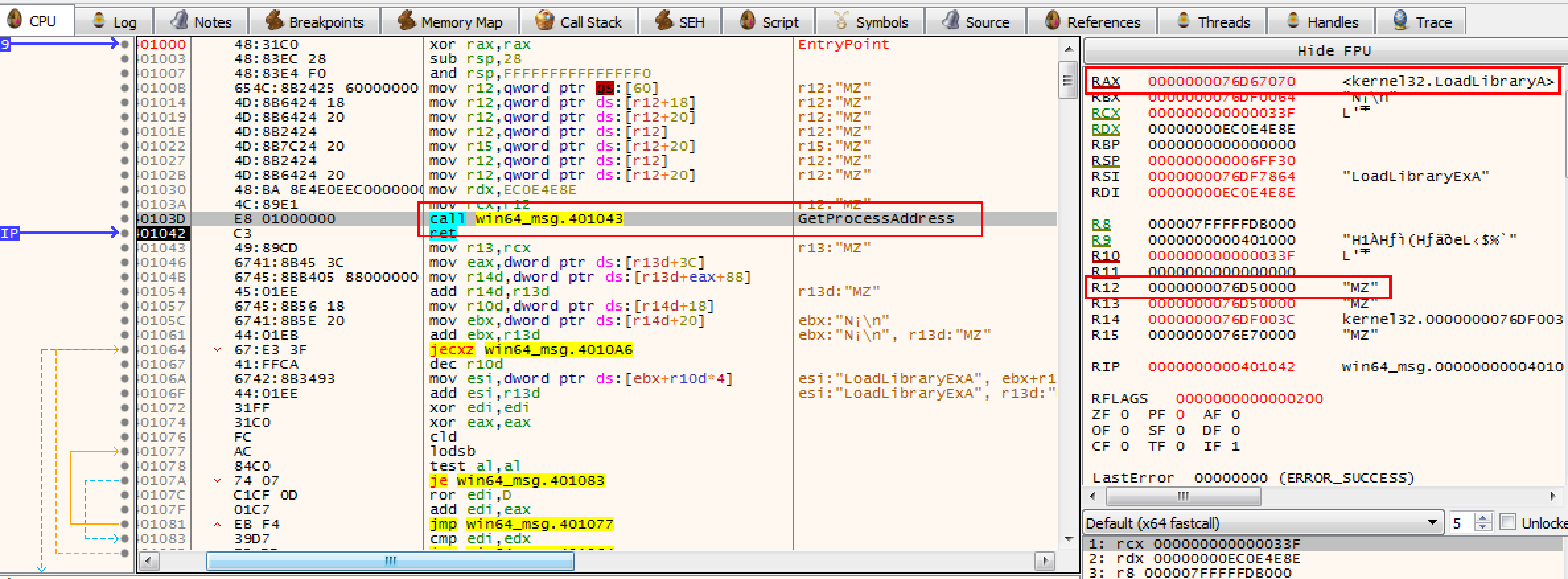
r12 存储 kernel32 基址,通过 GetProcessAddress 将 LoadLibraryA 函数地址存储在 rax:
format PE64 GUI 6.0

entry main

section '.text' executable

main:

    ;write your code here

    xor rax, rax

    sub rsp, 28h                ;reserve stack space for called function

    and rsp, 0fffffffffffffff0h ;make sure stack 16-byte aligned

    mov r12, [gs:60h]           ;peb

    mov r12, [r12 + 0x18]       ;peb->ldr

    mov r12, [r12 + 0x20]       ;peb->ldr->InMemoryOrderModuleList

    mov r12, [r12]              ;2st entry

    mov r15, [r12 + 0x20]       ;ntdll.dll base address!

    mov r12, [r12]              ;3nd entry

    mov r12, [r12 + 0x20]       ;kernel32.dll base address!

    mov rdx, 0xec0e4e8e         ;LoadLibraryA hash from ror13

    mov rcx, r12                ;kernel32 base address

    call GetProcessAddress

    ret

;Hashing section to resolve a function address

GetProcessAddress:

    mov r13, rcx                     ;base address of dll loaded

    mov eax, [r13d + 0x3c]           ;skip DOS header and go to PE header

    mov r14d, [r13d + eax + 0x88]    ;0x88 offset from the PE header is the export table.

    add r14d, r13d                  ;make the export table an absolute base address and put it in r14d.

    mov r10d, [r14d + 0x18]         ;go into the export table and get the numberOfNames

    mov ebx, [r14d + 0x20]          ;get the AddressOfNames offset.

    add ebx, r13d                   ;AddressofNames base.

find_function_loop:

    jecxz find_function_finished   ;if ecx is zero, quit :( nothing found.

    dec r10d                       ;dec ECX by one for the loop until a match/none are found

    mov esi, [ebx + r10d * 4]      ;get a name to play with from the export table.

    add esi, r13d                  ;esi is now the current name to search on.

find_hashes:

    xor edi, edi

    xor eax, eax

    cld

continue_hashing:

    lodsb                         ;get into al from esi

    test al, al                   ;is the end of string resarched?

    jz compute_hash_finished

    ror dword edi, 0xd            ;ROR13 for hash calculation!

    add edi, eax

    jmp continue_hashing

compute_hash_finished:

    cmp edi, edx                  ;edx has the function hash

    jnz find_function_loop        ;didn't match, keep trying!

    mov ebx, [r14d + 0x24]        ;put the address of the ordinal table and put it in ebx.

    add ebx, r13d                 ;absolute address

    xor ecx, ecx                  ;ensure ecx is 0'd.

    mov cx, [ebx + 2 * r10d]      ;ordinal = 2 bytes. Get the current ordinal and put it in cx. ECX was our counter for which # we were in.

    mov ebx, [r14d + 0x1c]        ;extract the address table offset

    add ebx, r13d                 ;put absolute address in EBX.

    mov eax, [ebx + 4 * ecx]      ;relative address

    add eax, r13d

find_function_finished:

    ret
编译:fasm win64_msg.asm
使用 x64dbg 调试查看到获取地址成功:
0x02 GetProcAddreass 获取 API 地址
这个函数里为什么要用 hash 比对,也可以直接 API 名字比对,但是汇编比较麻烦,并且会在生成的二进制文件中出现字符串特征,所以用 hash 比对。
通过对 kernel32.dll 的导出表中记录的 API name 进行 hash 对比,可以找到 LoadLibraryA API 基址,然后就可以利用该函数加载其他 dll 了。
弹消息框需要的是 user32.dll 的 MessageBox,所以我们需要先载入 user32.dll,之后使用上面同样的 hash 比对方法获取 MessageBox API 的地址,关于 API hash怎么获取,可以参考:https://github.com/ihack4falafel/ROR13HashGenerato。
0x03 获取 MessageBoxA 地址并弹框
最终代码:
format binary

use64

;format PE64 GUI 6.0

;entry main

;section '.text' executable

;main:

    ;find kernel32 dll base address from peb

    push rbp

    mov rbp, rsp

    sub rsp, 60h                ; reserve stack space for called function

    and rsp, 0fffffffffffffff0h ; make sure stack 16-byte aligned

    mov r12, [gs:60h]           ; peb

    mov r12, [r12 + 0x18]       ; peb->ldr

    mov r12, [r12 + 0x20]       ; peb->ldr->InMemoryOrderModuleList

    mov r12, [r12]              ; 2st entry

    mov r15, [r12 + 0x20]       ; ntdll.dll base address!

    mov r12, [r12]              ; 3nd entry

    mov r12, [r12 + 0x20]       ; kernel32.dll base address!

    ;find LoadLibraryA API address from kernel32.dll

    mov rdx, 0xec0e4e8e         ; LoadLibraryA hash from ror13

    mov rcx, r12                ; kernel32 base address

    call GetProcessAddress      ; LoadLibraryA address -> rax

    mov [rbp-30h], rax

    ;use LoadLibraryA to load user32.dll

    jmp GetUser32String         ; call/pop get 'user32.dll' string

jmpFromGetUser32String:

    pop rcx                     ; rcx <- esp <- 'user32.dll'

    call rax                    ; call LoadLibraryA, store base address to rax

    ;find MessageBoxA API address from user32.dll

    mov rdx, 0xBC4DA2A8         ; MessageBoxA hash from ror13

    mov rcx, rax                ; user32 base address

    call GetProcessAddress      ; MessageBoxA address -> rax

    ;call MessageBoxA API to display message dialog

    mov r9, 0                   ; MS_BUTTEN_OK

    jmp GetTitleString          ; store title string to stack

jmpFromGetTitleString:

    pop r8                      ; get title string from stack top

    jmp GetTextString           ; store text string to stack

jmpFromGetTextString:

    pop rdx                     ; get text string from stack top

    mov rcx, 0                  ; hWnd

    call rax                    ; call MessageBoxA

    ;find ExitThread API address from kernel32

    ;mov rdx, 0x60E0CEEF         ; ExitThread hash from ror13

    ;mov rcx, r12                ; kernel32 base address

    ;call GetProcessAddress      ; ExitThread address -> rax

    ;load ntdll.dll

    mov rax, [rbp-30h]                     ; rax = address of LoadLibraryA

    jmp GetNtdllString

jmpFromGetNtdllString:

    pop rcx

    call rax

    ;find RltExitUserThread API address from ntdll.dll

    mov rdx, 0xFF7F061A

    mov rcx, rax

    call GetProcessAddress

    ;call RltExitUserThread API to exit thread

    mov rcx, 0                  ; thread exit code = 0

    call rax                    ; call ExitThread

    ;add rsp, 60h                ; restore stack

    ;pop rbp

    ;ret

GetNtdllString:

    call jmpFromGetNtdllString

    db 'ntdll.dll',0

GetUser32String:

    call jmpFromGetUser32String

    db 'user32.dll',0

GetTitleString:

    call jmpFromGetTitleString

    db 'ERROR',0

GetTextString:

    call jmpFromGetTextString

    db 'Hello World!',0

;Hashing section to resolve a function address

GetProcessAddress:

    mov r13, rcx                     ;base address of dll loaded

    mov eax, [r13d + 0x3c]           ;skip DOS header and go to PE header

    mov r14d, [r13d + eax + 0x88]    ;0x88 offset from the PE header is the export table.

    add r14d, r13d                  ;make the export table an absolute base address and put it in r14d.

    mov r10d, [r14d + 0x18]         ;go into the export table and get the numberOfNames

    mov ebx, [r14d + 0x20]          ;get the AddressOfNames offset.

    add ebx, r13d                   ;AddressofNames base.

find_function_loop:

    jecxz find_function_finished   ;if ecx is zero, quit :( nothing found.

    dec r10d                       ;dec ECX by one for the loop until a match/none are found

    mov esi, [ebx + r10d * 4]      ;get a name to play with from the export table.

    add esi, r13d                  ;esi is now the current name to search on.

find_hashes:

    xor edi, edi

    xor eax, eax

    cld

continue_hashing:

    lodsb                         ;get into al from esi

    test al, al                   ;is the end of string resarched?

    jz compute_hash_finished

    ror dword edi, 0xd            ;ROR13 for hash calculation!

    add edi, eax

    jmp continue_hashing

compute_hash_finished:

    cmp edi, edx                  ;edx has the function hash

    jnz find_function_loop        ;didn't match, keep trying!

    mov ebx, [r14d + 0x24]        ;put the address of the ordinal table and put it in ebx.

    add ebx, r13d                 ;absolute address

    xor ecx, ecx                  ;ensure ecx is 0'd.

    mov cx, [ebx + 2 * r10d]      ;ordinal = 2 bytes. Get the current ordinal and put it in cx. ECX was our counter for which # we were in.

    mov ebx, [r14d + 0x1c]        ;extract the address table offset

    add ebx, r13d                 ;put absolute address in EBX.

    mov eax, [ebx + 4 * ecx]      ;relative address

    add eax, r13d

find_function_finished:

    ret
其中 format binary 和 use64 表示生成 64 位的 shellcode,如果注释掉,如果换成下面我注释的那四行代表生成 64 位 exe。
加载 shellcode,可以自己写,也可以用这个项目里的 runshc64.exe 测试一下 https://github.com/hasherezade/pe_to_shellcode。
0x04 shellcode 退出
shellcode 执行完相应的功能,退出的方式有以下几种:
- 调用 kernel32!ExitProcess,适合直接终止整个程序
- 调用 kernel32!ExitThread,适合终止线程
- ret,正常返回,结束程序由主程序负责
测试线程退出的时候发现,直接汇编调用 kernel32!ExitThread 会导致程序 crash:
;find ExitThread API address from kernel32

mov rdx, 0x60E0CEEF         ; ExitThread hash from ror13

mov rcx, r12                ; kernel32 base address

call GetProcessAddress      ; ExitThread address -> rax

mov rcx, 0                  ; thread exit code = 0

call rax                    ; call ExitThread
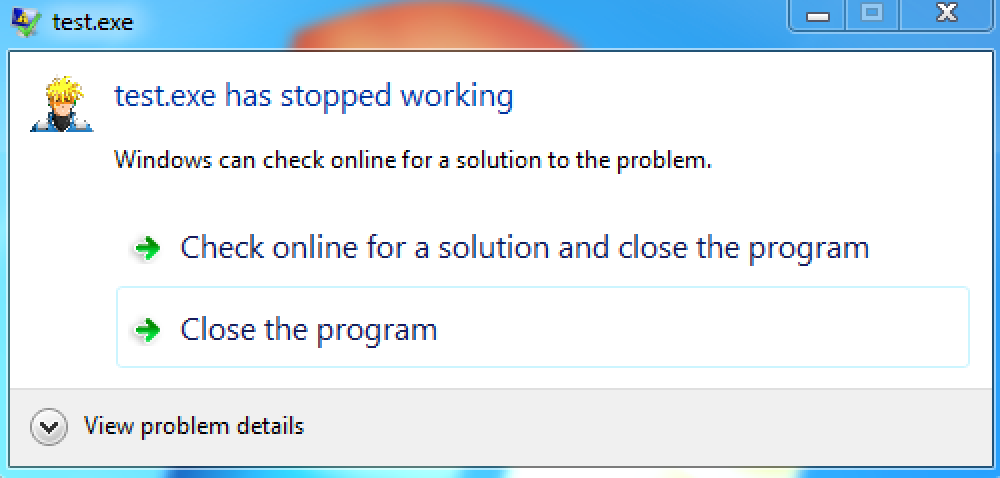
由于 kernel32!ExitThread 最终会重定向到 ntdll!RtlExitUserThread 所以改用这个试试:
;load ntdll.dll

mov rax, [rbp-30h]                     ; rax = address of LoadLibraryA

jmp GetNtdllString

jmpFromGetNtdllString:

pop rcx

call rax

;find RltExitUserThread API address from ntdll.dll

mov rdx, 0xFF7F061A

mov rcx, rax

call GetProcessAddress

;call RltExitUserThread API to exit thread

mov rcx, 0                  ; thread exit code = 0

call rax                    ; call ExitThread
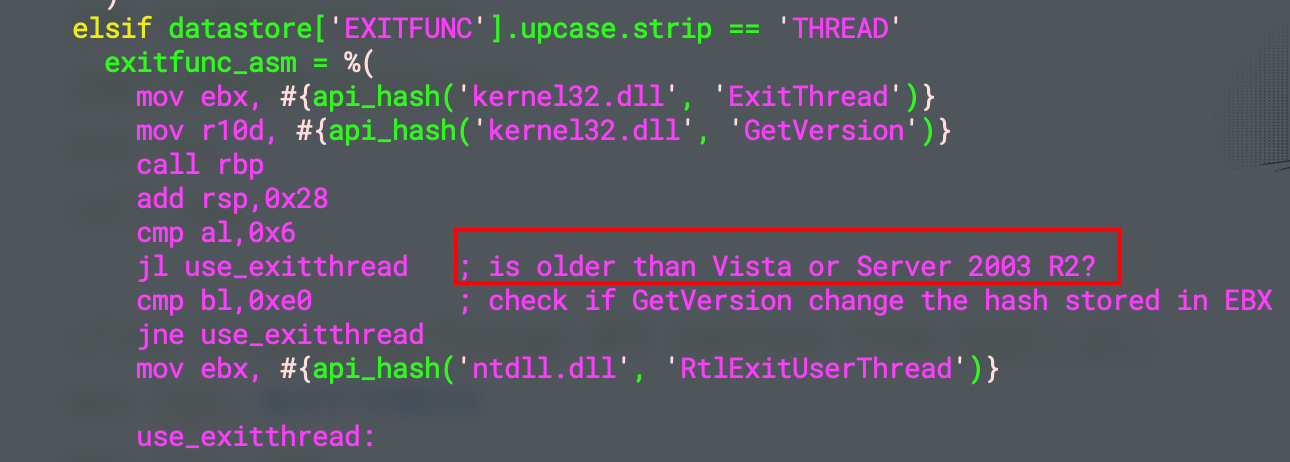
这个就没有问题,很神奇,同时简单看了一下 msf 生成 MessageBox 汇编的代码,貌似和 Windows 版本有关系。
还有一个问题,就是如果不使用 API 退出,只是 ret 的话主进程并不能退出,搞不懂:
xor rax, rax

add rsp, 60h                ; restore stack

pop rbp

ret
由 x64dbg 调了一下,发现是堆栈不平衡导致的,为什么会堆栈不平衡?
push rbp

mov rbp, rsp

sub rsp, 60h                ; reserve stack space for called function

and rsp, 0fffffffffffffff0h ; make sure stack 16-byte aligned

;;;;;;;;;;;;

xor rax, rax

add rsp, 60h                ; restore stack

pop rbp

ret
这是由于 and rsp, 0fffffffffffffff0h 这句导致的,在某些情况下会导致 rsp - 8。知道问题根源之后,就想把这句去掉,去掉之后发现 MessageBoxA 调用过程内存访问异常了,纳闷。
最后想了个办法,在 and 指令之前先用 rbp 保存一下当前栈顶,然后到结束直接恢复回去:
push rbp                    ; save rbp original state

mov rbp, rsp

sub rsp, 60h                ; reserve stack space for called function

and rsp, 0fffffffffffffff0h ; make sure stack 16-byte aligned

;;;;;;;;;;;;

xor rax, rax

mov rsp, rbp                ; resotre rsp

pop rbp                     ; restore rbp

ret
这个解决之后,返回到调用 shellcode 之后的地方继续执行,会出现访问异常,这个调了一下,发现是 shellcode 执行过程把 rsi 寄存器改了,所以解决办法就是像 rbp 一样,先保存一下,最后恢复回去:
push rsi                    ; save rbp state

push rbp                    ; save rbp state

mov rbp, rsp

sub rsp, 60h                ; reserve stack space for called function

and rsp, 0fffffffffffffff0h ; make sure stack 16-byte aligned

;;;;;;;;;;;;

xor rax, rax                ; return 0

mov rsp, rbp                ; resotre rsp

pop rbp                     ; restore rbp

pop rsi                     ; restore rsi

ret
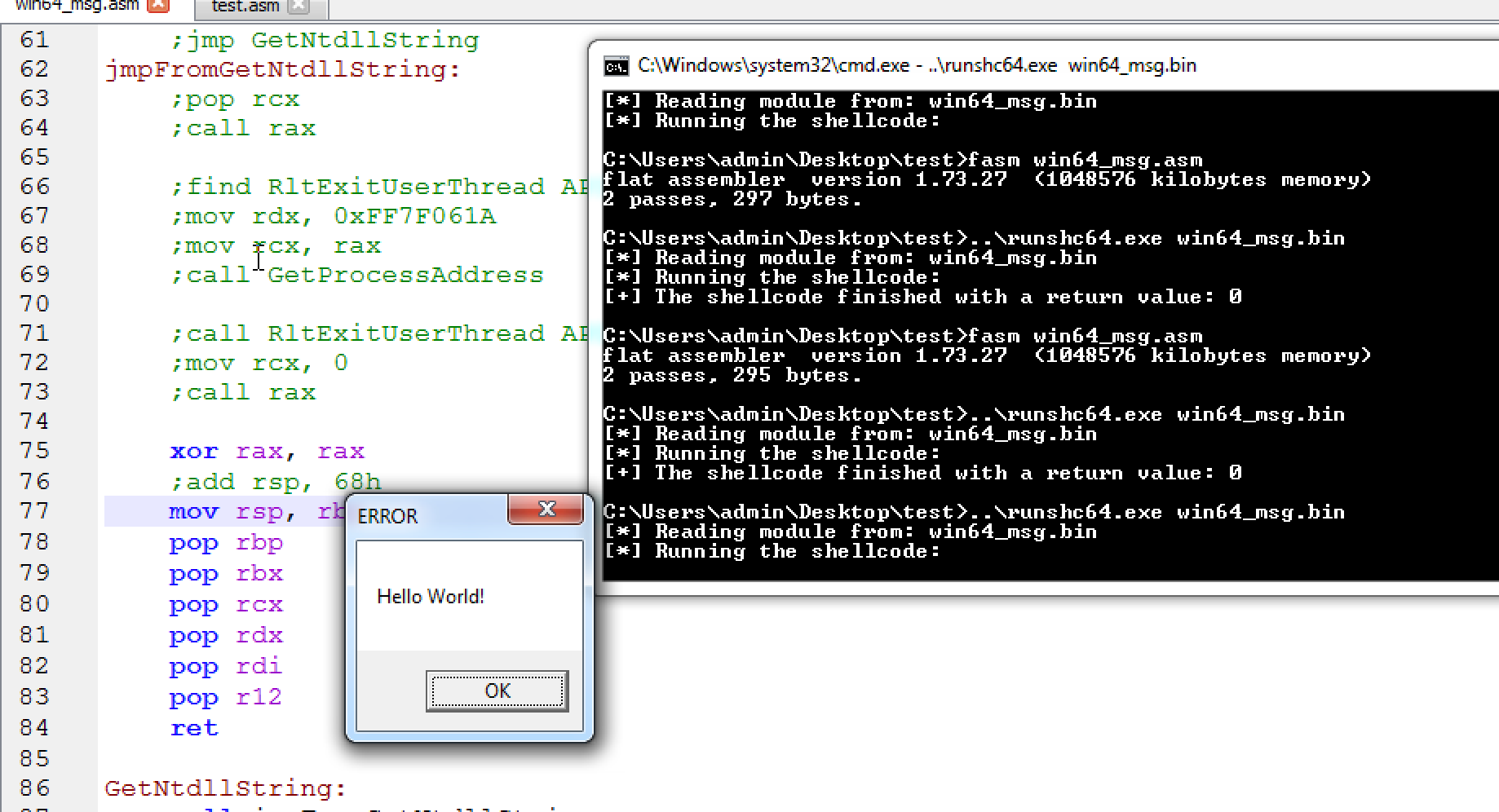
最后,完美运行!
0x05 中文弹框
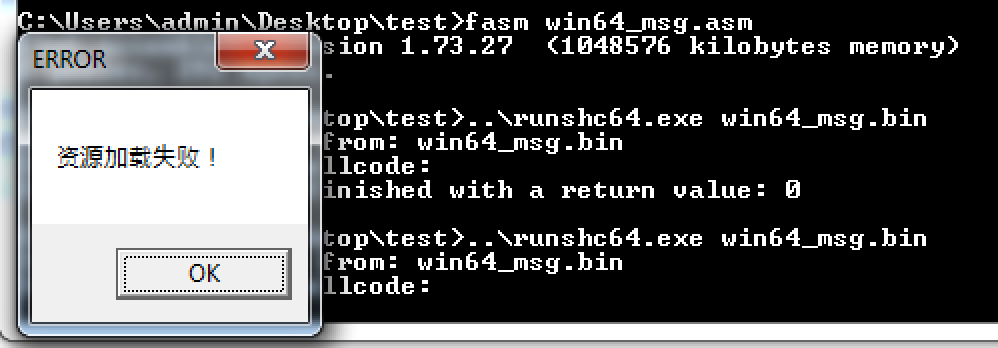
改成 MessageBoxW,他的 hash 是 0xBC4DA2BE,然后使用 fasm 提供的 du 指令,需要包含 encoding\utf8.inc:
include 'encoding\utf8.inc'

format binary

use64

;format PE64 GUI 6.0

;entry main

;section '.text' executable

;main:

    ;find kernel32 dll base address from peb

    push r12

    push rdi

    push rdx

    push rcx

    push rbx

    push rbp

    mov rbp, rsp

    sub rsp, 68h                ; reserve stack space for called function

    and rsp, 0fffffffffffffff0h ; make sure stack 16-byte aligned

    mov r12, [gs:60h]           ; peb

    mov r12, [r12 + 0x18]       ; peb->ldr

    mov r12, [r12 + 0x20]       ; peb->ldr->InMemoryOrderModuleList

    mov r12, [r12]              ; 2st entry

    mov r15, [r12 + 0x20]       ; ntdll.dll base address!

    mov r12, [r12]              ; 3nd entry

    mov r12, [r12 + 0x20]       ; kernel32.dll base address!

    ;find LoadLibraryA API address from kernel32.dll

    mov rdx, 0xec0e4e8e         ; LoadLibraryA hash from ror13

    mov rcx, r12                ; kernel32 base address

    call GetProcessAddress      ; LoadLibraryA address -> rax

    mov [rbp-30h], rax

    ;use LoadLibraryA to load user32.dll

    jmp GetUser32String         ; call/pop get 'user32.dll' string

jmpFromGetUser32String:

    pop rcx                     ; rcx <- esp <- 'user32.dll'

    call rax                    ; call LoadLibraryA, store base address to rax

    ;find MessageBoxW API address from user32.dll

    mov rdx, 0xBC4DA2BE         ; MessageBoxW hash from ror13

    mov rcx, rax                ; user32 base address

    call GetProcessAddress      ; MessageBoxW address -> rax

    ;call MessageBoxW API to display message dialog

    mov r9, 0                   ; MS_BUTTEN_OK

    jmp GetTitleString          ; store title string to stack

jmpFromGetTitleString:

    pop r8                      ; get title string from stack top

    jmp GetTextString           ; store text string to stack

jmpFromGetTextString:

    pop rdx                     ; get text string from stack top

    mov rcx, 0                  ; hWnd

    call rax                    ; call MessageBoxW

    xor rax, rax

    mov rsp, rbp

    pop rbp

    pop rbx

    pop rcx

    pop rdx

    pop rdi

    pop r12

    ret

GetUser32String:

    call jmpFromGetUser32String

    db 'user32.dll',0

GetTitleString:

    call jmpFromGetTitleString

    du 'ERROR',0

GetTextString:

    call jmpFromGetTextString

    du '资源加载失败!',0

;Hashing section to resolve a function address

GetProcessAddress:

    mov r13, rcx                     ;base address of dll loaded

    mov eax, [r13d + 0x3c]           ;skip DOS header and go to PE header

    mov r14d, [r13d + eax + 0x88]    ;0x88 offset from the PE header is the export table.

    add r14d, r13d                  ;make the export table an absolute base address and put it in r14d.

    mov r10d, [r14d + 0x18]         ;go into the export table and get the numberOfNames

    mov ebx, [r14d + 0x20]          ;get the AddressOfNames offset.

    add ebx, r13d                   ;AddressofNames base.

find_function_loop:

    jecxz find_function_finished   ;if ecx is zero, quit :( nothing found.

    dec r10d                       ;dec ECX by one for the loop until a match/none are found

    mov esi, [ebx + r10d * 4]      ;get a name to play with from the export table.

    add esi, r13d                  ;esi is now the current name to search on.

find_hashes:

    xor edi, edi

    xor eax, eax

    cld

continue_hashing:

    lodsb                         ;get into al from esi

    test al, al                   ;is the end of string resarched?

    jz compute_hash_finished

    ror dword edi, 0xd            ;ROR13 for hash calculation!

    add edi, eax

    jmp continue_hashing

compute_hash_finished:

    cmp edi, edx                  ;edx has the function hash

    jnz find_function_loop        ;didn't match, keep trying!

    mov ebx, [r14d + 0x24]        ;put the address of the ordinal table and put it in ebx.

    add ebx, r13d                 ;absolute address

    xor ecx, ecx                  ;ensure ecx is 0'd.

    mov cx, [ebx + 2 * r10d]      ;ordinal = 2 bytes. Get the current ordinal and put it in cx. ECX was our counter for which # we were in.

    mov ebx, [r14d + 0x1c]        ;extract the address table offset

    add ebx, r13d                 ;put absolute address in EBX.

    mov eax, [ebx + 4 * ecx]      ;relative address

    add eax, r13d

find_function_finished:

    ret
显示正常,nice!
shellcode 开发的更多相关文章
- Shellcode开发辅助工具shellnoob
Shellcode开发辅助工具shellnoob Shellcode开发的过程中会遇到很多繁杂的工作,如编译.反编译.调试等.为了减少这部分工作,Kali Linux提供了开发辅助工具shelln ...
- 栈溢出原理与 shellcode 开发
ESP:该指针永远指向系统栈最上面一个栈帧的栈顶 EBP:该指针永远指向系统栈最上面一个栈帧的底部 01 修改函数返回地址 #include<stdio.h> #include< ...
- GitHub万星项目:黑客成长技术清单
最近有个GitHub项目很火,叫"Awesome Hacking",这个项目是由Twitter账号@HackwithGithub 维护,喜欢逛Twitter的安全爱好者应该了解,在 ...
- 转:GitHub 万星推荐成长技术清单
转:http://www.4hou.com/info/news/7061.html 最近两天,在reddit安全板块和Twitter上有个GitHub项目很火,叫“Awesome Hacking”. ...
- GitHub 万星推荐:黑客成长技术清单
GitHub 万星推荐:黑客成长技术清单 导语:如果你需要一些安全入门引导,“Awesome Hacking”无疑是最佳选择之一. 最近两天,在reddit安全板块和Twitter上有个GitHub项 ...
- BlackArch-Tools
BlackArch-Tools 简介 安装在ArchLinux之上添加存储库从blackarch存储库安装工具替代安装方法BlackArch Linux Complete Tools List 简介 ...
- 仁者见仁:缓冲区栈溢出之利用 Exploit 形成完整攻击链完全攻略(含有 PayLoad)
> 前言 内存缓冲区溢出又名 Buffer OverFlow,是一种非常危险的漏洞,在各种操作系统和应用软件中广泛存在.利用缓冲区溢出进行的攻击,小则导致程序运行失败.系统宕机等后果,大则可以取 ...
- 开发shellcode的艺术
专业术语 ShellCode:实际是一段代码(也可以是填充数据) exploit:攻击通过ShellCode等方法攻击漏洞 栈帧移位与jmp esp 一般情况下,ESP寄存器中的地址总是指向系统栈且不 ...
- 逆向工程学习第二天--动手开发自己的第一个shellcode
一个简单的c语言添加windows管理员账号的小程序,之前在渗透的时候经常用到,现在拿它来做自己的第一个shellcode. C代码: #pragma comment(lib, "netap ...
随机推荐
- SpringBoot(十一): Spring Boot集成Redis
1.在 pom.xml 中配置相关的 jar 依赖: <!-- 加载 spring boot redis 包 --> <dependency> <groupId>o ...
- MySql-Day-01
MySql 能够理解数据库的概念 能够安装MySQL数据库 能够启动,关闭及登录MySQL 能够使用SQL语句操作数据库 能够使用SQL语句操作表结构 能够使用SQL语句进行数据的添加修改和删除的操作 ...
- LeetCode-重建二叉树(前序遍历+中序遍历)
重建二叉树 LeetCode-105 首次需要知道前序遍历和中序遍历的性质. 解题思路如下:首先使用前序比遍历找到根节点,然后使用中序遍历找到左右子树的范围,再分别对左右子树实施递归重建. 本题的难点 ...
- 记一次Linux内核崩溃:kdump,crash,vmcore
原理 Linux内核发送崩溃时,kdump会生成一个内核转储文件vmcore. 可以通过分析vmcore分析出内核崩溃的原因. crash是一个被广泛应用的内核奔溃转储文件分析工具.使用crash调试 ...
- JS table排序
<html lang="en"> <head> <meta charset="UTF-8"> <meta http-e ...
- 安装RPM包或者源码包
RPM工具 RPM他是以一种数据库记录的方式将我们所需要的套件安装到linux主机的一套管理程序关于RPM各个选项的含义如下-i:表示安装-v:表示可视化-h:表示安装进度在安装RPM包时,常用的附带 ...
- 2019看雪CTF 晋级赛Q2第四题wp
上次参加2019看雪CTF 晋级赛Q2卡在了这道题上,虽然逆出算法,但是方程不会解,哈哈哈哈,果然数学知识很重要呀,现在记录一下. 首先根据关键信息,根据错误提示字符串定位到这里: 1 int __t ...
- 一次 outline 去除经验(非继承属性,看着像继承)
情况描述: 目前维护的老项目是通过 easyui 生成的 html,嵌套结构非常多,当点击元素后,会有个边框???非常影响页面美观,这是啥迷惑点击交互??? 经验告诉我,这是 css 的 outlin ...
- python中数组切片[:,i] [i:j:k] [:-i] [i,j,:k]
逗号","分隔各个维度,":"表示各个维度内的切片,只有:表示取这个维度的全部值,举例说明如下 1 1.二维数组 2 3 X[:,0]取所有行的第0个数据,第二 ...
- 获取执行计划之Autotrace
Autotrace 简介 AUTOTRACE是一项SQL*Plus功能,自动跟踪为SQL语句生成一个执行计划并且提供与该语句的处理有关的统计. AUTOTRACE的好处是您不必设置跟踪文件的格式,并且 ...