
linux tomcat【9.0.12】 使用 ssl证书 配置 https 的具体操作 【使用 域名 】
1.前言
根据上一个随笔,已经可以正式在 阿里云服务器发布 工程了 ,但是用的协议默认是 http ,端口80
但是 http不安全 ,容易被拦截抓包 ,于是出来了个 https
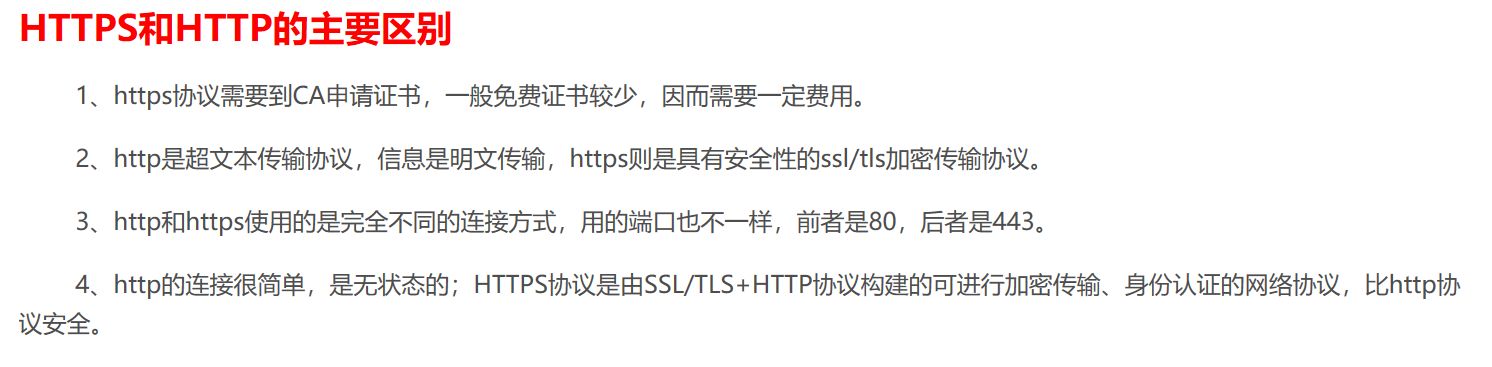
tomcat发布 对https 的配置根据版本会有所变化 ,但是其实变化不大
版本9.x版本的tomcat 强制要求证书 别名是tomcat,否则报错
引用官网的解释:

下面的演示是在上一随笔的基础上做的,不清楚 Linux使用公网ip配置tomcat ,请去看完上一随笔【 https://www.cnblogs.com/c2g5201314/p/13058413.html 】
2.操作
(1)进入阿里云后台 ,下载ssl证书和密钥
地址 https://yundun.console.aliyun.com/?spm=5176.10173289.products-recent.dcas.116e2e77ITJsCC&p=cas#/overview/cn-hangzhou
【需要登录才可以访问】

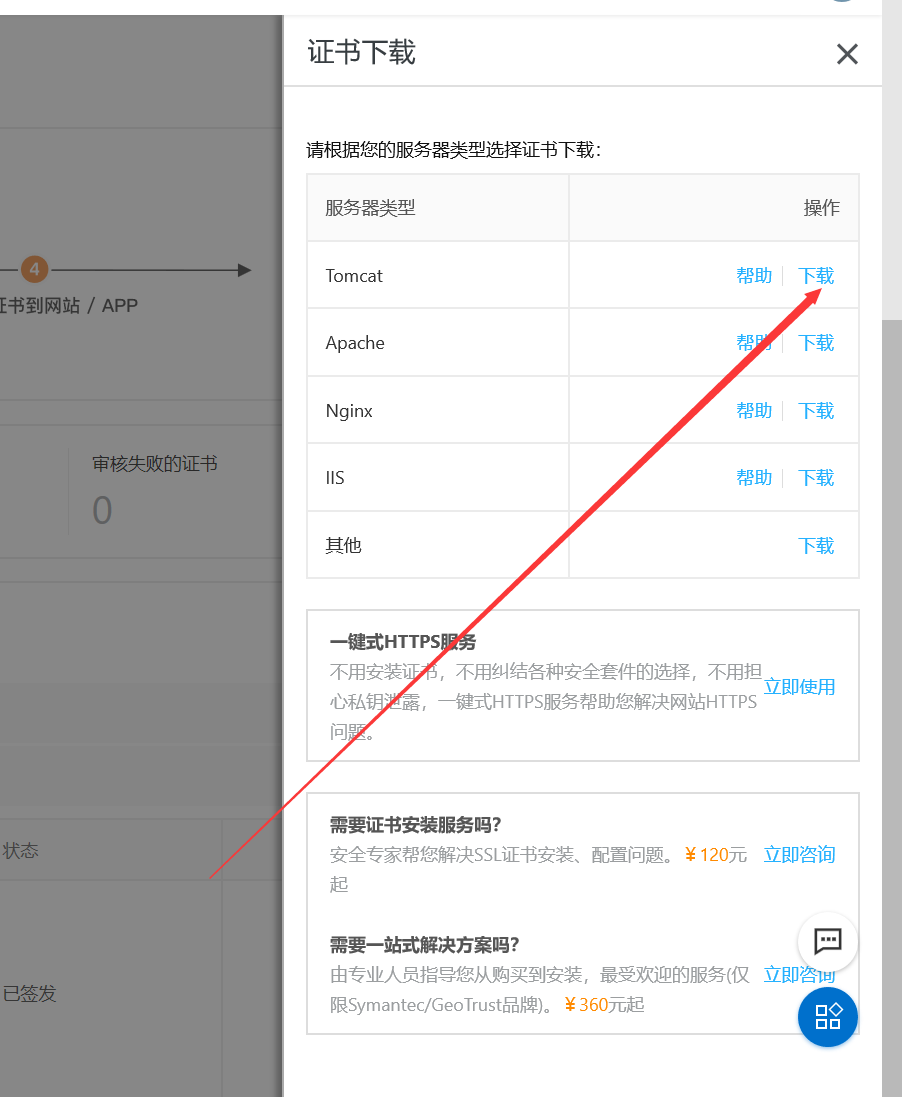
加载的两个文件
在 tomcat根路径新建一个叫cerf的文件夹,将加载的文件拷贝到里面【我是使用xftp传输的】

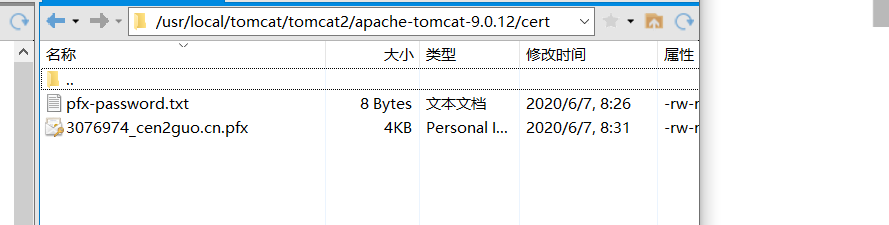
后缀 .pfx 的文件就是安全证书 ,另一个是密钥
(2)我的是tomcat 9.0.12,因此需要修改证书别名 ,不是9.x版本客户省略这一步
需要找到jdk的安装目录,然后找到keytool 的路径

我的是 /usr/local/java/jdk1.8.0_251/bin/keytool
因为 我 的 安全证书 的路径是 /usr/local/tomcat/tomcat2/apache-tomcat-9.0.12/cert/3076974_cen2guo.cn.pfx
因此修改别名的指令
/usr/local/java/jdk1.8.0_251/bin/keytool -changealias -keystore /usr/local/tomcat/tomcat2/apache-tomcat-9.0.12/cert/3076974_cen2guo.cn.pfx -alias alias -destalias tomcat
然后会提示输入密码 ,即密钥文件里的内,回车即可执行【建议直接复制粘贴,手写容易写错,无明文】

(3)配置server.xml文件
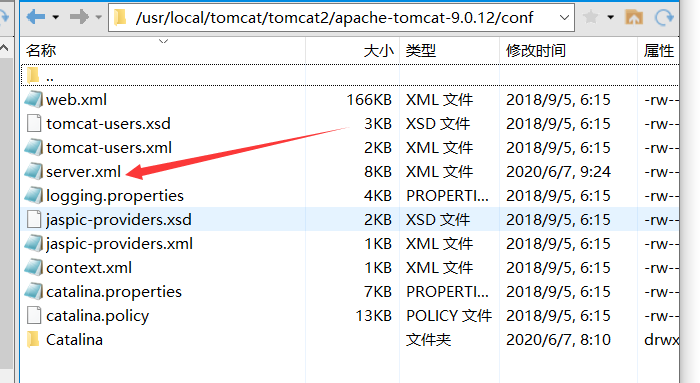
服务节点的 的端口 可以不变 ,如果需要使用域名 ,则直接将 写有 公网ip 的 字符串换成 域名字符串即可【就两个地方,多简单,哈哈哈】

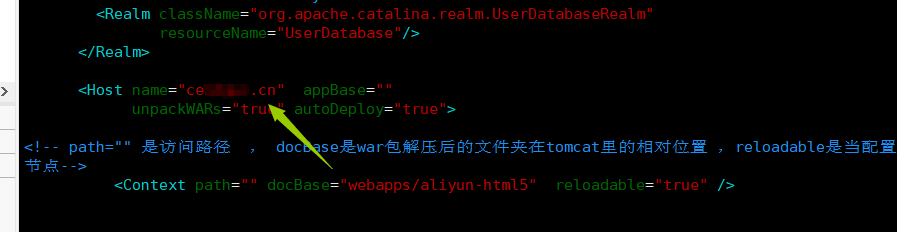
好了回归正题 ,配置 安全证书

源码


<?xml version="1.0" encoding="UTF-8"?>
<!--
Licensed to the Apache Software Foundation (ASF) under one or more
contributor license agreements. See the NOTICE file distributed with
this work for additional information regarding copyright ownership.
The ASF licenses this file to You under the Apache License, Version 2.0
(the "License"); you may not use this file except in compliance with
the License. You may obtain a copy of the License at http://www.apache.org/licenses/LICENSE-2.0 Unless required by applicable law or agreed to in writing, software
distributed under the License is distributed on an "AS IS" BASIS,
WITHOUT WARRANTIES OR CONDITIONS OF ANY KIND, either express or implied.
See the License for the specific language governing permissions and
limitations under the License.
-->
<!-- Note: A "Server" is not itself a "Container", so you may not
define subcomponents such as "Valves" at this level.
Documentation at /docs/config/server.html
-->
<Server port="83" shutdown="SHUTDOWN">
<Listener className="org.apache.catalina.startup.VersionLoggerListener" />
<!-- Security listener. Documentation at /docs/config/listeners.html
<Listener className="org.apache.catalina.security.SecurityListener" />
-->
<!--APR library loader. Documentation at /docs/apr.html -->
<Listener className="org.apache.catalina.core.AprLifecycleListener" SSLEngine="on" />
<!-- Prevent memory leaks due to use of particular java/javax APIs-->
<Listener className="org.apache.catalina.core.JreMemoryLeakPreventionListener" />
<Listener className="org.apache.catalina.mbeans.GlobalResourcesLifecycleListener" />
<Listener className="org.apache.catalina.core.ThreadLocalLeakPreventionListener" /> <!-- Global JNDI resources
Documentation at /docs/jndi-resources-howto.html
-->
<GlobalNamingResources>
<!-- Editable user database that can also be used by
UserDatabaseRealm to authenticate users
-->
<Resource name="UserDatabase" auth="Container"
type="org.apache.catalina.UserDatabase"
description="User database that can be updated and saved"
factory="org.apache.catalina.users.MemoryUserDatabaseFactory"
pathname="conf/tomcat-users.xml" />
</GlobalNamingResources> <!-- A "Service" is a collection of one or more "Connectors" that share
a single "Container" Note: A "Service" is not itself a "Container",
so you may not define subcomponents such as "Valves" at this level.
Documentation at /docs/config/service.html
-->
<Service name="Catalina"> <!--The connectors can use a shared executor, you can define one or more named thread pools-->
<!--
<Executor name="tomcatThreadPool" namePrefix="catalina-exec-"
maxThreads="150" minSpareThreads="4"/>
--> <!-- A "Connector" represents an endpoint by which requests are received
and responses are returned. Documentation at :
Java HTTP Connector: /docs/config/http.html
Java AJP Connector: /docs/config/ajp.html
APR (HTTP/AJP) Connector: /docs/apr.html
Define a non-SSL/TLS HTTP/1.1 Connector on port 8080
-->
<Connector port="80" protocol="HTTP/1.1"
connectionTimeout="20000"
redirectPort="82" />
<!-- A "Connector" using the shared thread pool-->
<!--
<Connector executor="tomcatThreadPool"
port="8080" protocol="HTTP/1.1"
connectionTimeout="20000"
redirectPort="8443" />
-->
<!-- Define a SSL/TLS HTTP/1.1 Connector on port 8443
This connector uses the NIO implementation. The default
SSLImplementation will depend on the presence of the APR/native
library and the useOpenSSL attribute of the
AprLifecycleListener.
Either JSSE or OpenSSL style configuration may be used regardless of
the SSLImplementation selected. JSSE style configuration is used below.
-->
<!--
<Connector port="8443" protocol="org.apache.coyote.http11.Http11NioProtocol"
maxThreads="150" SSLEnabled="true">
<SSLHostConfig>
<Certificate certificateKeystoreFile="conf/localhost-rsa.jks"
type="RSA" />
</SSLHostConfig>
</Connector>
-->
<!-- Define a SSL/TLS HTTP/1.1 Connector on port 8443 with HTTP/2
This connector uses the APR/native implementation which always uses
OpenSSL for TLS.
Either JSSE or OpenSSL style configuration may be used. OpenSSL style
configuration is used below.
-->
<!--配置https协议 ,ssl证书 -->
<!-- #port属性根据实际情况修改(https默认端口为443)。如果使用其他端口号,则您需要使用https://yourdomain:port的方式来访问您的网站。-->
<Connector port="443" protocol="HTTP/1.1"
SSLEnabled="true"
scheme="https"
secure="true"
keystoreFile="/usr/local/tomcat/tomcat2/apache-tomcat-9.0.12/cert/3076974_cen2guo.cn.pfx【这里写安全证书的地址】"
keystoreType="PKCS12"
keystorePass="66666666【这里写密钥】"
clientAuth="false"
SSLProtocol="TLSv1+TLSv1.1+TLSv1.2"
ciphers="TLS_RSA_WITH_AES_128_CBC_SHA,TLS_RSA_WITH_AES_256_CBC_SHA,TLS_ECDHE_RSA_WITH_AES_128_CBC_SHA,TLS_ECDHE_RSA_WITH_AES_128_CBC_SHA256,TLS_RSA_WITH_AES_128_CBC_SHA256,TLS_RSA_WITH_AES_256_CBC_SHA256"
/> <!--
<UpgradeProtocol className="org.apache.coyote.http2.Http2Protocol" />
<SSLHostConfig>
<Certificate certificateKeyFile="conf/localhost-rsa-key.pem"
certificateFile="conf/localhost-rsa-cert.pem"
certificateChainFile="conf/localhost-rsa-chain.pem"
type="RSA" />
</SSLHostConfig>
</Connector>
--> <!-- Define an AJP 1.3 Connector on port 8009 -->
<Connector port="81" protocol="AJP/1.3" redirectPort="82" /> <!-- An Engine represents the entry point (within Catalina) that processes
every request. The Engine implementation for Tomcat stand alone
analyzes the HTTP headers included with the request, and passes them
on to the appropriate Host (virtual host).
Documentation at /docs/config/engine.html --> <!-- You should set jvmRoute to support load-balancing via AJP ie :
<Engine name="Catalina" defaultHost="localhost" jvmRoute="jvm1">
-->
<Engine name="Catalina" defaultHost="cen域名.cn"> <!--For clustering, please take a look at documentation at:
/docs/cluster-howto.html (simple how to)
/docs/config/cluster.html (reference documentation) -->
<!--
<Cluster className="org.apache.catalina.ha.tcp.SimpleTcpCluster"/>
--> <!-- Use the LockOutRealm to prevent attempts to guess user passwords
via a brute-force attack -->
<Realm className="org.apache.catalina.realm.LockOutRealm">
<!-- This Realm uses the UserDatabase configured in the global JNDI
resources under the key "UserDatabase". Any edits
that are performed against this UserDatabase are immediately
available for use by the Realm. -->
<Realm className="org.apache.catalina.realm.UserDatabaseRealm"
resourceName="UserDatabase"/>
</Realm> <Host name="cen域名.cn" appBase=""
unpackWARs="true" autoDeploy="true"> <!-- path="" 是访问路径 , docBase是war包解压后的文件夹在tomcat里的相对位置 ,reloadable是当配置文件有修改时重启节点-->
<Context path="" docBase="webapps/aliyun-html5" reloadable="true" /> <!-- SingleSignOn valve, share authentication between web applications
Documentation at: /docs/config/valve.html -->
<!--
<Valve className="org.apache.catalina.authenticator.SingleSignOn" />
--> <!-- Access log processes all example.
Documentation at: /docs/config/valve.html
Note: The pattern used is equivalent to using pattern="common" -->
<Valve className="org.apache.catalina.valves.AccessLogValve" directory="logs"
prefix="localhost_access_log" suffix=".txt"
pattern="%h %l %u %t "%r" %s %b" /> </Host>
</Engine>
</Service>
</Server>
3.测试
启动tomcat ,等几分钟,等<server>节点的关闭端口启动后即可使用浏览器访问
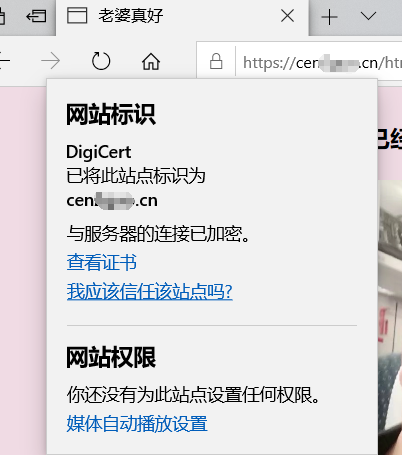
访问 网址 https://cen域名.cn/html/love.html 访问静态前端 ,不需要写端口号443 ,这是https的默认端口,类似于http的80

点开网址边上的锁,可以查看证书信息,认证成功
网址也可以添加 www.前缀,这是默认允许的,【一般用来向小白装逼,是我就懒得写】
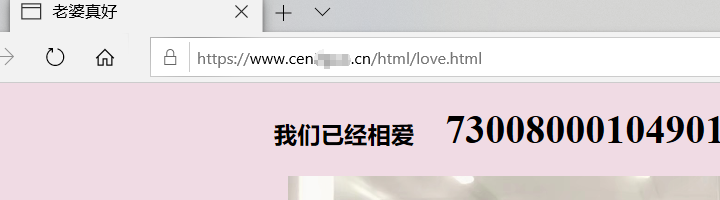
当然,即便配置了https ,那http其实也是可以用的

linux tomcat【9.0.12】 使用 ssl证书 配置 https 的具体操作 【使用 域名 】的更多相关文章
- 最新阿里云服务器免费SSL证书配置HTTPS的两种方法(图文教程二)
在大家学习如何利用免费SSL证书配置网站HTTPS之前,我们先要搞清楚为什么要开启HTTPS,这个绿色的小锁真的有用吗?所谓的HTTPS其实是(安全套接字层超文本传输协议)是以安全为目标的HTTP通道 ...
- 阿里云服务器Centos上Apache安装SSL证书配置Https
首先我们先去阿里云申请一个免费的SSL证书(https://common-buy.aliyun.com/?spm=5176.7968328.1266638..5e971232BzMSp5&co ...
- 使用自签名SSL证书配置HTTPS,解决浏览器提示不安全警告
项目测试过程中需要将应用从HTTP升级到HTTPS,浏览了网上一些帖子,参考<WebLogic11g-单双向SSL配置(以Springside3为例)>一文使用openssl工具来自建CA ...
- Nginx使用SSL模块配置https
背景 开发微信小程序,需要https域名,因此使用Nginx的SSL模块配置https 步骤 一.去域名管理商(如腾讯云.阿里云等)申请CA证书 二.在Nginx中配置,一般情况下域名管理商会提供配置 ...
- Tomcat的SSL证书配置以及Tomcat+Nginx实现SSL配置
把jks上传到java容器在的服务器上,路径只要不是webapps下就可以,然后到conf目录下server.xml里配置 <Connector port=" protocol=&qu ...
- linux ssl证书配置(apache)
1. 前提是 已通过第三方 申请到 .crt .key 和 .ca-bundle 文件 2. 将三个文件拷贝到linux服务器上 任意一个指定的目录 3. 找到要编辑的apache配置 Apache主 ...
- Linux下Nginx配置阿里云 SSL证书实现HTTPS访问
这篇文章主要介绍了nginx配置ssl证书实现https访问的示例 1.服务器系统:Centos 2. 阿里云申请SSL证书 选择“免费版DV SSL”,点击立即购买: 下载证书 列表中找到已签发的证 ...
- [转帖]一个ip对应多个域名多个ssl证书配置-Nginx实现多域名证书HTTPS
一个ip对应多个域名多个ssl证书配置-Nginx实现多域名证书HTTPS https://home.cnblogs.com/u/beyang/ 一台服务器,两个域名 首先购买https,获取到CA证 ...
- 阿里云负载均衡SSL证书配置
阿里云负载均衡SSL证书 转载请注明地址:http://www.cnblogs.com/funnyzpc/p/8908461.html 好久了呢,距上篇博客的这段时间中:考试.搬家.工作赶工.业务考察 ...
随机推荐
- 注册页面html版本
<!DOCTYPE html><html lang="en"><head> <meta charset="UTF-8" ...
- antd动态的表格合并(包含排序功能)
主要是两个步骤, 1.处理接口返回数据,给其添加两个属性,一个是合并行数(列数),一个是当前数据的序号 2.在columns结合antd官网的处理方法合并表格 3.尽可能得减少计算量 数据处理函数 / ...
- 【Python机器学习实战】聚类算法(2)——层次聚类(HAC)和DBSCAN
层次聚类和DBSCAN 前面说到K-means聚类算法,K-Means聚类是一种分散性聚类算法,本节主要是基于数据结构的聚类算法--层次聚类和基于密度的聚类算法--DBSCAN两种算法. 1.层次聚类 ...
- Git差异并列显示
默认的git diff命令只会将文件的修改差异使用"+","-"符号标注出来,并不直观. 最理想的方式应该是使用诸如"DiffMerge"这 ...
- python3 迭代器&生成器
前戏:列表生成式 等于 用列表生成式生成列表.需要将所有数据生成到内存中,占用空间,如果数据太多.生成数据就会耗时较久. 例如需要运行卡顿一下..... 定义一个生成器:定义时不生成任何数据,只有通过 ...
- react中使用Input表单双向绑定方法
input react 表单 input 密码框在谷歌浏览器下 会有黄色填充 官网的不太用,这个比较好用 type="password" autoComplete="ne ...
- mac osx 准备 nanogui 记录
!!版权声明:本文为博主原创文章,版权归原文作者和博客园共有,谢绝任何形式的 转载!! 作者:mohist mac osx : 10.14.6 Mojave. 之前没有配置openGL相关开发环境,自 ...
- xcode使用spdlog(1.7)总结
!!版权声明:本文为博主原创文章,版权归原文作者和博客园共有,谢绝任何形式的 转载!! 作者:mohist 注意️ 请选择对c++11支持完善的编译器, 因为spdlog一直更新. 本文演示环境: m ...
- 【LeetCode】面试题 17.16. 按摩师 解题报告(C++)
作者: 负雪明烛 id: fuxuemingzhu 个人博客:http://fuxuemingzhu.cn/ 目录 题目描述 题目大意 解题方法 动态规划 日期 题目地址:https://leetco ...
- 【九度OJ】题目1078:二叉树遍历 解题报告
[九度OJ]题目1078:二叉树遍历 解题报告 标签(空格分隔): 九度OJ http://ac.jobdu.com/problem.php?pid=1078 题目描述: 二叉树的前序.中序.后序遍历 ...