
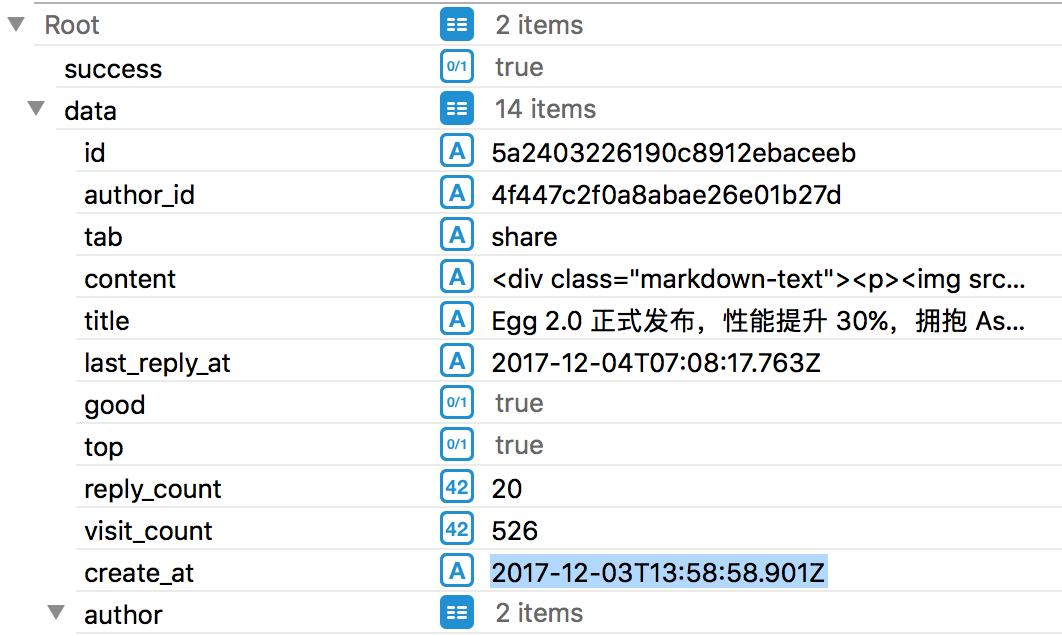
返回日期格式:2017-12-03T13:58:58.901Z,判断时间间隔 如 “刚刚”,“一分钟前”,“一小时前”等
后台返回的格式如下:
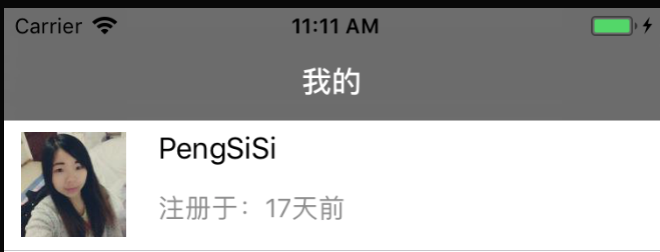
实现输出如下:
我的处理如下:
// 处理数据 2017-11-28T02:41:09.487Z

    // 请求的时间戳。日期格式按照ISO8601标准表示,并需要使用UTC时间。

    // 去掉.之后的字符串

    NSArray *strArray = [time componentsSeparatedByString:@"."];

    // 字符串转date

    NSDate *registerDate = [NSString dateFromString:[NSString stringWithFormat:@"%@Z",strArray[]]];

    // 对ISO8601标准时间date转String

    NSString *str = [NSString timeStamp:registerDate];

    // 对ISO8601标准时间String转时间间隔

    NSString *str1 = [NSString JudgmentTimeIntervalWithISOTime:str];

    self.registerTimeLabel.text = [NSString stringWithFormat:@"注册于:%@", [NSString compareCurrentTime:str1]];
具体的工具函数如下:
//方式一 后台给的格式为yyyy-MM-dd HH:mm:ss

+ (NSString *)compareCurrentTime:(NSString *)str {

    //把字符串转为NSdate

    NSDateFormatter *dateFormatter = [[NSDateFormatter alloc] init];

    [dateFormatter setDateFormat:@"yyyy-MM-dd HH:mm:ss"];

    NSDate *timeDate = [dateFormatter dateFromString:str];

    NSDate *currentDate = [NSDate date];

    //得到两个时间差

    NSTimeInterval timeInterval = [currentDate timeIntervalSinceDate:timeDate];

    long temp = ;

    NSString *result;

    if (timeInterval/ < ){

        result = [NSString stringWithFormat:@"刚刚"];

    }

    else if((temp = timeInterval/) <){

        result = [NSString stringWithFormat:@"%ld分钟前",temp];

    }

    else if((temp = temp/) <){

        result = [NSString stringWithFormat:@"%ld小时前",temp];

    }

    else if((temp = temp/) <){

        result = [NSString stringWithFormat:@"%ld天前",temp];

    }

    else if((temp = temp/) <){

        result = [NSString stringWithFormat:@"%ld月前",temp];

    } else{

        temp = temp/;

        result = [NSString stringWithFormat:@"%ld年前",temp];

    }

    return  result;

}

//方式二 后台给的格式为 纯数字1352170595000(13位)

- (NSString *)updateTimeForRow:(NSString *)str {

    // 获取当前时时间戳 1466386762.345715 十位整数 6位小数

    NSTimeInterval currentTime = [[NSDate date] timeIntervalSince1970];

    // 创建歌曲时间戳(后台返回的时间 一般是13位数字)

    NSTimeInterval createTime =[str floatValue]/;

    // 时间差

    NSTimeInterval time = currentTime - createTime;

    //秒转分钟

    NSInteger small = time / ;

    if (small == ) {

        return [NSString stringWithFormat:@"刚刚"];

    }

    if (small < ) {

        return [NSString stringWithFormat:@"%ld分钟前",small];

    }

    // 秒转小时

    NSInteger hours = time/;

    if (hours<) {

        return [NSString stringWithFormat:@"%ld小时前",hours];

    }

    //秒转天数

    NSInteger days = time//;

    if (days < ) {

        return [NSString stringWithFormat:@"%ld天前",days];

    }

    //秒转月

    NSInteger months = time///;

    if (months < ) {

        return [NSString stringWithFormat:@"%ld月前",months];

    }

    //秒转年

    NSInteger years = time////;

    return [NSString stringWithFormat:@"%ld年前",years];

}

// ISO8601的Date转String

+ (NSString *)timeStamp: (NSDate *)date {

    // 获取当前时间

//    NSDate *date = [NSDate new];

    NSDateFormatter *timeFormatter = [NSDateFormatter new];

    [timeFormatter setTimeZone:[NSTimeZone timeZoneWithName:@"GMT"]];

    [timeFormatter setDateFormat:@"yyyy-MM-dd'T'HH:mm:ss'Z'"];

    NSString *timestamp = [timeFormatter stringFromDate:date];

    return timestamp;

}

// String转Date

+ (NSDate *)dateFromString: (NSString *)str {

    NSDateFormatter *timeFormatter = [NSDateFormatter new];

    [timeFormatter setTimeZone:[NSTimeZone timeZoneWithName:@"GMT"]];

    [timeFormatter setDateFormat:@"yyyy-MM-dd'T'HH:mm:ss'Z'"];

    return [timeFormatter dateFromString:str];

}

// ISO8601格式字符串转Date

+ (NSDate *)dateFromISO8601String:(NSString *)string {

    if (!string) return nil;

    struct tm tm;

    time_t t;

    strptime([string cStringUsingEncoding:NSUTF8StringEncoding], "%Y-%m-%dT%H:%M:%S%z", &tm);

    tm.tm_isdst = -;

    t = mktime(&tm);

    //    return [NSDate dateWithTimeIntervalSince1970:t]; // 零时区

    return [NSDate dateWithTimeIntervalSince1970:t + [[NSTimeZone localTimeZone] secondsFromGMT]];//东八区

}

//根据获取到的时间判断时间间隔 如 “刚刚”,“一分钟前”,“一小时前”等;

//获取时间 是用上面的方法获取的

+(NSString *)JudgmentTimeIntervalWithISOTime:(NSString *)timeStr{

    NSDate *theDate = [self dateFromISO8601String:timeStr];

    NSDateFormatter *dateFormatter = [[NSDateFormatter alloc] init];

    [dateFormatter setDateFormat:@"yyyy-MM-dd HH:mm:ss"];

    NSString * timeString = nil;

    NSTimeInterval cha =   - [theDate timeIntervalSinceDate:[NSDate date]];

    if (cha/ < ) {

        timeString = [NSString stringWithFormat:@"%f", cha/];

        timeString = [timeString substringToIndex:timeString.length-];

        int num= [timeString intValue];

        if (num <= ) {

            timeString = [NSString stringWithFormat:@"刚刚"];

        }else{

            timeString = [NSString stringWithFormat:@"%@分钟前", timeString];

        }

    }

    if (cha/ >  && cha/ < ) {

        timeString = [NSString stringWithFormat:@"%f", cha/];

        timeString = [timeString substringToIndex:timeString.length-];

        timeString = [NSString stringWithFormat:@"%@小时前", timeString];

    }

    if (cha/ > ){

        timeString = [NSString stringWithFormat:@"%f", cha/];

        timeString = [timeString substringToIndex:timeString.length-];

        int num = [timeString intValue];

        if (num < ) {

            timeString = [NSString stringWithFormat:@"昨天"];

        } else{

            timeString =[dateFormatter stringFromDate:theDate];

        }

    }

    return timeString;

}
以前没遇到过这个格式的日期,今天算是长见识了,哈哈。希望你遇到这日期能看到我的博客,哈哈
返回日期格式:2017-12-03T13:58:58.901Z,判断时间间隔 如 “刚刚”,“一分钟前”,“一小时前”等的更多相关文章
- SQL Server判断是否满足日期格式(YYYYMMDD)以及中文等判断,格式化为YYYY-MM-DD
SQL Server判断是否满足日期格式(YYYYMMDD)以及中文等判断: 在做sql数据的正确性审核中,需要判断数据是否满足日期格式,网上找不到相关的资料,于是自己花了半天写了一个简单的函数 具体 ...
- .Net Core WebApi返回日期格式的问题
环境:.net core 2.1 webapi 问题简介: 返回DateTime,前端接收到的字符有时候为2018-01-01T12:01:01,有时候为2018-01-01T01:01:01.722 ...
- js jq插件 显示中文时间戳 刚刚 N分钟前 N小时前 今天 上午 下午 日期格式化
注:页面需提前引用JQ ; $.fn.extend({ /* ** notes: 获取13位时间戳的简单操作 ** new Date('2018-02-01 15:10:00').getTime() ...
- java createSQLQuery().list()返回日期格式没有时分秒的解决方法
方法一 将Oracel数据库对应表中“收单时间的字段”receive_sheet_time,由原来的Date类型改为timestamp 然后,在java程序中,由 (java.util.timesta ...
- Json 返回日期格式转换
//日期转换 function ChangeDateFormat(time) { if (time != null) { var date = new Date(parseInt(time.repla ...
- springmvc 格式化返回日期格式
<mvc:annotation-driven conversion-service="conversionService"> <mvc:message-conve ...
- 用javascript写一个显示时间差 几分钟前 几小时前 几天前 几周前 大于一个月显示日期
window.onload = function(){ var show_times = $(".times span"); for(var i=0;i<show_times ...
- POI对Excel自定义日期格式的读取
用POI读取Excel数据:(版本号:POI3.7) 1.读取Excel private List<String[]> rosolveFile(InputStream is, String ...
- poi处理excel自定义日期格式
poi读取excel自定义时间类型时,读取到的是CELL_TYPE_NUMERIC,即数值类型,这个时候如果直接取值的话会发现取到的值和表格中的值不一样,这时应该先判断值是否是时间或者日期类型再进行处 ...
随机推荐
- 为RIDE创建桌面快捷方式
问题场景:默认情况下,RIDE的图标不是自动创建的,需要手动添加. 解决方法: 在桌面上新建"快捷方式" 目标对象的位置:C:\Python27\python2.exe - ...
- Mybatis获取自增主键值
1.配置文件变化 <?xml version="1.0" encoding="UTF-8" ?> <!DOCTYPE mapper PUBLI ...
- 你所不知道的printf函数
#include <stdio.h> int main(void) { int a = 4; int b = 3; int c = a / b; float d = *(float *)( ...
- sql 存储过程set nocount on 的作用
在存储过程中,经常用到SET NOCOUNT ON: 作用:阻止在结果集中返回显示受T-SQL语句或则usp影响的行计数信息.当SET ONCOUNT ON时候,不返回计数,当SET NOCOUNT ...
- Cashe的使用
1.CacheHelper public class CacheHelper { public static ObjectCache Cache { get { return MemoryCache. ...
- 1.设计模式 - Singleton模式(单件模式)
Singleton是一种创建型模式,指某个类采用Singleton模式,则在这个类被创建后,只可能产生一个实例供外部访问,并且提供一个全局的访问点,一般用于Activity的控制层全局对象和Singl ...
- 关于 requestAnimationFrame 小结
一.小谈 requestAnimationFrame: 说起 requestAnimationFrame,我们先看幅图: 相当一部分的浏览器的显示频率是16.7ms, 就是上图第一行的节奏,表现就是“ ...
- [Luogu] 外星密码
https://www.luogu.org/problemnew/show/P1928 沙比提 读清题目 #include <bits/stdc++.h> using namespace ...
- 好久木来了,一直忙于项目(加懒惰),今天讲讲vuecli3.0的使用
vue更新换代很快,马上vue都要出3.0了,这是一个巨大的变革,不过今天讲的是vuecli3.0,里面使用的vue仍然是2的,所有可以放心大胆使用. Vue CLI 是一个基于 Vue.js 进行快 ...
- (6)打造简单OS-内存分页
好长时间没有更新了,最近比较忙...... 内存分页可以放在C代码中,这样比较方便编写!即loader执行完后进入kernel_main函数之后在分配内存分页! 一.地址 讲到内存必然要讲到计算机中经 ...