
MyBatis 源码篇-日志模块2
上一章的案例,配置日志级别为 debug,执行一个简单的查询操作,会将 JDBC 操作打印出来。本章通过 MyBatis 日志部分源码分析它是如何实现日志打印的。
在 MyBatis 的日志模块中有一个 jdbc package,package 中的内容如下图所示:
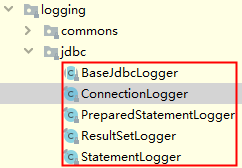
BaseJdbcLogger 是一个抽象类,它是 jdbc package 下其他类的父类,类继承关系如下图所示:

BaseJdbcLogger 类中定义了一些公共集合和简单的工具方法,提供给子类使用。
BaseJdbcLogger 的子类有如下特性:
- ConnectionLogger:Connection 的代理类,封装了 Connection 对象,继承了 BaseJdbcLogger 抽象类并实现了 InvocationHandler 接口,newInstance() 方法会为其封装的 Connection 对象创建相应的代理对象;
- PreparedStatementLogger:PreparedStatement 的代理类,封装了 PreparedStatement 对象,继承了 BaseJdbcLogger 抽象类并实现了 InvocationHandler 接口,newInstance() 方法的实现与 Connection 的类似;
- StatementLogger:与 PreparedStatementLogger 类似;
- ResultSetLogger:ResultSet 的代理类,封装了 ResultSet 对象,继承了 BaseJdbcLogger 抽象类并实现了 InvocationHandler 接口,newInstance() 方法的实现与 Connection 的类似;
MyBatis 就是通过动态代理的方式,对 JDBC 原生类进行了一层封装,在代理类的 invoke 方法中添加对应 JDBC 操作的日志打印功能。
ConnectionLogger 的实现如下:
public final class ConnectionLogger extends BaseJdbcLogger implements InvocationHandler {

  private final Connection connection;

  private ConnectionLogger(Connection conn, Log statementLog, int queryStack) {

    super(statementLog, queryStack);

    this.connection = conn;

  }

  @Override

  public Object invoke(Object proxy, Method method, Object[] params)

      throws Throwable {

    try {

      // 如果调用的是从Object继承的方法,则直接调用,不做任何其他处理

      if (Object.class.equals(method.getDeclaringClass())) {

        return method.invoke(this, params);

      }

      // 如果调用的是prepareStatement()方法、prepareCall()方法或createStatement()方法

      // 则在创建相应的statement对象后,为其创建代理对象并返回该代理对象

      if ("prepareStatement".equals(method.getName())) {

        // 输出日志

        if (isDebugEnabled()) {

          debug(" Preparing: " + removeBreakingWhitespace((String) params[0]), true);

        }

        // 调用Connection的prepareStatement()方法,得到PreparedStatement对象

        PreparedStatement stmt = (PreparedStatement) method.invoke(connection, params);

        // 为PreparedStatement对象创建代理对象

        stmt = PreparedStatementLogger.newInstance(stmt, statementLog, queryStack);

        return stmt;

      } else if ("prepareCall".equals(method.getName())) {

        // 输出日志

        if (isDebugEnabled()) {

          debug(" Preparing: " + removeBreakingWhitespace((String) params[0]), true);

        }

        PreparedStatement stmt = (PreparedStatement) method.invoke(connection, params);

        stmt = PreparedStatementLogger.newInstance(stmt, statementLog, queryStack);

        return stmt;

      } else if ("createStatement".equals(method.getName())) {

        Statement stmt = (Statement) method.invoke(connection, params);

        stmt = StatementLogger.newInstance(stmt, statementLog, queryStack);

        return stmt;

      } else {

        return method.invoke(connection, params);

      }

    } catch (Throwable t) {

      throw ExceptionUtil.unwrapThrowable(t);

    }

  }

  /*

   * Creates a logging version of a connection

   *

   * @param conn - the original connection

   * @return - the connection with logging

   */

  public static Connection newInstance(Connection conn, Log statementLog, int queryStack) {

    // 使用动态代理的方式创建代理对象

    InvocationHandler handler = new ConnectionLogger(conn, statementLog, queryStack);

    ClassLoader cl = Connection.class.getClassLoader();

    return (Connection) Proxy.newProxyInstance(cl, new Class[]{Connection.class}, handler);

  }

  /*

   * return the wrapped connection

   *

   * @return the connection

   */

  public Connection getConnection() {

    return connection;

  }

}
其他子类的实现与 ConnectionLogger 类似,不在赘述。
ConnectionLogger 会创建 PreparedStatementLogger 或 StatementLogger,PreparedStatementLogger 会创建 ResultSetLogger,这样就保证了每一步 JDBC 操作在 debug 日志级别下都有日志输出。
那么 ConnectionLogger 又是在哪里创建的呢?跟踪 SQL 的执行流程,在 org.apache.ibatis.executor.BaseExecutor#getConnection 方法中找到 ConnectionLogger 的创建代码:
protected Connection getConnection(Log statementLog) throws SQLException {

  Connection connection = transaction.getConnection();

  // 判断日志级别为debug,则创建Connection的代理类ConnectionLogger

  if (statementLog.isDebugEnabled()) {

    return ConnectionLogger.newInstance(connection, statementLog, queryStack);

  } else {

    return connection;

  }

}
从源码中可以看出,如果日志级别为 debug,则会创建代理类 ConnectionLogger,否则只会使用正常的 Connection 对象。
MyBatis 源码篇
MyBatis 源码篇-日志模块2的更多相关文章
- MyBatis 源码篇-日志模块1
在 Java 开发中常用的日志框架有 Log4j.Log4j2.Apache Common Log.java.util.logging.slf4j 等,这些日志框架对外提供的接口各不相同.本章详细描述 ...
- MyBatis 源码篇-插件模块
本章主要描述 MyBatis 插件模块的原理,从以下两点出发: MyBatis 是如何加载插件配置的? MyBatis 是如何实现用户使用自定义拦截器对 SQL 语句执行过程中的某一点进行拦截的? 示 ...
- MyBatis 源码篇-MyBatis-Spring 剖析
本章通过分析 mybatis-spring-x.x.x.jar Jar 包中的源码,了解 MyBatis 是如何与 Spring 进行集成的. Spring 配置文件 MyBatis 与 Spring ...
- MyBatis 源码篇-Transaction
本章简单介绍一下 MyBatis 的事务模块,这块内容比较简单,主要为后面介绍 mybatis-spring-1.**.jar(MyBatis 与 Spring 集成)中的事务模块做准备. 类图结构 ...
- MyBatis 源码篇-DataSource
本章介绍 MyBatis 提供的数据源模块,为后面与 Spring 集成做铺垫,从以下三点出发: 描述 MyBatis 数据源模块的类图结构: MyBatis 是如何集成第三方数据源组件的: Pool ...
- MyBatis 源码篇-资源加载
本章主要描述 MyBatis 资源加载模块中的 ClassLoaderWrapper 类和 Java 加载配置文件的三种方式. ClassLoaderWrapper 上一章的案例,使用 org.apa ...
- MyBatis 源码篇-SQL 执行的流程
本章通过一个简单的例子,来了解 MyBatis 执行一条 SQL 语句的大致过程是怎样的. 案例代码如下所示: public class MybatisTest { @Test public void ...
- MyBatis 源码篇-整体架构
MyBatis 的整体架构分为三层, 分别是基础支持层.核心处理层和接口层,如下图所示. 基础支持层 反射模块 该模块对 Java 原生的反射进行了良好的封装,提供了更加简洁易用的 API ,方便上层 ...
- myBatis源码解析-日志篇(1)
上半年在进行知识储备,下半年争取写一点好的博客来记录自己源码之路.在学习源码的路上也掌握了一些设计模式,可所谓一举两得.本次打算写Mybatis的源码解读. 准备工作 1. 下载mybatis源码 下 ...
随机推荐
- elasticsearch各种服务链接
查看elasticsearch信息http://localhost:9200/ 查看某个索引信息http://localhost:9200/index_name例如:http://localhost: ...
- C#winform如何实现文本编辑框(TextBox)的Hint提示文字效果
C#winform如何实现文本编辑框(TextBox)的Hint提示文字效果 private const int EM_SETCUEBANNER = 0x1501; [DllImport(" ...
- 使用PyMySQL连接MySQL错误
使用PyMySQL连接MySQL错误 之前写了一个小项目,今天突然想起来,准备优化一下,但是原本好好的项目竟然跑不起来了 emmm....我真的啥都没干呀 具体错误是这样的: Traceback (m ...
- tensorflow训练时用到的一些“工具”
1.graph和参数的store和restore 2.tensorboard查看 2.1tensorboard根据.meta文件查看图 2.2如何看图
- 如何查看appPackage和启动appActivity
安装apk,模拟器或真机中在前台运行该应用程序,获取appPackage,即应用包名 appPackage: adb shell dumpsys activity | find "mFoc ...
- FIREDAC返回多结果集
FIREDAC返回多结果集 以前使用ADO, 如果SQL返回的结果集有多个 可以通过NextRecordset来依次获取 代码移植到FireDAC, 对于多结果集处理差不多, 但是还是有一些不一样的地 ...
- Object.keys() 遍历对象
Object.keys()方法的运用与数组遍历 Object.keys()用于获得由对象属性名组成的数组,可与数组遍历相结合使用,用起来效果杠杠滴.数组遍历可以用for()或forEach()来实现, ...
- Windows10 64位安装DB2数据库
安装前准备 : 系统:Windows10 64位 DB2 v9.5下载地址(迅雷):http://big3.ddooo.com/db2_93661.rar 选择安装包解压位置,并复制记住: 去到解压的 ...
- 苹果系统安装虚拟机 Mac如何安装虚拟机教程 (含系统镜像的下载地址)
镜像下载地址 http://www.itellyou.cn 1.前言 大家在用 Mac 系统的时候,可能有时难免还是要用到 Windows 系统.在 Mac 上使用 Windows 系统有二种方 ...
- [Scikit-learn] 1.1 Generalized Linear Models - Neural network models
本章涉及到的若干知识点(红字):本章节是作为通往Tensorflow的前奏! 链接:https://www.zhihu.com/question/27823925/answer/38460833 首先 ...