
(四)SpringBoot2.0基础篇- 多数据源,JdbcTemplate和JpaRepository
在日常开发中,经常会遇到多个数据源的问题,而SpringBoot也有相关API:Configure Two DataSources:https://docs.spring.io/spring-boot/docs/1.5.4.RELEASE/reference/htmlsingle/#howto-two-datasources
本文SpringBoot版本为2.0(由于2.0之前的版本和之后的版本配置会有些许不同,2.0之前的版本推荐一位大牛的博文:http://blog.didispace.com/springbootmultidatasource/)下面会介绍这两种多数据源的配置方法,希望大家多多指教!
一、JdbcTemplate多数据源配置
1、添加applicaton.properties数据库连接信息,有两个数据源,一个为主,一个为从:
app.datasource.foo.url=jdbc:mysql://192.168.1.121:3306/test

app.datasource.foo.username=root

app.datasource.foo.password=admincss

app.datasource.foo.driver-class-name=com.mysql.jdbc.Driver

app.datasource.bar.url=jdbc:mysql://192.168.1.121:3306/test2

app.datasource.bar.username=root

app.datasource.bar.password=admincss

app.datasource.bar.driver-class-name=com.mysql.jdbc.Driver
2、创建数据源类:
package com.cn.datasource;

import org.springframework.beans.factory.annotation.Qualifier;

import org.springframework.boot.autoconfigure.jdbc.DataSourceProperties;

import org.springframework.boot.context.properties.ConfigurationProperties;

import org.springframework.context.annotation.Bean;

import org.springframework.context.annotation.Configuration;

import org.springframework.context.annotation.Primary;

import org.springframework.jdbc.core.JdbcTemplate;

import javax.sql.DataSource;

/**

 * @program: spring-boot-example

 * @description: 数据源配置类

 * @author:

 * @create: 2018-05-03 14:35

 **/

@Configuration

public class JdbcDataSourceConfig {

    @Primary

    @Bean(name = "dataSourcePropertiesFoo")

    @Qualifier("dataSourcePropertiesFoo")

    @ConfigurationProperties(prefix="app.datasource.foo")

    public DataSourceProperties dataSourcePropertiesFoo() {

        return new DataSourceProperties();

    }

    @Primary

    @Bean(name = "fooDataSource")

    @Qualifier("fooDataSource")

    @ConfigurationProperties(prefix="app.datasource.foo")

    public DataSource fooDataSource(@Qualifier("dataSourcePropertiesFoo") DataSourceProperties dataSourceProperties) {

        return dataSourceProperties.initializeDataSourceBuilder().build();

    }

    @Bean(name = "dataSourcePropertiesBar")

    @Qualifier("dataSourcePropertiesBar")

    @ConfigurationProperties(prefix="app.datasource.bar")

    public DataSourceProperties dataSourcePropertiesBar() {

        return new DataSourceProperties();

    }

    @Bean(name = "barDataSource")

    @Qualifier("barDataSource")

    @ConfigurationProperties(prefix="app.datasource.bar")

    public DataSource barDataSource(@Qualifier("dataSourcePropertiesBar") DataSourceProperties dataSourceProperties) {

        return dataSourceProperties.initializeDataSourceBuilder().build();

    }

    @Bean(name = "fooJdbcTemplate")

    @Qualifier("fooJdbcTemplate")

    public JdbcTemplate fooJdbcTemplate(@Qualifier("fooDataSource") DataSource dataSource) {

        return new JdbcTemplate(dataSource);

    }

    @Bean(name = "barJdbcTemplate")

    @Qualifier("barJdbcTemplate")

    public JdbcTemplate barJdbcTemplate(@Qualifier("barDataSource") DataSource dataSource) {

        return new JdbcTemplate(dataSource);

    }

}
3、创建简单的测试bean、controller、service、entityRowMapper:
package com.cn.entity.u;

import java.io.Serializable;

/**

 * @program: spring-boot-example

 * @description: 用户类

 * @author:

 * @create: 2018-05-02 09:59

 **/

public class User implements Serializable{

    private int id;

    private String name;

    private int age;

    private String address;

    @Override

    public String toString() {

        return "User{" +

            "id=" + id +

            ", name='" + name + '\'' +

            ", age=" + age +

            ", address='" + address + '\'' +

            '}';

    }

    public int getId() {

        return id;

    }

    public void setId(int id) {

        this.id = id;

    }

    public String getName() {

        return name;

    }

    public void setName(String name) {

        this.name = name;

    }

    public int getAge() {

        return age;

    }

    public void setAge(int age) {

        this.age = age;

    }

    public String getAddress() {

        return address;

    }

    public void setAddress(String address) {

        this.address = address;

    }

}
User.java
package com.cn.controller;

import com.cn.entity.u.User;

import com.cn.service.UserService;

import org.springframework.beans.factory.annotation.Autowired;

import org.springframework.web.bind.annotation.PathVariable;

import org.springframework.web.bind.annotation.RequestMapping;

import org.springframework.web.bind.annotation.RequestMethod;

import org.springframework.web.bind.annotation.RestController;

/**

 * @program: spring-boot-example

 * @description:

 * @author:

 * @create: 2018-05-02 09:58

 **/

@RestController

public class JdbcTestController {

    @Autowired

    private UserService userService;

    @RequestMapping(value = "getUserById/{id}",method = RequestMethod.GET)

    public User getUserById(@PathVariable int id) {

        return userService.getUserById(id);

    }

}
JdbcTestController.java
package com.cn.service;

import com.cn.entity.u.User;

/**

 * @program: spring-boot-example

 * @description:

 * @author:

 * @create: 2018-05-02 10:02

 **/

public interface UserService {

    User getUserById(int id);

}
UserService.java
package com.cn.service;

import com.cn.entity.u.User;

import org.springframework.beans.factory.annotation.Autowired;

import org.springframework.beans.factory.annotation.Qualifier;

import org.springframework.jdbc.core.JdbcTemplate;

import org.springframework.stereotype.Service;

/**

 * @program: spring-boot-example

 * @description:

 * @author:

 * @create: 2018-05-02 10:07

 **/

@Service

public class UserServiceImpl implements UserService{

    @Autowired

    @Qualifier("fooJdbcTemplate")

    protected JdbcTemplate fooJdbcTemplate;

    @Autowired

    @Qualifier("barJdbcTemplate")

    protected JdbcTemplate barJdbcTemplate;

    @Override

    public User getUserById(int id) {

        User user = fooJdbcTemplate.queryForObject("select * from user where id=?", new Object[]{id},new UserRowMapper());

        User user2 = barJdbcTemplate.queryForObject("select * from user where id=?", new Object[]{id},new UserRowMapper());

        System.out.println(user);

        System.out.println(user2);

        return user;

    }

}
UserServiceImpl.java
package com.cn.service;

import com.cn.entity.u.User;

import org.springframework.jdbc.core.RowMapper;

import java.sql.ResultSet;

import java.sql.SQLException;

class UserRowMapper implements RowMapper<User> {

    public User mapRow(ResultSet resultSet, int i) throws SQLException {

        User user = new User();

        user.setName(resultSet.getString("name"));

        user.setId(resultSet.getInt("id"));

        user.setAge(resultSet.getInt("age"));

        user.setAddress(resultSet.getString("address"));

        return user;

    }

}
UserRowMapper.java
4、测试;
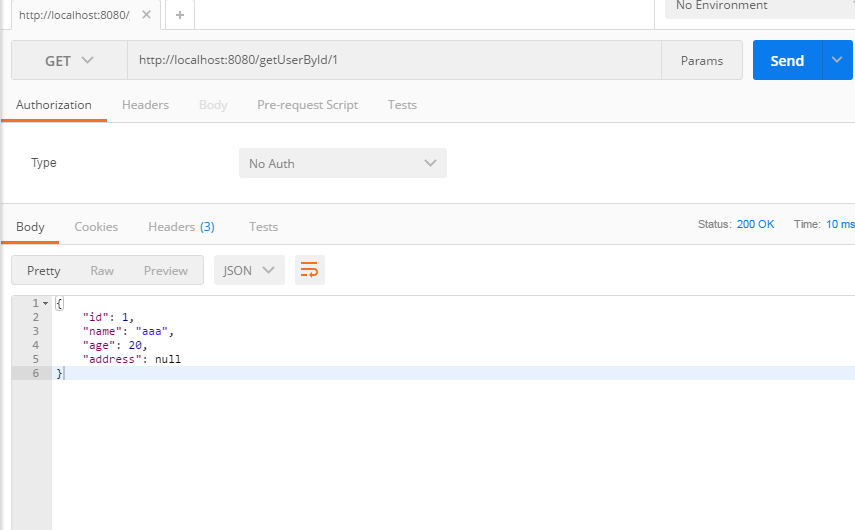
二、JpaRepository多数据源
1、添加数据源信息如上;
2、使用上一个项目的数据源DataSource进行进一步的配置JpaFooConfig、JpaBarConfig:
package com.cn.datasource;

import java.util.Map;

import javax.annotation.Resource;

import javax.persistence.EntityManager;

import javax.sql.DataSource;

import org.springframework.beans.factory.annotation.Qualifier;

import org.springframework.boot.autoconfigure.orm.jpa.HibernateSettings;

import org.springframework.boot.autoconfigure.orm.jpa.JpaProperties;

import org.springframework.boot.orm.jpa.EntityManagerFactoryBuilder;

import org.springframework.context.annotation.Bean;

import org.springframework.context.annotation.Configuration;

import org.springframework.context.annotation.Primary;

import org.springframework.data.jpa.repository.config.EnableJpaRepositories;

import org.springframework.orm.jpa.JpaTransactionManager;

import org.springframework.orm.jpa.LocalContainerEntityManagerFactoryBean;

import org.springframework.transaction.PlatformTransactionManager;

import org.springframework.transaction.annotation.EnableTransactionManagement;

/**

 * @program: spring-boot-example

 * @description:

 * @author:

 * @create: 2018-05-04 10:54

 **/

@Configuration

@EnableTransactionManagement

@EnableJpaRepositories(

    entityManagerFactoryRef = "entityManagerFactoryFoo",

    transactionManagerRef = "transactionManagerFoo",

    basePackages = {"com.cn.entity.s"})

public class JpaFooConfig {

    @Resource

    @Qualifier("fooDataSource")

    private DataSource fooDataSource;

    @Primary

    @Bean(name = "entityManagerFoo")

    public EntityManager entityManager(EntityManagerFactoryBuilder builder) {

        return entityManagerFactoryFoo(builder).getObject().createEntityManager();

    }

    @Resource

    private JpaProperties jpaProperties;

    private Map<String, Object> getVendorProperties() {

        return jpaProperties.getHibernateProperties(new HibernateSettings());

    }

    /**

     * 设置实体类所在位置

     */

    @Primary

    @Bean(name = "entityManagerFactoryFoo")

    public LocalContainerEntityManagerFactoryBean entityManagerFactoryFoo(EntityManagerFactoryBuilder builder) {

        return builder

            .dataSource(fooDataSource)

            .packages("com.cn.entity.s")

            .persistenceUnit("fooPersistenceUnit")

            .properties(getVendorProperties())

            .build();

    }

    @Primary

    @Bean(name = "transactionManagerFoo")

    public PlatformTransactionManager transactionManagerFoo(EntityManagerFactoryBuilder builder) {

        return new JpaTransactionManager(entityManagerFactoryFoo(builder).getObject());

    }

}
package com.cn.datasource;

import java.util.Map;

import javax.annotation.Resource;

import javax.persistence.EntityManager;

import javax.sql.DataSource;

import org.springframework.beans.factory.annotation.Autowired;

import org.springframework.beans.factory.annotation.Qualifier;

import org.springframework.boot.autoconfigure.orm.jpa.HibernateSettings;

import org.springframework.boot.autoconfigure.orm.jpa.JpaProperties;

import org.springframework.boot.orm.jpa.EntityManagerFactoryBuilder;

import org.springframework.context.annotation.Bean;

import org.springframework.context.annotation.Configuration;

import org.springframework.data.jpa.repository.config.EnableJpaRepositories;

import org.springframework.orm.jpa.JpaTransactionManager;

import org.springframework.orm.jpa.LocalContainerEntityManagerFactoryBean;

import org.springframework.transaction.PlatformTransactionManager;

import org.springframework.transaction.annotation.EnableTransactionManagement;

/**

 * @program: spring-boot-example

 * @description:

 * @author:

 * @create: 2018-05-04 10:54

 **/

@Configuration

@EnableTransactionManagement

@EnableJpaRepositories(

    entityManagerFactoryRef = "entityManagerFactoryBar",

    transactionManagerRef = "transactionManagerBar",

    basePackages = {"com.cn.entity.t"})//repository的目录

public class JpaBarConfig {

    @Autowired

    @Qualifier("barDataSource")

    private DataSource barDataSource;

    @Bean(name = "entityManagerBar")

    public EntityManager entityManager(EntityManagerFactoryBuilder builder) {

        return entityManagerFactoryBar(builder).getObject().createEntityManager();

    }

    @Resource

    private JpaProperties jpaProperties;

    private Map<String, Object> getVendorProperties() {

        return jpaProperties.getHibernateProperties(new HibernateSettings());

    }

    @Bean(name = "entityManagerFactoryBar")

    public LocalContainerEntityManagerFactoryBean entityManagerFactoryBar(EntityManagerFactoryBuilder builder) {

        return builder

            .dataSource(barDataSource)

            .packages("com.cn.entity.t")//实体类的目录

            .persistenceUnit("barPersistenceUnit")

            .properties(getVendorProperties())

            .build();

    }

    @Bean(name = "transactionManagerBar")

    PlatformTransactionManager transactionManagerBar(EntityManagerFactoryBuilder builder) {

        return new JpaTransactionManager(entityManagerFactoryBar(builder).getObject());

    }

}
3、同上创建相关的测试类进行测试(bean、repository、controller、service 注意bean、repository的目录要放在2步骤中配置的位置):
package com.cn.entity.s;

import javax.persistence.Entity;

import javax.persistence.GeneratedValue;

import javax.persistence.Id;

/**

 * @program: spring-boot-example

 * @description: 学生实体类

 * @author:

 * @create: 2018-05-02 10:47

 **/

@Entity

public class Student {

    @Id

    @GeneratedValue

    private int id;

    private String name;

    private int age;

    private int grade;

    public Student() {

    }

    public Student(String name, int age, int grade) {

        this.name = name;

        this.age = age;

        this.grade = grade;

    }

    @Override

    public String toString() {

        return "Student{" +

            "id=" + id +

            ", name='" + name + '\'' +

            ", age=" + age +

            ", grade=" + grade +

            '}';

    }

    public int getId() {

        return id;

    }

    public void setId(int id) {

        this.id = id;

    }

    public String getName() {

        return name;

    }

    public void setName(String name) {

        this.name = name;

    }

    public int getAge() {

        return age;

    }

    public void setAge(int age) {

        this.age = age;

    }

    public int getGrade() {

        return grade;

    }

    public void setGrade(int grade) {

        this.grade = grade;

    }

}
Student.java
package com.cn.entity.s;

import org.springframework.data.jpa.repository.JpaRepository;

/**

 * @program: spring-boot-example

 * @description:

 * @author:

 * @create: 2018-05-02 11:02

 **/

public interface StudentDao extends JpaRepository<Student,Integer> {

    Student findByName(String name);

}
StudentDao.java
package com.cn.entity.t;

import javax.persistence.Entity;

import javax.persistence.GeneratedValue;

import javax.persistence.Id;

/**

 * @program: spring-boot-example

 * @description:

 * @author:

 * @create: 2018-05-04 10:38

 **/

@Entity

public class Teacher {

    @Id

    @GeneratedValue

    private int id;

    private String name;

    private String age;

    private String course;

    public Teacher() {

    }

    public Teacher(String name, String age, String course) {

        this.name = name;

        this.age = age;

        this.course = course;

    }

    @Override

    public String toString() {

        return "Teacher{" +

            "id=" + id +

            ", name='" + name + '\'' +

            ", age='" + age + '\'' +

            ", course='" + course + '\'' +

            '}';

    }

    public int getId() {

        return id;

    }

    public void setId(int id) {

        this.id = id;

    }

    public String getName() {

        return name;

    }

    public void setName(String name) {

        this.name = name;

    }

    public String getAge() {

        return age;

    }

    public void setAge(String age) {

        this.age = age;

    }

    public String getCourse() {

        return course;

    }

    public void setCourse(String course) {

        this.course = course;

    }

}
Teacher.java
package com.cn.entity.t;

import org.springframework.data.jpa.repository.JpaRepository;

/**

 * @program: spring-boot-example

 * @description:

 * @author:

 * @create: 2018-05-02 11:02

 **/

public interface TeacherDao extends JpaRepository<Teacher,Integer> {

    Teacher findByName(String name);

}
TeacherDao.java
package com.cn.controller;

import com.cn.entity.s.Student;

import com.cn.service.JpaService;

import org.springframework.beans.factory.annotation.Autowired;

import org.springframework.web.bind.annotation.PathVariable;

import org.springframework.web.bind.annotation.RequestMapping;

import org.springframework.web.bind.annotation.RestController;

/*

 * @program: spring-boot-example

 * @description:

 * @author:

 * @create: 2018-05-02 11:15

 */

@RestController

public class JpaTestController {

    @Autowired

    private JpaService jpaService;

    @RequestMapping("findByName/{name}")

    public Student findByName(@PathVariable String name) {

        return jpaService.findByName(name);

    }

}
JpaTestController.java
package com.cn.service;

import com.cn.entity.s.Student;

/*

 * @program: spring-boot-example

 * @description:

 * @author:

 * @create: 2018-05-02 11:12

 */

public interface JpaService {

    Student findByName(String name);

}
JpaService.java
package com.cn.service;

import com.cn.entity.s.StudentDao;

import com.cn.entity.s.Student;

import org.springframework.beans.factory.annotation.Autowired;

import org.springframework.stereotype.Service;

/*

 * @program: spring-boot-example

 * @description:

 * @author:

 * @create: 2018-05-02 11:13

 */

@Service

public class JpaServiceImpl implements JpaService {

    @Autowired

    private StudentDao studentDao;

    @Override

    public Student findByName(String name) {

        return studentDao.findByName(name);

    }

}
JpaServiceImpl.java
4、测试;
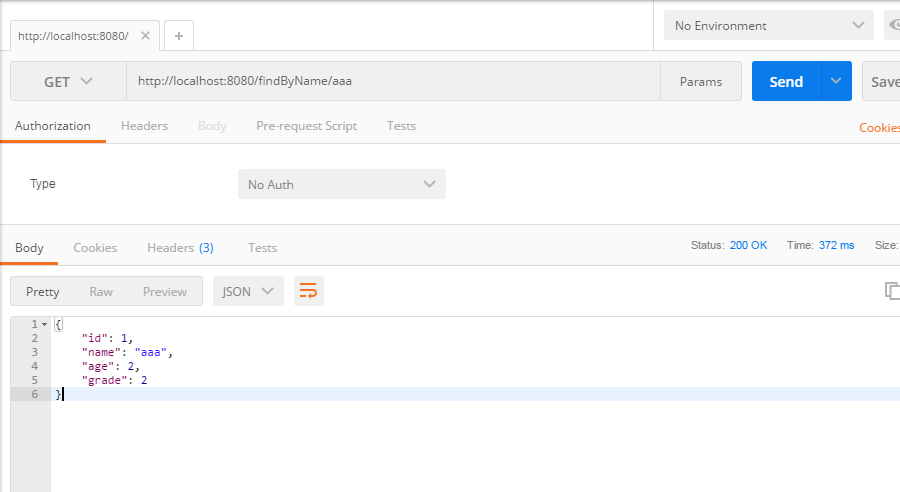
示例代码:https://gitee.com/lfalex/spring-boot-example/tree/dev/spring-boot-datasource
参考官方文档:https://docs.spring.io/spring-boot/docs/1.5.4.RELEASE/reference/htmlsingle/#howto-data-access
(四)SpringBoot2.0基础篇- 多数据源,JdbcTemplate和JpaRepository的更多相关文章
- (六)SpringBoot2.0基础篇- Redis整合(JedisCluster集群连接)
一.环境 Redis:4.0.9 SpringBoot:2.0.1 Redis安装:Linux(Redhat)安装Redis 二.SpringBoot整合Redis 1.项目基本搭建: 我们基于(五) ...
- (二)SpringBoot2.0基础篇- 静态资源的访问及Thymeleaf模板引擎的使用
一.描述 在应用系统开发的过程中,不可避免的需要使用静态资源(浏览器看的懂,他可以有变量,例:HTML页面,css样式文件,文本,属性文件,图片等): 并且SpringBoot内置了Thymeleaf ...
- (三)SpringBoot2.0基础篇- 持久层,jdbcTemplate和JpaRespository
一.介绍 SpringBoot框架为使用SQL数据库提供了广泛的支持,从使用JdbcTemplate的直接JDBC访问到完整的“对象关系映射”技术(如Hibernate).Spring-data-jp ...
- (五)SpringBoot2.0基础篇- Mybatis与插件生成代码
SpringBoot与Mybatis合并 一.创建SpringBoot项目,引入相关依赖包: <?xml version="1.0" encoding="UTF-8 ...
- (一)SpringBoot2.0基础篇- 介绍及HelloWorld初体验
1.SpringBoot介绍: 根据官方SpringBoot文档描述,BUILD ANYTHING WITH SPRING BOOT (用SPRING BOOT构建任何东西,很牛X呀!),下面是官方文 ...
- (七)SpringBoot2.0基础篇- application.properties属性文件的解析及获取
默认访问的属性文件为application.properties文件,可在启动项目参数中指定spring.config.location的参数: java -jar myproject.jar --s ...
- SpringBoot2.0 基础案例(12):基于转账案例,演示事务管理操作
本文源码 GitHub地址:知了一笑 https://github.com/cicadasmile/spring-boot-base 一.事务管理简介 1.事务基本概念 一组业务操作ABCD,要么全部 ...
- 【转】WF4.0 (基础篇)
转自:http://www.cnblogs.com/foundation/category/215023.html 作者:WXWinter —— 兰竹菊梅★春夏秋冬☆ —— wxwinter@16 ...
- iOS开发swift语法0基础篇—————(swift技术交流群:361513739)
iOS开发之swift语法0基础篇:点击打开链接 swift技术交流QQ群361513739
随机推荐
- Android进阶(十四)Android Adapter详解
Android Adapter详解 Android是完全遵循MVC模式设计的框架,Activity是Controller,layout是View.因为layout五花八门,很多数据都不能直接绑定上去, ...
- 【一天一道LeetCode】#81. Search in Rotated Sorted Array II
一天一道LeetCode 本系列文章已全部上传至我的github,地址:ZeeCoder's Github 欢迎大家关注我的新浪微博,我的新浪微博 欢迎转载,转载请注明出处 (一)题目 Follow ...
- 完美滑动顶部固定ScrollView,合并可以上拉,下拉加载更多
先看效果: 主要处理: 使用PullToRefreshScrollView修改内部的scrollView源码,更换成可以固定顶部的自定义scrollView @Override protected S ...
- 【一天一道LeetCode】#59. Spiral Matrix II
一天一道LeetCode系列 (一)题目 Given an integer n, generate a square matrix filled with elements from 1 to n2 ...
- 2016/1/9:深度剖析安卓Framebuffer设备驱动
忙了几天,今天在公司居然没什么活干 ,所以早上就用公司的电脑写写之前在公司编写framebuffer的使用心得体会总结,这也算是一点开发经验,不过我还没写全,精华部分还是自己藏着吧.直到下午才开始有点 ...
- AngularJS进阶(四)ANGULAR.JS实现下拉菜单单选
ANGULAR.JS: NG-SELECT AND NG-OPTIONS PS:其实看英文文档比看中文文档更容易理解,前提是你的英语基础还可以.英文文档对于知识点讲述简明扼要,通俗易懂,而有些中文文档 ...
- 【LaTeX排版】LaTeX使用--入门基础<二>
1.在命令之后留一个空格有下列方式: 源文件如下: \documentclass[a4paper,12pt]{book}%采用book类型(中篇论文一般采用这种类型),A4纸,字体为12磅,默认为10 ...
- shell脚本里面相互调用时路径不要用pwd获取
shellA调用shellB,如果shellB 里面需要使用路径作为变量,去寻找其它文件.那么要注意,不用pwd,其返回的是系统中用户当前所在位置的路径,也就是shellA的路径,这样就错了.应该用d ...
- 【54】Java反射机制剖析
java反射机制: 1.指的是可以于运行时加载,探知和使用编译期间完全未知的类. 2.程序在运行状态中, 可以动态加载一个只有名称的类, 对于任意一个已经加载的类,都能够知道这个类的所有属性和方法; ...
- ROS探索总结(十一)——机器视觉
机器视觉在计算机时代已经越来越流行,摄像头价格越来越低廉,部分集成深度传感器的混合型传感器也逐渐在研究领域普及,例如微软推出的Kinect,而且与之配套的软件功能十分强大,为开发带来了极大的便利.RO ...