
html中滚动小球的demo
类似于下图的效果:
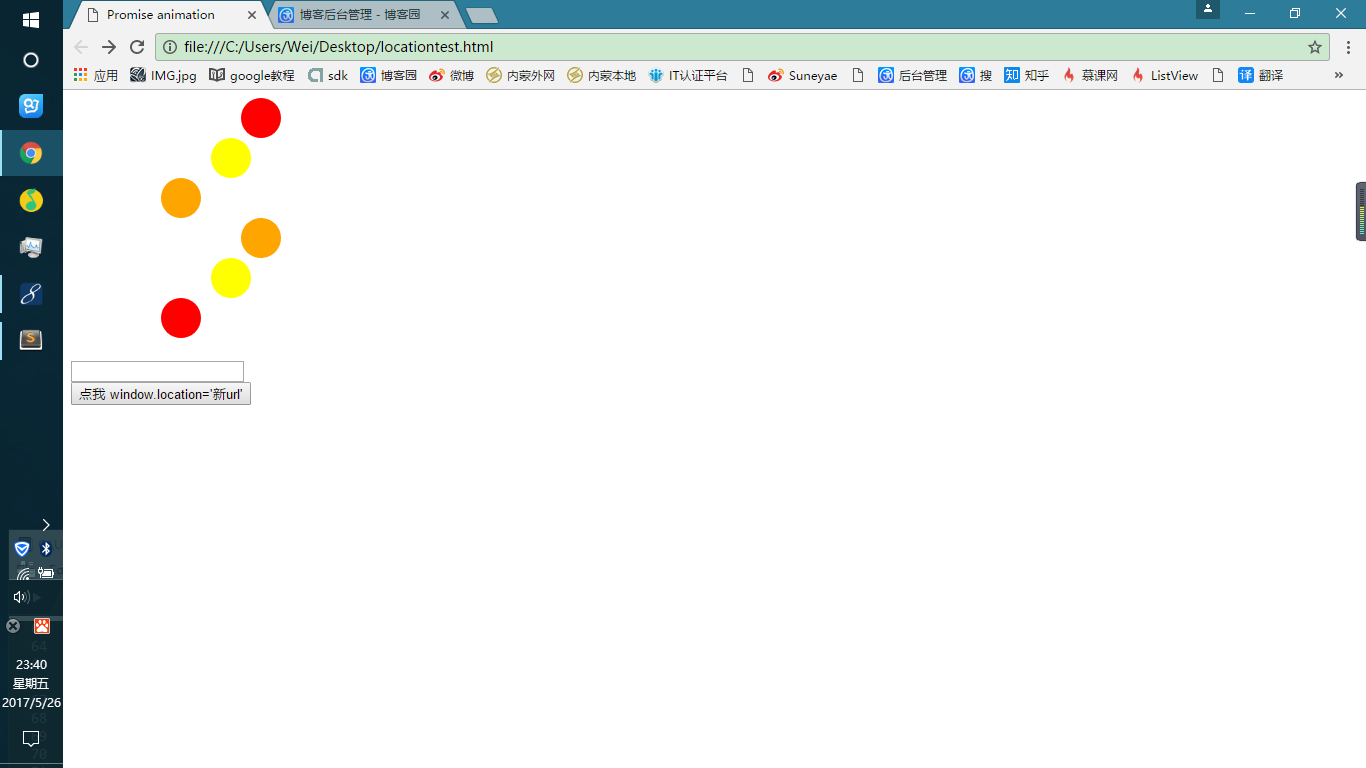
代码:
 <!DOCTYPE html>

 <html>

 <head>

     <title>Promise animation</title>

     <meta http-equiv="Content-Type" content="text/html; charset=utf-8">

     <style type="text/css">

         .ball{

             width: 40px;

             height: 40px;

             border-radius: 20px;

         }

         .ball1{

             background: red;

         }

         .ball2{

             background: yellow;

         }

         .ball3{

             background: orange;

         }

         .ball4{

             background: orange;

         }

         .ball5{

             background: yellow;

         }

         .ball6{

             background: red;

         }

     </style>

 </head>

 <body>

     <div class="ball ball1" style="margin-left: 100px;"></div>

     <div class="ball ball2" style="margin-left: 120px;"></div>

     <div class="ball ball3" style="margin-left: 140px;"></div>

     <div class="ball ball4" style="margin-left: 100px;"></div>

     <div class="ball ball5" style="margin-left: 120px;"></div>

     <div class="ball ball6" style="margin-left: 140px;"></div>

     <br>

     <input id="id_txt" value="" />

     <br>

     <input id="id_button" value="点我 window.location='新url'" type="button"  onclick="newUrl();"/>

     <script type="text/javascript">

         var ball1 = document.querySelector('.ball1');

         var ball2 = document.querySelector('.ball2');

         var ball3 = document.querySelector('.ball3');

         var ball4 = document.querySelector('.ball4');

         var ball5 = document.querySelector('.ball5');

         var ball6 = document.querySelector('.ball6');

         // alert(ball1);

         function newUrl(){

             var obj = {};

             obj.target =  document.getElementById('id_button');

             var tmp_localhost = window.location.origin;//    "http://localhost:8080"

             var pathName = window.location.pathname;// "/Mytag/locationtest.html"

             var index_ = pathName.indexOf("/", "1");//

             var projectName = pathName.substring(0, index_);//获取到 当前的项目名 类似于 /Mytag

             if(obj.target){

                 //跳转到另一个页面,就有点和点超链接类似

                 //                  主机名(包含端口号)  项目名        资源路径

                 window.location = tmp_localhost+projectName+'/declaration.jsp';

             }

         }

         function recyle(obj) {

             // 用来保存所有的属性名称和值

             var props = "";

             // 开始遍历

             for ( var p in obj) { // 方法

                 if (typeof (obj[p]) == "function") {

                     if(p=="querySelector"){

                         console.log('--------------asfawa');

                     }

                     props += "function:"+p+"\n";

                 } else { // p 为属性名称,obj[p]为对应属性的值

                     props += p + " = " + obj[p] + " \n ";

                 }

             } // 最后显示所有的属性

             console.log(props+"\n");

             // document.getElementById('id_txt').value = props;

         }

         function animate(ball,distance,callback){

             var margin_left =parseInt(ball.style.marginLeft,10);

             setTimeout(function(){

                 if(margin_left===distance){

                     callback&&callback();

                 }else{

                     if(margin_left<distance){

                         margin_left++;

                     }else{

                         margin_left--;

                     }

                     ball.style.marginLeft = margin_left+'px';

                     animate(ball,distance,callback);

                 }

             },12);

         }

         function re(){

             animate(ball1,170,function(){

                 animate(ball2,170,function(){

                     animate(ball3,170,function(){

                         animate(ball3,90,function(){

                             animate(ball2,90,function(){

                                 animate(ball1,90,function(){

                                     re();

                                 });

                             });

                         });

                     });

                 });

             });

         }

         function re2(){

             animate(ball4,170,function(){

                 animate(ball5,170,function(){

                     animate(ball6,170,function(){

                         animate(ball6,90,function(){

                             animate(ball5,90,function(){

                                 animate(ball4,90,function(){

                                     re2();

                                 });

                             });

                         });

                     });

                 });

             });

         }

         re();

         re2();

         // animate(ball1,600,animate);

     </script>

 </body>

 </html>
html中滚动小球的demo的更多相关文章
- C# 在RichTextBox中滚动鼠标时滚动的是父窗口的滚动条
1. RichTextBox u2 = new RichTextBox(); 2. 先记住日RichTextBox没有显示滚动条时的总宽度和显示宽度 u2.Width - u2.ClientSize. ...
- universal image loader在listview/gridview中滚动时重复加载图片的问题及解决方法
在listview/gridview中使用UIL来display每个item的图片,当图片数量较多需要滑动滚动时会出现卡顿,而且加载过的图片再次上翻后依然会重复加载(显示设置好的加载中图片) 最近在使 ...
- html中滚动栏的样式
DIV滚动栏设置 (CSS)2008/09/26 03:07div 中滚动栏的控制2008年01月06日 星期日 01:181)隐藏滚动栏<body style="overflow-x ...
- vue中滚动页面,改变样式&&导航栏滚动时,样式透明度修改
vue中滚动页面,改变样式&&导航栏滚动时,样式透明度修改.vue <div class="commonHeader" v-bind:class=" ...
- Android中Service的一个Demo例子
Android中Service的一个Demo例子 Service组件是Android系统重要的一部分,网上看了代码,很简单,但要想熟练使用还是需要Coding. 本文,主要贴代码,不对Servic ...
- 炼金术(1): 识别项目开发中的ProtoType、Demo、MVP
软件开发是很分裂的,只有不断使用原则和规律,才能带来质量. 只要不是玩具性质的项目,项目应该可以大概划分为0-1,1-10,10-100,100-1000四个种重要阶段.其中,0-1是原型验证性的:1 ...
- iphone对fixed模态框支持不太好,弹出窗口中滚动点击穿透的bug
iphone对fixed展现层中存在滚动内容支持非常不好, 尤其是背景页面产生滚动以后,输入控件就找不到了, 取消冒泡也不行,最后是这么解决的,可以参考 <style> .modeldiv ...
- 记录WEUI中滚动加载的一个BUG
最近写微信公众号,用到的技术栈是jq+vue的混合开发,采用的UI是移动端比较火的WEUI,在微信开发中应该较广泛.个人看惯了elementUI文档,相对于饿了么组件文档的详细,WEUI的文档还是比较 ...
- java web中验证码生成的demo
首先创建一个CaptailCode类 package com.xiaoqiang.code; import java.awt.*; import java.awt.font.FontRenderCon ...
随机推荐
- org.apache.ibatis.builder.IncompleteElementException: Could not find result map java.lang.Integer
如图: 详细错误信息如下: org.apache.ibatis.builder.IncompleteElementException: Could not find result map java.l ...
- JavaScript键盘鼠标事件处理
监听键盘鼠标事件 监听某个按键事件 当键盘上的某个键被按下时,会依次触发一次下面的事件: onkeydown: 键盘按下这个动作(按下键盘) onkeypress: 键盘被按住(一直按着键盘不动) o ...
- 【Vue.js】代码优化:在dom中加一行v-if就可少写一个循环类方法
[问题描述] 把当前用户的购物车中(cartList),商品(good)选中字段checked = true的商品在订单页面中进行展示出来. [一般做法](两次循环) 首先取出当前用户的购物车列表,循 ...
- 程序猿想聊天 - 創問 4C 團隊教練心得(一)
今天難得參加了創問舉辦的 4C 團隊教練課程 From : http://www.cccoach.cn/Home/Activity/show/id/449.html 整個課程主要圍繞著 Common ...
- js 获取上传视频的时长、大小、后缀名
参考资料:获取时长 var fileName = $("#sectionfileUpload").val(); //C:\fakepath\3.jpeg var exts = fi ...
- 【转】Redis一般会遇到的问题以及解析
单线程的 Redis 为什么这么快 这个问题是对 Redis 内部机制的一个考察.根据我的面试经验,很多人都不知道Redis 是单线程工作模型.所以,这个问题还是应该要复习一下的. 回答主要是以下三点 ...
- Oracle数据库的安装 【超详细的文图详解】
Oracle简介Oracle Database,又名Oracle RDBMS,或简称Oracle.是甲骨文公司的一款关系数据库管理系统.它是在数据库领域一直处于领先地位的产品.可以说Oracle数据库 ...
- <3>Centos系统完整安装python流程
一.环境 系统:Centos7 Python:3.6.5 自带pip.setuptools 二.命令 介绍:因为yum是依赖于python2,所以千万别删除自带的python2,下面的方法就是py2 ...
- 深入浅出KNN算法(一) KNN算法原理
一.KNN算法概述 KNN可以说是最简单的分类算法之一,同时,它也是最常用的分类算法之一,注意KNN算法是有监督学习中的分类算法,它看起来和另一个机器学习算法Kmeans有点像(Kmeans是无监督学 ...
- 放下技术,是PM迈出的第一步
上一篇,我们从项目层面提出了PM的核心能力架构.今天,我想从公司层面,分析一下PM的核心能力架构中的过程能力,这也是PM当下最关心.最真切的痛点. 还记得上一篇我的同事老A吗? 为什么他能在知名外企带 ...