
Android拦截并获取WebView内部POST请求参数
起因:
有些时候自家APP中嵌入的H5页面并不是自家的。但是很多时候又想在H5不知情的情况下获取H5内部请求的参数,这应该怎么做到呢?
带着这个疑问,就有了这篇博客。
实现过程:
方案一:
最开始想到的方案是直接拦截H5中所有的请求:
 webView.setWebViewClient(new WebViewClient() {

     @Override

     public WebResourceResponse shouldInterceptRequest(WebView view, WebResourceRequest request) {

         try {

             URL url = new URL(request.getUrl());

         } catch (MalformedURLException e) {

             e.printStackTrace();

         }

         Log.e("InternetActivity", request + "");

         return super.shouldInterceptRequest(view, request);

     }

 });
但是通过此方法只能获取get请求的参数(因为参数直接拼在了url链接中),对于post请求的参数无可奈何。
方案二:
后来参考了request_data_webviewclient,有了新的实现方式,具体原理为:给H5注入一段js代码,目的是在每次Ajax请求都会调用Android原生的方法,将请求参数传给客户端。
具体流程如下:

其中,
js注入代码:
 <script language="JavaScript">

     function generateRandom() {

       return Math.floor((1 + Math.random()) * 0x10000)

         .toString(16)

         .substring(1);

     }

     // This only works if `open` and `send` are called in a synchronous way

     // That is, after calling `open`, there must be no other call to `open` or

     // `send` from another place of the code until the matching `send` is called.

     requestID = null;

     XMLHttpRequest.prototype.reallyOpen = XMLHttpRequest.prototype.open;

     XMLHttpRequest.prototype.open = function(method, url, async, user, password) {

         requestID = generateRandom()

         var signed_url = url + "AJAXINTERCEPT" + requestID;

         this.reallyOpen(method, signed_url , async, user, password);

     };

     XMLHttpRequest.prototype.reallySend = XMLHttpRequest.prototype.send;

     XMLHttpRequest.prototype.send = function(body) {

         interception.customAjax(requestID, body);

         this.reallySend(body);

     };

 </script>
客户端拦截请求:
 @Override

 public final WebResourceResponse shouldInterceptRequest(final WebView view, WebResourceRequest request) {

     String requestBody = null;

     Uri uri = request.getUrl();

     // 判断是否为Ajax请求(只要链接中包含AJAXINTERCEPT即是)

     if (isAjaxRequest(request)) {

         // 获取post请求参数

         requestBody = getRequestBody(request);

         // 获取原链接

         uri = getOriginalRequestUri(request, MARKER);

     }

     // 重新构造请求,并获取response

     WebResourceResponse webResourceResponse = shouldInterceptRequest(view, new WriteHandlingWebResourceRequest(request, requestBody, uri));

     if (webResourceResponse == null) {

         return webResourceResponse;

     } else {

         return injectIntercept(webResourceResponse, view.getContext());

     }

 }
客户端注入js代码:
 private WebResourceResponse injectIntercept(WebResourceResponse response, Context context) {

     String encoding = response.getEncoding();

     String mime = response.getMimeType();

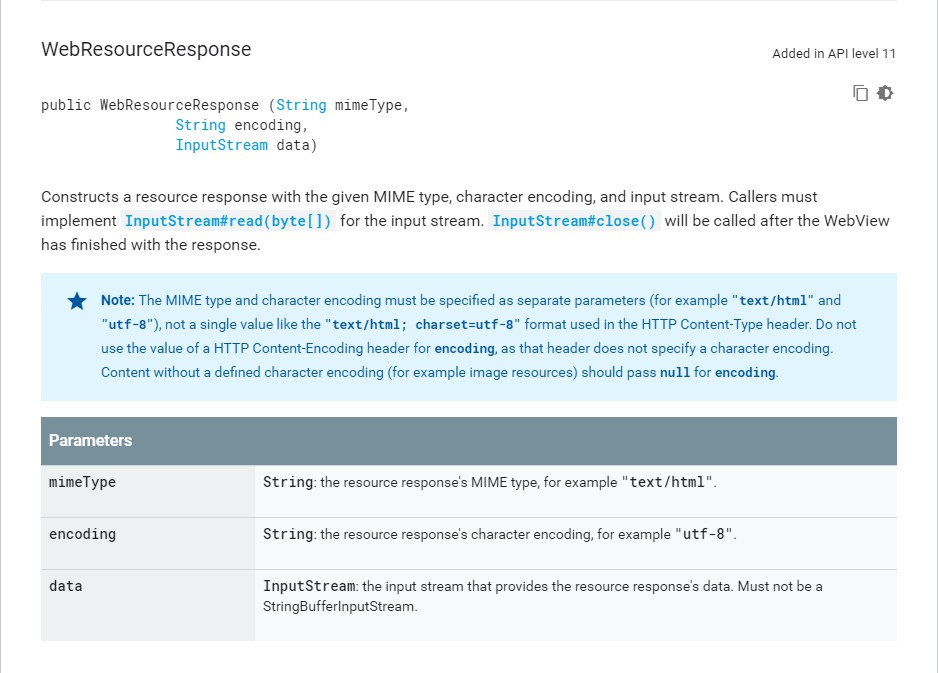
     // WebResourceResponse的mime必须为"text/html",不能是"text/html; charset=utf-8"

     if (mime.contains("text/html")) {

         mime = "text/html";

     }

     InputStream responseData = response.getData();

     InputStream injectedResponseData = injectInterceptToStream(

             context,

             responseData,

             mime,

             encoding

     );

     return new WebResourceResponse(mime, encoding, injectedResponseData);

 }
注:根据谷歌官方文档,mime必须为"text/html"。
反思:
- 开发过程中遇到了页面一直显示不了的问题,实际上就是因为获取到的mime是"text/html; charset=utf-8",得改成"text/html";
- 通过此方法也可篡改response与request,但不要滥用;
- 所以说,Android确实不安全!
GitHub地址:webview_post_data
大家如果有什么疑问或者建议可以通过评论或者邮件的方式联系我,欢迎大家的评论~
Android拦截并获取WebView内部POST请求参数的更多相关文章
- springboot springmvc拦截器 拦截POST、PUT、DELETE请求参数和响应数据,并记录操作日志
1.操作日志实体类 @Document(collection = "operation_log") @Getter @Setter @ToString public class O ...
- java从request中获取GET和POST请求参数
URL和参数列表 一 获取请求方式 request.getMethod(); get和post都可用, 二 获取请求类型 request.getContentType(); get和post都可用,示 ...
- requset获取post提交的请求参数
1.请求体的内容通常是通过post来提交的,格式是 username=zhansan&password=123&hobby=football||&hobby=basketbal ...
- java 获取request中的请求参数
1.get 和 post请求方式 (1)request.getParameterNames(); 获取所有参数key后.遍历request.getParameter(key)获取value (2)re ...
- SpringBoot 拦截器获取http请求参数
SpringBoot 拦截器获取http请求参数-- 所有骚操作基础 目录 SpringBoot 拦截器获取http请求参数-- 所有骚操作基础 获取http请求参数是一种刚需 定义拦截器获取请求 为 ...
- jmeter脚本中请求参数获取的几种方式
a.从数据库获取: 譬如接口请求参数中id的值,我需要从数据库获取,如下设置: 先设置jdbc connection configuration,然后设置JDBC b.从CSV获取: 获取CSV文件 ...
- struts2视频学习笔记 11-12(动态方法调用,接收请求参数)
课时11 动态方法调用 如果Action中存在多个方法时,可以使用!+方法名调用指定方法.(不推荐使用) public String execute(){ setMsg("execute&q ...
- Android之网络----使用HttpClient发送HTTP请求(通过get方法获取数据)
[正文] 一.HTTP协议初探: HTTP(Hypertext Transfer Protocol)中文 "超文本传输协议",是一种为分布式,合作式,多媒体信息系统服务,面向应用层 ...
- [Android] 获取WebView的页面标题(Title)-----WebChromeClient.onReceivedTitle()方法的重写
应用开发中需要获取WebView当前页面的标题,可能通过对WebChromeClient.onReceivedTitle()方法的重写来实现 效果图如下: 代码如下: public class Mai ...
随机推荐
- Nctf_web_wp
1.签到题 右键源代码即可2.md5 collision 这个考点是php"=="的弱相等,为何会出现弱加密呢,是因为在比较==两边的时候,会将字符串类型转化为相同, ...
- BootStrap 常用控件总结
下拉选择Select2:http://ivaynberg.github.io/select2/index.html 文件上传bootstrap-fileinput:https://github.com ...
- https://doc.opensuse.org/projects/kiwi/doc/
KIWI 是用于创建操作系统映像的系统.映像是带有一个文件的目录,该文件包含操作系统.其应用程序与配置.操作系统的文件系统结构.可能的附加元数据,以及(取决于映像类型)磁盘几何属性和分区表数据.通过 ...
- Oracle聚合函数
max(),min(),avg(),sum() 其中 avg(),sum()只能操作数字 , max(),min()能操作数字.日期.字母 等.
- Git的思想和基本工作原理2
那么,简单地说,Git 究竟是怎样的一个系统呢?请注意,接下来的内容非常重要,若是理解了 Git 的思想和基本工作原理,用起来就会知其所以然,游刃有余. 在开始学习 Git 的时候,请不要尝试把各种概 ...
- apache2.4 虚拟主机配置
网上教程很多,仅记录我的配置,可供参考 一.修改httpd.conf 打开appserv的安装目录,找到httpd.conf文件,分别去掉下面两行文字前面的#号. #LoadModule vhost_ ...
- 关于js中循环遍历中顺序执行多个嵌套ajax的问题
就是业务上需要完成一个功能,这个功能需要依次调用四个接口,后面接口的参数都依赖于前一个接口的返回值. 类似这样: var objArr = "从其他逻辑获得"; for(var n ...
- call(),apply()方法解析(一)
1.call()和apply()的作用是改变this指向,区别是传参列表不同(前者连续参数,后者为参数数组) 2.方法定义: function.apply(thisObj[, argArray]) f ...
- Windows Defender Service 是选择Windows 10系统的最大障碍!
今天从早上开始,Windows Defender Service服务从CPU消耗资源30%一直上升到60%并且无法下降. 我一直使用的是Windows 10 Enterprise 2016长期服务支持 ...
- 手动撸个Android雷达图(蜘蛛网图)RadarView
公司产品需要一个雷达图来展示各维度的比重,网上找了一波,学到不少,直接自己上手来撸一记 无图言虚空 简单分析一波,确定雷达图正几边形的--正五边形 int count=5,分为几个层数--4 层 in ...