
我的树莓派 Raspberry Pi Zero 2W 折腾笔记,记录一些遇到的问题和解决办法
0x00 前言说明
最近买了一块Raspberry Pi Zero 2W来玩,目的是想搭建一台远程运行的个人服务器,上面放个博客、点个灯啥的。于是就有了这篇文章。
树莓派官网地址:https://www.raspberrypi.com/
0x01 SSH连接
首先一开始买到手之后我是很懵的,于是在google上找到了以下几篇文章帮助了我很多。
- https://www.freesion.com/article/3840979679/
- https://www.cnblogs.com/liaouser/p/15844159.html
- https://www.freebuf.com/geek/209255.html
- https://shumeipai.nxez.com/2018/02/20/raspberry-pi-zero-usb-ethernet-gadget-tutorial.html?variant=zh-cn
- https://www.youtube.com/watch?v=sUU-ch8LEcE&ab_channel=ITCommander
看了那个youtube上面的视频后,发现其实买之前是可以叫淘宝客服帮忙焊接gpio引脚的。然后发现我身边有一个电烙铁,于是打算试一下(从来焊接过),结局如下
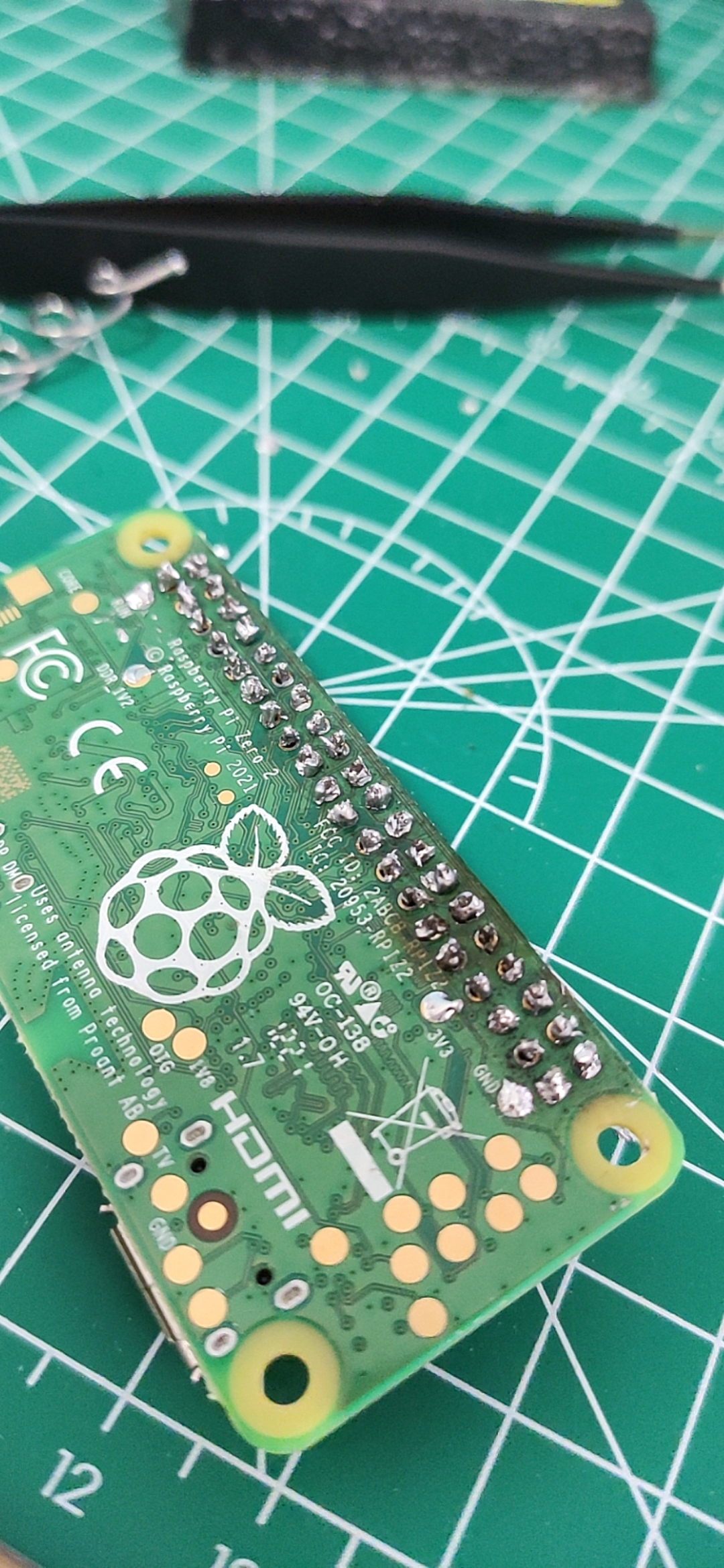
还好,没有坏掉!哈哈,这就是不看教程就直接动手的后果,望大家引以为戒!那么,跟着上面的教程写入操作系统到sd卡之后就是安装驱动和ssh连接树莓派了,连接的时候遇到了一个问题就是pi@raspberrypi.local's password,ssh登录不上去,看了下官方发现:
There are also mechanisms to preconfigure an image without using Imager. To set up a user on first boot and bypass the wizard completely, create a file called userconf or userconf.txt in the boot partition of the SD card; this is the part of the SD card which can be seen when it is mounted in a Windows or MacOS computer.

This file should contain a single line of text, consisting of username:encrypted- password – so your desired username, followed immediately by a colon, followed immediately by an encrypted representation of the password you want to use.

To generate the encrypted password, the easiest way is to use OpenSSL on a Raspberry Pi that is already running – open a terminal window and enter

echo 'mypassword' | openssl passwd -6 -stdin

This will produce what looks like a string of random characters, which is actually an encrypted version of the supplied password.
https://www.raspberrypi.com/news/raspberry-pi-bullseye-update-april-2022/
简单来说就是树莓派为了安全起见不在使用默认密码,所以需要在启动前在boot目录下创建一个userconf.txt,格式如下:
username:encrypted-password
其中encrypted-password可以用echo 'mypassword' | openssl passwd -6 -stdin这条命令生成,贴一下我生成的配置:
pi:$6$T12E4motTbeG7HXC$0vvzm.7sNj9bsEzVL2JT4P9OYXpvsk3lwqK6CzTVyyLrRdUA.fZVWrfzqmU./mmuU1O/i3xSueXPX4ieBjrCM/
也就是用户名为pi,密码为raspberry。重新写入sd卡之后,再次连接一波!
λ ssh pi@raspberrypi.local -p 22

Warning: Permanently added the ECDSA host key for IP address '169.254.155.237' to the list of known hosts.

pi@raspberrypi.local's password:

Linux raspberrypi 5.15.32-v8+ #1538 SMP PREEMPT Thu Mar 31 19:40:39 BST 2022 aarch64

The programs included with the Debian GNU/Linux system are free software;

the exact distribution terms for each program are described in the

individual files in /usr/share/doc/*/copyright.

Debian GNU/Linux comes with ABSOLUTELY NO WARRANTY, to the extent

permitted by applicable law.

Last login: Mon Apr  4 15:41:56 2022

SSH is enabled and the default password for the 'pi' user has not been changed.

This is a security risk - please login as the 'pi' user and type 'passwd' to set a new password.

Wi-Fi is currently blocked by rfkill.

Use raspi-config to set the country before use.

pi@raspberrypi:~ $
成功了!!!!!!!!!!!!!!!哇,成就感满满的!
0x02 配置网络
输入sudo raspi-config,选择国家—> “System Options”—>选第一个 —> 输入WiFi名称密码—> 重启sudo reboot
pi@raspberrypi:~ $ ifconfig

lo: flags=73<UP,LOOPBACK,RUNNING>  mtu 65536

        inet 127.0.0.1  netmask 255.0.0.0

        inet6 ::1  prefixlen 128  scopeid 0x10<host>

        loop  txqueuelen 1000  (Local Loopback)

        RX packets 10  bytes 1600 (1.5 KiB)

        RX errors 0  dropped 0  overruns 0  frame 0

        TX packets 10  bytes 1600 (1.5 KiB)

        TX errors 0  dropped 0 overruns 0  carrier 0  collisions 0

usb0: flags=4163<UP,BROADCAST,RUNNING,MULTICAST>  mtu 1500

        inet 169.254.174.149  netmask 255.255.0.0  broadcast 169.254.255.255

        inet6 fe80::74a7:e6a5:d1b2:66e  prefixlen 64  scopeid 0x20<link>

        ether 62:ae:a7:2d:b5:2f  txqueuelen 1000  (Ethernet)

        RX packets 187  bytes 19160 (18.7 KiB)

        RX errors 0  dropped 0  overruns 0  frame 0

        TX packets 30  bytes 5905 (5.7 KiB)

        TX errors 0  dropped 0 overruns 0  carrier 0  collisions 0

wlan0: flags=4163<UP,BROADCAST,RUNNING,MULTICAST>  mtu 1500

        inet 192.168.1.4  netmask 255.255.255.0  broadcast 192.168.1.255

        inet6 240e:379:1a87:b500:fc16:62d:3ce4:de2b  prefixlen 64  scopeid 0x0<global>

        inet6 fe80::4ee:25c1:2732:51c0  prefixlen 64  scopeid 0x20<link>

        ether e4:5f:01:4b:3a:e4  txqueuelen 1000  (Ethernet)

        RX packets 157  bytes 24008 (23.4 KiB)

        RX errors 0  dropped 0  overruns 0  frame 0

        TX packets 87  bytes 14755 (14.4 KiB)

        TX errors 0  dropped 0 overruns 0  carrier 0  collisions 0

pi@raspberrypi:~ $ ping www.baidu.com

PING www.a.shifen.com (14.215.177.39) 56(84) bytes of data.

64 bytes from 14.215.177.39 (14.215.177.39): icmp_seq=1 ttl=55 time=19.8 ms

64 bytes from 14.215.177.39 (14.215.177.39): icmp_seq=2 ttl=55 time=23.1 ms

64 bytes from 14.215.177.39 (14.215.177.39): icmp_seq=3 ttl=55 time=22.9 ms

64 bytes from 14.215.177.39 (14.215.177.39): icmp_seq=4 ttl=55 time=22.9 ms

64 bytes from 14.215.177.39 (14.215.177.39): icmp_seq=5 ttl=55 time=22.8 ms

64 bytes from 14.215.177.39 (14.215.177.39): icmp_seq=6 ttl=55 time=24.1 ms

^C

--- www.a.shifen.com ping statistics ---

6 packets transmitted, 6 received, 0% packet loss, time 5007ms

rtt min/avg/max/mdev = 19.849/22.594/24.104/1.306 ms

pi@raspberrypi:~ $
连接网络成功!哦耶!
0x03 文本结语
那么先到这里,后续出一个电灯的文章!!!
我的树莓派 Raspberry Pi Zero 2W 折腾笔记,记录一些遇到的问题和解决办法的更多相关文章
- 树莓派(raspberry pi)学习4: 更改键盘布局(转)
树莓派(raspberry pi)用了几次后,发现键盘老是按错,一些字符打不出来或打错 这个问题,折腾我半天.还是把心得分享一下吧 上网查,发现是键盘布局不对,树莓派(raspberry pi)是英国 ...
- 树莓派(raspberry pi)更改键盘布局
http://blog.csdn.net/c80486/article/details/8460271 树莓派(raspberry pi)用了几次后,发现键盘老是按错,一些字符打不出来或打错 这个问题 ...
- 树莓派(Raspberry Pi)搭建简单的lamp服务
树莓派(Raspberry Pi)搭建简单的lamp服务: 1. LAMP 的安装 sudo apt-get install apache2 mysql-server mysql-client php ...
- 外网登录访问树莓派 Raspberry Pi
外网登录访问树莓派 Raspberry Pi 本地的树莓派 Raspberry Pi,只能在局域网内访问,怎样从公网也能登录访问树莓派 Raspberry Pi? 本文将介绍具体的实现步骤. 1. 准 ...
- 树莓派(Raspberry Pi)使用Shell编写的极简Service
树莓派(Raspberry Pi)运行的系统是基于Debian的,不仅可以运行Shell,还支持systemd和docker,可以编写一个简单的服务,让其在启动时运行,执行一些自动化的操作.这里在Ra ...
- 树莓派raspberry pi配置
(1)国际化语言 树莓派初装系统之后,首次启动会出现“raspi-config”工具,如下图:(若不是初次启动,在命令模式下,请输入 sudo raspi-config 命令,即可调出此界面.若在图形 ...
- 树莓派(raspberry pi)学习11: 将树莓派变成一个Web服务器(转)
将树莓派变成一个Web服务器,通过访问网页,就可以控制树莓派,比如:查看摄像头\开灯等等. 一想到Linux Web服务器,我们首先想到的是,Apache + MySql + Php. 树莓派可以安装 ...
- 做一个树莓派Raspberry Pi拍立得
用树莓派Raspberry Pi打造一台拍立得,作法如下: 材料:树莓派+数字相机模块+热敏打印机 因为打印机所需电流较高,所以电源供应器的规格需要5V 3A以上. 再找一个稳定的电源以及够大的外壳装 ...
- VLOG丨树莓派Raspberry Pi 3安装PLEX并挂载USB硬盘打造最牛的微型家庭影音服务器2018
视频介绍 树莓派3安装目前最流行的PLEX服务器,实现既能最大限度降低功耗,也能随时随地观看分享影片. 一.在树莓派下安装PLEX媒体服务器 1.在终端,将你的树莓派更新至最新 sudo apt up ...
随机推荐
- onGUI常用脚本学习(引用)
https://blog.csdn.net/Hannah1221/article/details/101941174?spm=1001.2101.3001.6650.3&utm_medium= ...
- Spring根据路径前缀获取不同Resource
相关文章:https://www.jianshu.com/p/5bab9e03ab92 官方文档:https://docs.spring.io/spring/docs/current/spring-f ...
- 什么是持续集成CI?
持续集成(CI)是每次团队成员提交版本控制更改时自动构建和测试代码的过程. 这鼓励开发人员通过在每个小任务完成后将更改合并到共享版本控制存储库来共 享代码和单元测试.
- 在IE中设置在序列化没有版本号就提示
- 以太网在汽车行业中的挑战——灵活的接口及软件使ECU开发不再复杂
以太网在汽车行业中的挑战--灵活的接口及软件使ECU开发不再复杂 以太网将会在一批新车型中作为一个车载系统网络使用.因此,下一步就是以太网和现有汽车网络技术的集成,包括:CAN.FlexRay.LIN ...
- mplab使用小知识
选择Debugger->Select Tool->MPLAB SIM可以使用MPALB中的软件调试 StopWatch可以观察程序运行时间 注意:在测试时需要注意红圈内晶振是不是和单片机上 ...
- 002.MEMS应用在开关电源上,实现大功率超小型化
设计任务书 1.有关MEMS还有待具体了解 2.有关开关电源的目前难题也需要了解
- mysql实现in子句的limit查询 (转)
在supesite里面执行一个SQL语句: select * from supe_spaceitems where catid=98 and itemid not in(select itemid f ...
- Html5 Canvas学习之路(五)
Canvas 图像(上) Canvas 图像API可以加载图像数据,然后直接将图像应用到画布上.还可以裁切.拼贴图像数据,以显示用户需要的部分.此外,Canvas还提供了像素数据的存储功能,这样就能对 ...
- 【Android开发】用WebView访问证书有问题的SSL网页
Android系统的碎片化很严重,并且手机日期不正确.手机根证书异常.com.google.android.webview BUG等各种原因,都会导致WebViewClient无法访问HTTPS站点. ...