
Element基本组件
Element按钮组件:
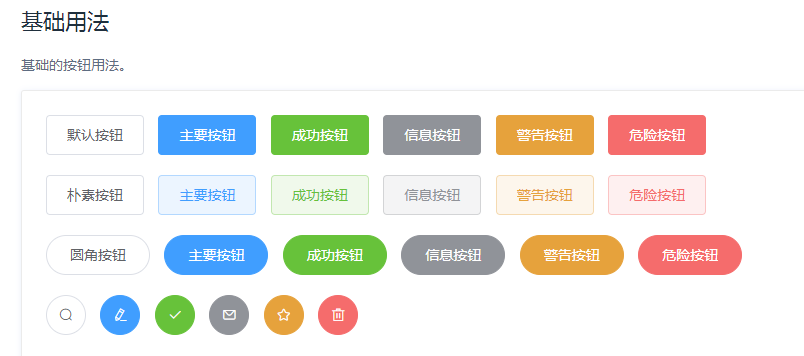
<el-row>

  <el-button>默认按钮</el-button>

  <el-button type="primary">主要按钮</el-button>

  <el-button type="success">成功按钮</el-button>

  <el-button type="info">信息按钮</el-button>

  <el-button type="warning">警告按钮</el-button>

  <el-button type="danger">危险按钮</el-button>

</el-row>

<el-row>

  <el-button plain>朴素按钮</el-button>

  <el-button type="primary" plain>主要按钮</el-button>

  <el-button type="success" plain>成功按钮</el-button>

  <el-button type="info" plain>信息按钮</el-button>

  <el-button type="warning" plain>警告按钮</el-button>

  <el-button type="danger" plain>危险按钮</el-button>

</el-row>

<el-row>

  <el-button round>圆角按钮</el-button>

  <el-button type="primary" round>主要按钮</el-button>

  <el-button type="success" round>成功按钮</el-button>

  <el-button type="info" round>信息按钮</el-button>

  <el-button type="warning" round>警告按钮</el-button>

  <el-button type="danger" round>危险按钮</el-button>

</el-row>

<el-row>

  <el-button icon="el-icon-search" circle></el-button>

  <el-button type="primary" icon="el-icon-edit" circle></el-button>

  <el-button type="success" icon="el-icon-check" circle></el-button>

  <el-button type="info" icon="el-icon-message" circle></el-button>

  <el-button type="warning" icon="el-icon-star-off" circle></el-button>

  <el-button type="danger" icon="el-icon-delete" circle></el-button>

</el-row>
按钮大小设置:
<el-row>

  <el-button>默认按钮</el-button>

  <el-button size="medium">中等按钮</el-button>

  <el-button size="small">小型按钮</el-button>

  <el-button size="mini">超小按钮</el-button>

</el-row>

<el-row>

  <el-button round>默认按钮</el-button>

  <el-button size="medium" round>中等按钮</el-button>

  <el-button size="small" round>小型按钮</el-button>

  <el-button size="mini" round>超小按钮</el-button>

</el-row>
文字按钮:
<el-button type="text">文字按钮</el-button>

<el-button type="text" disabled>文字按钮</el-button>
图标按钮:
<el-button type="primary" icon="el-icon-edit"></el-button>

<el-button type="primary" icon="el-icon-share"></el-button>

<el-button type="primary" icon="el-icon-delete"></el-button>

<el-button type="primary" icon="el-icon-search">搜索</el-button>

<el-button type="primary">上传<i class="el-icon-upload el-icon--right"></i></el-button>
按钮组:
<el-button-group>

  <el-button type="primary" icon="el-icon-arrow-left">上一页</el-button>

  <el-button type="primary">下一页<i class="el-icon-arrow-right el-icon--right"></i></el-button>

</el-button-group>

<el-button-group>

  <el-button type="primary" icon="el-icon-edit"></el-button>

  <el-button type="primary" icon="el-icon-share"></el-button>

  <el-button type="primary" icon="el-icon-delete"></el-button>

</el-button-group>
Element输入框组件:
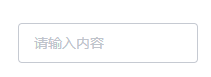
<el-input v-model="input" placeholder="请输入内容"></el-input>

<script>

export default {

  data() {

    return {

      input: ''

    }

  }

}

</script>
禁用状态:
<el-input

  placeholder="请输入内容"

  v-model="input"

  :disabled="true">

</el-input>

<script>

export default {

  data() {

    return {

      input: ''

    }

  }

}

</script>
密码框:
<el-input placeholder="请输入密码" v-model="input" show-password></el-input>

<script>

  export default {

    data() {

      return {

        input: ''

      }

    }

  }

</script>
带输入建议:
<el-row class="demo-autocomplete">

  <el-col :span="12">

    <div class="sub-title">激活即列出输入建议</div>

    <el-autocomplete

      class="inline-input"

      v-model="state1"

      :fetch-suggestions="querySearch"

      placeholder="请输入内容"

      @select="handleSelect"

    ></el-autocomplete>

  </el-col>

  <el-col :span="12">

    <div class="sub-title">输入后匹配输入建议</div>

    <el-autocomplete

      class="inline-input"

      v-model="state2"

      :fetch-suggestions="querySearch"

      placeholder="请输入内容"

      :trigger-on-focus="false"

      @select="handleSelect"

    ></el-autocomplete>

  </el-col>

</el-row>

<script>

  export default {

    data() {

      return {

        restaurants: [],

        state1: '',

        state2: ''

      };

    },

    methods: {

      querySearch(queryString, cb) {

        var restaurants = this.restaurants;

        var results = queryString ? restaurants.filter(this.createFilter(queryString)) : restaurants;

        // 调用 callback 返回建议列表的数据

        cb(results);

      },

      createFilter(queryString) {

        return (restaurant) => {

          return (restaurant.value.toLowerCase().indexOf(queryString.toLowerCase()) === 0);

        };

      },

      loadAll() {

        return [

          { "value": "三全鲜食(北新泾店)", "address": "长宁区新渔路144号" },

          { "value": "Hot honey 首尔炸鸡(仙霞路)", "address": "上海市长宁区淞虹路661号" },

          { "value": "新旺角茶餐厅", "address": "上海市普陀区真北路988号创邑金沙谷6号楼113" },

          { "value": "泷千家(天山西路店)", "address": "天山西路438号" },

          { "value": "胖仙女纸杯蛋糕(上海凌空店)", "address": "上海市长宁区金钟路968号1幢18号楼一层商铺18-101" },

          { "value": "贡茶", "address": "上海市长宁区金钟路633号" },

          { "value": "豪大大香鸡排超级奶爸", "address": "上海市嘉定区曹安公路曹安路1685号" },

          { "value": "茶芝兰(奶茶,手抓饼)", "address": "上海市普陀区同普路1435号" },

          { "value": "十二泷町", "address": "上海市北翟路1444弄81号B幢-107" },

          { "value": "星移浓缩咖啡", "address": "上海市嘉定区新郁路817号" },

          { "value": "阿姨奶茶/豪大大", "address": "嘉定区曹安路1611号" },

          { "value": "新麦甜四季甜品炸鸡", "address": "嘉定区曹安公路2383弄55号" },

          { "value": "Monica摩托主题咖啡店", "address": "嘉定区江桥镇曹安公路2409号1F,2383弄62号1F" },

          { "value": "浮生若茶(凌空soho店)", "address": "上海长宁区金钟路968号9号楼地下一层" },

          { "value": "NONO JUICE  鲜榨果汁", "address": "上海市长宁区天山西路119号" },

          { "value": "CoCo都可(北新泾店)", "address": "上海市长宁区仙霞西路" },

          { "value": "快乐柠檬(神州智慧店)", "address": "上海市长宁区天山西路567号1层R117号店铺" },

          { "value": "Merci Paul cafe", "address": "上海市普陀区光复西路丹巴路28弄6号楼819" },

          { "value": "猫山王(西郊百联店)", "address": "上海市长宁区仙霞西路88号第一层G05-F01-1-306" },

          { "value": "枪会山", "address": "上海市普陀区棕榈路" },

          { "value": "纵食", "address": "元丰天山花园(东门) 双流路267号" },

          { "value": "钱记", "address": "上海市长宁区天山西路" },

          { "value": "壹杯加", "address": "上海市长宁区通协路" },

          { "value": "唦哇嘀咖", "address": "上海市长宁区新泾镇金钟路999号2幢(B幢)第01层第1-02A单元" },

          { "value": "爱茜茜里(西郊百联)", "address": "长宁区仙霞西路88号1305室" },

          { "value": "爱茜茜里(近铁广场)", "address": "上海市普陀区真北路818号近铁城市广场北区地下二楼N-B2-O2-C商铺" },

          { "value": "鲜果榨汁(金沙江路和美广店)", "address": "普陀区金沙江路2239号金沙和美广场B1-10-6" },

          { "value": "开心丽果(缤谷店)", "address": "上海市长宁区威宁路天山路341号" },

          { "value": "超级鸡车(丰庄路店)", "address": "上海市嘉定区丰庄路240号" },

          { "value": "妙生活果园(北新泾店)", "address": "长宁区新渔路144号" },

          { "value": "香宜度麻辣香锅", "address": "长宁区淞虹路148号" },

          { "value": "凡仔汉堡(老真北路店)", "address": "上海市普陀区老真北路160号" },

          { "value": "港式小铺", "address": "上海市长宁区金钟路968号15楼15-105室" },

          { "value": "蜀香源麻辣香锅(剑河路店)", "address": "剑河路443-1" },

          { "value": "北京饺子馆", "address": "长宁区北新泾街道天山西路490-1号" },

          { "value": "饭典*新简餐(凌空SOHO店)", "address": "上海市长宁区金钟路968号9号楼地下一层9-83室" },

          { "value": "焦耳·川式快餐(金钟路店)", "address": "上海市金钟路633号地下一层甲部" },

          { "value": "动力鸡车", "address": "长宁区仙霞西路299弄3号101B" },

          { "value": "浏阳蒸菜", "address": "天山西路430号" },

          { "value": "四海游龙(天山西路店)", "address": "上海市长宁区天山西路" },

          { "value": "樱花食堂(凌空店)", "address": "上海市长宁区金钟路968号15楼15-105室" },

          { "value": "壹分米客家传统调制米粉(天山店)", "address": "天山西路428号" },

          { "value": "福荣祥烧腊(平溪路店)", "address": "上海市长宁区协和路福泉路255弄57-73号" },

          { "value": "速记黄焖鸡米饭", "address": "上海市长宁区北新泾街道金钟路180号1层01号摊位" },

          { "value": "红辣椒麻辣烫", "address": "上海市长宁区天山西路492号" },

          { "value": "(小杨生煎)西郊百联餐厅", "address": "长宁区仙霞西路88号百联2楼" },

          { "value": "阳阳麻辣烫", "address": "天山西路389号" },

          { "value": "南拳妈妈龙虾盖浇饭", "address": "普陀区金沙江路1699号鑫乐惠美食广场A13" }

        ];

      },

      handleSelect(item) {

        console.log(item);

      }

    },

    mounted() {

      this.restaurants = this.loadAll();

    }

  }

</script>
Table 表格

 <template>

    <el-table

      :data="tableData"

      style="width: 100%">

      <el-table-column

        prop="date"

        label="日期"

        width="180">

      </el-table-column>

      <el-table-column

        prop="name"

        label="姓名"

        width="180">

      </el-table-column>

      <el-table-column

        prop="address"

        label="地址">

      </el-table-column>

    </el-table>

  </template>

  <script>

    export default {

      data() {

        return {

          tableData: [{

            date: '2016-05-02',

            name: '王小虎',

            address: '上海市普陀区金沙江路 1518 弄'

          }, {

            date: '2016-05-04',

            name: '王小虎',

            address: '上海市普陀区金沙江路 1517 弄'

          }, {

            date: '2016-05-01',

            name: '王小虎',

            address: '上海市普陀区金沙江路 1519 弄'

          }, {

            date: '2016-05-03',

            name: '王小虎',

            address: '上海市普陀区金沙江路 1516 弄'

          }]

        }

      }

    }

  </script>
固定列
<template>

  <el-table

    :data="tableData"

    border

    style="width: 100%">

    <el-table-column

      fixed

      prop="date"

      label="日期"

      width="150">

    </el-table-column>

    <el-table-column

      prop="name"

      label="姓名"

      width="120">

    </el-table-column>

    <el-table-column

      prop="province"

      label="省份"

      width="120">

    </el-table-column>

    <el-table-column

      prop="city"

      label="市区"

      width="120">

    </el-table-column>

    <el-table-column

      prop="address"

      label="地址"

      width="300">

    </el-table-column>

    <el-table-column

      prop="zip"

      label="邮编"

      width="120">

    </el-table-column>

    <el-table-column

      fixed="right"

      label="操作"

      width="100">

      <template slot-scope="scope">

        <el-button @click="handleClick(scope.row)" type="text" size="small">查看</el-button>

        <el-button type="text" size="small">编辑</el-button>

      </template>

    </el-table-column>

  </el-table>

</template>

<script>

  export default {

    methods: {

      handleClick(row) {

        console.log(row);

      }

    },

    data() {

      return {

        tableData: [{

          date: '2016-05-02',

          name: '王小虎',

          province: '上海',

          city: '普陀区',

          address: '上海市普陀区金沙江路 1518 弄',

          zip: 200333

        }, {

          date: '2016-05-04',

          name: '王小虎',

          province: '上海',

          city: '普陀区',

          address: '上海市普陀区金沙江路 1517 弄',

          zip: 200333

        }, {

          date: '2016-05-01',

          name: '王小虎',

          province: '上海',

          city: '普陀区',

          address: '上海市普陀区金沙江路 1519 弄',

          zip: 200333

        }, {

          date: '2016-05-03',

          name: '王小虎',

          province: '上海',

          city: '普陀区',

          address: '上海市普陀区金沙江路 1516 弄',

          zip: 200333

        }]

      }

    }

  }

</script>
Element基本组件的更多相关文章
- Element Tabs 组件中使用 ve-histogram组件渲染不出来(已解决)
Element Tabs 组件中使用 ve-histogram组件渲染不出来 发现问题提了issue,饿了么前端“西瓜”同学很快做了回复,饿了么大前端团队有沉淀很专业,赞. tip: GitHub 的 ...
- src-resolve: 无法将名称 'extension' 解析为 'element declaration' 组件。
activiti流程部署时,出现“src-resolve: 无法将名称 'extension' 解析为 'element declaration' 组件.”错误. 出错原因:项目所在路径中有中文.
- element table 组件内容换行方案
element table 组件内容换行方案 white-space的值: normal 默认.空白会被浏览器忽略.pre 空白会被浏览器保留.其行为方式类似 HTML 中的<pre> 标 ...
- element ui组件的开始时间-结束时间验证
<el-date-picker v-model="seach.before" type="date" placeholder="开始时间&quo ...
- Element el-table-column组件列宽度设置百分比无效
问题 使用Element table组件时,给列设置百分比宽度无效(width="30%") 解决 用属性min-width="3"代替属性width=&quo ...
- 关于Element对话框组件Dialog在使用时的一些问题及解决办法
Element对话框组件Dialog在我们的实际项目开发中可以说是一个使用频率较高的组件,它能为我们展示提示的功能,如:业务模块提交前展示我们曾经输入或选择过的业务信息,或者展示列表信息中某项业务的具 ...
- 循序渐进VUE+Element 前端应用开发(6)--- 常规Element 界面组件的使用
在我们开发BS页面的时候,往往需要了解常规界面组件的使用,小到最普通的单文本输入框.多文本框.下拉列表,以及按钮.图片展示.弹出对话框.表单处理.条码二维码等等,本篇随笔基于普通表格业务的展示录入的场 ...
- (Element UI 组件 Table)去除单元格底部的横线
Element UI 组件 Table 有一个属性 border,添加它可以增加纵向边框,但是无法控制横线边框,因此即使是最简单的 el-table,也会包含一个底部横线. 这个底部横线其实是一个 b ...
- 修改element表格组件的样式
最近在开发一个项目,使用到了element中的表格组件,但是该组件的样式不是我们想要的样式,需要自己再调整,但是常常会遇到自己设置的样式无效,我使用的技术是Vue开发的 1. 页面使用了三栏布局,最右 ...
随机推荐
- Excel 逻辑函数(一):IF 和 IFS
IF IF 函数有三个参数,第一个为条件判断,第二个是当条件为真时执行的表达式,第三个是条件为假时执行的表达式. IF(A1="是", A2 * 0.8, 0),如果 A1 单元格 ...
- 有一个线性表,采用带头结点的单链表L来存储,设计一个算法将其逆置,且不能建立新节点,只能通过表中已有的节点的重新组合来完成。
有一个线性表,采用带头结点的单链表L来存储,设计一个算法将其逆置,且不能建立新节点,只能通过表中已有的节点的重新组合来完成. 分析:线性表中关于逆序的问题,就是用建立链表的头插法.而本题要求不能建立新 ...
- Spring(二)-生命周期 + 自动装配(xml) +自动装配(注解)
1.生命周期 **Spring容器的 bean **的生命周期: 1.1 默认生命周期 1.1.1 生命周期 调用构造方法,创建实例对象: set方法,给实例对象赋值: init 初始化方法 初始化对 ...
- 简单创建一个SpringCloud2021.0.3项目(四)
目录 1. 项目说明 1. 版本 2. 用到组件 3. 功能 2. 上三篇教程 3. 日志处理 1. 创建日志公共模块 2. Eureka引入日志模块 4. 到此的功能代码 5. 注册中心换成naco ...
- Android蓝牙线控切歌、连接状态监听(无线耳机也适用)
1. 监听蓝牙设备(音频)连接状态 所有代码已测试在Android11也能正常使用 (Android SDK 30) 首先新建一个广播类 BluetoothStateReceiver /** * @a ...
- Springboot连接数据库
好家伙, 这里使用的软件是IDEA 2021 1.新建项目 2.更改配置项目文件目录 更改前: 更改后: 2.1.更改pom.xml文件 在该文件中添加: <dependency> < ...
- Self-Attention:初步理解
Self-Attention 的基本结构与计算 Attention(注意力)实际上就是权重的另一种应用的称呼,其具体结构与初始输入的 content \(\vec{x_{1}}, \vec{x_{2} ...
- http服务(postman调用方法及反参)
#region 监听url #region 监听url路径请求 static HttpListener httpobj; private void listeningUrl() { //提供一个简单的 ...
- .NET 实现启动时重定向程序运行路径及 Windows 服务运行模式部署
日常工作中有时候会遇到需要将程序直接在服务器上运行,而不依赖于 IIS 托管的情况,直接运行有两种方式,一种是部署为 服务模式,另一种则是 直接启动 .NET 发布之后的 exe 文件以 控制台模式运 ...
- Memlab,一款分析 JavaScript 堆并查找浏览器和 Node.js 中内存泄漏的开源框架
Memlab 是一款 E2E 测试和分析框架,用于发现 JavaScript 内存泄漏和优化机会. Memlab 是 JavaScript 的内存测试框架.它支持定义一个测试场景(使用 Puppete ...