
Entity Framework + WCF REST JSON Service
利用EF 和WCF 建立一个REST JSON Service. 首先我们要下载一个Visual Studio 的Template 叫 “ADO.NET C# POCO Entity Generator With WCF Support”.
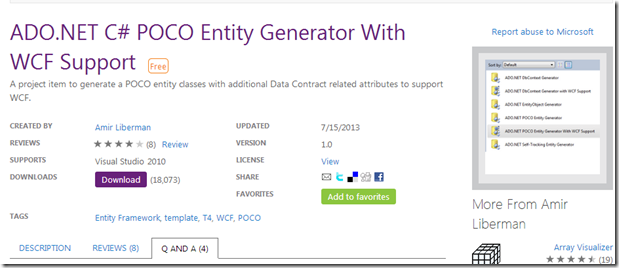
这个主要是用于生成WCF的Model Class. 因为默认的EF 的Template是没有[DataMember]和[DataContract]这个Annotation的。
建立一个Visual Studio 的project.建立一个Entity framework EDMX。这里面我们有一个Table,
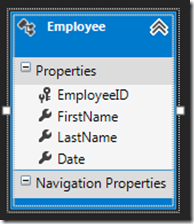
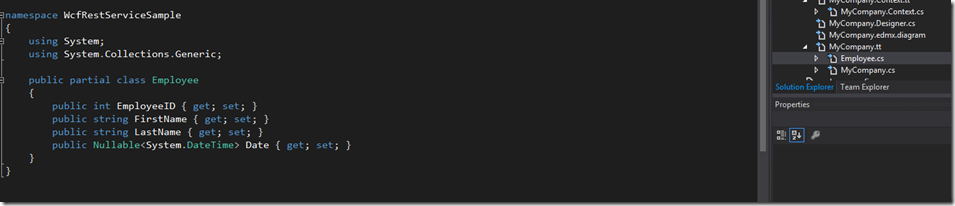
上面已经说过,默认的EF 4.0下生成的template是没有[DataMember]和[DataContract]这个Annotation的,所以我们要用新的Template来生成Model class.
如果你打开Employee.cs的时候,你会发现class上面是没有[DataContract],属性是没有DataMember的。
首先,我们先删除自动生成的template和Model class
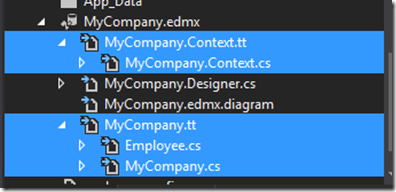
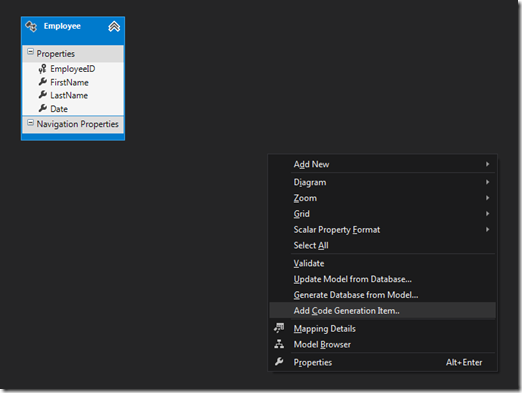
首先回到EDMX,右键Add Code Generation Item…
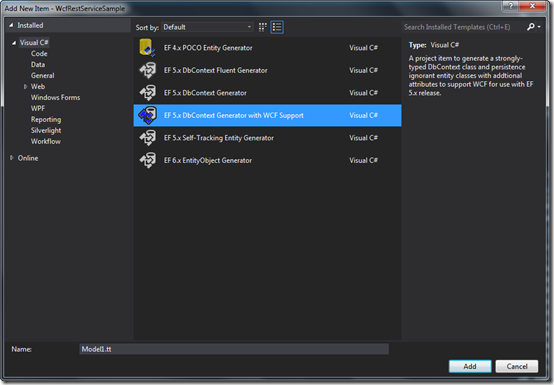
选择 EF 5.x DbContext Generator with WCF Support
当我们加完之后,再看我们的Employee.cs
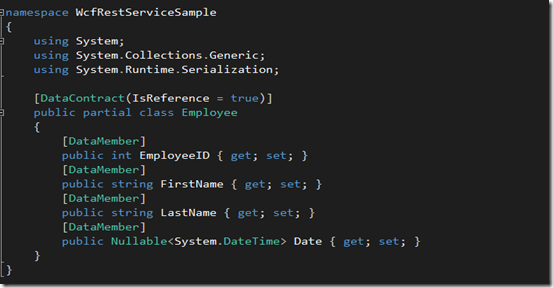
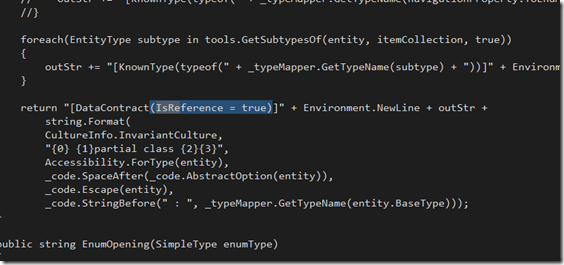
这里面要说一下,因为JSON不支持序列化IsReference这个属性,所以如果你要输出JSON的话,就需要删除这个IsReference.如果你输出时xml的话,IsReference是没问题的。
所以我们要进到template文件,删除这个IsReference,这个就很简单了,走一个简单的查询就可以了。注意,在这个template中IsReference有两处,记得全删除就可以了
基本上,Entity Framework上JSON的问题已经完成了,下面就是写Service了,我们就写一个Service,GetEmployee(int employeID)
首先,我们创建一个EmployeeService.svc,
这里有一点注意,如果你用UriTemplate = “employee/{id}”的话,Employee GetEmployee(int id)这里,就必须是String id,否则的话他会抛异常

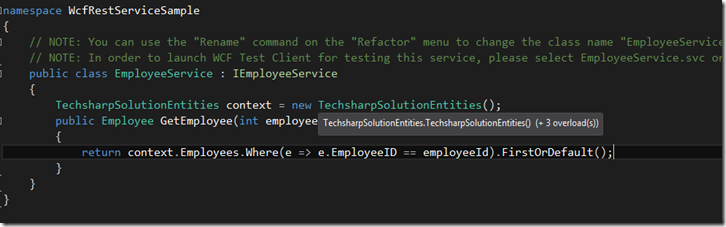
好了,最后就是web.config了
webconfig里面没有什么,只要注意加一个endpointBehavior <webHttp />,然后你的service endpoint 里面behaviorConfiguration = 这个endpointBehavior.
还有就是你的service endpoint的binding type 是 webHttpBinding.
最后记得加mexHttpBinding
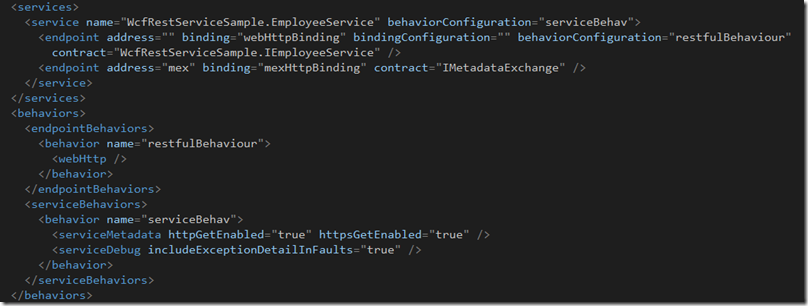
全部的web.config在这里
<?xml version="1.0" encoding="utf-8"?>
<configuration>
<configSections>
<!-- For more information on Entity Framework configuration, visit http://go.microsoft.com/fwlink/?LinkID=237468 -->
<section name="entityFramework" type="System.Data.Entity.Internal.ConfigFile.EntityFrameworkSection, EntityFramework, Version=5.0.0.0, Culture=neutral, PublicKeyToken=b77a5c561934e089" requirePermission="false" />
</configSections>
<appSettings>
<add key="aspnet:UseTaskFriendlySynchronizationContext" value="true" />
</appSettings>
<system.web>
<compilation debug="true" targetFramework="4.5">
<assemblies>
<add assembly="System.Data.Entity, Version=4.0.0.0, Culture=neutral, PublicKeyToken=b77a5c561934e089" />
</assemblies>
</compilation>
<httpRuntime targetFramework="4.5" />
</system.web>
<system.serviceModel>
<services>
<service name="WcfRestServiceSample.EmployeeService" behaviorConfiguration="serviceBehav">
<endpoint address="" binding="webHttpBinding" bindingConfiguration="" behaviorConfiguration="restfulBehaviour"
contract="WcfRestServiceSample.IEmployeeService" />
<endpoint address="mex" binding="mexHttpBinding" contract="IMetadataExchange" />
</service>
</services>
<behaviors>
<endpointBehaviors>
<behavior name="restfulBehaviour">
<webHttp />
</behavior>
</endpointBehaviors>
<serviceBehaviors>
<behavior name="serviceBehav">
<serviceMetadata httpGetEnabled="true" httpsGetEnabled="true" />
<serviceDebug includeExceptionDetailInFaults="true" />
</behavior>
</serviceBehaviors>
</behaviors>
<protocolMapping>
<add binding="basicHttpsBinding" scheme="https" />
</protocolMapping>
<serviceHostingEnvironment aspNetCompatibilityEnabled="true" multipleSiteBindingsEnabled="true" />
</system.serviceModel>
<system.webServer>
<modules runAllManagedModulesForAllRequests="true" />
<!--
To browse web app root directory during debugging, set the value below to true.
Set to false before deployment to avoid disclosing web app folder information.
-->
<directoryBrowse enabled="true" />
</system.webServer>
<connectionStrings>
<add name="TechsharpSolutionEntities" connectionString="metadata=res://*/MyCompany.csdl|res://*/MyCompany.ssdl|res://*/MyCompany.msl;provider=System.Data.SqlClient;provider connection string="data source=localhost\Sql2008R2;initial catalog=TechsharpSolution;persist security info=True;user id=sa;password=9ijn)OKM;MultipleActiveResultSets=True;App=EntityFramework"" providerName="System.Data.EntityClient" />
</connectionStrings>
<entityFramework>
<defaultConnectionFactory type="System.Data.Entity.Infrastructure.LocalDbConnectionFactory, EntityFramework">
<parameters>
<parameter value="v11.0" />
</parameters>
</defaultConnectionFactory>
</entityFramework>
</configuration>
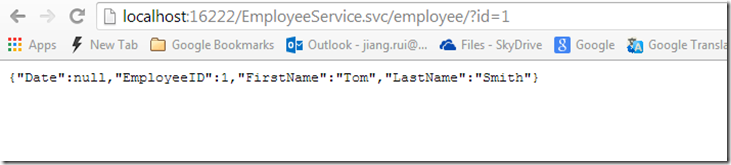
执行的结果是
Entity Framework + WCF REST JSON Service的更多相关文章
- Entity Framework + WCF 远程调用出错
在使用Entity Framework中使用WCF,在程序中调用服务一直报错,我一直以为是WCF的哪个地方的配置有问题,找来找去,一直没有解决. 最后在网上找到一篇文章 ...
- Entity framework在用于WCF时创建数据模型的问题
众所周知,WCF的传输对象,在创建时需要在类名上标识[DataContract]以及在属性上标识[DataMember],当我们在使用Entity framework时(不考虑Code first的情 ...
- Entity Framework在WCF中序列化的问题
问题描述 如果你在WCF中用Entity Framework来获取数据并返回实体对象,那么对下面的错误一定不陌生. 接收对 http://localhost:5115/ReService.svc 的 ...
- 精进不休 .NET 4.5 (12) - ADO.NET Entity Framework 6.0 新特性, WCF Data Services 5.6 新特性
[索引页][源码下载] 精进不休 .NET 4.5 (12) - ADO.NET Entity Framework 6.0 新特性, WCF Data Services 5.6 新特性 作者:weba ...
- 如何使用ASP.NET Web API OData在Oracle中使用Entity Framework 6.x Code-First方式开发 OData V4 Service
环境: Visual Studio 2013 + .Net Framework 4.5.2 1.新建项目 2.安装OData,ODP.NET 安装的包: 下面是部分代码: using System; ...
- JSON Support in PostgreSQL and Entity Framework
JSON 和JSONB的区别(What's difference between JSON and JSONB data type in PosgresSQL?) When should be use ...
- Windows Service 项目中 Entity Framework 无法加载的问题
Windows Service 项目引用了别的类库项目,别的项目用到了 Entity Framework(通过Nuget引入),但是我的 Windows Service 无法开启,于是我修改了 App ...
- Newtonsoft.Json高级用法,json序列号,model反序列化,支持序列化和反序列化DataTable,DataSet,Entity Framework和Entity,字符串
原文地址:https://www.cnblogs.com/yanweidie/p/4605212.html 手机端应用讲究速度快,体验好.刚好手头上的一个项目服务端接口有性能问题,需要进行优化.在接口 ...
- Entity Framework在WCF中序列化的问题(转)
问题描述 如果你在WCF中用Entity Framework来获取数据并返回实体对象,那么对下面的错误一定不陌生. 接收对 http://localhost:5115/ReService.svc 的 ...
随机推荐
- iOS开发60分钟入门
原文:https://github.com/qinjx/30min_guides/blob/master/ios.md 本文面向已有其它语言(如Java,C,PHP,Javascript)编程经验的i ...
- Arduino Due, Maple and Teensy3.0 的 W5200性能测试
开源平台中以太网连接方案里W5100是众所周知的,W5200正在此领域越来越受欢迎.这个测试结果是在Arduino Due(Atmel CortexM3-84Mhz), Maple(ST Cortex ...
- FPGA静态时序分析——IO口时序(Input Delay /output Delay)
1.1 概述 在高速系统中FPGA时序约束不止包括内部时钟约束,还应包括完整的IO时序约束和时序例外约束才能实现PCB板级的时序收敛.因此,FPGA时序约束中IO口时序约束也是一个重点.只有约束正确 ...
- weak nonatomic strong等介绍(ios)
@property的属性weak nonatomic strong等介绍(ios) 2014-12-02 18:06 676人阅读 评论(0) 收藏 举报 学习ios也已经快半个月了,也尝试做简单的应 ...
- linux 一些遇到的问题
亚马逊云服务器上的YUM源有些问题,是64位系统,安装GCC的时候要用 yum install gcc44 yum install gcc44-c++ 查看源的列表和禁用(开启)源 yum-confi ...
- 极限编程(XP)基本原则与规范
1. 坐在一起(Sitting Together) 尽可能让团队成员坐在一起,Kent Block在一次芝加哥的某个濒临困境的项目中发现,虽然这个团队都是由程序 精英组成,但是却陷入困境,后来他发现, ...
- BZOJ 3505: [Cqoi2014]数三角形 数学
3505: [Cqoi2014]数三角形 Time Limit: 1 Sec Memory Limit: 256 MB 题目连接 http://www.lydsy.com/JudgeOnline/pr ...
- QuickXdev+sublime text打造quick-cocos2d-x开发环境
Sublime 插件安装方法: 一.简单的安装方法 使用Ctrl+`快捷键或者通过View->Show Console菜单打开命令行,粘贴如下代码: import urllib.request, ...
- 浅谈Java对象回收的三种方式
半夜睡不着,加上最近在看Java虚拟机,写点给新手和自己看的东西. 第一类:生命周期中止 void scope(){ Test t = new Test(); } 第二类:对象无引用 (一).对象的应 ...
- Android源码编译的全过程记录
写本篇文章主要参考了官方文档和网上的一些资料,但是对于Android最新的代码来说,网上资料有些已经过时.本文中步骤已经作者实验,大家可以亲自执行试试.由于没有使用Eclipse的习惯,所以没有做Ec ...