
使用Yeoman搭建 AngularJS 应用 (10) —— 让我们搭建一个网页应用
原文地址:http://yeoman.io/codelab/write-unit-tests.html
对于不熟悉的Karma的人来说,这是JavaScript测试框架,这个Angular的生成器包含了两个测试框架: ngSenario和Jasmine,当我们之前运行yo angular创建了一个karma.conf.js文件。并且获取Karma的Node模块。我们将编辑一个Jasmine来测试我们的项目。
运行单元测试
让我们回到命令行,使用Ctrl + C来关闭Grunt服务。这已经存在于Gruntfile.js基架中。输入下面的命令
grunt test
当我们运行 grunt test,你将看到Yeoman界面中的警告,不要担心,我们来修复它。
记得查看grunt当前的端口有没有被占用,否则会出现错误的。
更新Karma的配置
第一,我们需要检查Karma配置来看我们是否安装了最新的Bower
打开karma.conf.js。现在这个files看起来是这样的
    files: [

      // bower:js

      'bower_components/jquery/dist/jquery.js',

      'bower_components/angular/angular.js',

      'bower_components/bootstrap/dist/js/bootstrap.js',

      'bower_components/angular-animate/angular-animate.js',

      'bower_components/angular-cookies/angular-cookies.js',

      'bower_components/angular-resource/angular-resource.js',

      'bower_components/angular-route/angular-route.js',

      'bower_components/angular-sanitize/angular-sanitize.js',

      'bower_components/angular-touch/angular-touch.js',

      'bower_components/jquery-ui/jquery-ui.js',

      'bower_components/angular-ui-sortable/sortable.js',

      'bower_components/angular-mocks/angular-mocks.js',

      // endbower

      'app/scripts/**/*.js',

      'test/mock/**/*.js',

      'test/spec/**/*.js'

    ],
Bower已经读取了新的依赖文件,并且自动的添加了karma.conf.js文件
更新单元测试
你在test/spec/controllers/main.js更改代码如下
it('should attach a list of awesomeThings to the scope', function () {

  expect(scope.awesomeThings.length).toBe(3);

});
然后代替成如下代码
it('should have no items to start', function () {

  expect(scope.todos.length).toBe(0);

});
打开scripts/controllers/main.js
删除$scope.todos中的3个元素
$scope.todos = [];
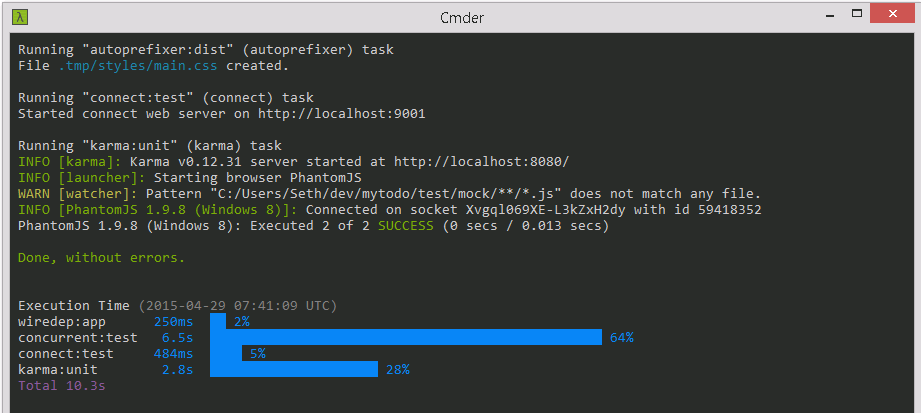
重新运行grunt test,你将看到测试通过
如果出现下面的错误

那就输入下面的命令
npm install grunt-karma karma karma-phantomjs-launcher karma-jasmine jasmine-core phantomjs --save-dev
添加更多的单元测试
让我们添加更多的单元测试
it('should add items to the list', function () {

  scope.todo = 'Test 1';

  scope.addTodo();

  expect(scope.todos.length).toBe(1);

});

it('should add then remove an item from the list', function () {

  scope.todo = 'Test 1';

  scope.addTodo();

  scope.removeTodo(0);

  expect(scope.todos.length).toBe(0);

});
MainCtrl测试如下所示(test/spec/controllers/main.js)
'use strict';

describe('Controller: MainCtrl', function () {

  // load the controller's module

  beforeEach(module('mytodoApp'));

  var MainCtrl,

    scope;

  // Initialize the controller and a mock scope

  beforeEach(inject(function ($controller, $rootScope) {

    scope = $rootScope.$new();

    MainCtrl = $controller('MainCtrl', {

      $scope: scope

    });

  }));

  it('should have no items to start', function () {

    expect(scope.todos.length).toBe(0);

  });

  it('should add items to the list', function () {

    scope.todo = 'Test 1';

    scope.addTodo();

    expect(scope.todos.length).toBe(1);

  });

  it('should add then remove an item from the list', function () {

    scope.todo = 'Test 1';

    scope.addTodo();

    scope.removeTodo(0);

    expect(scope.todos.length).toBe(0);

  });

});
再次运行测试,我们会得到下面结果

测试成功
使用Yeoman搭建 AngularJS 应用 (10) —— 让我们搭建一个网页应用的更多相关文章
- 使用Yeoman搭建 AngularJS 应用 (12) —— 让我们搭建一个网页应用
原文地址:http://yeoman.io/codelab/local-storage.html 安装Bower程序包 我们使用另一个Angular模块,"angular-local-sto ...
- 使用Yeoman搭建 AngularJS 应用 (5) —— 让我们搭建一个网页应用
原文地址:http://yeoman.io/codelab/scaffold-app.html 基架 (Scaffolding) 在Yeoman中的意思是为基于你特殊的配置需求,为网站程序生成文件的工 ...
- 使用Yeoman搭建 AngularJS 应用 (4) —— 让我们搭建一个网页应用
在开发一个的网页传统工作流程中,你需要大量的时间去设置引用文件,下载依赖文件,并且手动的创建网页文件结构.Yeoman生成器将会帮助你完成这些.让我们安装一个AngularJS项目的生成器. 安装An ...
- 使用Yeoman搭建 AngularJS 应用 (3) —— 让我们搭建一个网页应用
原文地址:http://yeoman.io/codelab/setup.html 与Yeoman的交互大多数是通过命令行.在苹果机器需要使用Terminal应用,在Linux使用shell.如果使用W ...
- 使用Yeoman搭建 AngularJS 应用 (2) —— 让我们搭建一个网页应用
原文地址:http://yeoman.io/codelab/index.html 使用Yeoman搭建简单的应用 今天将会搭建一个简单的网页程序.你将可以添加,删除,拖拽和保存. 浏览Yeoman Y ...
- 使用Yeoman搭建 AngularJS 应用 (11) —— 让我们搭建一个网页应用
原文地址:http://yeoman.io/codelab/prepare-production.html 让我们发布这个应用 优化产品的文件 为了创建应用的产品版本,我们想做如下的事情 检查你的代码 ...
- 使用Yeoman搭建 AngularJS 应用 (9) —— 让我们搭建一个网页应用
原文地址:http://yeoman.io/codelab/install-packages.html 列出当前程序包 我们现在查看一下我们已经安装的程序包,输入下面的命令 bower list 查找 ...
- 使用Yeoman搭建 AngularJS 应用 (8) —— 让我们搭建一个网页应用
原文地址:http://yeoman.io/codelab/write-app.html 创建一个新的模板来显示一个todo的列表 打开views/main.html 为了从一个干净的模板开始,删除m ...
- 使用Yeoman搭建 AngularJS 应用 (7) —— 让我们搭建一个网页应用
原文地址:http://yeoman.io/codelab/preview-inbrowser.html 开启你的服务 运行Grunt任务,通过输入下面的命令来创建一个本地Node的http服务,地址 ...
随机推荐
- MJViewController的view的创建
- 【改进】用Log4net建立日志记录
上一篇随笔中只使用了普通的文件读写来进行日志的写入,正如很多朋友说的,频繁的对文件进行读写会造成很多的问题,代码缺少边界控制和操作控制,没有对资源进行管理,是非常典型的bad code. 然后经过前辈 ...
- Java Concurrency - wait & notify, 等待通知机制
生产者消费者问题是一个常见的多线程同步案例:一组生产者线程和一组消费者线程共享一个初始状态为空.大小为 N 的缓冲区.只有当缓冲区没满的时候,生产者才能把消息放入缓冲区,否则必须等待:只有缓冲区不空的 ...
- Linux 命令 - traceroute: 数据报传输路径追踪
traceroute 工具用于跟踪数据报的传输路径:当数据报从一台计算机传向另一台计算机时,会经过多重的网关,traceroute 命令能够找到数据报传输路径上的所有路由器.通过 traceroute ...
- Git CMD - tag: Create, list, delete or verify a tag object signed with GPG
命令格式 git tag [-a | -s | -u <keyid>] [-f] [-m <msg> | -F <file>] <tagname> [& ...
- Android 扫描蓝牙设备
Android扫描蓝牙设备是个异步的过程,核心的步骤为:调用bluetoothAdapter的startDiscovery()进行设备扫描,扫描的结果通过广播接收处理!具体如下: 1.申请相关权限 & ...
- Bootstrap引用
<!--设置移动设置页面标准--> <meta name="viewport" content="width=device-width,i ...
- Excel Operation
在日常工作中, 常常需要收集统计一些数据, 然后整理到excel, 这种重复性的操作可以自己写个工具来实现. 采用HtmlUnitDriver 访问页面, 抓取数据, 再把数据列表通过调用POI放到e ...
- iOS - 基于蓝牙数据交换的环境监测(温度、湿度、光照、粉尘、噪声)
一.蓝牙外设的数据接收 二.App端显示获取数据
- Cocos2d-x内置粒子系统
从类图中我们可以看到,Cocos2d-x中有内置的11粒子,这些粒子的属性都是预先定义好的,我们也可以在程序代码中单独修改某些属性,我们在上一节的实例中都已经实现了这些属性的设置. 内置粒子系统 内置 ...