
使用Yeoman搭建 AngularJS 应用 (12) —— 让我们搭建一个网页应用
原文地址:http://yeoman.io/codelab/local-storage.html
安装Bower程序包
我们使用另一个Angular模块,"angular-local-storage" 然后让我们快速的搭建一个本地存储。这次,轮到Bower来大显神通。
运行下面的命令
bower install --save angular-local-storage

添加本地存储
就像我们添加的jQuery和AngularUI Sortable那样,我们需要添加angular-local-storage.js到index.html中
我们使用Ctrl+C按键组合来退出当前的命令行应用程序,然后重新运行grunt server来自动生成index.html
在index.html底部,会添加下面的语句
<script src="bower_components/angular-local-storage/dist/angular-local-storage.js"></script>
你的index.html中script段落如下所示
<!-- build:js scripts/vendor.js -->

<!-- bower:js -->

<script src="bower_components/jquery/dist/jquery.js"></script>

<script src="bower_components/angular/angular.js"></script>

<script src="bower_components/bootstrap/dist/js/bootstrap.js"></script>

<script src="bower_components/angular-resource/angular-resource.js"></script>

<script src="bower_components/angular-cookies/angular-cookies.js"></script>

<script src="bower_components/angular-sanitize/angular-sanitize.js"></script>

<script src="bower_components/angular-animate/angular-animate.js"></script>

<script src="bower_components/angular-touch/angular-touch.js"></script>

<script src="bower_components/angular-route/angular-route.js"></script>

<script src="bower_components/jquery-ui/ui/jquery-ui.js"></script>

<script src="bower_components/angular-ui-sortable/sortable.js"></script>

<script src="bower_components/angular-local-storage/dist/angular-local-storage.js"></script>

<!-- endbower -->

<!-- endbuild -->
编辑mytodoApp应用程序来包含LocalStorageModule适配器 (scripts/app.js)
angular

  .module('mytodoApp', [

    'ngAnimate',

    'ngCookies',

    'ngResource',

    'ngRoute',

    'ngSanitize',

    'ngTouch',

    'ui.sortable',

    'LocalStorageModule'

])
在app.js里,你也要配置ls来配置localStorageServiceProvider
.config(['localStorageServiceProvider', function(localStorageServiceProvider){

  localStorageServiceProvider.setPrefix('ls');

}])
我们的应用模块现在看起来像这样
'use strict';

angular

  .module('mytodoApp', [

    'ngAnimate',

    'ngCookies',

    'ngResource',

    'ngRoute',

    'ngSanitize',

    'ngTouch',

    'ui.sortable',

    'LocalStorageModule'

  ])

  .config(['localStorageServiceProvider', function(localStorageServiceProvider){

    localStorageServiceProvider.setPrefix('ls');

  }])

  .config(function ($routeProvider) {

    $routeProvider

      .when('/', {

        templateUrl: 'views/main.html',

        controller: 'MainCtrl'

      })

      .when('/about', {

        templateUrl: 'views/about.html',

        controller: 'AboutCtrl'

      })

      .otherwise({

        redirectTo: '/'

      });

  });
也需要更新控制器(main.js),添加localStorageServcice
'use strict';

angular.module('mytodoApp')

  .controller('MainCtrl', function ($scope, localStorageService) {

    // (code hidden here to save space)

  });
现在为止,我们读取的todos是硬编码的,我们将从本地存储来获取$scope.todos来代替
我将使用angular的$watch监听来监听$scope.todos的值,如果一些人添加或者删除一个元素,它将异步的保存本地存储。
因此,我们需要删除当前的$scope.todos声明
$scope.todos = [];
替代为
var todosInStore = localStorageService.get('todos');

$scope.todos = todosInStore || [];

$scope.$watch('todos', function () {

  localStorageService.set('todos', $scope.todos);

}, true);
我们的控制器现在如下所示
'use strict';

angular.module('mytodoApp')

  .controller('MainCtrl', function ($scope, localStorageService) {

    var todosInStore = localStorageService.get('todos');

    $scope.todos = todosInStore || [];

    $scope.$watch('todos', function () {

      localStorageService.set('todos', $scope.todos);

    }, true);

    $scope.addTodo = function () {

      $scope.todos.push($scope.todo);

      $scope.todo = '';

    };

    $scope.removeTodo = function (index) {

      $scope.todos.splice(index, 1);

    };

  });
现在打开浏览器,你将看到列表中没有值,这个app从本地存储中初始化了todos的列表,但是我们还没有存值
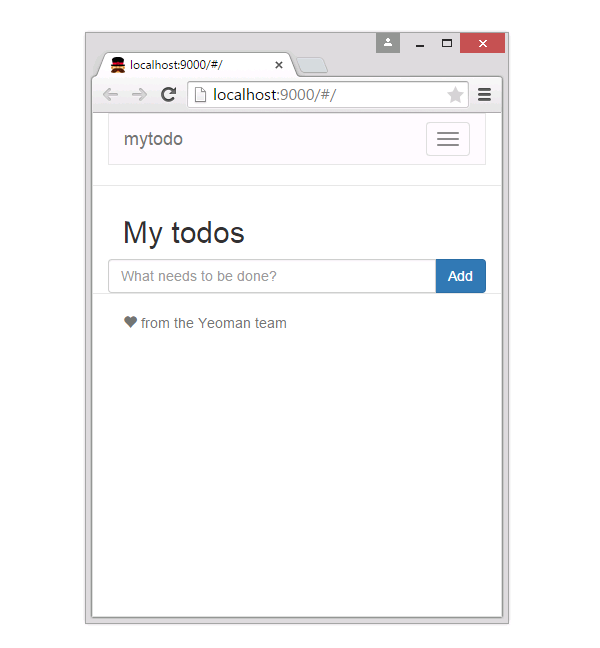
添加一些todo元素到todo列表中

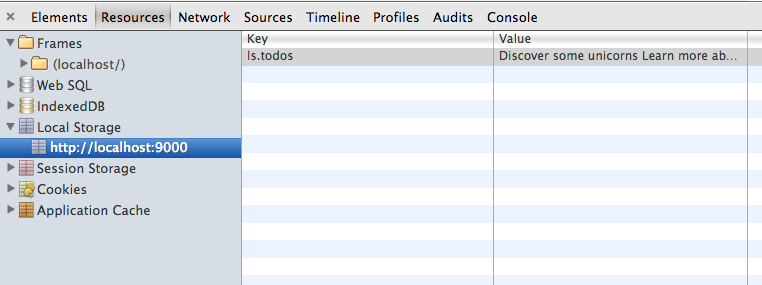
现在,我们刷新浏览器,我们确认我们的数据是不是存在与当地存储。我们检查Chrome中的Resources选项然后选择Local Storage。
继续深造
为了拥有更强大的功能,我们可以访问下面的资源
AngularJS (angularjs.org) helped us write this Todo app quickly and with elegance. To dig deeper into the sweet spots of AngularJS, take a look at the detailed documentation.
Grunt (gruntjs.com) has tasks for almost anything you might like to do with your app, whether it’scompiling CoffeeScript or hooking up your app to custom middleware like PHP or Express. Your Yeoman app already has a Gruntfile.js already set up for you so read up on how to configure more Grunt tasks here.
Bower (bower.io) has a growing collection of easily installable packages for adding capabilities to your app. View all the packages available through Bower's registry here.
Yeoman is always evolving. Be sure to check out yeoman.io for more information and follow@yeoman and +Yeoman to stay up to date.
使用Yeoman搭建 AngularJS 应用 (12) —— 让我们搭建一个网页应用的更多相关文章
- 使用Yeoman搭建 AngularJS 应用 (5) —— 让我们搭建一个网页应用
原文地址:http://yeoman.io/codelab/scaffold-app.html 基架 (Scaffolding) 在Yeoman中的意思是为基于你特殊的配置需求,为网站程序生成文件的工 ...
- 使用Yeoman搭建 AngularJS 应用 (4) —— 让我们搭建一个网页应用
在开发一个的网页传统工作流程中,你需要大量的时间去设置引用文件,下载依赖文件,并且手动的创建网页文件结构.Yeoman生成器将会帮助你完成这些.让我们安装一个AngularJS项目的生成器. 安装An ...
- 使用Yeoman搭建 AngularJS 应用 (2) —— 让我们搭建一个网页应用
原文地址:http://yeoman.io/codelab/index.html 使用Yeoman搭建简单的应用 今天将会搭建一个简单的网页程序.你将可以添加,删除,拖拽和保存. 浏览Yeoman Y ...
- 使用Yeoman搭建 AngularJS 应用 (11) —— 让我们搭建一个网页应用
原文地址:http://yeoman.io/codelab/prepare-production.html 让我们发布这个应用 优化产品的文件 为了创建应用的产品版本,我们想做如下的事情 检查你的代码 ...
- 使用Yeoman搭建 AngularJS 应用 (10) —— 让我们搭建一个网页应用
原文地址:http://yeoman.io/codelab/write-unit-tests.html 对于不熟悉的Karma的人来说,这是JavaScript测试框架,这个Angular的生成器包含 ...
- 使用Yeoman搭建 AngularJS 应用 (9) —— 让我们搭建一个网页应用
原文地址:http://yeoman.io/codelab/install-packages.html 列出当前程序包 我们现在查看一下我们已经安装的程序包,输入下面的命令 bower list 查找 ...
- 使用Yeoman搭建 AngularJS 应用 (8) —— 让我们搭建一个网页应用
原文地址:http://yeoman.io/codelab/write-app.html 创建一个新的模板来显示一个todo的列表 打开views/main.html 为了从一个干净的模板开始,删除m ...
- 使用Yeoman搭建 AngularJS 应用 (7) —— 让我们搭建一个网页应用
原文地址:http://yeoman.io/codelab/preview-inbrowser.html 开启你的服务 运行Grunt任务,通过输入下面的命令来创建一个本地Node的http服务,地址 ...
- 使用Yeoman搭建 AngularJS 应用 (6) —— 让我们搭建一个网页应用
原文地址:http://yeoman.io/codelab/review-generated-files.html 打开mytodo文件夹,你会看到现在的基架.如下图所示 在mytodo文件夹,我们能 ...
随机推荐
- Ehcache(2.9.x) - Configuration Guide, Configuring Cache
About Ehcache Configuration Ehcache supports declarative configuration via an XML configuration file ...
- 每天一道LeetCode--141.Linked List Cycle(链表环问题)
Given a linked list, determine if it has a cycle in it. Follow up:Can you solve it without using ext ...
- 一些C++内容的总结(2013.10.17)
1.using namespace std;使用的是C++标准库当中的一些变量,比如cout,cin等.但是using namespace std作用域只对当前文件内作用,所以using namesp ...
- 找不到System.Runtime.Serialization.Json的解决方案
System.ServiceModel System.ServiceModel.Web System.Runtime.Serialization 三者均要添加引用
- 在慕课学习Bootstrap
---恢复内容开始--- 可以用class=“h1”等给元素加h1样式 <h>------<small>----</small></h> < ...
- Java的导入与导出Excel
使用Jakarta POI导入.导出Excel Jakarta POI 是一套用于访问微软格式文档的Java API.Jakarta POI有很多组件组成,其中有用于操作Excel格式文件的HSSF和 ...
- 《APUE》第五章练习1
题目:用setvbuf实现setbuf. 这两个函数都是改变流的缓冲模式的.函数原型如下: #include <stdio.h> void setbuf(FILE *fp, char *b ...
- Java Web容器的启动与处理请求的过程
容器启动时的加载顺序 一.启动一个WEB项目的时候,WEB容器会去读取它的配置文件web.xml,读取<context-param>结点.二.容创建一个ServletContext(ser ...
- 窗体位置设置StartPosition属性
有如下选项,分别含义如下: CenterParent 窗体在其父窗体中居中. CenterScreen 窗体在当前 ...
- mongodb下如何开启不同端口,本地远程ip的服务器呢
mongod --bind_ip 10.0.10.27 --port 28000 像这样可以绑定ip,绑定地址