
使用coreData
1、设计数据模型
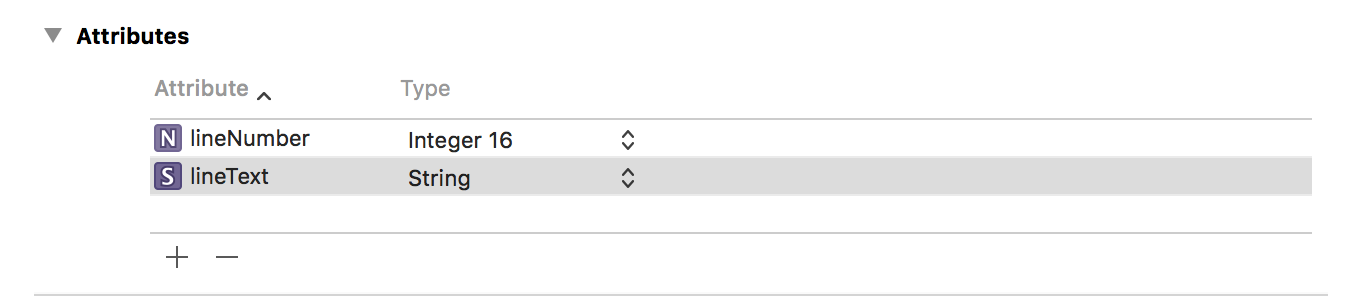
2、创建持久化视图和控制器
 #import "BIDViewController.h"

 #import "BIDAppDelegate.h"

 static NSString * const kLineEntityName = @"Line";

 static NSString * const kLineNumberKey = @"lineNumber";

 static NSString * const kLineTextKey = @"lineText";

 @interface BIDViewController ()

 @property (strong, nonatomic) IBOutletCollection(UITextField) NSArray *lineFields;

 @end

 @implementation BIDViewController

 - (void)viewDidLoad

 {

     [super viewDidLoad];
    //获取应用委托的引用,使用引用获得创建托管对象上下文。

     BIDAppDelegate * appDelegate = [UIApplication sharedApplication].delegate;

     NSManagedObjectContext * context = [appDelegate managedObjectContext];

    //创建一个获取请求并将实体描述传递给它,以便请求知道要检索的对象类型。

     NSFetchRequest * request = [[NSFetchRequest alloc]

                                initWithEntityName:kLineEntityName];

     //通过执行没有谓语的请求,上下文将返回库中的每一个Line对象。

     NSError * error;

     NSArray * objects = [context executeFetchRequest:request error:&error];

     if (objects == nil) {

         NSLog(@"There was an error!");

         // Do whatever error handling is appropriate

     }


    //遍历以获取托管对象数组,从中提取每个托管对象的lineNumber和lineText值,并使用信息更新界面的文本框。

     for (NSManagedObject * oneObject in objects) {

         int lineNum = [[oneObject valueForKey:kLineNumberKey] intValue];

         NSString *lineText = [oneObject valueForKey:kLineTextKey];

         UITextField *theField = self.lineFields[lineNum];

         theField.text = lineText;

     }

     UIApplication *app = [UIApplication sharedApplication];

     [[NSNotificationCenter defaultCenter]

      addObserver:self

      selector:@selector(applicationWillResignActive:)

      name:UIApplicationWillResignActiveNotification

      object:app];

 }

 - (void)applicationWillResignActive:(NSNotification *)notification

 {
    //先获取对应的委托引用,然后使用此引用获取指向应用的默认上下文指针。

     BIDAppDelegate * appDelegate = [UIApplication sharedApplication].delegate;

     NSManagedObjectContext * context = [appDelegate managedObjectContext];

     NSError *error;

     for (int i = ; i < ; i++) {

         UITextField *theField = self.lineFields[i];
       //为line实体创建获取请求,创建一个谓语,确认持久存储中是否已经有一个与这个字段对应的托管对象。

         NSFetchRequest *request = [[NSFetchRequest alloc]

                                    initWithEntityName:kLineEntityName];

         NSPredicate *pred = [NSPredicate

                              predicateWithFormat:@"(%K = %d)", kLineNumberKey, i];

         [request setPredicate:pred];

         //在上下文中执行获取请求

         NSArray * objects = [context executeFetchRequest:request error:&error];

         if (objects == nil) {

             NSLog(@"There was an error!");

             // Do whatever error handling is appropriate

         }

         //申明一个指向NSManagedObject的指针并将它设置为nil。检查返回值对象objects,如果存在有效对象就加载,否则创建一个新的托管对象来保存这个字段的文本。

         NSManagedObject * theLine = nil;

         if ([objects count] > ) {

             theLine = [objects objectAtIndex:];

         } else {

             theLine = [NSEntityDescription

                        insertNewObjectForEntityForName:kLineEntityName

                        inManagedObjectContext:context];

         }

         //使用键——值编码来设置行号以及此托管对象的文本。

         [theLine setValue:[NSNumber numberWithInt:i] forKey:kLineNumberKey];

         [theLine setValue:theField.text forKey:kLineTextKey];

     }
    //通知上下文保存修改。

     [appDelegate saveContext];

 }
使用coreData的更多相关文章
- iOS基本数据库存储方式 - CoreData
CoreData 创建模型文件的过程 1.选择模板 2.添加实体 3.添加实体的属性[注意]属性的首字母必须小写 一.CoreData管理类(必备以下三个类对象) 1.CoreData数据操作的上下文 ...
- iOS CoreData 中 objectID 的不变性
关于 CoreData的 objectID 官方文档有这样的表述:新建的Object还没保存到持久化存储上,那么它的objectID是临时id,而保存之后,就是持久化的id,不会再变化了. 那么,我想 ...
- CoreData __ 基本原理
操作过程 Context想要获取值,先要告诉连接器,我要什么东西 链接器再告诉store, 你给我什么东西, store去找 找到之后返回给链接器,链接器再返回给Context Co ...
- iOS CoreData primitive accessor
Given an entity with an attribute firstName, Core Data automatically generates firstName, setFirstNa ...
- 初识CoreData与详解
Core Data数据持久化是对SQLite的一个升级,它是iOS集成的,在说Core Data之前,我们先说说在CoreData中使用的几个类. (1)NSManagedObjectModel(被管 ...
- CoreData教程
网上关于CoreData的教程能搜到不少,但很多都是点到即止,真正实用的部分都没有讲到,而基本不需要的地方又讲了太多,所以我打算根据我的使用情况写这么一篇实用教程.内容将包括:创建entity.创建r ...
- CoreData和SQLite多线程访问时的线程安全
关于CoreData和SQLite多线程访问时的线程安全问题 数据库读取操作一般都是多线程访问的.在对数据进行读取时,我们要保证其当前状态不能被修改,即读取时加锁,否则就会出现数据错误混乱.IOS中常 ...
- IOS数据存储之CoreData使用优缺点
前言: 学习了Sqlite数据之后认真思考了一下,对于已经习惯使用orm数据库的开发者或者对sql语句小白的开发者来说该如何做好数据库开发呢?这个上网搜了一下?看来总李多虑了!apple 提供了一种数 ...
- iOS开发之表视图爱上CoreData
在接触到CoreData时,感觉就是苹果封装的一个ORM.CoreData负责在Model的实体和sqllite建立关联,数据模型的实体类就相当于Java中的JavaBean, 而CoreData的功 ...
- CoreData
之前在学习使用SQLite时, 需要编写大量的sql语句,完成数据的增删改查,但对于不熟悉sql语句的开发人员来说,难度较大,调试程序比较困难. 由此出现CoreData框架,将sql的操作转换成为对 ...
随机推荐
- Ubuntu_wifi&pppoe
学校现在上网全部要拨号,加上我在宿舍用的是无线路由,也就是要在ubuntu下实现连接wifi后再拨号,这个功能在默认的ubuntu网络设置里面是没有的,里面有dsl但是对有线网络使用的,有点小郁闷.不 ...
- PLSQL 连接Oracle11g (64位)
1.用plsql连不上oracle 11g(64位),先去下载一个oracle 11g(32位客户端) http://www.oracle.com/technetwork/database/featu ...
- Spark SQL概念学习系列之Spark SQL 优化策略(五)
查询优化是传统数据库中最为重要的一环,这项技术在传统数据库中已经很成熟.除了查询优化, Spark SQL 在存储上也进行了优化,从以下几点查看 Spark SQL 的一些优化策略. (1)内存列式存 ...
- DelphiXE Android的所有权限按照分类总结说明
相关资料:http://www.delphitop.com/html/Android/2778.html 网络相关的: android.permission.INTERNET 允许程序打开网络套接 ...
- java assert的用法简介
assert的基本用法 assertion(断言)在软件开发中是一种常用的调试方式,很多开发语言中都支持这种机制,如C,C++和Eiffel等,但是支持的形式不尽相同,有的是通过语言本身.有的是通过库 ...
- I - Control - HDU 4289 (最大流)
题意:有N个城市,现在城市S出现了一伙歹徒,他们想运送一些炸弹到D城市,不过警方已经得到了线报知道他们的事情,不过警察不知道他们所在的具体位置,所以只能采取封锁城市的办法来阻断暴徒,不过封锁城市是需要 ...
- App启动加载广告页面思路
需求 很多app(如淘宝.美团等)在启动图加载完毕后,还会显示几秒的广告,一般都有个跳过按钮可以跳过这个广告,有的app在点击广告页之后还会进入一个广告页面,点击返回进入首页.今天我们就来开发一个广告 ...
- oracle 的rowid和rownum
rowid就是唯一标志记录物理位置的一个id,对于rownum来说它是oracle系统顺序分配为从查询返回的行的编号,返回的第一行分配的是1,第二行是2,依此类推,这个伪字段可以用于限制查询返回的总行 ...
- java应用CPU占用率过高问题的分析
使用top查询哪个进程占用CPU过高 查看CPU占用高的进程中,哪个线程占用CPU高 可通过以下三种方式查看: 1 top中按SHIFT+H查找哪个线程占用高 2 top -H -p PID命令查看哪 ...
- Spring启动时加载数据
程序中也许有会有许多常用的,不会经常更改的数据,我们可以在程序初始化的时候就把他们加载,就不用频繁的加载或者查询. 以下是几个常用的,有COPY收集的,也有自己弄. 1. 实现BeanPostProc ...