
Android 7.0 PopupWindow 的兼容问题
Android7.0 PopupWindow的兼容问题
Android7.0 中对 PopupWindow 这个常用的控件又做了一些改动,修复了以前遗留的一些问题的同时貌似又引入了一些问题,本文通过在7.0设备上实测并且结合源码分析,带你了解关于 PopupWindow 的相关改动。
Android7.0 中下面两个问题解决了,这里强调一下,不是说从 Android7.0 开始才解决这两个问题的,因为具体版本细节没去深究。可能在其他的某些版本下面的问题也是被解决了的。
PopupWindow不响应点击外部消失和返回键消失的解决方法,博文地址:
http://www.cnblogs.com/popfisher/p/5608717.html- 不得不吐槽的
Android PopupWindow的几个痛点(实现带箭头的上下文菜单遇到的坑),博文地址:
http://www.cnblogs.com/popfisher/p/5944054.html
Android7.0 中又引入了新的问题(这就非常的尴尬了)
- 调用
update方法,PopupWindow的Gravity会改变
从源码看7.0怎么解决遗留问题的
解决 PopupWindow 不响应点击外部消失和返回键消失的问题,我们是通过自己设置一个背景。Android7.0 中不设置背景也是可以的,那么它的代码肯定做了处理。从 api24 的源码中找到 PopupWindow.java 文件,我找到里面的 preparePopup 方法如下:
private void preparePopup(WindowManager.LayoutParams p) {

    if (mContentView == null || mContext == null || mWindowManager == null) {

        throw new IllegalStateException("You must specify a valid content view by "

                + "calling setContentView() before attempting to show the popup.");

    }

    // The old decor view may be transitioning out. Make sure it finishes

    // and cleans up before we try to create another one.

    if (mDecorView != null) {

        mDecorView.cancelTransitions();

    }

    // When a background is available, we embed the content view within

    // another view that owns the background drawable.

    if (mBackground != null) {

        mBackgroundView = createBackgroundView(mContentView);

        mBackgroundView.setBackground(mBackground);

    } else {

        mBackgroundView = mContentView;

    }

    mDecorView = createDecorView(mBackgroundView);

    // The background owner should be elevated so that it casts a shadow.

    mBackgroundView.setElevation(mElevation);

    // We may wrap that in another view, so we'll need to manually specify

    // the surface insets.

    p.setSurfaceInsets(mBackgroundView, true /*manual*/, true /*preservePrevious*/);

    mPopupViewInitialLayoutDirectionInherited =

            (mContentView.getRawLayoutDirection() == View.LAYOUT_DIRECTION_INHERIT);

}
重点只需要看 mDecorView = createDecorView(mBackgroundView); 可以看到不管 mBackground 变量是否为空,最终都执行了这句代码,这句代码会多加一层 ViewGroup 把 mBackgroundView 包进去了,里面应该包含了对返回键的处理逻辑,我们再看看 createDecorView 方法源码:
private PopupDecorView createDecorView(View contentView) {

    final ViewGroup.LayoutParams layoutParams = mContentView.getLayoutParams();

    final int height;

    if (layoutParams != null && layoutParams.height == WRAP_CONTENT) {

        height = WRAP_CONTENT;

    } else {

        height = MATCH_PARENT;

    }

    final PopupDecorView decorView = new PopupDecorView(mContext);

    decorView.addView(contentView, MATCH_PARENT, height);

    decorView.setClipChildren(false);

    decorView.setClipToPadding(false);

    return decorView;

}
createDecorView 里面还是没有直接看出对事件的处理,但是里面有个 PopupDecorView 类,应该在里面了吧,继续看:
    private class PopupDecorView extends FrameLayout {

    //......有代码被省略

    @Override

    public boolean dispatchKeyEvent(KeyEvent event) {

        if (event.getKeyCode() == KeyEvent.KEYCODE_BACK) {

            if (getKeyDispatcherState() == null) {

                return super.dispatchKeyEvent(event);

            }

            if (event.getAction() == KeyEvent.ACTION_DOWN && event.getRepeatCount() == 0) {

                final KeyEvent.DispatcherState state = getKeyDispatcherState();

                if (state != null) {

                    state.startTracking(event, this);

                }

                return true;

            } else if (event.getAction() == KeyEvent.ACTION_UP) {

                final KeyEvent.DispatcherState state = getKeyDispatcherState();

                if (state != null && state.isTracking(event) && !event.isCanceled()) {

                    dismiss();

                    return true;

                }

            }

            return super.dispatchKeyEvent(event);

        } else {

            return super.dispatchKeyEvent(event);

        }

    }

    //......有代码被省略

    @Override

    public boolean onTouchEvent(MotionEvent event) {

        final int x = (int) event.getX();

        final int y = (int) event.getY();

        if ((event.getAction() == MotionEvent.ACTION_DOWN)

                && ((x < 0) || (x >= getWidth()) || (y < 0) || (y >= getHeight()))) {

            dismiss();

            return true;

        } else if (event.getAction() == MotionEvent.ACTION_OUTSIDE) {

            dismiss();

            return true;

        } else {

            return super.onTouchEvent(event);

        }

    }

	//......有代码被省略

}
从上面的代码中我们看到了KeyEvent.KEYCODE_BACK 和 MotionEvent.ACTION_OUTSIDE,没错这里有对返回键和其他事件的处理。
至于怎么解决 showAsDropDown 方法弹出位置不对的问题,也就是上文中描述的第二个问题,本文就不贴源码了,感兴趣的可以下载源码去看看,本文只是提供一种解决问题的思路,希望大家能从源码中找到解决问题的办法,这才是作者希望达到的效果。 文章末尾会给出 Android7.0 PopupWindow.java 的 java 文件。
Android7.0引入的新问题
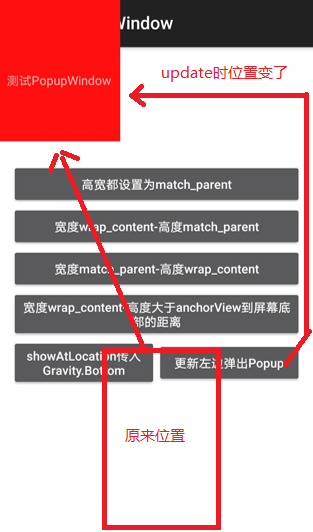
调用 update 方法时,PopupWindow 的 Gravity 会改变,导致位置发生了改变,具体看下图:
showAtLocation传入Gravity.Bottom:从屏幕底部对齐弹出
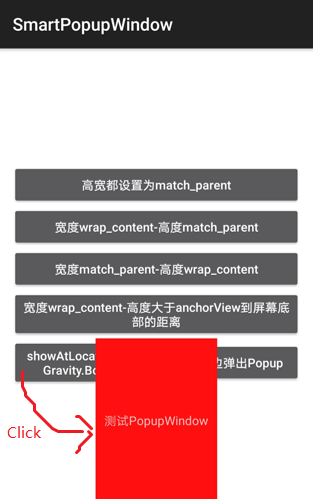
调用update方法更新第5点中弹出PopupWindow,发现PopupWindow的Gravity发生了改变
关于这个问题还有篇文章可以参考, http://www.jianshu.com/p/0df10893bf5b
Android7.0 PopupWindow其他改动点,与Android5.1的对比
主界面
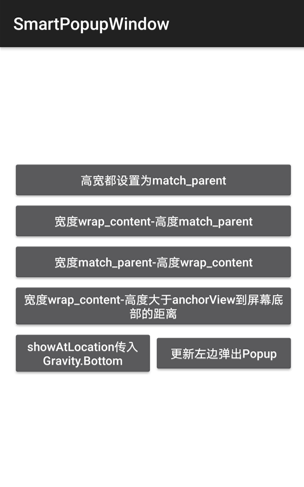
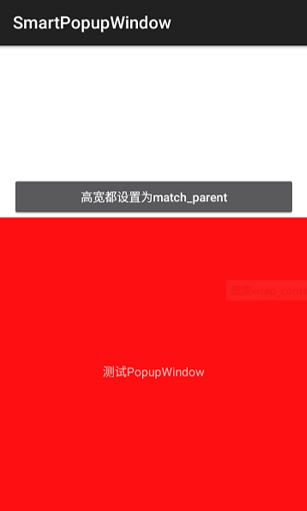
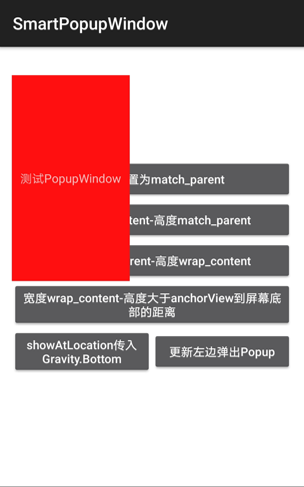
1. PopupWindow高宽都设置为match_parent:7.0(左边)从屏幕左上角弹出,5.1(右边)从anchorView下方弹出
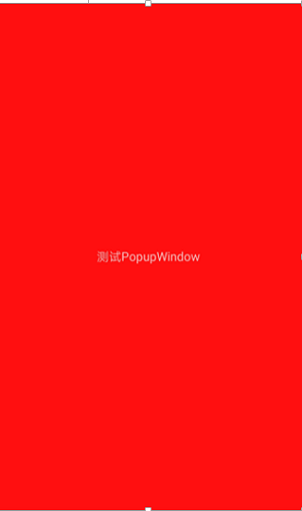
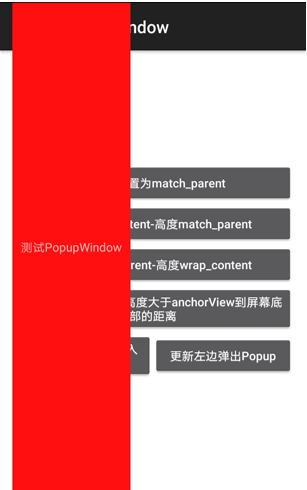
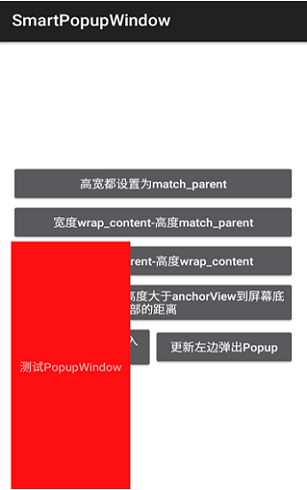
2. 宽度wrap_content-高度match_parent:7.0(左边)从屏幕左上角弹出,5.1(右边)从anchorView下方弹出
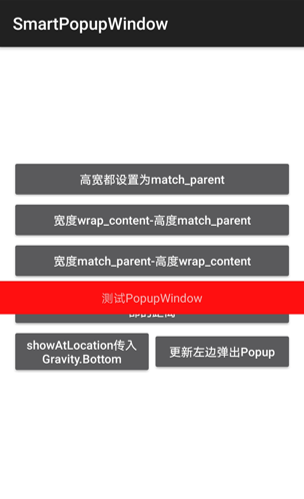
3. 宽度match_parent-高度wrap_content:都从anchorView下方弹出
4. 宽度wrap_content-高度大于anchorView到屏幕底部的距离:7.0与5.1都从anchorView上方弹出,与anchorView左对齐
源码地址
Github工程地址,收录了 PopupWindow 相关使用问题:
https://github.com/PopFisher/SmartPopupWindow
Android 7.0 PopupWindow.java 文件:
https://github.com/PopFisher/SmartPopupWindow/blob/master/sourcecode/PopupWindow(7.0).java
总结
Android PopupWindow 这个控件 Google 一直没有优化好,使用时需要参考我之前的几篇文章。本文是希望读者善于从源码的角度去分析和解决问题,加深自己对源码的理解,对问题的理解,这样印象要深刻一些。
本来2017年回来还没有时间写写文章,这篇文章也是巧合,同事在 Android7.0 中发现 PopupWindow 使用上有 bug,所以我就借此机会研究一下,虽然知识点简单,但是也花费了几个小时的时间整理出这样一篇文章。如果读者觉得有用,别忘记点击推荐哦,总之也算是开了一个好头吧,以后还是会坚持每个月写些文章出来分享。
Android 7.0 PopupWindow 的兼容问题的更多相关文章
- Android 7.0 PopupWindow 又引入新的问题,Google工程师也不够仔细么
Android7.0 PopupWindow的兼容问题 Android7.0 中对 PopupWindow 这个常用的控件又做了一些改动,修复了以前遗留的一些问题的同时貌似又引入了一些问题,本文通 ...
- Android 7.0 因为file://引起的FileUriExposedException异常
最近作者又碰到因为android 7.0 引起的兼容问题了. 在7.0以前的版本: //创建临时图片 File photoOutputFile = SDPath.getFile("temp. ...
- 「国产系统」Tubian 0.3,兼容Windows和Android的GNU/Linux系统!
0.4版已发布:https://www.cnblogs.com/tubentubentu/p/16741197.html Sourceforge.net主页(提供下载):https://sourcef ...
- 「国产系统」Tubian 0.2,兼容Windows和Android的GNU/Linux系统!
0.3版已发布:https://www.cnblogs.com/tubentubentu/p/16733005.html Sourceforge.net主页(提供下载):https://sourcef ...
- 「国产系统」Tubian 0.1,兼容Windows和Android的GNU/Linux系统!
Tubian 0.42已发布:https://www.cnblogs.com/tubentubentu/p/16745926.html Tubian是我的自用系统整理而成的Linux发行版,基于Deb ...
- Android数据存储之Android 6.0运行时权限下文件存储的思考
前言: 在我们做App开发的过程中基本上都会用到文件存储,所以文件存储对于我们来说是相当熟悉了,不过自从Android 6.0发布之后,基于运行时权限机制访问外置sdcard是需要动态申请权限,所以以 ...
- Android 6.0 - 动态权限管理的解决方案
Android 6.0版本(Api 23)推出了很多新的特性, 大幅提升了用户体验, 同时也为程序员带来新的负担. 动态权限管理就是这样, 一方面让用户更加容易的控制自己的隐私, 一方面需要重新适配应 ...
- 【译】Android 6.0 Changes (机翻加轻微人工校对)
Android 6.0 Changes In this document Runtime Permissions Doze and App Standby Apache HTTP Client Rem ...
- Android中的PopupWindow
1.功能 PopupWindow这个类用来实现一个弹出框,可以使用任意布局的View作为其内容,这个弹出框是悬浮在当前activity之上的,可以设置显示位置. 2.需求 弹出软键盘,实现键盘功能从而 ...
随机推荐
- UIButton样式设置
btn.frame = CGRectMake(x, y, width, height); [btn setTitle: @”search” forState: UIControlStateNormal ...
- Java:reflection
参考:http://docs.oracle.com/javase/tutorial/reflect/index.html what and why? 通过反射来检测或者修改应用某些对象在运行时的状态或 ...
- Oracle 事件
Oracle 的事物 事物是设么 事物是用于高正数据的一致性,他由一组相关的dml语句组成(增加删除语句),这组语句要么全部成功要不全部失败. 如:网上转账. 1)设置保存点 Savepoint a1 ...
- StackExchange.Redis 官方文档(二) Configuration
配置 有多种方式可以配置redis,StackExchange.Redis提供了一个丰富的配置模型,在执行Connect (or ConnectAsync) 时被调用: var conn = Conn ...
- Asp.NET开启一个线程,不停的执行
using System;using System.Threading;using System.Threading.Tasks; class StartNewDemo{ static void ...
- AdaBoost 算法原理及推导
AdaBoost(Adaptive Boosting):自适应提升方法. 1.AdaBoost算法介绍 AdaBoost是Boosting方法中最优代表性的提升算法.该方法通过在每轮降低分对样例的权重 ...
- System.Web.UI.WebControls的Web服务器控件
calendar[英][ˈkælɪndə(r)][美][ˈkæləndɚ]n.日历; 历法; 日程表; (一年之中的)重大事件(或重要日期)一览表; vt.把…记入日程表中; 把…列入表中; 为(文件 ...
- Bmob 之 简单使用
1. pod pod 'BmobSDK' 与 pod "BmobSDK" 好像没什么区别 2. 导入 在AppDelegate中: #import <BmobSDK/Bmob ...
- 详细解析Linux scp命令的应用
详细解析Linux scp命令的应用 Linux命令有人统计说是有4000多个,Linux scp命令是用于Linux之间复制文件和目录,这里详细介绍scp命令使用和参数. AD: Linux scp ...
- js架构设计模式——前端MVVM框架设计及实现(一)
前端MVVM框架设计及实现(一) 最近抽出点时间想弄个dom模块化的模板引擎,不过现在这种都是MVVM自带的,索性就想自己造轮子写一个简单的MVVM框架了 借鉴的自然还是从正美的avalon开始了,我 ...