
[svc]centos7的服务治理-systemd
经常用到的高频命令小结
- 所有服务unit放在这里

ll /usr/lib/systemd/system

- 默认启动级别

[root@n1 ~]# ll /etc/systemd/system/default.target

lrwxrwxrwx 1 root root 41 Mar  4 09:02 /etc/systemd/system/default.target -> /usr/lib/systemd/system/multi-user.target

- 开机启动的服务

ll /etc/systemd/system/multi-user.target.wants/

- 哪些服务开机会启动

[root@n1 ~]# systemctl list-unit-files --type service |grep enable

autovt@.service                               enabled

crond.service                                 enabled

docker.service                                enabled

getty@.service                                enabled

ntpdate.service                               enabled

rsyslog.service                               enabled

sshd.service                                  enabled

sysstat.service                               enabled

- 目前哪些服务处于active状态

[root@n1 ~]# systemctl list-units --type service |grep active

crond.service                      loaded active running Command Scheduler

dbus.service                       loaded active running D-Bus System Message Bus

docker.service                     loaded active running Docker Application Container Engine

getty@tty1.service                 loaded active running Getty on tty1

- 查看某个服务是否开机自启

systemctl is-enabled httpd.service 或

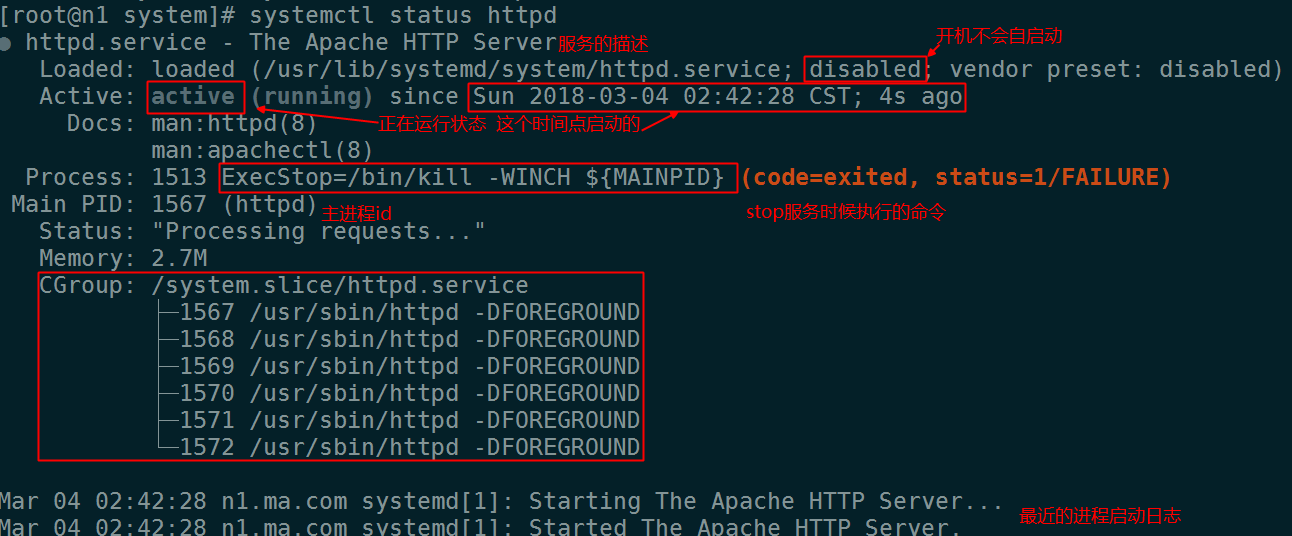
systemctl status httpd.service
systemd 有很多unit,其中service.unit是管理系统服务的.
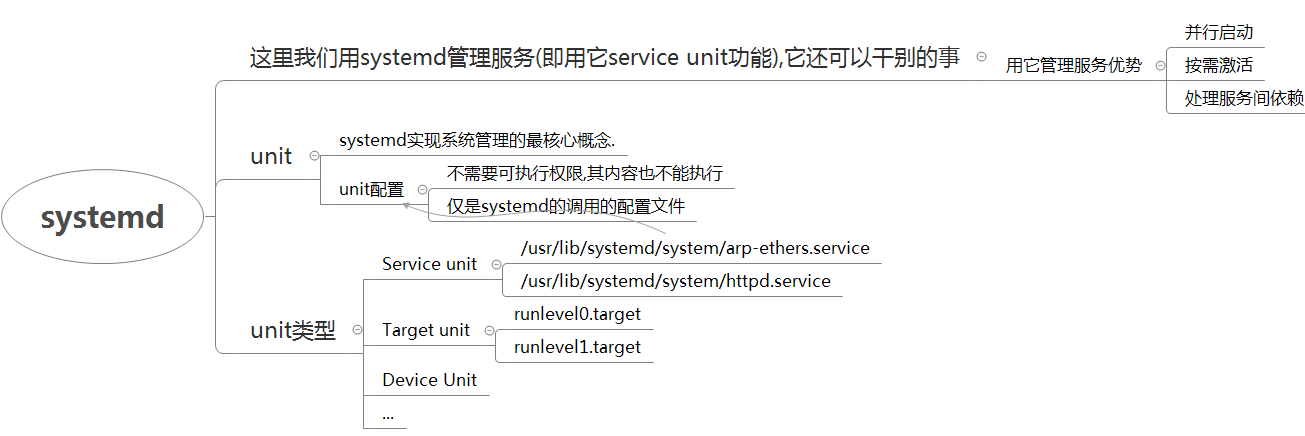
unit的类型
/usr/lib/systemd/system

查看管理系统服务的相关的, 即 .service后缀的
[root@n1 system]# ls /usr/lib/systemd/system/*.service|more

/usr/lib/systemd/system/arp-ethers.service

/usr/lib/systemd/system/auditd.service

/usr/lib/systemd/system/autovt@.service

/usr/lib/systemd/system/blk-availability.service

/usr/lib/systemd/system/brandbot.service

...

特点:

    不需要可执行权限,其内容也不能执行

    仅是systemd的调用的配置文件
| unit类型 | 作用 |
|---|---|
| Service unit | 管理系统服务,我们暂且只关心这个 |
| Target unit | 多个Unit构成的一个组 |
| Device Unit | 硬件设备 |
| Mount Unit | 文件系统的挂载点 |
| Automount Unit | 自动挂载点 |
| Path Unit | 文件或路径 |
| Scope Unit | 不是由 Systemd 启动的外部进程 |
| Slice Unit | 进程组 |
| Snapshot Unit | Systemd 快照,可以切回某个快照 |
| Socket Unit | 进程间通信的 socket |
| Swap Unit | swap 文件 |
| Timer Unit | 定时器 |
centos6 chkconfig VS 使用systemd的service unit治理centos7服务
| 任务 | 旧指令 | 新指令 |
|---|---|---|
| 哪些服务正在跑? | chkconfig --list\grep 3:on | systemctl list-units --type=service |
| 哪些服务开机会自启动? | chkconfig --list | systemctl list-unit-files --type=service |
| 使httpd开机自启动 | chkconfig --level 3 httpd on | systemctl enable httpd.service |
| 使httd开机不自启动 | chkconfig --level 3 httpd off | systemctl disable httpd.service |
| 查看httpd现在是否启动着 | service httpd status | systemctl status httpd.service (服务详细信息) |
| 启动某服务 | /etc/init.d/httpd start | systemctl start httpd.service |
| 停止某服务 | /etc/init.d/httpd stop | systemctl stop httpd.service |
| 重启某服务 | /etc/init.d/httpd restart | systemctl restart httpd.service |
| 所有已装载的级别(而非当前级别) | runlevel | systemctl list-units --type target |
| 查看默认级别是啥 | cat /etc/inittab | systemctl get-default |
| 设置默认级别 | init 3 | systemctl set-default multi-user.target |
| 查看服务状态 | /etc/init.d/http status | systemctl is-enabled httpd.service/systemctl status httpd.service |
| 默认启动第一个进程 | init | systemd |
ls /usr/lib/systemd/system/*.service|more 下以service开头的文件,都是和系统服务有关的, 其下还有别的后缀的服务.是别的unit的配置文件.
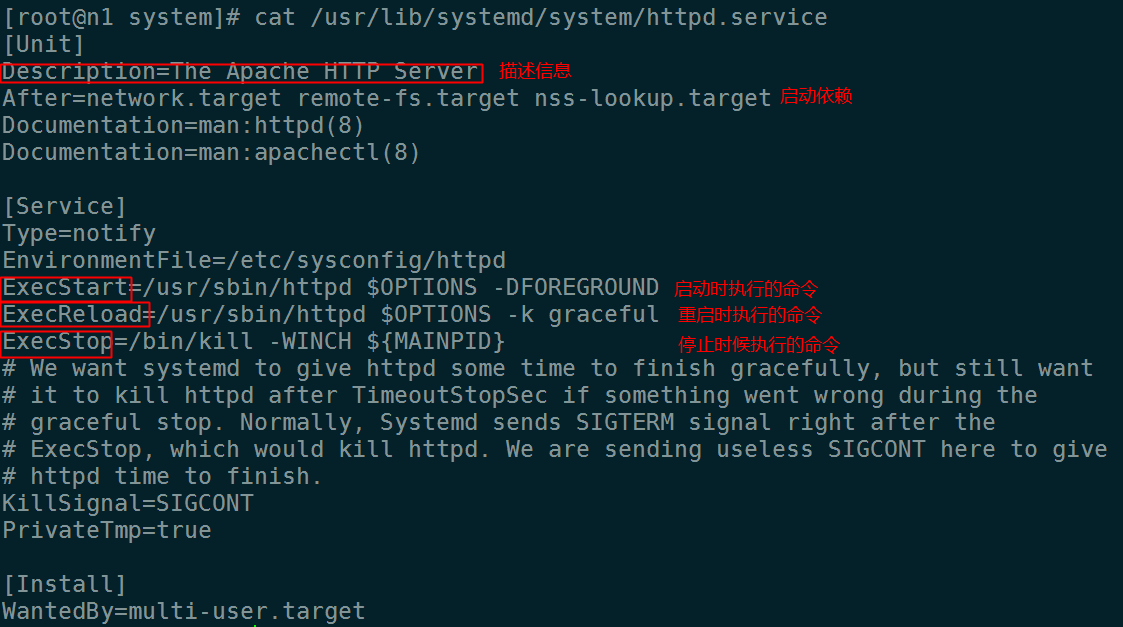
serivice unit配置
target unit: 的含义是服务组,表示一组服务。
将很多服务放在一坨, 开启启动时候加载这个文件.
启动级别
/usr/lib/systemd/system

/etc/systemd/system

runlevel0.target -> poweroff.target

runlevel2.target -> multi-user.target

runlevel3.target -> multi-user.target

runlevel4.target -> multi-user.target

runlevel5.target -> graphical.target

runlevel6.target -> reboot.target
注意: centos7里,运行级别234没区别.
查看在运行的服务
我们看ACTIVE就ok了,SUB这一列可以不用理会
[root@n1 system]# systemctl list-units --type=service

UNIT                               LOAD   ACTIVE SUB     DESCRIPTION

crond.service                      loaded active running Command Scheduler

dbus.service                       loaded active running D-Bus System Message Bus

docker.service                     loaded active running Docker Application Container Engine

getty@tty1.service                 loaded active running Getty on tty1

httpd.service                      loaded active running The Apache HTTP Server
查看开机是否会启动
[root@n1 system]# systemctl list-unit-files --type=service

UNIT FILE                                     STATE

arp-ethers.service                            disabled

auditd.service                                disabled

autovt@.service                               enabled #开机会启动

blk-availability.service                      disabled#开机不会启动

brandbot.service                              static  #这类不用管

conntrackd.service                            disabled
设置开机自动启动细节
[root@n1 ~]# yum install psmisc -y

[root@n1 ~]# pstree

systemd─┬─agetty

        ├─crond

        ├─dbus-daemon

        ├─dockerd─┬─docker-containe─┬─docker-containe─┬─mysqld───20*[{mysqld}]

        │         │                 │                 └─8*[{docker-containe}]

        │         │                 └─9*[{docker-containe}]

        │         ├─docker-proxy───3*[{docker-proxy}]

        │         └─11*[{dockerd}]

        ├─httpd───8*[httpd]

        ├─lvmetad

        ├─polkitd───5*[{polkitd}]

        ├─rsyslogd───2*[{rsyslogd}]

        ├─sshd───sshd───bash───pstree

        ├─systemd-journal

        ├─systemd-logind

        └─systemd-udevd
[root@n1 system]# systemctl enable httpd

Created symlink from /etc/systemd/system/multi-user.target.wants/httpd.service to /usr/lib/systemd/system/httpd.service.
相当于执行
ln -s /usr/lib/systemd/system/httpd.service /etc/systemd/system/multi-user.target.wants/httpd.service
disable相当于删除
[root@n1 system]# systemctl disable httpd

Removed symlink /etc/systemd/system/multi-user.target.wants/httpd.service.
[root@n1 system]# ll /etc/systemd/system/multi-user.target.wants

total 0

lrwxrwxrwx. 1 root root 37 Dec 27 04:44 crond.service -> /usr/lib/systemd/system/crond.service

lrwxrwxrwx  1 root root 38 Dec 26 21:05 docker.service -> /usr/lib/systemd/system/docker.service

lrwxrwxrwx  1 root root 37 Mar  4 03:39 httpd.service -> /usr/lib/systemd/system/httpd.service

lrwxrwxrwx. 1 root root 39 Dec 26 21:00 ntpdate.service -> /usr/lib/systemd/system/ntpdate.service

lrwxrwxrwx. 1 root root 40 Dec 27 04:44 remote-fs.target -> /usr/lib/systemd/system/remote-fs.target

lrwxrwxrwx. 1 root root 39 Dec 27 04:44 rsyslog.service -> /usr/lib/systemd/system/rsyslog.service

lrwxrwxrwx. 1 root root 36 Dec 27 04:44 sshd.service -> /usr/lib/systemd/system/sshd.service

lrwxrwxrwx. 1 root root 39 Dec 27 05:00 sysstat.service -> /usr/lib/systemd/system/sysstat.service
设置启动级别的命令
- 设置默认启动级别

[root@n1 ~]# systemctl set-default graphical.target

Removed symlink /etc/systemd/system/default.target.

Created symlink from /etc/systemd/system/default.target to /usr/lib/systemd/system/graphical.target.

- 查看默认的启动级别

[root@n1 ~]# systemctl get-default

graphical.target

- 手动修改启动级别(先将原来的rm了)

[root@n1 ~]# ln -sv /usr/lib/systemd/system/multi-user.target /etc/systemd/system/default.target

ln: failed to create symbolic link ‘/etc/systemd/system/default.target’: File exists

[root@n1 ~]# rm -rf /etc/systemd/system/default.target

[root@n1 ~]# ln -sv /usr/lib/systemd/system/multi-user.target /etc/systemd/system/default.target

‘/etc/systemd/system/default.target’ -> ‘/usr/lib/systemd/system/multi-user.target’

[root@n1 ~]# systemctl get-default

multi-user.target

- 查看服务状态

[root@n1 ~]# systemctl is-enabled httpd.service

disabled
[svc]centos7的服务治理-systemd的更多相关文章
- centos7后台服务部署jar包
centos7 服务部署jar包 centos7 服务介绍 CentOS7的服务systemctl脚本存放在:/usr/lib/systemd/,有系统(system)和用户(user)之分, 每一个 ...
- centos7 将服务添加到systemctl
centos7中提供了systemd服务,可以方便的管理各种服务 但是有些通过编译安装的服务systemd里面没有,我们只需要添加一下服务文件即可 以下用nginx作为例子,展示如何添加服务到syst ...
- Centos7 -samba服务配置
Centos7 -samba服务配置 https://blog.csdn.net/zh515858237/article/details/76914905 http://blog.51cto.com/ ...
- Istio Ambient Mesh七层服务治理图文详解
摘要:本文主要集中剖析Ambient mesh七层服务治理相关内容. 本文分享自华为云社区<Istio Ambient Mesh七层服务治理图文详解>,作者:华为云云原生团队. 由于Amb ...
- 服务治理要先于SOA
讲在前面的话: 若企业缺乏对服务变更的控制和规则,那么一个服务在经过几个项目之后,就很有可能被随意更改成多个版本,将来变成什么样更是无法预测.久而久之,降低了服务重用的可能性,提高了服务利用的成本 ...
- 简述我的SOA服务治理
SOA服务治理 1.解决业务部门服务冲突和纠纷2.版本定义与版本管理3.服务备案与服务管理4.业务监督与服务监控 SOA的战略目的 一.业务价值胜过技术策略 二.战略目标胜过具体项目的效益 三.内置的 ...
- 基于Nginx dyups模块的站点动态上下线并实现简单服务治理
简介 今天主要讨论一下,对于分布式服务,站点如何平滑的上下线问题. 分布式服务 在分布式服务下,我们会用nginx做负载均衡, 业务站点访问某服务站点的时候, 统一走nginx, 然后nginx根据一 ...
- Dubbo框架中的应用(两)--服务治理
Dubbo服务治理了看法 watermark/2/text/aHR0cDovL2Jsb2cuY3Nkbi5uZXQvbGlzaGVoZQ==/font/5a6L5L2T/fontsize/400/fi ...
- CentOS7开机启动管理systemd简介及使用
systemd提供更优秀的框架以表示系统服务间的依赖关系实现系统初始化时服务的并行启动,同时达到降低Shell的系统开销的效果systemd的目标是:尽可能启动更少进程:尽可能将更多进程并行启动.sy ...
随机推荐
- 3299 有序数组合并求第K大问题
题目描述 Description 给出两个有序数组A和B(从小到大有序),合并两个有序数组后新数组c也有序,询问c数组中第k大的数 假设不计入输入输出复杂度,你能否给出一个O(logN)的方法? 输入 ...
- 第十九章,指针小练习(C++)
#include <iostream> int main(int argc, char** argv) { int i = 1; int *n ; n=&i;//*n=i 这样的赋 ...
- 怎么样删除linux里带括号的文件?
可以用 rm -i * 就是对每个删除都提示用户是否确定,这样在出现 (2).htaccess 的时候你回答y就可以了,其他回答n,当删除了 (2).htaccess这个文件之后,就可以用Ctrl+C ...
- hihocoder第196周
此题解法:动态规划,倒骑毛驴. 在使用动态规划的时候,如果正着求难求,可以考虑倒着来. 这道题坑不少,自己代码能力太弱了,写代码的过程中总是容易犯细节错误.虽然大的方向是对的,但是小坑非常致命! 比如 ...
- Debug 路漫漫-03
Debug 路漫漫-03:SVD++的 Matlab 版本 SVD++ 的 pu 这一项: 圈圈中的这一项,它既然要和pu 相加 的话 ,那么,它的维度也应该是 m*K.(就是维度和Pu一致的 . 而 ...
- 图解 eclicpse 智能提示 配置
输入的内容: “.abcdefghijklmnopqrstuvwxyzABCDEFGHIJKLMNOPQRSTUVWXYZ” 第一步: 第二步:
- ReactiveCocoa 5.0 初次了解
RAC 5.0 相比于 4.0 有了巨大的变化,不仅是受 swift 3.0 大升级的影响,RAC 对自身项目结构的也进行了大幅度的调整.这个调整就是将 RAC 拆分为四个库:ReactiveCoco ...
- 进阶之路(基础篇) - 003 I/O的模拟的读取
/********************************* 代码功能:读取某引脚的模拟量串口返回数据 使用函数: analogRead(引脚号); //调用10位AD 创作时间:2016*1 ...
- vim学习笔记(一)—— vim安装方法
一.完全卸载vim的方法 sudo apt-get remove --purge vim (--purge 是完全删除,会连配置文件一起删除) 二.Vim前言——————“世界上只有三种编辑器,EMA ...
- php加密总结
1.md5加密,加密之后是32位的字符串 2.sha1加密, 加密之后是40位的字符串 3.crypt加密, 加密之后是13位的字符串 上面是不可逆的 可逆的如下urlencode --> ur ...