
【代码笔记】iOS-推荐收听,左右两个tableView
一,效果图。
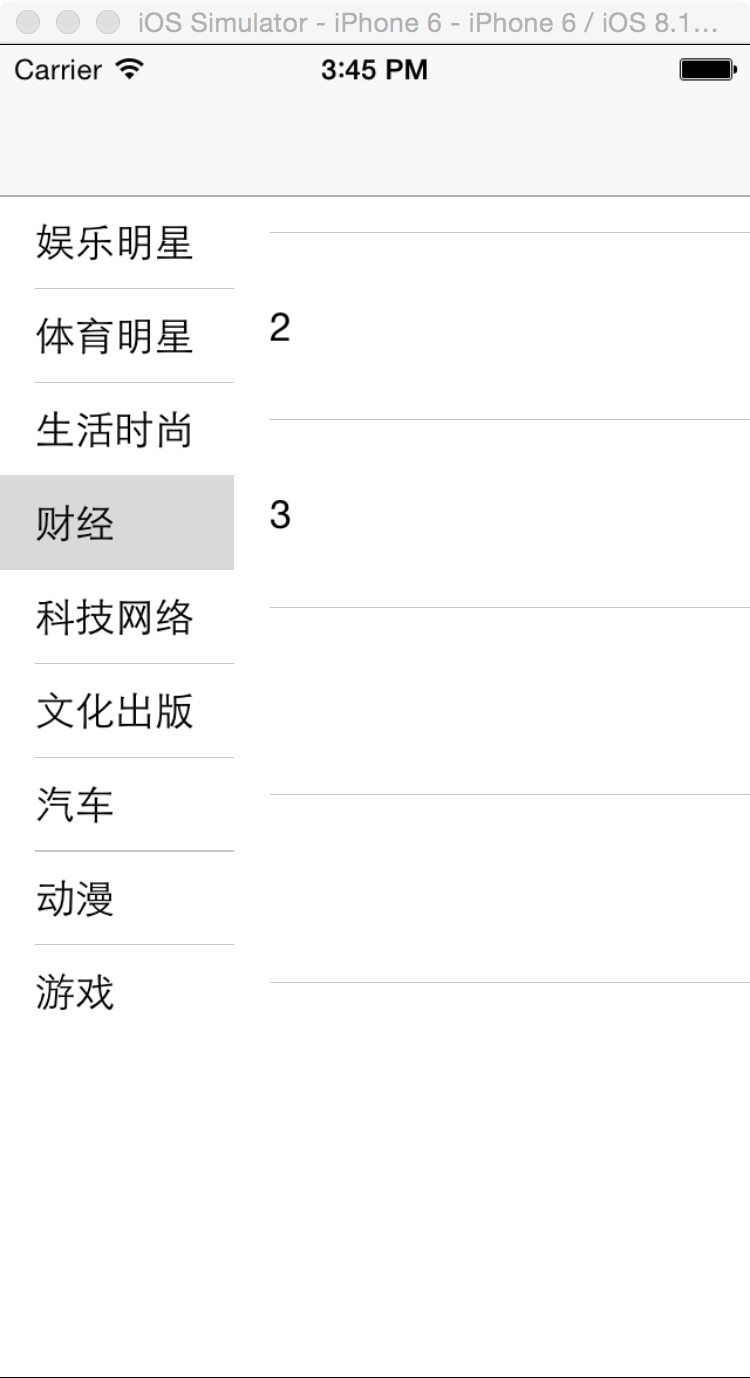
二,工程图。

三,代码。
RootViewController.h

#import <UIKit/UIKit.h>

@interface RootViewController : UIViewController

<UITableViewDelegate,UITableViewDataSource>

{

    //列表

    UITableView * _tableViewList;

    //显示内容

    UITableView * _tableViewMembers;

    NSMutableArray * ListArray;

    NSMutableArray * MembersArray;

}

@end
RootViewcontroller.m
#import "RootViewController.h"

@interface RootViewController ()

@end

@implementation RootViewController

- (id)initWithNibName:(NSString *)nibNameOrNil bundle:(NSBundle *)nibBundleOrNil

{

    self = [super initWithNibName:nibNameOrNil bundle:nibBundleOrNil];

    if (self) {

        // Custom initialization

    }

    return self;

}

- (void)viewDidLoad

{

    [super viewDidLoad];

    // Do any additional setup after loading the view.

    [self initTableView];

}

#pragma -mark -functions

-(void)initTableView

{

    //数据

    MembersArray = [[NSMutableArray alloc] initWithObjects:@"1",@"2",@"3",@"4",@"5",@"6", nil];

    ListArray = [[NSMutableArray alloc] initWithObjects:@"娱乐明星",

                 @"体育明星",

                 @"生活时尚",

                 @"财经",

                 @"科技网络",

                 @"文化出版",

                 @"汽车",

                 @"动漫",

                 @"游戏",

                 @"星座命理",

                 @"教育",

                 @"企业品牌",

                 @"酷站汇",

                 @"腾讯产品",

                 @"营销产品",

                 @"有趣用户",

                 @"政府机构",

                 @"公益慈善",

                 @"公务人员",

                 @"快乐女生",

                 @"公共名人",

                 @"花儿朵朵", nil];

    //列表tableView

    _tableViewList = [[UITableView alloc] initWithFrame:CGRectMake(0, 0, 100, 416) style:UITableViewStylePlain];

    _tableViewList.delegate = self;

    _tableViewList.dataSource = self;

    [self.view addSubview:_tableViewList];

    //内容tableView

    _tableViewMembers = [[UITableView alloc] initWithFrame:CGRectMake(100, 0, 240, 416) style:UITableViewStylePlain];

    _tableViewMembers.delegate = self;

    _tableViewMembers.dataSource = self;

    [self.view addSubview:_tableViewMembers];

}

#pragma -mark -UITableViewDelegate

-(NSInteger)tableView:(UITableView *)tableView numberOfRowsInSection:(NSInteger)section{

    if (tableView == _tableViewList) {

        return ListArray.count;

    }else if(tableView == _tableViewMembers){

        return MembersArray.count;

    }

    return 0;

}

-(UITableViewCell *)tableView:(UITableView *)tableView cellForRowAtIndexPath:(NSIndexPath *)indexPath{

    if (tableView == _tableViewList) {

        UITableViewCell * cell = [tableView dequeueReusableCellWithIdentifier:@"ID"];

        if (cell == nil) {

            cell = [[UITableViewCell alloc] initWithStyle:UITableViewCellStyleValue1 reuseIdentifier:@"ID"];

        }

        cell.textLabel.text = [ListArray objectAtIndex:indexPath.row];

        return cell;

    }else {

        UITableViewCell * cell = [tableView dequeueReusableCellWithIdentifier:@"ID"];

        if (cell == nil) {

            cell = [[UITableViewCell alloc] initWithStyle:UITableViewCellStyleValue1 reuseIdentifier:@"ID"];

        }

        cell.textLabel.text = [MembersArray objectAtIndex:indexPath.row];

        return cell;

    }

}

-(CGFloat)tableView:(UITableView *)tableView heightForRowAtIndexPath:(NSIndexPath *)indexPath{

    if (tableView==_tableViewList) {

        return 40;

    }else if (tableView==_tableViewMembers){

        return 80;

    }else{

        return 40;

    }

}

-(void)tableView:(UITableView *)tableView didSelectRowAtIndexPath:(NSIndexPath *)indexPath{

    if (tableView == _tableViewList) {

        //去服务器下载数据,同时_tableViewMembers刷新。

       [MembersArray removeAllObjects];

        MembersArray=[[NSMutableArray alloc]initWithObjects:@"1",@"2",@"3", nil];

        [_tableViewMembers reloadData];

    }else if(tableView==_tableViewMembers){

        ;

    }

}

- (void)didReceiveMemoryWarning

{

    [super didReceiveMemoryWarning];

    // Dispose of any resources that can be recreated.

}

@end
【代码笔记】iOS-推荐收听,左右两个tableView的更多相关文章
- 【代码笔记】iOS-UIScrollerView里有两个tableView
一,效果图. 二,工程图. 三,代码. RootViewController.h #import <UIKit/UIKit.h> @interface RootViewController ...
- 【代码笔记】iOS-json文件的两种解析方式
一,工程图. 二,代码. #import "ViewController.h" #import "SBJson.h" @interface ViewContro ...
- 【代码笔记】iOS-点击城市中的tableView跳转到旅游景点的tableView,下面会有“显示”更多。
一,效果图. 二,工程图. 三,代码. RootViewController.h #import <UIKit/UIKit.h> @interface RootViewController ...
- iOS不得姐项目--推荐关注模块(一个控制器控制两个tableView),数据重复请求的问题,分页数据的加载,上拉下拉刷新(MJRefresh)
一.推荐关注模块(一个控制器控制两个tableView) -- 数据的显示 刚开始加载数据值得注意的有以下几点 导航控制器会自动调整scrollView的contentInset,最好是取消系统的设置 ...
- 笔记-iOS 视图控制器转场详解(上)
这是一篇长文,详细讲解了视图控制器转场的方方面面,配有详细的示意图和代码,为了使得文章在微信公众号中易于阅读,seedante 辛苦将大量长篇代码用截图的方式呈现,另外作者也在 Github 上附上了 ...
- 【Unity Shaders】学习笔记——SurfaceShader(二)两个结构体和CG类型
[Unity Shaders]学习笔记——SurfaceShader(二)两个结构体和CG类型 转载请注明出处:http://www.cnblogs.com/-867259206/p/5596698. ...
- 【hadoop代码笔记】Mapreduce shuffle过程之Map输出过程
一.概要描述 shuffle是MapReduce的一个核心过程,因此没有在前面的MapReduce作业提交的过程中描述,而是单独拿出来比较详细的描述. 根据官方的流程图示如下: 本篇文章中只是想尝试从 ...
- 【hadoop代码笔记】hadoop作业提交之汇总
一.概述 在本篇博文中,试图通过代码了解hadoop job执行的整个流程.即用户提交的mapreduce的jar文件.输入提交到hadoop的集群,并在集群中运行.重点在代码的角度描述整个流程,有些 ...
- iOS 类似美团外卖 app 两个 tableView 联动效果实现
写在前面 首先声明哈,不是广告,我就是用的时候觉得这个功能比较好玩,就想着实现了一下.效果如图: 接下来简单的说一下思路吧~ 大体思路 可能我们看到这种功能的实现的时候,首先想着的是我在这个控制器中左 ...
- IOS文件操作的两种方式:NSFileManager操作和流操作
1.常见的NSFileManager文件方法 -(NSData *)contentsAtPath:path //从一个文件读取数据 -(BOOL)createFileAtPath: path cont ...
随机推荐
- 分享几个.NET WinForm开源组件,纪念逐渐远去的WinForm。。。
前面3个月的时间内,这些.NET开源项目你知道吗?系列文章已经发表了3篇,共计45个平时接触比较少,曾经默默无闻的.NET开源项目,展示给大家,当然不是每个人都能用得上,但也的确是有些人用了,反响还不 ...
- Lasso回归算法: 坐标轴下降法与最小角回归法小结
前面的文章对线性回归做了一个小结,文章在这: 线性回归原理小结.里面对线程回归的正则化也做了一个初步的介绍.提到了线程回归的L2正则化-Ridge回归,以及线程回归的L1正则化-Lasso回归.但是对 ...
- 【记录】JS 生成 URL 二维码
示例代码: <html> <head> <title>example</title> </head> <body> <sc ...
- 使用Spire.Barcode程序库生成二维码
使用Spire.Barcode程序库生成二维码 某天浏览网页发现了一个二维码的程序库.它的描述说他可以扫描二维码图像.我很感兴趣,想试试他是不是会有用.所以我就用了些方法扫描二维码图像来测试一下.结果 ...
- Coreseek Windows下安装调试
由于项目需要全文检索,后面就去网上查了下资料,找到了Sphinx[中文是狮身人面像]这个全文检索引擎,听说挺好用的,不过没有中文分词.后面又去找了一下,找到了Coreseek,一款中文全文检索/搜索软 ...
- 记录一则ORACLE MOVE操作后重建索引过程被强制中断导致的ORA-8104案例
环境:SunOS + Oracle 11.2.0.3 对部分表进行Move操作之后,未重建对应的索引,会导致ORA-1502 索引不可用. 此时需要用下面的查询拼接出重建不可用索引的sql语句: ...
- iOS-LaunchImage启动页
一. 目标: 设置一个漂亮的启动页. 二.步骤 1. 先创建LaunchImage 2. 进一步设置需要适配的启动页机型 3. 设置完成的效果 4.往里面拖图片,如图是适配的图片的配置 5. 在项目中 ...
- GIS项目中数据开源、工具开源、开发开源的解决方案
文章版权由作者李晓晖和博客园共有,若转载请于明显处标明出处:http://www.cnblogs.com/naaoveGIS/. 摆脱免费地图开发包的约束,拒绝商业地图软件的费用,高效.精确.完备是我 ...
- 实现一个纵向排列的 ListBox ,并具有操作按钮
需要实现的效果如下: 要想把 ListBox 的内容纵向显示很简单,只需把 ListBox 的内容控件为 WrapPanel 就可以了: <ListBox.ItemsPanel> < ...
- jQuery-1.9.1源码分析系列(十六)ajax——ajax框架
ajax的介绍就不多说了,点击可看. 既然是ajax框架,那么闲谈一谈jQuery的ajax处理思路. 现在的浏览器都支持ajax,只不过不同的浏览器使用方法可能有不同(IE使用new window. ...