
使用gRPC-Gateway快速构建微服务-双向认证下rpc-gateway使用(同时提供rpc和http接口)
https://github.com/grpc-ecosystem/grpc-gateway
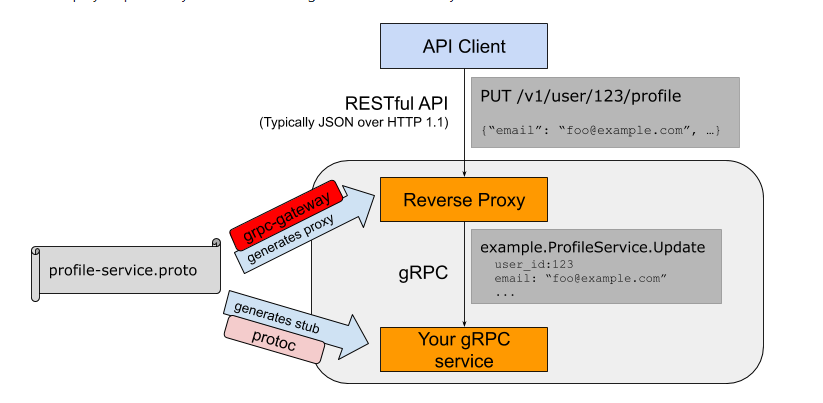
在grpc之上加一层代理并转发,转变成protobuf格式来访问grpc服务
安装
go get -u github.com/grpc-ecosystem/grpc-gateway/protoc-gen-grpc-gateway

go get -u github.com/grpc-ecosystem/grpc-gateway/protoc-gen-swagger

go get -u github.com/golang/protobuf/protoc-gen-go
Prod.proto
syntax="proto3";

package services;

import "google/api/annotations.proto";

message  ProdRequest {

    int32 prod_id =;   //传入的商品ID

}

message ProdResponse{

    int32 prod_stock=;//商品库存

}

service ProdService {

    rpc GetProdStock (ProdRequest) returns (ProdResponse){

        option (google.api.http) = {

            get: "/v1/prod/{prod_id}"

        };

    }

}
生成两个文件
首先cd 进入pbfiles
这会生成Prod.pb.go

protoc --go_out=plugins=grpc:../services  Prod.proto

这会生成Prod.pb.gw.go

protoc  --grpc-gateway_out=logtostderr=true:../services Prod.proto
httpserver.go
package main

import (

    "context"

    "github.com/grpc-ecosystem/grpc-gateway/runtime"

    "google.golang.org/grpc"

    "grpcpro/services"

    "log"

    "net/http"

)

func main()  {

    gwmux:=runtime.NewServeMux()

    opt := []grpc.DialOption{grpc.WithInsecure()}

    err:=services.RegisterProdServiceHandlerFromEndpoint(context.Background(),

        gwmux,"localhost:8081",opt)

    if err != nil {

        log.Fatal(err)

    }

    httpServer:=&http.Server{

        Addr:":8080",

        Handler:gwmux,

    }

    httpServer.ListenAndServe()

}
server.go
package main

import (

    "google.golang.org/grpc"

    "grpcpro/services"

    "net"

)

func main()  {

    rpcServer:=grpc.NewServer()

    services.RegisterProdServiceServer(rpcServer,new(services.ProdService))

    lis,_:=net.Listen("tcp",":8081")

    rpcServer.Serve(lis)

}
源码地址:
https://github.com/sunlongv520/grpc-learn
https://github.com/sunlongv520/grpc-doc
使用gRPC-Gateway快速构建微服务-双向认证下rpc-gateway使用(同时提供rpc和http接口)的更多相关文章
- 通过GeneXus如何快速构建微服务架构
概览 “微服务”是一个非常广泛的话题,在过去几年里,市面上存在着各种不同的定义. 虽然对这种架构方式没有一个非常精确的定义,但仍然有一些概念具有代表性. 微服务有着许多围绕业务能力.自动化部署.终端智 ...
- SpringBoot 快速构建微服务体系 知识点总结
可以通过http://start.spring.io/构建一个SpringBoot的脚手架项目 一.微服务 1.SpringBoot是一个可使用Java构建微服务的微框架. 2.微服务就是要倡导大家尽 ...
- Springboot揭秘-快速构建微服务体系-王福强-2016年5月第一次印刷
JavaConfig项目: spring IOC有一个非常核心的概念——Bean.由Spring容器来负责对Bean的实例化,装配和管理.XML是用来描述Bean最为流行的配置方式.Spring可以从 ...
- SpringBoot揭秘:快速构建微服务体系
chapter 2: 饮水思源:回顾与探索Spring框架本质 IoC其实有两种方式,一种是DI(dependency Injection),一种是DL(dependency Lookup 依赖查找, ...
- 《SpringBoot揭秘 快速构建微服务体系》读后感(一)
SpringIOC IOC有两种方式:一种是DI,另一种是DL,即Dependency Lookup(依赖查找).前者是当前软件实体被动接受其依赖的其他组件被IoC容器注入,而后者则是当前软件实体主动 ...
- 《SpringBoot揭秘 快速构建微服务体系》读后感(五)
应用日志和spring-boot-starter-logging 快速web应用开发与spring-boot-starter-web 1.项目结构层面的约定
- 《SpringBoot揭秘 快速构建微服务体系》读后感(四)
再谈自动配置 基于条件的自动配置 调整自动配置的顺序
- 《SpringBoot揭秘 快速构建微服务体系》读后感(三)
SpringApplication:SpringBoot程序启动的一站式解决方案 深入探索SpringApplication执行流程 因为书上的版本是1.2的,比较老,这里参考http://blog. ...
- 《SpringBoot揭秘 快速构建微服务体系》读后感(二)
最简单的springBoot应用 package com.louis.test; import org.springframework.boot.SpringApplication; import o ...
随机推荐
- QT 在QTabWidget中设置一些调色板
这次所做的项目中需要用到如下功能,点击tableWidget中的子项,将会弹出颜色选值对话框,实现子项的改变,如下图所示: 1.首先,将自己定制的调色板放入tableWidget中 for (int ...
- Walk Through Squares HDU - 4758 AC自动机+简单状压DP
题意:给你两个串,求用m个R,n个D能组成多少个包含这两个串 题解:先构造一个AC自动机记录每个状态包含两个串的状态, 状态很容易定义 dp[i][j][k][status]表示在AC自动机K这个节点 ...
- 18-2-call和apply
<!DOCTYPE html> <html lang="en"> <head> <meta charset="UTF-8&quo ...
- Java开发系列-JSP
概述 JSP是java 服务器页面,它运行在服务器端,本质上就是一个serlvet,产生的java文件和class保留在tomcat的word目录下. JSP主要作用是将内容的生成与页面相分离. JS ...
- 【BZOJ3944】Sum
题面 Description Input 一共T+1行 第1行为数据组数T(T<=10) 第2~T+1行每行一个非负整数N,代表一组询问 Output 一共T行,每行两个用空格分隔的数ans1, ...
- Linux下常用操作
************************ 镜像操作 ************************************* screen -s name 新建 screen -r name ...
- antidependence and data hazard
See below example. ADDD F6, F0, F8 SUBD F8, F10, F14 Some article would say that “ There’s an ant ...
- 条件渲染v-if
<!DOCTYPE html> <html lang="zh"> <head> <title></title> < ...
- python 第三方库的安装方法
一.看更大的python世界 python 全球计算生态的主站:python 社区 www.pypi.org 二.安装第三方库 1) pip 命令安装方法 1.1 安装第三方库 命令行输入pip in ...
- 04-4-typeof
<!DOCTYPE html> <html lang="en"> <head> <meta charset="UTF-8&quo ...