
DEVOPS技术实践_16:使用Centos容器作为salve的报错offline的问题
上一篇创建了一个centos的容器,而且已经安装了openssh
[root@node6 ~]# docker ps -a
f2320c5d3c54 centos "/bin/bash" minutes ago Exited () seconds ago compassionate_elbakyan
[root@node6 ~]# docker images
centos_jenkins latest deca1dcb74be minutes ago 703MB
1. 配置作为jenkins 的slave

2. 点击构建
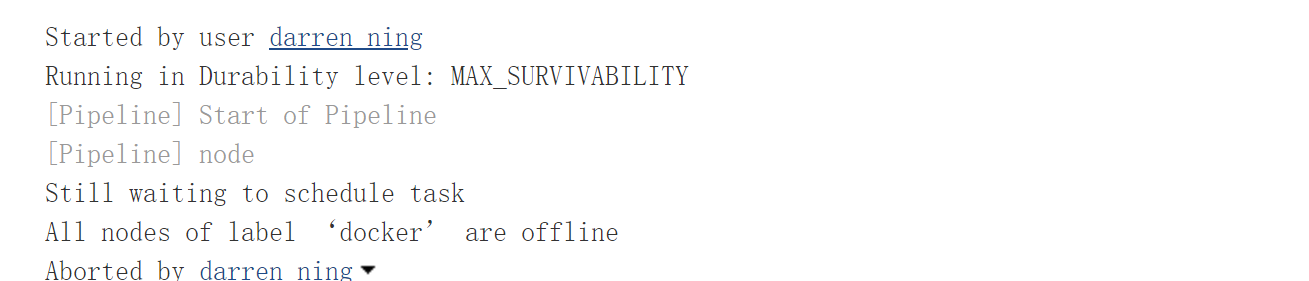
3. 构建结果
处于offline状态

尝试连接
SSHLauncher{host='192.168.132.136', port=, credentialsId='acd6a413-a34d-443d-9cd2-1f751fa1c488', jvmOptions='', javaPath='', prefixStartSlaveCmd='', suffixStartSlaveCmd='', launchTimeoutSeconds=, maxNumRetries=, retryWaitTime=, sshHostKeyVerificationStrategy=hudson.plugins.sshslaves.verifiers.NonVerifyingKeyVerificationStrategy, tcpNoDelay=true, trackCredentials=true}

[// ::] [SSH] Opening SSH connection to 192.168.132.136:.

[// ::] [SSH] WARNING: SSH Host Keys are not being verified. Man-in-the-middle attacks may be possible against this connection.

ERROR: Unexpected error while trying to authenticate as jenkins with credential=acd6a413-a34d-443d-9cd2-1f751fa1c488

java.io.IOException: Password authentication failed.

    at com.trilead.ssh2.auth.AuthenticationManager.authenticatePassword(AuthenticationManager.java:)

    at com.trilead.ssh2.Connection.authenticateWithPassword(Connection.java:)

    at com.cloudbees.jenkins.plugins.sshcredentials.impl.TrileadSSHPasswordAuthenticator.doAuthenticate(TrileadSSHPasswordAuthenticator.java:)

    at com.cloudbees.jenkins.plugins.sshcredentials.SSHAuthenticator.authenticate(SSHAuthenticator.java:)

    at com.cloudbees.jenkins.plugins.sshcredentials.SSHAuthenticator.authenticate(SSHAuthenticator.java:)

    at hudson.plugins.sshslaves.SSHLauncher.openConnection(SSHLauncher.java:)

    at hudson.plugins.sshslaves.SSHLauncher$.call(SSHLauncher.java:)

    at hudson.plugins.sshslaves.SSHLauncher$.call(SSHLauncher.java:)

    at java.util.concurrent.FutureTask.run(FutureTask.java:)

    at java.util.concurrent.ThreadPoolExecutor.runWorker(ThreadPoolExecutor.java:)

    at java.util.concurrent.ThreadPoolExecutor$Worker.run(ThreadPoolExecutor.java:)

    at java.lang.Thread.run(Thread.java:)

Caused by: java.io.IOException: The connection is closed.

    at com.trilead.ssh2.auth.AuthenticationManager.deQueue(AuthenticationManager.java:)

    at com.trilead.ssh2.auth.AuthenticationManager.getNextMessage(AuthenticationManager.java:)

    at com.trilead.ssh2.auth.AuthenticationManager.authenticatePassword(AuthenticationManager.java:)

    ...  more

Caused by: java.io.IOException: Cannot read full block, EOF reached.

    at com.trilead.ssh2.crypto.cipher.CipherInputStream.getBlock(CipherInputStream.java:)

    at com.trilead.ssh2.crypto.cipher.CipherInputStream.read(CipherInputStream.java:)

    at com.trilead.ssh2.transport.TransportConnection.receiveMessage(TransportConnection.java:)

    at com.trilead.ssh2.transport.TransportManager.receiveLoop(TransportManager.java:)

    at com.trilead.ssh2.transport.TransportManager$.run(TransportManager.java:)

    ...  more

[// ::] [SSH] Authentication failed.

Authentication failed.

[// ::] Launch failed - cleaning up connection

[// ::] [SSH] Connection closed.
4. 进入容器修改ssh配置文件
[root@node6 ~]# docker exec -it f2320c5d3c54 /bin/bash
[root@f2320c5d3c54 /]# vi /etc/ssh/sshd_config
添加修改下面两行
UsePAM no

UsePrivilegeSeparation no
[root@f2320c5d3c54 /]# exit
5. 提交到镜像
[root@node6 ~]# docker commit f2320c5d3c54 centos_jenkins_2
sha256:796d156227e69f272f8b524516ec666eef3715e467d6756bf20333b35f0fe89c
6.修改配置的镜像,再次构建
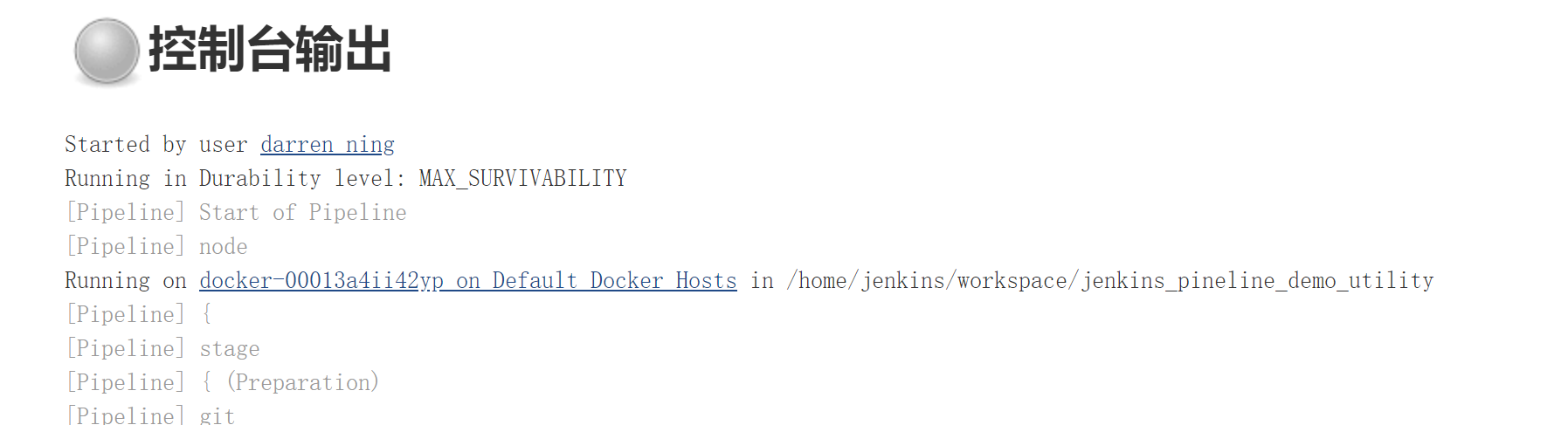

生成一个容器
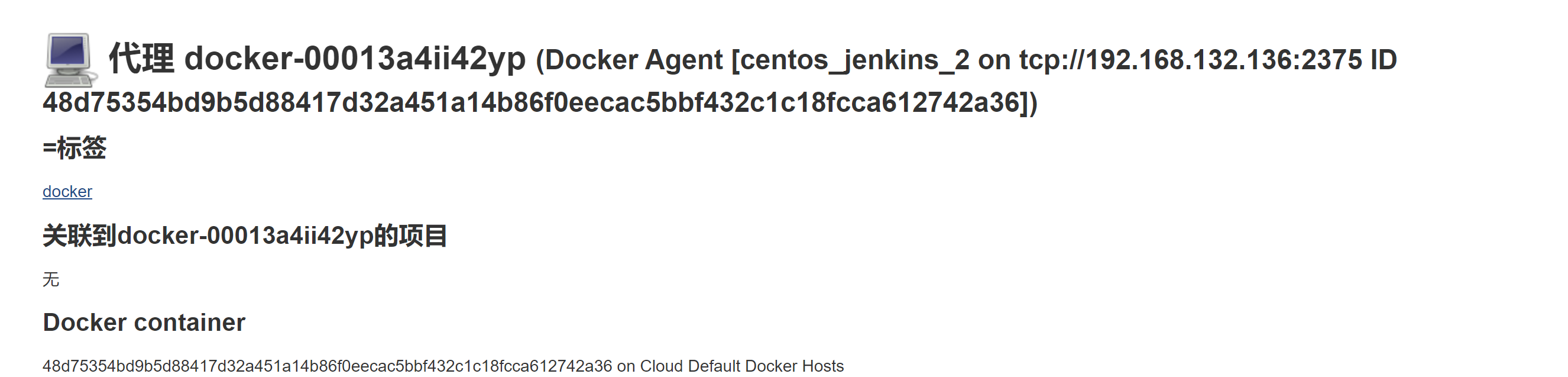
7. 查看容器
[root@node6 ~]# docker ps -a
48d75354bd9b centos_jenkins_2 "/usr/sbin/sshd -D -…" About a minute ago Up About a minute 0.0.0.0:->/tcp optimistic_grothendieck
构建完成之后再次查看容器
[root@node6 ~]# docker ps -a
容器已经删除
centos作为slave镜像配置完成
DEVOPS技术实践_16:使用Centos容器作为salve的报错offline的问题的更多相关文章
- CentOS 7.2重启网络报错 Failed to start LSB: Bring up/down
CentOS 7.2重启网络报错 Failed to start LSB: Bring up/down 我的虚拟机原本有两块网卡,一块叫eno16777736,另一块叫eno5033674.本来是正常 ...
- DEVOPS技术实践_15:使用Docker作为Jenkins的slave
前面实验了使用docker搭建一个jenkins,下面实验使用docker作为jenkins的slave节点 1. 环境准备 一个运行Docker的主机或者群集 Jenkins应该能访问互联网,方便安 ...
- DEVOPS技术实践_06:sonar与Jenksin集成
代码质量管理平台 一.checkout和打包功能 1.1 gitlab在新建一个文件 后续在写入内容 1.2 Jenkins新建一个任务 两个参数 1.3 流水线配置 copy仓库地址: http:/ ...
- DEVOPS技术实践_04:Jenkins参数化构建
一.参数化构建 1.1 各个参数的信息 凭据参数存储一个用户的账号密码信息,等等,运用最多的是选项参数 1.2 使用选项参数 构建已经变成参数化构建 1.3 获取这个值,修改Jenkinsfile文件 ...
- 容器中使用iptables报错can't initialize iptables table Permission denied (you must be root)
背景 在docker容器中部署了一微服务,该服务需要docker push镜像到docker registry.因此,docker容器中需要安装docker服务.但在启动容器的时候,却报错: can' ...
- jenkins centos slave起不来报错The SSH key presented by the remote host does not match the key saved in the Known Hosts file against this host. Connections to this host will be denied until the two keys mat
场景:我的centos-204是一台centos的机器,本来用https://www.cnblogs.com/zndxall/p/8297356.html 的centos slave方式搭建ok的,一 ...
- 【k8s】centos上安装kubernetes,报错Error:docker-ce-cli conflicts with 2:docker-1.13.1-94.gitb2f74b2.el7.centos.x86_64
使用命令: yum install kubernetes 报错: Error: docker-ce-cli conflicts with :docker--.git07f3374.el7.centos ...
- docker-compose进行部署容器的时候,报错权限不足
刚刚用docker-compose部署elk的时候,没有起来,查看日志的时候,发现在数据卷挂载的时候,报错权限不足. 由于日志不在了,这里就直接贴出解决办法. 问题原因及解决办法 原因是CentOS7 ...
- docker 部署mysql tomcat时 在root@localhost~下——-——docker exec -it 容器名 /bin/bash 报错
在docker部署mysql时 报错 找不到 容器不自动启动 , docker start 容器名 也没有效果 多次尝试发现 原因是创建容器时在 下面创建的 更改为下创建 问题解决
随机推荐
- c++ 模板和traits
#define TEST(ITEMNAME) AddItem(ITEMNAME, #ITEMNAME); template <typename T> void AddItem(T& ...
- util.date
package com.sxt.utils.date1; import java.util.Date; /* * util.date */ public class TestDate { public ...
- 开发板ping通虚拟机与主机
刚因为虚拟机与主机没法互相ping通的事情,奋战到将近凌晨一点.现在把这个过程总结一下,以方便后加入该行业的广大IT精英. VMWare提供了三种工作模式:bridged(桥接模式).NAT(网络地址 ...
- 学linux内核与学linux操作系统有什么区别!?
linux内核包括:进程管理,存储管理,IO管理,文件系统等功能.linux操作系统则是linux内核再加上像shell或图形界面和其他的实用软件,比内核庞大的多.建议先学shell命令和linux下 ...
- @noi.ac - 491@ explore
目录 @description@ @solution@ @accepted code@ @details@ @description@ 最近有一个巨大的古代地下遗迹在比特镇被发现.这个地下遗迹的俯视图 ...
- mysql basic operation,mysql总结,对mysql经常使用语句的详细总结,MySQL学习笔记
mysql> select * from wifi_data where dev_id like "0023-AABBCCCCBBAA" ; 1.显示数据库列表.show d ...
- MVC4 变更模板
模板位置: C:\Program Files (x86)\Microsoft Visual Studio 12.0\Common7\IDE\ItemTemplates\CSharp\Web\MVC 4 ...
- 用复制方式创建表 Create Table tbname as select * from user.tab where ...
用复制方式创建表 Create Table tbname as select * from user.tab where ...
- codeforces 1214
D 比赛的时候居然看漏了条件... 若在(x, y)格子,那么只能移动到(x+1, y)或(x, y+1) 这样的话就好做了,直接dp,然后统计每一种路径长度经过的点数. #include<cs ...
- H3C NAT ALG