
XCode Playground Overview
http://rshankar.com/xcode-6-and-playground/
Playground is an interactive work environment that allows you to see the values in the sidebar for the written code. As and when you make changes to your code the sidebar reflects the changed result. Listed below are some examples written using Swift language in Playground
Sum of n numbers
|
1
2
3
4
5
6
|
var sum = 0for i in 0...10 { sum += i}sum |
Fibonacci Series
|
1
2
3
4
5
|
var fibonacci = 0var temp1 = 1var temp2 = 0println(fibonacci) |
|
1
2
3
4
5
6
|
for j in 0...10 { temp2 = fibonacci fibonacci += temp1 temp1 = temp2 println(fibonacci)} |
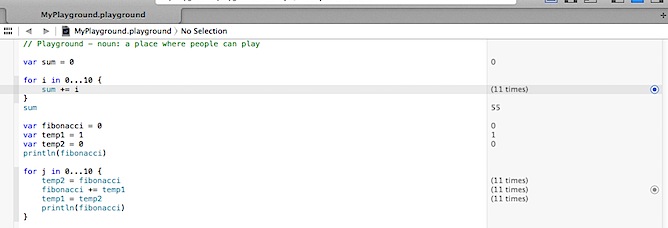
In the below screenshot, you can observe that the sidebar displaying the values for the variables.

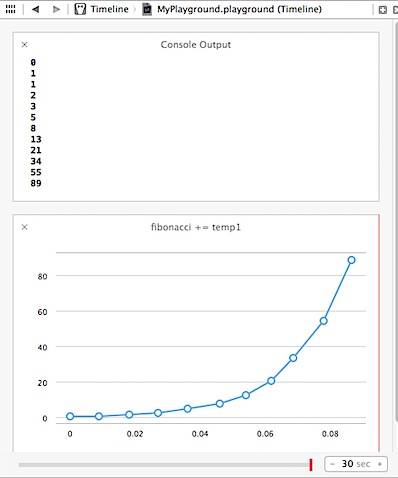
Similarly the console output displays the message written using println statements And by clicking the Value History option, the timeline feature is displayed for that expression. Console Output, Timeline can be accessed using the Assistant Editor.
Pin the Result
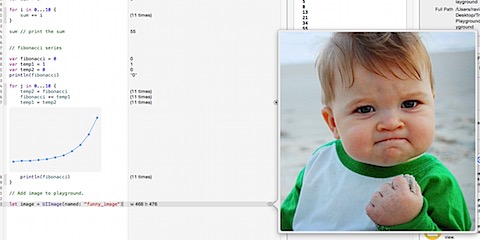
Playground allows to pin the result to the editor window using the Show result option. The playground also allows users the take look at the values using the Quick Look option as shown in the below screenshot. Quick Look can display colours, Strings (plain and attributed), Images, Views, Arrays and Dictionaries, Points, rects, sizes, Bezier Paths, URLs/WebView, Classes and Structs.

Adding images to playground
We can add images to playground by following the below mentioned steps
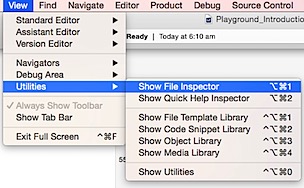
Step 1: Click View menu and select Show File Inspector and Utilities
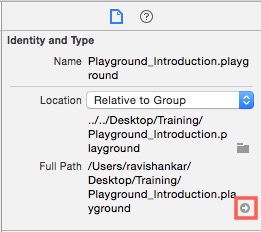
Step 2: Under File Inspector, click Full Path option to access location of the playground file.
Step 3: Right click on the file and select Show Package Contents
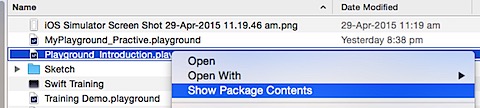
Step 4: Create a folder with name as Resources
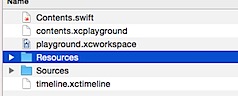
Step 5: Copy the required image file under Resources folder. For this demo, I have copied a file named as funny_image of type PNG.
Go to your Playground file and add the following line of code to access the file.
|
1
2
3
|
// Add image to playground.let image = UIImage(named: "funny_image”) |
Quick look option should now display the image as shown below.
Playground Utilities
- XCPShowView – Show live views in timeline.
- XCPSetExecutionShouldContinueIndefinitely. – Allows execution to continue even after reaching playground’s top level code.
- XCPCaptureValue – Manually capture values.
- XCPSharedDataDirectoryPath – Retrieves the directory path which contains the shared data between all playgrounds
In order use the above mentioned playground utilities, we need to import XCPlayground module. Let us see couple of examples for this module.
XCPSHOWVIEW
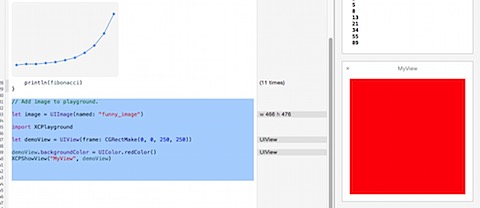
Add the following code to Playground, which creates a UIView with background colour as Red. And by using XCPShowView, we will add this view to the playground timeline.
|
1
2
3
4
5
6
7
|
// Add image to playground.let image = UIImage(named: "funny_image")import XCPlaygroundlet demoView = UIView(frame: CGRectMake(0, 0, 250, 250))demoView.backgroundColor = UIColor.redColor()XCPShowView("MyView", demoView) |
XCPShowView accepts two parameters, an identifier for the View and the actual View itself.
XCPSETEXECUTIONSHOULDCONTINUEINDEFINITELY
Let us see an example of Asynchronous call by calling a web service that returns your IP details.
|
1
2
3
4
5
6
7
8
9
10
11
12
13
14
15
16
17
18
19
20
21
|
// Making Asynchronous call in PlaygroundXCPSetExecutionShouldContinueIndefinitely(continueIndefinitely: true)NSURLSession.sharedSession().dataTaskWithURL(url!, completionHandler: { (data: NSData!, response: NSURLResponse!, error: NSError!) -> Void in if error == nil { var error:NSError? if let result = data { if let dict = NSJSONSerialization.JSONObjectWithData(result, options: NSJSONReadingOptions.AllowFragments, error: &error) as? NSDictionary { println(dict) } else { println("Error Processing data") } } } else { println(error.localizedDescription) }}).resume() |
You need to make sure the execution is continued until you receive the information from callback method. This is done by adding XCPSetExecutionShouldContinueIndefinitely(continueIndefinitely: true). The service result will be printed to your console as shown below.
|
1
2
3
4
5
6
7
8
9
10
11
12
13
14
15
|
{"area_code" = 0;asn = AS24560;"continent_code" = AS;country = India;"country_code" = IN;"country_code3" = IND;"dma_code" = 0;ip = "182.65.61.59";isp = "Bharti Airtel Ltd., Telemedia Services";latitude = 20;longitude = 77;offset = 5;timezone = "Asia/Kolkata";} |
Playground Limitations
- Playground cannot be used for performance testing.
- Does not support User Interaction.
- Does not support On-device execution.
- Cannot use your app or framework code.
- Does not support custom entitlements.
XCode Playground Overview的更多相关文章
- Xcode playground markdown常用语法
//: **Bold** *Italic* /*: # h1 ## h2 ### h3 #### h4 h5 h6 same as h3 --- --- --- * blank seperate li ...
- How to make an HTTP request in Swift
from: http://stackoverflow.com/questions/24016142/how-to-make-an-http-request-in-swift You can use N ...
- Functor and Monad in Swift
I have been trying to teach myself Functional Programming since late 2013. Many of the concepts are ...
- Xcode在playground的quick look框中显示对象自定义视图
对于一般对象,playground中默认的quick look显示已经够用,比如简单的字符串,Int,或简单的自定义Class等等. 不过对于有些情况,我们需要自定义对象在playground中的显示 ...
- Xcode的playground中对于SpriteKit物理对象的更新为何无效
大熊猫猪·侯佩原创或翻译作品.欢迎转载,转载请注明出处. 如果觉得写的不好请多提意见,如果觉得不错请多多支持点赞.谢谢! hopy ;) 为了便于SpriteKit中物理行为的调试,我们可以借助于Xc ...
- Xcode打开playground运行很慢或者无法输出的解决办法
学习Swift最快捷的方法就是创建playground,但有时后运行很慢或者一直显示Running,无法输出. 解决办法 关闭Xcode 在终端里执行2段代码 rm -rf ~/Library/Dev ...
- Xcode 打开playground文件的时候提示-Unable to find execution service for selected run destination
解决办法: step 1: 关闭Xcode (快捷键cmd + q) step 2:在terminal里面运行如下语句 rm -rf ~/Library/Developer/CoreSimulator ...
- 对Xcode菜单选项的详细探索(干货)
本文调研Xcode的版本是 7.1,基本是探索了菜单的每一个按钮.虽然从xcode4一直用到了xcode7,但是一般都只是用了一些基础的功能,说来也惭愧.在一次偶然的机遇突然发现了“显示调用层级”的选 ...
- 【转】对 Xcode 菜单选项的详细探索(干货)
http://www.cocoachina.com/ios/20151204/14480.html 本文调研Xcode的版本是 7.1,基本是探索了菜单的每一个按钮.虽然从xcode4一直用到了xco ...
随机推荐
- 多个excel合并(excel2007)
1.新建一个空的excel文件,在需要合并的目录下. 2.右键点击sheet1,点击查看代码 3.执行此段代码 Sub 合并当前目录下所有工作簿的全部工作表() Dim MyPath, MyName, ...
- 实用的placeholder插件,兼容IE下的placeholder,jquery插件
placeholder在IE下无法兼容 ,下面的插件很好的处理了这个问题,拿去不谢 /* * jQuery placeholder, fix for IE6,7,8,9 * @website itmy ...
- CodeForces - 948C(前缀和 + 二分)
链接:CodeForces - 948C 题意:N天,每天生产一堆雪体积 V[i] ,每天每堆雪融化 T[i],问每天融化了多少雪. 题解:对 T 求前缀和,求每一堆雪能熬过多少天,再记录一下多余的就 ...
- 使用CodeBlocks编译64位程序(用的编译器仅仅是windows sdk的)
需求: -CodeBlocks使用nightly版本: -Windows SDK(我使用的是6.0A,即微软针对vista的,因为这个比较小,你也可以选择其他版本但是要有64位编译器.他也适用于xps ...
- Pro Git - 笔记2
Git Basics Getting a Git Repository Initializing a Repository in an Existing Directory For Linux: $ ...
- Mininet实验 基于Mininet测量路径的损耗率
实验原理 在SDN环境中,控制器可以通过对交换机下发流表操作来控制交换机的转发行为,此外,还可以利用控制器测量路径的损耗率.在本实验中,基于Mininet脚本,设置特定的交换机间的路径损耗速率,然后编 ...
- 手动修改PHP页面返回状态码
<?php //比如当前页面要返回404状态码 header("HTTP/1.1 404 Not Found"); header("Status: 404 Not ...
- [POI2007]ATR-Tourist Attractions
题目大意:一个无向图,从$1$到$n$,要求必须经过$2,3,\dots,k+1$,给出一些限制关系,要求在经过$v\leq k+1$之前必须经过$u\leq k+1$,求最短路 题解:预处理出$1\ ...
- MySQL之数据库及表的修改和删除
本文章来自实验楼的操作过程和其中相应地解释.(博客园不知道怎么回事,上传图片总是失败.) 一.对数据库修改 1)删除数据库的命令为:DROP DATABASE 数据名; 二.对表的修改 1)重命名一张 ...
- clear:both其实是有瑕疵的
在开发中,从美工MM给你Html代码中,肯定能经常看"<div style="clear:both;"></div>"这样的代码,但是你 ...