
Centos手动编译安装vim8
系统:CentOs6.9
gcc版本:5.1.0
github上拉取vim工程之后,cd src,执行一下命令:
$ ./configure

$ sudo make

gcc -c -I. -Iproto -DHAVE_CONFIG_H     -g -O2 -U_FORTIFY_SOURCE -D_FORTIFY_SOURCE=        -o objects/arabic.o arabic.c

gcc: error trying to exec 'cc1': execvp: No such file or directory

make: *** [objects/arabic.o] Error
发现找不到cc1。全局找下cc1在哪:
$ sudo find / -name cc1

/usr/local/libexec/gcc/x86_64-unknown-linux-gnu/5.1./cc1

/usr/libexec/gcc/x86_64-redhat-linux/4.4./cc1

/root/software/gcc-5.1-build/gcc/cc1

/root/software/gcc-5.1-build/stage1-gcc/cc1

/root/software/gcc-5.1-build/prev-gcc/cc1
建立一个软连接:
$ sudo ln -s /usr/local/libexec/gcc/x86_64-unknown-linux-gnu/5.1./cc1 /usr/bin/cc1
重新编译一下:
$ sudo make

gcc -c -I. -Iproto -DHAVE_CONFIG_H     -g -O2 -U_FORTIFY_SOURCE -D_FORTIFY_SOURCE=        -o objects/arabic.o arabic.c

In file included from os_unix.h::,

                 from vim.h:,

                 from arabic.c::

/usr/include/stdio.h::: fatal error: stddef.h: No such file or directory

compilation terminated.

make: *** [objects/arabic.o] Error
发现还是有问题,而且这个报错报在了库文件
全局找下这个文件:
$ sudo find / -name stddef.h

/usr/local/lib/gcc/x86_64-unknown-linux-gnu/5.1./include/stddef.h

/usr/include/linux/stddef.h

/usr/lib/gcc/x86_64-redhat-linux/4.4./include/stddef.h

/root/software/gcc-5.1-build/gcc/include/stddef.h

/root/software/gcc-5.1-build/stage1-gcc/include/stddef.h

/root/software/gcc-5.1-build/prev-gcc/include/stddef.h

/root/software/gcc-5.1./gcc/ginclude/stddef.h

/root/software/gcc-5.1./libstdc++-v3/include/c_compatibility/stddef.h
发现是能找到,不过报错的文件的位置,是/usr/include/stdio.h,感觉是路径问题了。
尝试用sudo权限运行./configure:
$ sudo ./configure

configure: loading cache auto/config.cache

checking whether make sets $(MAKE)... (cached) yes

checking for gcc... (cached) gcc

checking whether the C compiler works... no

configure: error: in `/home/haiming.li/opensource/vim/src':

configure: error: C compiler cannot create executables

See `config.log' for more details
同样通过find命令,找到config.log所在的位置是src/auto下面,打开看看:
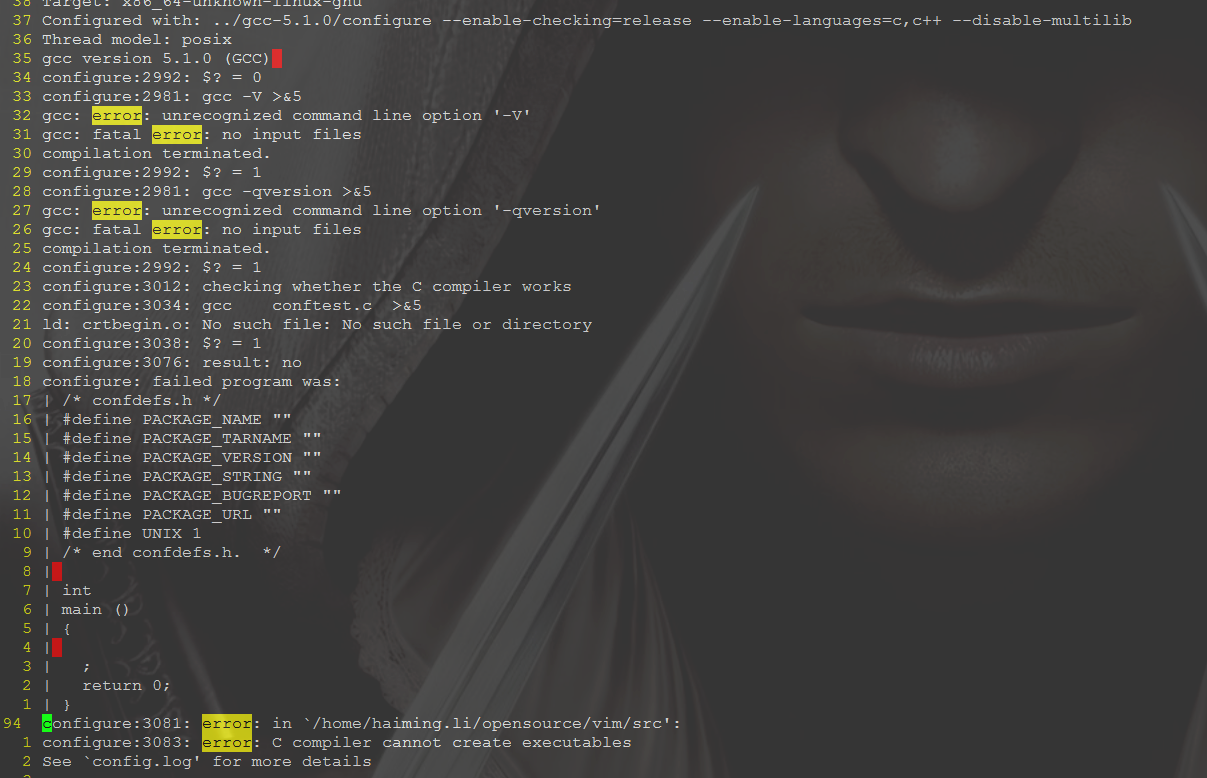
感觉很莫名的报错,而且为何sudo与非sudo执行的时候结果差别那么大呢?
猜测是sudo的gcc跟非sudo下的gcc,版本不一致,尝试验证下:
$ which gcc

/usr/local/bin/gcc

$ sudo which gcc

/usr/bin/gcc
果然,sudo和非sudo下,gcc调用的执行程序不一样。/usr/local/bin/gcc --version 和 /usr/bin/gcc --version的执行结果是一样的,这个比较莫名。不过如果做下软连接,我相信能解决问题。
先对原来的/usr/bin下的gcc做下备份:
$ cd /usr/bin/

$ sudo mv gcc gcc_bak

$ sudo ln -s /usr/local/bin/gcc gcc
继续:
$ ./configure

$ sudo make
然后报了类似这样的错误:
/opt/local/bin/gcc-mp-4.8 -c -I. -Iproto -DHAVE_CONFIG_H   -I/usr/local/include  -g -O2 -D_FORTIFY_SOURCE=       -o objects/buffer.o buffer.c

In file included from vim.h::,

                 from buffer.c::

auto/osdef.h::: error: conflicting types for 'printf'

 extern int printf __ARGS((char *, ...));
google之后,只发现了一个日文网页,而且说得好像不是一个问题,灵机一动下,make clean了一下,然后make就通过了,接着
$ sudo make install
执行下vim:
$ vim

-bash: /usr/bin/vim: No such file or directory
在编译日志里面找了找,感觉vim应该是在/usr/local/bin/vim:
$ /usr/local/bin/vim --version

VIM - Vi IMproved 8.1 ( May , compiled May   ::)

Included patches: -...

果然在这里,做下软连接:

$ sudo ln -s /usr/local/bin/vim /usr/bin/vim
OK,大功告成,手动编译vim8.1搞定。
Centos手动编译安装vim8的更多相关文章
- CentOS手动编译安装gcc
最近尝试了fedora.ubuntu.mint.debian.opensuse等多种linux发行版,与CentOS比较之后还是感觉之前用的CentOS比较熟悉,比较习惯.现在CentOS的最新版本为 ...
- centos手动编译安装apache、php、mysql
64位centos 5.5手动安装lamp,要求curl.json.pdo_mysql.gd,记录如下. centos 5.4.5.5.5.6的内核都是2.6.18,都可以安装php 5.3. 卸载旧 ...
- LNAMP服务器环境搭建(手动编译安装)
LNAMP服务器环境搭建(手动编译安装) 一.准备材料 阿里云主机一台,操作系统CentOS 6.5 64位 lnamp.zip包(包含搭建环境所需要的所有软件) http://123.56.144. ...
- centos mysql 编译安装
centos mysql 编译安装 1.安装 创建MySQL用户 sudo useradd mysql 下载MySQL的源码包,我们这里使用的时5.5.18 安装依赖 sudo yum -y inst ...
- web服务器学习1---httpd-2.4.29源码手动编译安装
环境准备: 系统:CentOS 7.4 软件:httpd-2.4.29 一 Apache主要特点 apache服务器在功能,性能和安全性等方面表现比较突出,可以较好地满足web服务器地应用需求.主要 ...
- 手动编译安装tmux
tmux的好处就不多说了,总之是多屏管理的神器.通常我们用系统通用的安装方式可以安装到tmux,但有时候,安装到的可能不是我们所需要的版本,又或者软件源里面没有带tmux.这个时候就需要手动编译安装了 ...
- centos下编译安装lnmp
centos下编译安装lnmp 本文以centos为背景在其中编译安装nginx搭建lnmp环境. 编译安装nginx时,需要事先安装 开发包组"Development Tools" ...
- CentOS 7 编译安装 Code::Blocks
CentOS 7 编译安装 Code::Blocks yum install cairo-devel yum install pango-devel yum install atk-devel yum ...
- Debian/Ubuntu手动编译安装MongoDB C++11驱动及驱动测试
本文章仅限cnblogs网站内转载!请某网站自觉,遵纪守法,尊重原创! 系统环境情况: 最小化.无桌面环境 新安装的Debian 8 Server 版本操作系统虚拟机一台 手动编译安装MongoDB ...
随机推荐
- html 压缩成一行
文章java gulp-htmlmin 减少下载的时间
- AndroidManifest.xml activity属性设置大全
1.android:allowTaskReparenting=["true"|"false"] 是否允许activity更换从属的任务,比如从短信息任务切换到浏 ...
- Games Delphi developers play
Original link: Games Delphi developers play Delphi game developers are stupid people having too ma ...
- VMware Workstation/Fusion 14/15 密钥
VMware WorkStation 14 CG54H-D8D0H-H8DHY-C6X7X-N2KG6 ZC3WK-AFXEK-488JP-A7MQX-XL8YF AC5XK-0ZD4H-088HP- ...
- linux 备份svn
下面具体描述备份的方法: =============== 1.svnadmin dump备份工具 ------------------------ 这是subversion官方推荐的备份方式. ...
- MS SQL Server2000转换成MySQL
按计划今天着手进行将后台数据库从MS SQL Server2000转换成MySQL5.1.3.目的是便于发布软件的测试版本. 1. 驱动: mysql-connector-odbc-5.1.11-wi ...
- docker -ce(社区免费版)
Docker -ce https://www.cnblogs.com/zhangxiaoyong/p/9706392.html Docker 是世界领先的软件容器平台.开发人员利用 Docker 可以 ...
- oscache源码浅析
oscache作为本地缓存框架,存储模型依然是通用的缓存键值对模型.oscache使用HashTable存放数据,我们看下源码: GeneralCacheAdministrator: /** * Ge ...
- Qt5.4中遇到找不到头文件<QApplication>等。
从新学习Qt时,重装了Qt5.4,当运行Hello World例子时,遇到了下列的情况 <span style="font-size:18px;">#include & ...
- 低成本FPGA中实现动态相位调整
在FPGA中,动态相位调整(DPA)主要是实现LVDS接口接收时对时钟和数据通道的相位补偿,以达到正确接收的目的.ALTERA的高端FPGA,如STRATIX(r) 系列中自带有DPA电路,但低端的F ...