
最好用的数据存储Easy Save2讲解
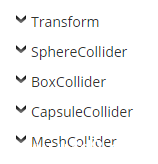
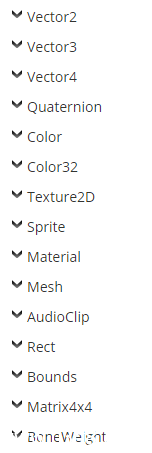
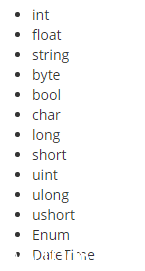
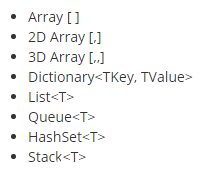
|
1
2
|
ES2.Save(data, "C:/Users/User/myFile.txt"); // 这里myFile.txt只存储dataES2.Save(transform.position, "C:/Users/User/myFile.txt?tag=myPosition"); // 在myFile.txt文件里插入key:myPosition对应value:transform.positiontransform.position = ES2.Load<Vector3>("C:/Users/User/myFile.txt?tag=myPosition"); //从myFile.txt文件里读取key:myPosition的value |
|
01
02
03
04
05
06
07
08
09
10
11
12
13
14
15
16
17
18
19
20
21
22
23
24
25
26
27
28
29
30
31
32
33
34
35
36
37
38
39
40
41
42
43
44
|
public IEnumerator UploadMesh(Mesh mesh, string tag){ // Create a URL and add parameters to the end of it. string myURL = "http://www.server.com/ES2.php"; myURL += "?webfilename=myFile.txt&webusername=user&webpassword=pass"; // Create our ES2Web object. ES2Web web = new ES2Web(myURL + "&tag=" + tag); // Start uploading our data and wait for it to finish. yield return StartCoroutine(web.Upload(mesh)); if (web.isError) { // Enter your own code to handle errors here. Debug.LogError(web.errorCode + ":" + web.error); }}public IEnumerator DownloadMesh(string tag){ // Create a URL and add parameters to the end of it. string myURL = "http://www.server.com/ES2.php"; myURL += "?webfilename=myFile.txt&webusername=user&webpassword=pass"; // Create our ES2Web object. ES2Web web = new ES2Web(myURL + "&tag=" + tag); // Start downloading our data and wait for it to finish. yield return StartCoroutine(web.Download()); if (web.isError) { // Enter your own code to handle errors here. Debug.LogError(web.errorCode + ":" + web.error); } else { // We could save our data to a local file and load from that. web.SaveToFile("myFile.txt"); // Or we could just load directly from the ES2Web object. this.GetComponent<MeshFilter>().mesh = web.Load<Mesh>(tag); }} |
|
001
002
003
004
005
006
007
008
009
010
011
012
013
014
015
016
017
018
019
020
021
022
023
024
025
026
027
028
029
030
031
032
033
034
035
036
037
038
039
040
041
042
043
044
045
046
047
048
049
050
051
052
053
054
055
056
057
058
059
060
061
062
063
064
065
066
067
068
069
070
071
072
073
074
075
076
077
078
079
080
081
082
083
084
085
086
087
088
089
090
091
092
093
094
095
096
097
098
099
100
101
102
103
104
105
106
107
108
109
110
111
112
113
|
using UnityEngine;using System.Collections;using System.Collections.Generic;using UnityEngine.UI; public class SaveTest : MonoBehaviour { public Image image; public void Save() { ES2.Save(123, "IntData"); ES2.Save(1.23f, "FloatData"); ES2.Save(true, "BoolData"); ES2.Save("abc", "StringData"); ES2.Save(new Vector3(10, 20, 30), "Vector3Data"); // 存储transform GameObject go = new GameObject(); go.transform.localPosition = new Vector3(10, 20, 30); go.transform.localScale = new Vector3(3, 3, 3); ES2.Save(go.transform, "TransformData"); // 存储数组 int[] intArray = new int[3] { 3, 2, 1 }; ES2.Save(intArray, "IntArrayData"); // 存储集合 List<string> stringList = new List<string>(); stringList.Add("stringlist1"); stringList.Add("stringlist2"); stringList.Add("stringlist3"); ES2.Save(stringList, "StringListData"); // 存储字典 Dictionary<int, string> stringDict = new Dictionary<int, string>(); stringDict.Add(1, "a"); stringDict.Add(2, "b"); ES2.Save(stringDict, "StringDictData"); // 存储栈 Stack<string> stringStack = new Stack<string>(); stringStack.Push("aaa"); stringStack.Push("bbb"); ES2.Save(stringStack, "StringStackData"); ES2.SaveImage(image.sprite.texture, "MyImage.png"); } public void Load() { int loadInt = ES2.Load<int>("IntData"); Debug.Log("读取的int:" + loadInt); float loadFloat = ES2.Load<float>("FloatData"); Debug.Log("读取的float:" + loadFloat); bool loadBool = ES2.Load<bool>("BoolData"); Debug.Log("读取的bool:" + loadBool); string loadString = ES2.Load<string>("StringData"); Debug.Log("读取的string:" + loadString); Vector3 loadVector3 = ES2.Load<Vector3>("Vector3Data"); Debug.Log("读取的vector3:" + loadVector3); Transform loadTransform = ES2.Load<Transform>("TransformData"); Debug.Log("读取的transform: 坐标" + loadTransform.localPosition + " 缩放" + loadTransform.localScale); // 读取数组格式存储 int[] loadIntArray = ES2.LoadArray<int>("IntArrayData"); foreach (int i in loadIntArray) { Debug.Log("读取的数组:" + i); } // 读取集合格式存储 List<string> loadStringList = ES2.LoadList<string>("StringListData"); foreach (string s in loadStringList) { Debug.Log("读取的集合数据:" + s); } // 读取字典格式存储 Dictionary<int, string> loadStringDict = ES2.LoadDictionary<int, string>("StringDictData"); foreach (var item in loadStringDict) { Debug.Log("读取的字典数据: key" + item.Key + " value" + item.Value); } Stack<string> loadStringStack = ES2.LoadStack<string>("StringStackData"); foreach (string ss in loadStringStack) { Debug.Log("读取的栈内数据:" + ss); } Texture2D tex = ES2.LoadImage("MyImage.png"); Sprite temp = Sprite.Create(tex, new Rect(0, 0, tex.width, tex.height), new Vector2(0, 0)); image.sprite = temp; // 判断是否有该存储key Debug.Log(ES2.Exists("IntData")); // 删除存储key ES2.Delete("IntData"); } } |
附上下载链接:链接:http://pan.baidu.com/s/1gfAd0uJ 密码:3qd1
最好用的数据存储Easy Save2讲解的更多相关文章
- Android中数据存储(一)
国庆没有给国家添堵,没有勾搭妹子,乖乖的写着自己的博客..... 本文将为大家介绍Android中数据存储的五种方式,数据存储可是非常重要的知识哦. 一,文件存储数据 ①在ROM存储数据 关于在ROM ...
- Android数据存储五种方式总结
本文介绍Android平台进行数据存储的五大方式,分别如下: 1 使用SharedPreferences存储数据 2 文件存储数据 3 SQLite数据库存储数据 4 使用Cont ...
- android 数据存储Ⅱ
本章继续讲解在Android开发中,数据的存储与管理.涉及知识点:SQLite,SwipeRefreshLayout控件刷新. 1.功能需求 练习使用SQLite 做一个登录界面,数据库字段包含用户名 ...
- 使用SharedPreferences进行数据存储
使用SharedPreferences进行数据存储 很多时候我们开发的软件需要向用户提供软件参数设置功能,例如我们常用的QQ,用户可以设置是否允许陌生人添加自己为好友.对于软件配置参数的保存,如果是w ...
- Android实现数据存储技术
转载:Android实现数据存储技术 本文介绍Android中的5种数据存储方式. 数据存储在开发中是使用最频繁的,在这里主要介绍Android平台中实现数据存储的5种方式,分别是: 1 使用Shar ...
- Base-Android快速开发框架(二)--数据存储之SharedPreferences
对于App开发者,抽象来说,其实就是将数据以各种各样的方式展示在用户面前以及采集用户的数据.采集用户的数据包括用户的输入.触摸.传感器等,展示的数据通过网络来源于各业务系统,以及用户的 输入数据.在这 ...
- 数据存储简单了解(NSUserDefaults)
数据存储-使用NSUserDefaults 两个类介绍: NSUserDefaults适合存储轻量级的本地数据,比如要保存一个登陆界面的数据,用户名.密码之类的,个人觉得使用NSUserDefault ...
- Android数据存储三剑客——SharedPreferences、File、SQLite
Android中常用的数据存储一般有三种方式:SharedPreferences.文件和SQLite数据库,用来保存需要长时间保存的数据.本文将通过几个具体的小实例来讲解这三种方式的具体实现. 数据存 ...
- android的数据存储方式
数据存储在开发中是使用最频繁的,在这里主要介绍Android平台中实现数据存储的5种方式,分别是: 1 使用SharedPreferences存储数据 2 文件存储数据 3 SQLite数据库存储数据 ...
随机推荐
- Oracle 已连接到空闲例程或ORA-01034: ORACLE not available
因为是本地数据库没有重要资料,所以可以随便自己折腾. 出现问题原因:从生产数据库导入一个表到本地库测试,因数据量过大,在导入4-5个小时后,手动中断导入.是否异常关机不能确定. 之后再打开数据库出现一 ...
- 利用Response.Buffer做类似异步效果
在page_load加入以下代码 Response.Buffer = false; //这句话非常重要 for (int i = 0; i < 10; i++) { Thread.Sleep( ...
- C# 操作 MongoDB
今项目使用Mongodb,C#操作MongoDB使用MongoDB.Driver.dll库(Nuget),写了个小Demo,如下: using System; using System.Collect ...
- WeStrom自定义设置修改快捷键
按照下图操作,不BB: 终极懒人设置:!!!
- VINS-Mono Installation
Prerequisites 1.1 ** Ubuntu 16.04, ROS Kinetic ** sudo apt-get install ros-kinetic-cv-bridge ros-kin ...
- 2018数学建模国赛总结(A题/编程选手视角)
2018数学建模已经告一段落了,先说说基本情况吧,我们队伍专业分别为:金融(A),会计(B),计算机(我),配置还算可以,他们俩会数据分析软件也会写论文,我可以写代码,画图.他们俩打过美赛(M奖),我 ...
- 为什么不应该重写service方法?
故事通常是这样开始的: 从前,有一个程序猿,他语重心长地对孙子说:“孩子,要是你以后写servlet,最好不要重写service方法啊” 孙子大为不解,程序猿又说:“听爷爷的,准没错,爷爷的爷爷就 ...
- EF进阶篇(二)——CRUD
前言 不写前言了... 内容 我们都知道我们修改的实体状态添加到上下文里面,然后上下文根据实体状态生成相应的SQL执行脚本,去隐式执行到数据库中.(屏幕前的你暂且这样理解吧,因为小编语文没有学好,太通 ...
- bzoj2564: 集合的面积(闵可夫斯基和 凸包)
题面 传送门 题解 花了一个下午的时间调出了一个稍微能看的板子--没办法网上的板子和咱的不太兼容-- 首先有一个叫做闵可夫斯基和的东西,就是给你两个点集\(A,B\),要你求一个点集\(C=\{x+y ...
- GitHub 十大 CI 工具
简评:GitHub 上最受欢迎的 CI 工具. 持续集成(Continuous integration)指的是,频繁地(一天多次)将代码集成到主干. 持续集成工具让产品可以快速迭代,同时还能保持高质量 ...