
Reading Text-based Files In ASP.NET
Friday, July 17, 2015 1:43 PM
Every time I need to work with the contents of text-based files in an ASP.NET application I invariably start off thinking about using the various static methods on the System.IO.File class to extract the text and then some string manipulation or Regex to parse the content into some kind of structure. And, just in time, I remember the TextFieldParser class that hides itself away in the Microsoft.VisualBasic assembly. The purpose of this article is to introduce this component to a wider audience, but also to serve me as an aide-mémoire in terms of the basic usage, which I always have to look up.
The Microsoft.VisualBasic library is a collection of namespaces containing a miscellany of components and utilities. Most of them seem to provide VB6 developers with something that they will be familiar with such as .NET implementations of the string-related Left and Right methods, but despite its name (and the fact that MSDN examples are all VB-only), the library is pure .NET code and can be used with any .NET compliant language. C# projects do not include a reference to Microsoft.VisualBasic by default, so you need to use the Add References dialog to add it yourself:
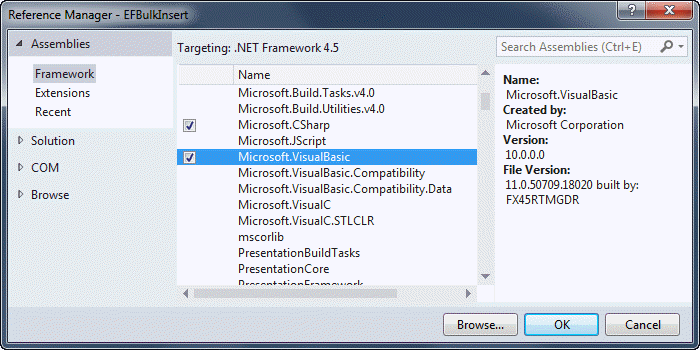
A TextFieldParser instance can be initialised from a number of sources: a stream, a physical file on disk, or aTextReader. The first two options are likely to be used more often in ASP.NET applications. This first example illustrates creating a TextFieldParser from an uploaded file in an MVC application:
[HttpPost]

public ActionResult Index(HttpPostedFileBase file)

{

    if (file != null)

    {

        if (file.ContentLength > 0)

        {

            using (var parser = new TextFieldParser(file.InputStream))

            {

                // ...

            }

        }

    }

    return View();

}
The TextFieldParser is instantiated within a using block because it implements IDisposable, and the usingblock ensures that the object will be displosed of safely and correctly. The next example sees a file path passed to the TextFieldParser constructor:
var file = @"C:\test.csv";

using (var parser = new TextFieldParser(file))

{

    //..

}
Finally, here's an example of the constructor that accepts a concrete implementation of the TextReader:
var csv = @"1,Mike,Brind,www.mikesdotnetting.com";

using (var parser = new TextFieldParser(new StringReader(csv)))

{

    // ...

}
Configuration
Configuration options are set through properties and methods. The key options are featured below:
| Option | Description | Default |
|---|---|---|
Delimiters (property) |
Specifies the field delimiters used in the text file. | null |
SetDelimiters (method) |
Alterntative way to specify the field delimiters used in the file | |
TextFieldType (property) |
Specify whether the file is Delimited orFixedWidth |
TextFieldType.Delimited |
HasFieldsEnclosedInQuotes(property) |
Boolean indicating whether text fields are enclosed in quotes |
true |
FieldWidths (property) |
An array of ints specifying the widths of individual fields in a fixed width file |
null |
SetFieldWidths (method) |
An alternative way to specify the widths of individual fields in a fixed width file | |
CommentTokens (property) |
An array specifying the tokens used to indicate comments in the file | null |
TrimWhiteSpace (property) |
Boolean indicating whether leading and trailing white space should be removed from fields |
true |
Having instantiated and configured a TextFieldParser, you will want to start accessing the data in the text file. The parser has a ReadFields method that gobbles up content a line at a time. It returns an array of strings. It also has an EndOfData property which indicates whether there are any more lines of data to be read. The following code shows how to use this property and method in combination to read each line of data in a simple example:
var data = @"1,Potato,Vegetable

2,Strawberry,Fruit

3,Carrot,Vegetable

4,Milk,Dairy,

5,Apple,Fruit

6,Bread,Cereal";

using (var parser = new TextFieldParser(new StringReader(data)))

{

    parser.Delimiters = new[] { "," };

    while (!parser.EndOfData)

    {

        var row = parser.ReadFields();

        var foodType = row[2];

    }

}
The sample above doesn't have a header. The following sample features the same data with a header row, and illustrates how to copy the whole thing into a DataTable:
var data = @"Id,Food,FoodType

1,Potato,Vegetable

2,Strawberry,Fruit

3,Carrot,Vegetable

4,Milk,Dairy,

5,Apple,Fruit

6,Bread,Cereal";

using (var parser = new TextFieldParser(new StringReader(data)))

{

    var headerRow = true;

    var dt = new DataTable();

    parser.Delimiters = new[] { "," };

    while (!parser.EndOfData)

    {

        var currentRow = parser.ReadFields();

        if (headerRow)

        {

            foreach (var field in currentRow)

            {

                dt.Columns.Add(field, typeof(object));

            }

            headerRow = false;

        }

        else

        {

            dt.Rows.Add(currentRow);

        }

    }

}
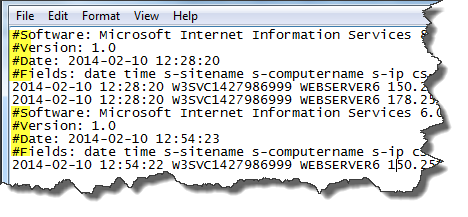
The final example shows how to apply the CommentTokens property to be able to read a standard IIS log file into aDataTable where comment lines are prefixed with a hash (#) symbol:
var file = @"C:\Logs\W3SVC6\ex140210.log";

var commentTokens = new[] { "#" };

var headerRow = File.ReadAllLines(file).First(l => l.StartsWith("#Fields:"));

using (var parser = new TextFieldParser(file))

{

    var dt = new DataTable();

    var columns = headerRow.Replace("#Fields: ", string.Empty).Split(new[] { ' ' }, StringSplitOptions.RemoveEmptyEntries);

    foreach (var column in columns)

    {

        dt.Columns.Add(column, typeof(object));

    }

    parser.SetDelimiters(" ");

    parser.CommentTokens = commentTokens;

    while (!parser.EndOfData)

    {

        {

            dt.Rows.Add(parser.ReadFields());

        }

    }

}
In this case, because the parser is configured to ignore lines beginning with the specified comment token, a bit of additional code is used to extract the field headers for the DataTable column names.
Summary
Next time you need to parse a text file in a .NET application, rather than reaching for string manipulation functions, you could consider using the TextFieldParser in the Microsoft.VisualBasic library.
原文链接:http://www.mikesdotnetting.com/article/279/reading-text-based-files-in-asp-net
Reading Text-based Files In ASP.NET的更多相关文章
- AsciiDoc Text based document generation
AsciiDoc Text based document generation AsciiDoc Home Page http://asciidoc.org/ AsciiDoc is a t ...
- How to easily concatenate text based on criteria in Excel? 如何将Excel中的文本按条件合并
To combine text with the unique ID numbers, you can extract the unique values first and then create ...
- Adding Cache-Control headers to Static Files in ASP.NET Core
Thanks to the ASP.NET Core middleware pipeline, it is relatively simple to add additional HTTP heade ...
- Reading Text from Images Using C#
Introduction By using Optical Character Recognition (OCR), you can detect and extract handwritten an ...
- Upload Files In ASP.NET Core 1.0 (Form POST And JQuery Ajax)
Uploading files is a common requirement in web applications. In ASP.NET Core 1.0 uploading files and ...
- PostgreSQL Reading Ad Writing Files、Execution System Instructions Vul
catalog . postgresql简介 . 文件读取/写入 . 命令执行 . 影响范围 . 恶意代码分析 . 缓解方案 1. postgresql简介 PostgreSQL 是一个自由的对象-关 ...
- HTTP based RESTful APIs - asp.net web api
1.HTTP http://www.w3.org/Protocols/rfc2616/rfc2616.html 2.REST是什么http://www.ics.uci.edu/~fielding/pu ...
- Uploading files using ASP.NET Web Api
http://chris.59north.com/post/Uploading-files-using-ASPNET-Web-Api
- Suspended Animation——《The Economist》阅读积累(考研英语二·2010 Reading Text 1)
[知识小百科] Damien Hirst(达米恩●赫斯特):生于1965年,是新一代英国艺术家的主要代表人物之一.他主导了90年代英国艺术发展并享有很高的国际声誉.赫斯特在1986年9月就读于伦敦大学 ...
随机推荐
- css控制div下图片自适应解决方法:图片不超过最大宽度
我们(特别是像我一样的菜鸟)经常会遇到一个问题——图片自适应.这个问题是很普遍的.在文章区,在论坛,可以这么说:哪儿需要上传图片,哪儿就存在这个问题,而论坛上也不时有人询问.为什么?原因很简单,我们不 ...
- Java 程序员容易犯的10个SQL错误
Java程序员编程时需要混合面向对象思维和一般命令式编程的方法,能否完美的将两者结合起来完全得依靠编程人员的水准: 技能(任何人都能容易学会命令式编程) 模式(有些人用“模式-模式”,举个例子,模式可 ...
- 让memcached分布式
memcached是应用最广的开源cache产品,它本身不提供分布式的解决方案,我猜想一方面它想尽量保持产品简单高效,另一方面cache的key-value的特性使得让memcached分布式起来比较 ...
- xunsearch全文检索初体验
目录 测试添加数据 测试搜索 简单搜索 稍微复杂的搜索 搜索建议 测试添加数据 ./Indexer.php --source=csv --clean demo 清空现有索引数据 ... 初始化数据源 ...
- KMP算法详解(转)
转自http://www.matrix67.com/blog/archives/115 通常我们的方法是枚举从A串的什么位置起开始与B匹配,然后验证是否匹配.假如A串长度为n,B串长度为m,那么这种方 ...
- C#读写EXCEL(二) ZedGraph在Asp.net中的应用
C#读写EXCEL(二) 2010-08-25 14:50:42| 分类: 默认分类 | 标签: |举报 |字号大中小 订阅 用微信 “扫一扫” 将文章分享到朋友圈. 用易信 “扫一扫” ...
- class function
type TTest = class public class function sayHello :String; function saybye:String; ...
- ubuntu12 安装redis和phpRedisAdmin详细流程
一.Ubuntu安装redis(redis默认端口6379) 方式一.直接下载源码,编译(redis可以编译源码之后直接运行,不需要安装) 1.1执行命令,从官网下载源码编译: $ wget http ...
- Winform绑定图片的三种方式
1.绝对路径: this.pictureBox2.Image=Image.FromFile("D:\\001.jpg"); 2.相对路径: Application.StartupP ...
- 幂等性的含义和 HTTP请求方法的幂等性
幂等性的含义和 HTTP请求方法的幂等性 1.什么是幂等性 =============== 幂等性,英文是idempotent,读作[aɪ'dɛmpətənt]. 它的含义如下: “Methods c ...