
uni-app之camera组件-人脸拍摄
小程序录制视频;10-30秒;需要拍摄人脸,大声朗读数字(123456)这种。
1.camera组件
camera页面内嵌的区域相机组件。注意这不是点击后全屏打开的相机
camera只支持小程序使用;官网链接
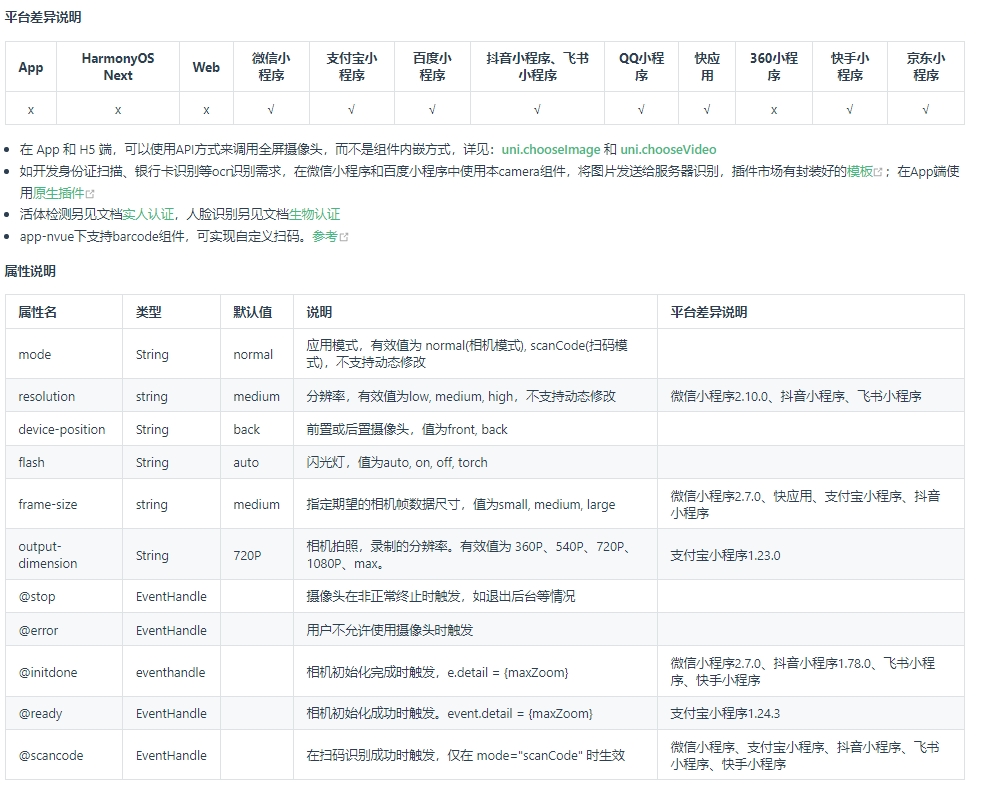
1.2 效果图
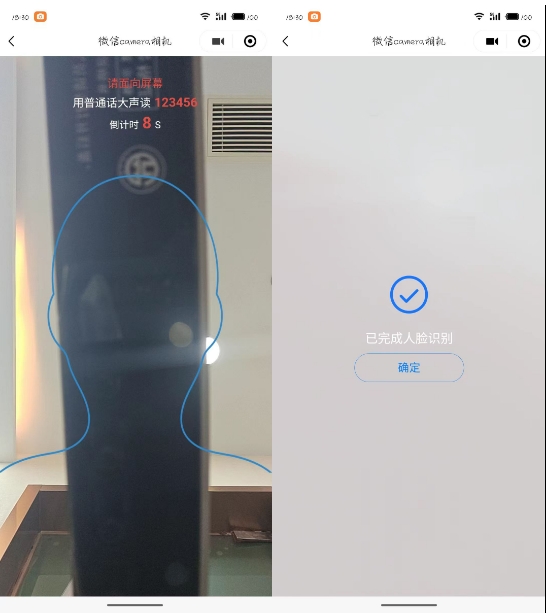
1.3 页面布局
camera 设置宽100%,高度通过uni.getSystemInfo获取,全屏展示。在通过定位把提示文字等信息放上去;
录制完毕,遮罩提示,完成录制,确认返回;


<template>

    <view class="camera-position">

        <camera device-position="front" flash="auto" @error="onCameraError"

            :style="'width: 100%; height: '+ screenHeight +'px;'">

            <!-- 人脸轮廓-图片 -->

            <image src="../../static/face/face-avater.png" style="width: 100%; height: 55vh; margin:22vh 0 0 0;"

                v-if="!achieveShow"></image>

        </camera>

        <!-- 顶部提示信息 -->

        <view class="camera-top text-center" v-show="!achieveShow">

            <view class="text-lg text-red">

                请面向屏幕

            </view>

            <view class="text-xl text-white margin-tb-xs">

                <text class="text-lg">用普通话大声读</text>

                <text class="text-red text-bold margin-left-xs">123456</text>

            </view>

            <view class="text-xxl text-red">

                <text class="text-df text-white">倒计时</text>

                <text class="text-red text-bold margin-lr-xs">{{totalSeconds}}</text>

                <text class="text-df text-white">S</text>

            </view>

        </view>

        <!-- 完成拍摄 -->

        <view class="achieve-shade" :style="'width: 100%; height: '+ screenHeight +'px;'" v-if="achieveShow">

            <view class="" style="font-size: 120rpx;color: #1977FF;">

                <text class="cuIcon-roundcheck"></text>

            </view>

            <view class="text-xl text-white margin-tb-sm">

                已完成人脸识别

            </view>

            <button class="cu-btn line-blue round lg" @click="confirmBut">确定</button>

        </view>

    </view>

</template>
View
css样式
<style lang="scss" scoped>

    .camera-position {

        position: relative;

        .camera-top {

            position: absolute;

            left: 0;

            top: 50rpx;

            width: 100%;

        }

        .camera-bottom {

            position: absolute;

            left: 0;

            bottom: 0;

            width: 100%;

        }

        .achieve-shade {

            position: absolute;

            left: 0;

            top: 0;

            background-color: rgba(222, 222, 222, 0.9);

            display: flex;

            flex-direction: column;

            align-items: center;

            justify-content: center;

            button {

                width: 300rpx;

            }

        }

    }

</style>
css
js代码
<script>

    export default {

        data() {

            return {

                cameraContext: null,

                //计时器

                timer: null,

                //录制时长

                totalSeconds: 10,

                //屏幕高度

                screenHeight: "",

                //是否显示-完成遮罩

                achieveShow: false

            }

        },

        onLoad() {

            let that = this

            uni.getSystemInfo({

                success: (res) => {

                    console.log('屏幕宽度,单位为px:', res.windowWidth);

                    console.log('屏幕高度,单位为px:', res.windowHeight);

                    that.screenHeight = res.windowHeight;

                },

            });

            setTimeout(() => {

                this.startShoot()

            }, 500)

        },

        onReady() {

            // 创建 camera 上下文 CameraContext 对象

            this.cameraContext = uni.createCameraContext()

        },

        methods: {

            // 开始拍摄

            startShoot() {

                this.cameraContext.startRecord({

                    timeoutCallback: () => {

                        console.error('超出限制时长', this.totalSecond);

                    },

                    timeout: this.totalSeconds,

                    success: (res) => {

                        //开启计时器

                        this.timer = setInterval(() => {

                            this.totalSeconds--

                        }, 1000)

                        console.log(res, '开始拍摄');

                    },

                    fail: (err) => {

                        this.errToast('摄像头启动失败,请重新打开')

                    }

                })

            },

            // 结束拍摄

            stopShoot() {

                // 接触 计时器

                if (this.timer) clearInterval(this.timer)

                this.cameraContext.stopRecord({

                    compressed: true,

                    success: (res) => {

                        //显示遮罩

                        this.achieveShow = true

                        // TODO 获取数据帧

                        console.log(res, '结束拍摄');

                    },

                    fail: (err) => {

                        this.errToast('视频保存失败,请重新录制')

                    },

                })

            },

            // 摄像头错误

            onCameraError(error) {

                console.error('摄像头错误: ', error.detail);

            },

            //摄像头-失败操作

            errToast(e) {

                this.$operate.toast({

                    title: e

                })

                setTimeout(() => {

                    this.confirmBut()

                }, 500)

            },

            //确定-返回上一页

            confirmBut() {

                uni.navigateBack()

            },

        },

        watch: {

            //监听倒计时

            totalSeconds: {

                handler(newVal) {

                    // console.log(newVal, '倒计时');

                    //倒计时 = 1 的时候结束拍摄

                    if (newVal == 1) {

                        //结束拍摄

                        this.stopShoot()

                    }

                }

            }

        }

    }

</script>
js
注:第一次进入页面,有时候摄像头会启动失败,需要重新点击打开;
2.微信官方api
微信小程序中需要使用手机拍摄照片以及视频;使用wx.chooseMediaAPI来实现;
该API用于拍摄或从手机相册中选择图片或视频,官网链接为:wx.chooseMedia-微信开放文档
wx.chooseMedia({

	//数量 1-9

	count: 1,

	//时长

	maxDuration: '10',

	// 文件类型  image 图片  video视频   mix同时选择图片和视频

	mediaType: ['video'],

	// 图片和视频选择的来源: album 相册  camera相机拍摄

	sourceType: ['camera'],

	//摄像头: back 前置  front 后置摄像头

	camera: 'back',

	success(res) {

		console.log(res)

		console.log(res.tempFiles[0].tempFilePath)

	},

	fail(err) {

		console.log(err)

	}

})
uni-app之camera组件-人脸拍摄的更多相关文章
- Hierarchy视图里的Transform和Camera组件
Hierarchy视图里的Transform和Camera组件 在Hierarchy视图里,选中Camera,然后在Inspector视图里查看其各组件,如图1-8所示.对于Transform和Cam ...
- ionic3+angular4开发混合app 之自定义组件
这里主要是记录ionic3+angular4开发混合app时自定义组件,我想自定义组件的方法和angular4应该类似,具体在纯angular4中自定义组件,暂时没有实践,个人觉得差别不大,之后实践了 ...
- Top Android App使用的组件(应用)
Top Android App使用的组件 唱吧_462 smack:de.measite.smack:??? ???:org.apache:??? smack:org.jivesoftware.s ...
- uni app中使用自定义图标库
项目中难免会用到自定义图标,那在uni app中应该怎么使用呢? 首先, 将图标目录放在static资源目录下: 在main.js中引入就可以全局使用了 import '@/static/icon-o ...
- uni app 零基础小白到项目实战-1
uni-app是一个使用vue.js开发跨平台应用的前端框架. 开发者通过编写vue.js代码,uni-app将其编译到Ios,android,微信小程序等多个平台,保证其正确并达到优秀体验. Uni ...
- MUI开发APP,scroll组件,运用到区域滚动
最近在开发APP的过程中,遇到一个问题,就是内容有一个固定的头部和底部. 头部就是我们常用的header了,底部的话,就放置一个button,用来提交页面数据或者进入下一个页面等,效果 ...
- 新闻类App使用的组件
UI SlidingMenu:com.jeremyfeinstein.slidingmenu:滑动菜单 ActionBarSherlock:com.actionbarsherlock:Action B ...
- Top Android App使用的组件 2
微信_355 SQLCipher:info.guardianproject.database:Android数据库加密 微博_650 点信传媒:cn.dx:广告平台 Apache HttpClient ...
- 外卖app的header组件开发
1.webpack框架创建 # 全局安装 vue-cli $ npm install --global vue-cli # 创建一个基于 webpack 模板的新项目 $ vue init webpa ...
- [Learn AF3]第五章 App Framework 3组件之Drawer——Side Menu
Drawer——Side menu 组件名称:Drawer 说明:af3中的side menu和af2中有很大变化,af3中的side menu实际上是通过插件$.afui.drawer来实现 ...
随机推荐
- 嵌入式HLS 案例开发步骤分享——基于Zynq-7010/20工业开发板(1)
目 录 前 言 3 1 HLS 开发流程说明 5 1.1 HLS 工程导入 5 1.2 编译与仿真 6 1.3 综合 8 1.4 IP 核封装 10 1.5 IP 核测试 14 前 言 本文主要介绍 ...
- Dotnet算法与数据结构:Hashset, List对比
哈希集A 是存储唯一元素的集合.它通过在内部使用哈希表来实现这一点,该哈希表为基本操作(如添加.删除和包含)提供恒定时间平均复杂度 (O(1)).此外,不允许重复元素,使其成为唯一性至关重要的场景的理 ...
- 如何做好一场NPS调研?
我们在工作中经常遇到的一个词,那就是"产品NPS调研".当部分项目缺少专业的用研人员时,设计师.产品经理则经常会接受上级的要求,投身于NPS调研工作. 笔者也曾在2022年的某天突 ...
- 统计里面PV 和 UV代表什么意思
1.网站流量bai统计中"PV"它所代表的意思是访问量了,具体指的du就是网站zhi的页面点击量或是浏览量,亦或是页面的刷新量dao了,网站的页面每刷新一次,就统计一个" ...
- JavaScript处理后端返回PDF文件流,在线预览下载PDF文件
在实际开发业务中,遇到这一需求,即后端返回的pdf文件,是以base64文件流的方式,在此不便操作接口响应等操作,便以上传一个文件转化为文件流的形式模拟 实际应用时,base64Img = res.d ...
- TIER 1: Sequel
TIER 1: Sequel MySQL MySQL 是一种流行的开源关系型数据库管理系统(RDBMS),它被广泛用于存储和管理大量的结构化数据.MySQL 是由瑞典公司 MySQL AB 开发的,后 ...
- 毕设项目:springboot+vue实现的在线求职平台
一.前言 随着信息技术的飞速发展和互联网的普及,线上求职已成为众多求职者和企业招聘的重要渠道.为满足市场需求,我们利用Spring Boot和Vue技术栈,开发了一款功能全面.用户友好的在线求职平台. ...
- 【js】 reduce、filter、map 数组链式调用求加和
let data = [ {hierarchy: '香蕉', count: 1}, {hierarchy: '苹果', count: 2}, {hierarchy: '葡萄', count: 3}, ...
- pytest批量执行多个测试文件(批量执行一个文件夹下的所有测试用例)
图片 代码 #!/usr/bin/env python # @File : test_runall.py import pytest import os # path = os.path.dirnam ...
- java开发环境安装IDEA+jdk1.8
一. 需要得安装包 (1)IDEA破解版.zip (2)jdk1.8.0_25.7z 获取方式(免费): (1) 登录-注册:http://resources.kittytiger.cn/ ...