
win7安装mysql-8.0.13-winx64
这里展示一下,由于需要安装一个版本测试一下数据,其实就是超简单的啦。
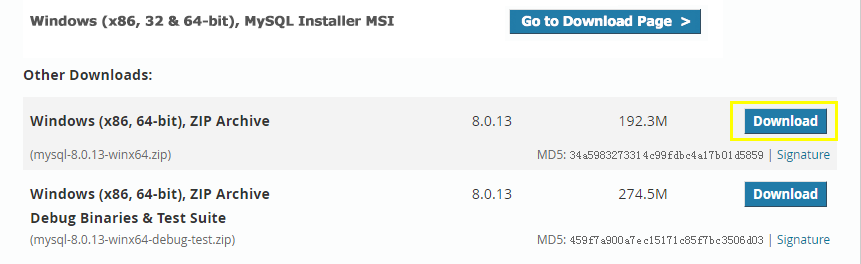
下包
注:https://dev.mysql.com/downloads/mysql/
解压与配置
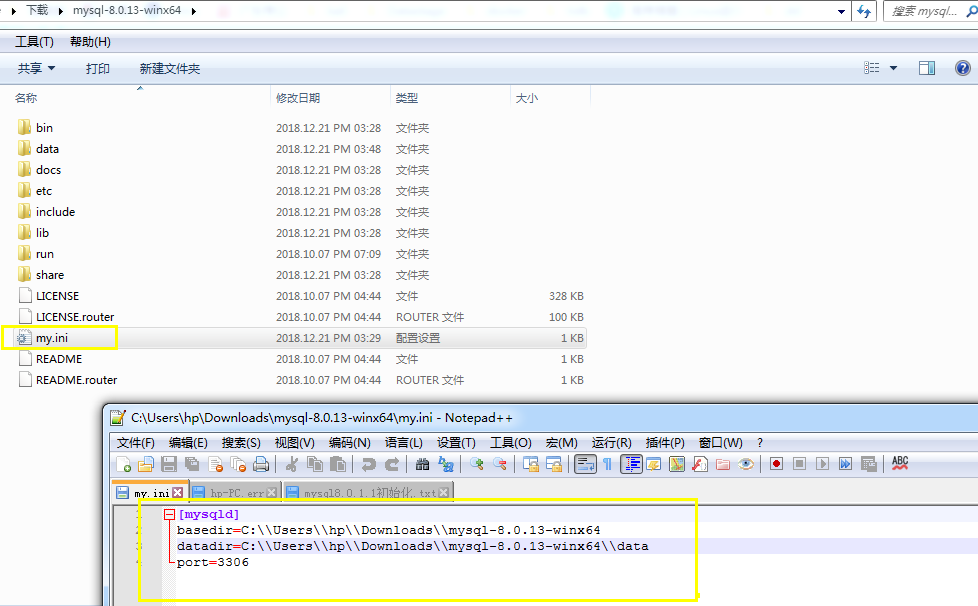
[mysqld]

basedir=C:\\Users\\hp\\Downloads\\mysql-8.0.13-winx64

datadir=C:\\Users\\hp\\Downloads\\mysql-8.0.13-winx64\\data

port=3306
初始化、安装、与启动
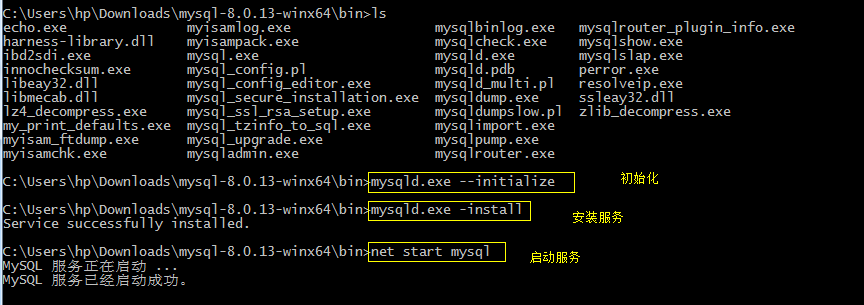
C:\Users\hp\Downloads\mysql-8.0.13-winx64\bin>mysqld.exe --initialize

C:\Users\hp\Downloads\mysql-8.0.13-winx64\bin>mysqld.exe -install

Service successfully installed.

C:\Users\hp\Downloads\mysql-8.0.13-winx64\bin>net start mysql

MySQL 服务正在启动 ...

MySQL 服务已经启动成功。
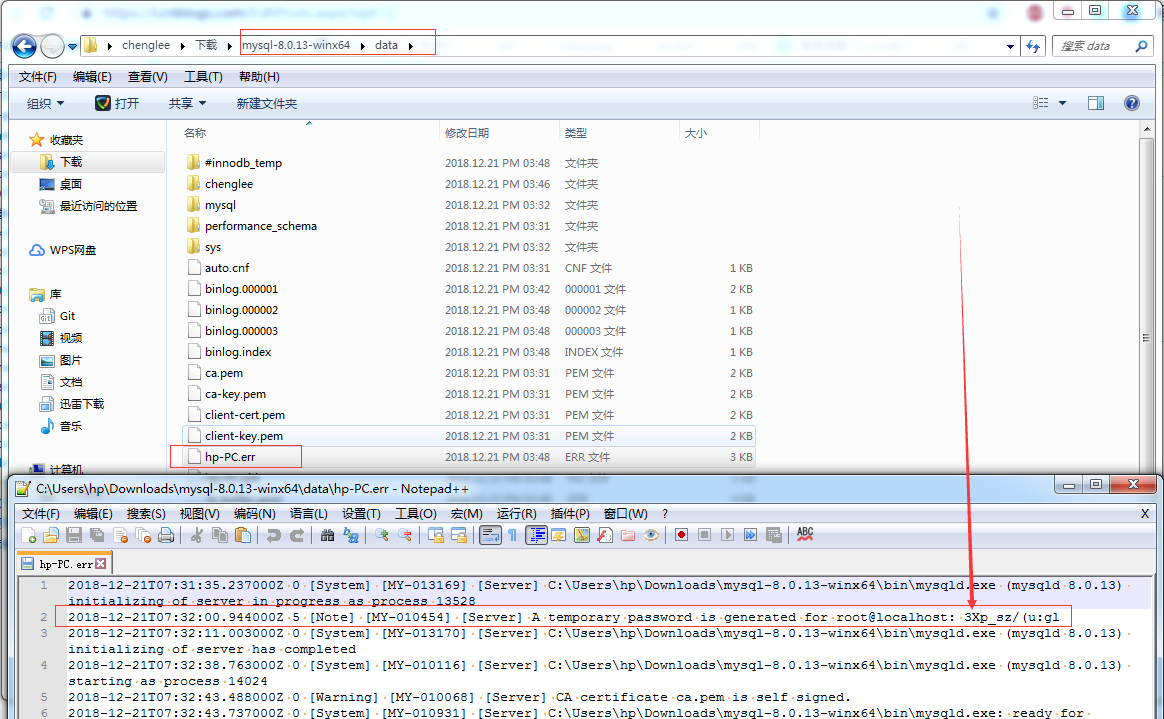
修改初始密码
注:在data目录下.err后缀名的就是日志, 日志里面记录了初始化的信息
登录与修改密码
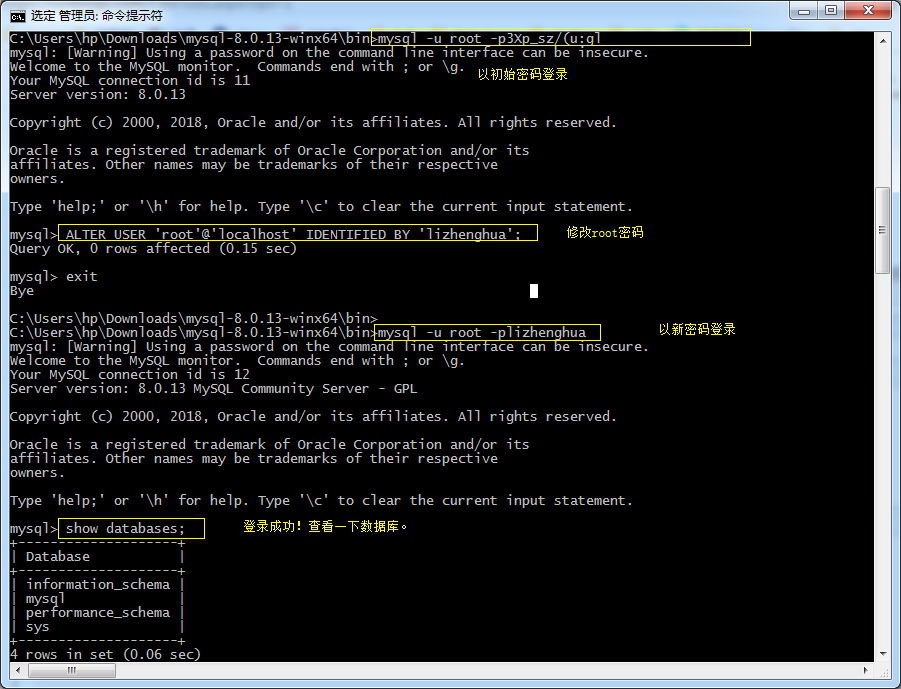
C:\Users\hp\Downloads\mysql-8.0.13-winx64\bin>mysql -u root -p3Xp_sz/(u:gl

mysql: [Warning] Using a password on the command line interface can be insecure.

Welcome to the MySQL monitor.  Commands end with ; or \g.

Your MySQL connection id is 11

Server version: 8.0.13

Copyright (c) 2000, 2018, Oracle and/or its affiliates. All rights reserved.

Oracle is a registered trademark of Oracle Corporation and/or its

affiliates. Other names may be trademarks of their respective

owners.

Type 'help;' or '\h' for help. Type '\c' to clear the current input statement.

mysql> ALTER USER 'root'@'localhost' IDENTIFIED BY 'lizhenghua';

Query OK, 0 rows affected (0.15 sec)

mysql> exit

Bye

C:\Users\hp\Downloads\mysql-8.0.13-winx64\bin>

C:\Users\hp\Downloads\mysql-8.0.13-winx64\bin>mysql -u root -plizhenghua

mysql: [Warning] Using a password on the command line interface can be insecure.

Welcome to the MySQL monitor.  Commands end with ; or \g.

Your MySQL connection id is 12

Server version: 8.0.13 MySQL Community Server - GPL

Copyright (c) 2000, 2018, Oracle and/or its affiliates. All rights reserved.

Oracle is a registered trademark of Oracle Corporation and/or its

affiliates. Other names may be trademarks of their respective

owners.

Type 'help;' or '\h' for help. Type '\c' to clear the current input statement.

mysql> show databases;

+--------------------+

| Database           |

+--------------------+

| information_schema |

| mysql              |

| performance_schema |

| sys                |

+--------------------+

4 rows in set (0.06 sec)

mysql> exit

Bye
重启服务

C:\Users\hp\Downloads\mysql-8.0.13-winx64\bin>net stop mysql

MySQL 服务正在停止.

MySQL 服务已成功停止。

C:\Users\hp\Downloads\mysql-8.0.13-winx64\bin>net start mysql

MySQL 服务正在启动 ..

MySQL 服务已经启动成功。
查看进程与端口
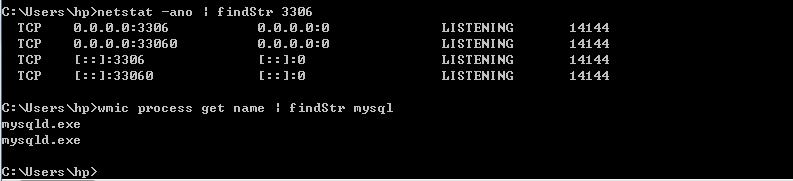
C:\Users\hp>netstat -ano | findStr 3306

  TCP    0.0.0.0:3306           0.0.0.0:0              LISTENING       14144

  TCP    0.0.0.0:33060          0.0.0.0:0              LISTENING       14144

  TCP    [::]:3306              [::]:0                 LISTENING       14144

  TCP    [::]:33060             [::]:0                 LISTENING       14144

C:\Users\hp>wmic process get name | findStr mysql

mysqld.exe

mysqld.exe

C:\Users\hp>
win7安装mysql-8.0.13-winx64的更多相关文章
- MySQL 8.0.13安装修改密码的一个问题,记录一下。
https://blog.csdn.net/qq_37350706/article/details/81707862 关于安装MySQL 8.0.13,本人就不多说了,上面这个链接讲的非常详细 请参考 ...
- centos 8及以上安装mysql 8.0
本文适用于centos 8及以上安装mysql 8.0,整体耗时20分钟内,不需要FQ 1.环境先搞好 systemctl stop firewalld //关闭防火墙 systemctl disab ...
- 在Ubuntu 18.04 安装 MySQL 8.0
在Ubuntu 18.04 安装 MySQL 8.0 ① 登入 mysql 官网,在官网中下载 deb 包,点击该链接,即可下载. https://dev.mysql.com/downloads/re ...
- windows 系统如何安装 mysql 8.0.15 数据库?
windows 系统如何安装 mysql 8.0.15 数据库? 1. 下载安装包 下载地址:https://cdn.mysql.com//Downloads/MySQL-8.0/mysql-8.0. ...
- win10 安装mysql 8.0.18 解决Navicat初次连接报错
win10 安装mysql 8.0.18 解决Navicat初次连接报错 win10 安装mysql 8.0.18-winx64 一,先去官网下载mysql 安装包 https://dev.mysql ...
- 安装Mysql 8.0的艰难体验
背景: Mysql 8.0 以后版本,在性能等方面有了很大提升,而且在自动编号.Timestamp等字段的设置上有了很方便的进步,因此在一年前即开始将原有的基于5.5版本的服务器逐渐向8.0转移.但转 ...
- CentOS 7 下安装 MySQL 8.0
前言 本篇文章主要介绍在 CentOS 7 环境下安装 MySQL 8.0. 正文 1. 配置yum源 首先在 https://dev.mysql.com/downloads/repo/yum/ 找到 ...
- Ubuntu18 安装 MySQL 8.0.22
Ubuntu18 安装 MySQL 8.0.22 网上教程都比旧,也不是第一次安装了,但依然还是花了比较多的时间,特此记录本次安装过程.因是安装完毕后回忆记录,或有错漏. 第一步: 下载 mysql ...
- 在 CentOS 7.5 64位上使用 yum 安装 MySQL 8.0
前段时间在 CentOS 7.5 64位上安装 MySQL 8.0.查了些资料,在这里记录一下详细的安装和设置步骤. 一.安装 使用yum安装MySQL之前需要先下载对应的.rpm文件,下载方法: 去 ...
- 超级简单!CentOS-8 安装 MySQL 8.0,比喝水还简单
中国人不骗中国人 果然是系统和MySQL的版本越高安装越便利了 在阿里云的 CentOS-8 比喝开水还简单的安装 MySQL 8.0,开始~ 1.以 root 用户通过 CentOS 软件包管理器来 ...
随机推荐
- PHP处理大文件下载
<?php /** * Created by PhpStorm. * User: Kung * Date: 15-10-21 * Time: 下午8:00 */ set_time_limit(0 ...
- mysql 延迟添加唯一索引
MySQL [test]> create table tbl_keyword ( -> id int not null auto_increment primary key, -> ...
- redhat vim编辑器永久添加行号及搜索
设置行号: 跳转到home $ cd ~ 编辑.vimrc,没有的话自动创建 $ vim .vimrc 第一行加入: set nu :wq 保存退出,即可 如果想取消设置,同理删除set nu即可 v ...
- gcc常用命令使用
gcc编译文件过程 .c文件到 .i文件 到.s(汇编文件) 到.o文件,再到可执行文件 .c到.i 实操一下: test.c文件如下 : #include <stdlib.h> #inc ...
- .NET 黑魔法 - asp.net core 身份认证 - Policy
身份认证几乎是每个项目都要集成的功能,在面向接口(Microservice)的系统中,我们需要有跨平台,多终端支持等特性的认证机制,基于token的认证方式无疑是最好的方案.今天我们就来介绍下在.Ne ...
- 解决ORA-00257: 归档程序错误。在释放之前仅限于内部连接
昨天尝试通过plsqldev尝试连接oracle数据库,报错,提示ORA-00257: 归档程序错误.在释放之前仅限于内部连接 通过查询,得知原因是archivedlog达到了数据库设置的空间限制. ...
- gpg无法生成密钥对的问题
今天在archlinux中生成key的过程中,发现卡在收集随机信息的步骤了. 而在windows系统中启动kleopatra之后,一直是一个任务条,显示loading certificate cach ...
- cache基础
cache是系统中的一块快速SRAM,价格高,但是访问速度快,可以减少CPU到main memory的latency. cache中的术语有: 1) Cache hits,表示可以在cache中,查找 ...
- tcl脚本
tcl,全名tool command language,是一种通用的工具语言. 1)每个命令之间,通过换行符或者分号隔开: 2)tcl的每个命令包含一个或者多个单词,默认第一个单词表示命令,第二个单词 ...
- linux打包压缩与搜索命令
1.tar命令 tar命令用于对文件进行打包压缩或解压,格式为“tar [选项] [文件]”. tar命令的参数及其作用 参数 作用 -c 创建压缩文件 -x 解开压缩文件 -t 查看压缩包内有哪些 ...