
winfrom datagridview ,picturebox,显示图片,以及删除问题

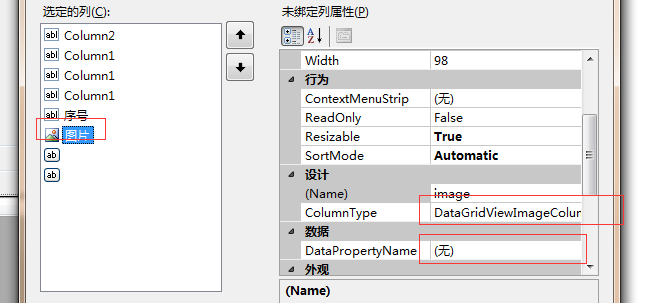
 private void write_listview(DataSet ds)

        {

            DataTable dt = ds.Tables[0];

            dataGridView1.DataSource = dt.DefaultView;

            for (int i = 0; i < dt.Rows.Count; i++)

            {

                dataGridView1.Rows[i].Cells["num"].Value = i + 1;

                dataGridView1.Rows[i].Cells["image"].Value = GetFile(AppDomain.CurrentDomain.BaseDirectory + @"File\" + dt.Rows[i]["Pic"].ToString());


            }

        }
/// pictureBox绑定图片
               pictureBox2.SizeMode = PictureBoxSizeMode.Zoom;


                pictureBox2.Image = GetFile(AppDomain.CurrentDomain.BaseDirectory + @"File\" + path);
 ///

        /// 将文件转为内存流

        ///

        ///

        ///

        private MemoryStream ReadFile(string path)

        {

            if (!File.Exists(path))

                return null;

            using (FileStream file = new FileStream(path, FileMode.Open))

            {

                byte[] b = new byte[file.Length];

                file.Read(b, 0, b.Length);

                MemoryStream stream = new MemoryStream(b);

                return stream;

            }

        }

        ///

        /// 将内存流转为图片

        ///

        ///

        ///

        private Image GetFile(string path)

        {

            MemoryStream stream = ReadFile(path);

            return stream == null ? null : Image.FromStream(stream);

        }
or(
  public System.Drawing.Image GetImage(string path)

        {

            FileStream fs = new FileStream(path, FileMode.Open);

            Image result = Image.FromStream(fs);

            fs.Close();

            return result;

        }
)
 private void dataGridView1_CellContentClick_1(object sender, DataGridViewCellEventArgs e)

        {

            //var s = dataGridView1.Columns[e.ColumnIndex].Name;

            path = dataGridView1.Rows[e.RowIndex].Cells["imagepath"].Value.ToString();

             id = dataGridView1.Rows[e.RowIndex].Cells["Column2"].Value.ToString();

            if (dataGridView1.Columns[e.ColumnIndex].Name == "image")

            {

                pictureBox2.SizeMode = PictureBoxSizeMode.Zoom;


                pictureBox2.Image = GetFile(AppDomain.CurrentDomain.BaseDirectory + @"File\" + path);

            }

            if (dataGridView1.Columns[e.ColumnIndex].Name == "Column_del")

            {

                pictureBox2.Image = null;


                if (File.Exists(AppDomain.CurrentDomain.BaseDirectory + @"File\" + path))

                {

                    File.Delete(AppDomain.CurrentDomain.BaseDirectory + @"File\" + path);

                }

                string sqlstr = "DELETE from [Image] where ID= '" + id + "'";

                int count = SQLiteHelper.ExecuteNonQuery(sqlstr);


                if (count > 0)

                {

                    this.dataGridView1.Rows.Remove(this.dataGridView1.Rows[e.RowIndex]);

                    MessageBox.Show("删除成功!");

                    sqlstr = "SELECT * FROM [Image] where [EID]='" + editsrt + "'";//"SELECT * FROM [Image] where EID='" + eid + "'";

                    DataSet ds_img = SQLiteHelper.ExecuteQuery(sqlstr);

                    write_listview(ds_img);

                }

            }
winfrom datagridview ,picturebox,显示图片,以及删除问题的更多相关文章
- EmguCV控件Emgu.CV.UI.ImageBox及C# picturebox显示图片连续刷新出现闪烁问题
在上一篇里,EmguCV(OpenCV)实现高效显示汉字及叠加 实现了视频叠加及显示,但存在问题,就是 Emgu.CV.UI.ImageBox及C# picturebox显示图片时都会出现闪烁,尤其 ...
- C#winfrom listview 设置显示图片
ListView控件有5种显示图片方式:LargeIcon(大图标),Detail(详细),SmallIcon(小图标),List(列表),Tile,常用前4种. 这里说一下设置方式:LargeIc ...
- [WinForm]- 设置DataGridView单元格内根据不同值显示图片
首先设置要显示图片的列 DataGridViewImageColumn status = new DataGridViewImageColumn(); status.DisplayIndex = ; ...
- 如何使用SOIL在VS2012的 C++环境下显示图片
先看下效果. 这是一个很无聊的功能....首先说下,我做这个功能的初衷并不是为了实现在控制台中显示图片...(这貌似很无聊) 而是因为自己想做用C做一个游戏:http://q.cnblogs.com/ ...
- While readingiphone真机无法显示图片,而模拟器可以正常显示
可能,很多开发IOS程序的遇到过在模拟器里,加载图片都是正常的,但是在真机里就会出现图片资源不能加载的问题. 其中一种原因是,在Simulator里面,例如:图片资源名称为:a.PNG,在代码你里,你 ...
- 利用COM组件IPicture读取jpg、gif、bmp图片文件数据和显示图片
1.读取图片数据 函数原型:bool LoadImage(const char *pName, unsigned char *pBitData); 函数功能,读取pName指向的图片文件的位图数据 b ...
- 我写的一个 Qt 显示图片的控件
Qt 中没有专门显示图片的控件.通常我们会使用QLabel来显示图片.可是QLabel 显示图片的能力还是有点弱.比方不支持图像的缩放一类的功能.使用起来不是非常方便. 因此我就自己写了个简单的类. ...
- FrameBuffer系列 之 显示图片
摘自:http://blog.csdn.net/luxiaoxun/article/details/7622988 #include <unistd.h> #include < ...
- winfrom中pictureBox控件的部分使用方法
一.后台属性 1.pictureBox1.Image显示图片 2.pictureBox1.ImageLocation存储和提取图片路径 二.面板属性 1.Picturebox控件SizeMode属性 ...
随机推荐
- Linus 谈软件开发管理经验(转载)
转注:英文原文写于 2011 年 导读:没有人比Linus Torvalds更了解软件开发项目管理中的酸甜苦辣了.作为Linux的创建者,Torvalds在过去二十年指导了数以千计的开发者共同改进开源 ...
- charles最新破解jar文件,及浏览器证书安装
一 在线破解文件下载 Charles 在线破解工具,https://www.zzzmode.com/mytools/charles/ 描述 此工具用于生成破解后的charles.jar文件, 破解原 ...
- python base64加解密
加密字符串 encodestr = base64.b64encode("chenglee1234".encode(encoding='utf-8')) 解密字符串 decodest ...
- shell 调试脚本设置
set -x 脚本部分内容 set +x
- 复旦高等代数II(16级)每周一题
每周一题的说明 一.本学期高代II的每周一题面向16级的同学,将定期更新(一般每周的周末公布下一周的题目); 二.欢迎16级的同学通过微信或书面方式提供解答图片或纸质文件给我,优秀的解答可以分享给大家 ...
- ng-model绑定的是ng-option中的什么?
<!DOCTYPE html> <html> <head> <meta charset="utf-8"> <script sr ...
- Flask学习【第8篇】:flask-session组件
简介 flask-session是flask框架的session组件,由于原来flask内置session使用签名cookie保存,该组件则将支持session保存到多个地方,如 redis:保存数据 ...
- 【做题】arc080_f-Prime Flip——转换、数论及匹配
题意:有一个无限序列,其中有\(n\)个位置上的数为\(1\),其余都是\(0\).你可以进行若干次操作,每次选取序列上的一个区间\([l,r)\),满足\(r-l\)为奇质数,将在这个区间上的数都异 ...
- [转] Java 基础
1. 面向对象和面向过程的区别 面向过程 面向对象 2. Java 语言有哪些特点 3. 关于 JVM JDK 和 JRE 最详细通俗的解答 JVM JDK 和 JRE 4. Oracle JDK 和 ...
- c# 之继承、封装、多态
虽然理解了继承和封装,但是多态总是忘记其定义,很容易被忽略,通过这一次的查找资料和总结能帮助自己更好的理解 1/多态的概念: 同一操作作用于不通过的对象,可以有不同的解释,产生不同的执行结果,这就是多 ...