
winfrom datagridview ,picturebox,显示图片,以及删除问题

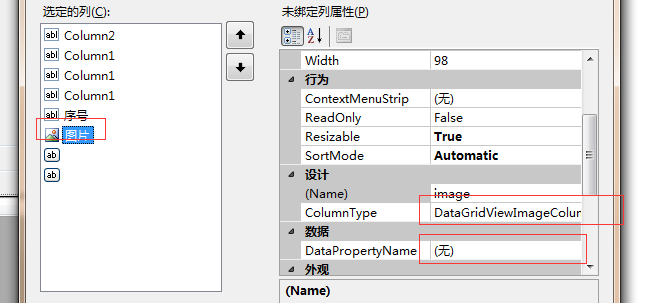
 private void write_listview(DataSet ds)

        {

            DataTable dt = ds.Tables[0];

            dataGridView1.DataSource = dt.DefaultView;

            for (int i = 0; i < dt.Rows.Count; i++)

            {

                dataGridView1.Rows[i].Cells["num"].Value = i + 1;

                dataGridView1.Rows[i].Cells["image"].Value = GetFile(AppDomain.CurrentDomain.BaseDirectory + @"File\" + dt.Rows[i]["Pic"].ToString());


            }

        }
/// pictureBox绑定图片
               pictureBox2.SizeMode = PictureBoxSizeMode.Zoom;


                pictureBox2.Image = GetFile(AppDomain.CurrentDomain.BaseDirectory + @"File\" + path);
 ///

        /// 将文件转为内存流

        ///

        ///

        ///

        private MemoryStream ReadFile(string path)

        {

            if (!File.Exists(path))

                return null;

            using (FileStream file = new FileStream(path, FileMode.Open))

            {

                byte[] b = new byte[file.Length];

                file.Read(b, 0, b.Length);

                MemoryStream stream = new MemoryStream(b);

                return stream;

            }

        }

        ///

        /// 将内存流转为图片

        ///

        ///

        ///

        private Image GetFile(string path)

        {

            MemoryStream stream = ReadFile(path);

            return stream == null ? null : Image.FromStream(stream);

        }
or(
  public System.Drawing.Image GetImage(string path)

        {

            FileStream fs = new FileStream(path, FileMode.Open);

            Image result = Image.FromStream(fs);

            fs.Close();

            return result;

        }
)
 private void dataGridView1_CellContentClick_1(object sender, DataGridViewCellEventArgs e)

        {

            //var s = dataGridView1.Columns[e.ColumnIndex].Name;

            path = dataGridView1.Rows[e.RowIndex].Cells["imagepath"].Value.ToString();

             id = dataGridView1.Rows[e.RowIndex].Cells["Column2"].Value.ToString();

            if (dataGridView1.Columns[e.ColumnIndex].Name == "image")

            {

                pictureBox2.SizeMode = PictureBoxSizeMode.Zoom;


                pictureBox2.Image = GetFile(AppDomain.CurrentDomain.BaseDirectory + @"File\" + path);

            }

            if (dataGridView1.Columns[e.ColumnIndex].Name == "Column_del")

            {

                pictureBox2.Image = null;


                if (File.Exists(AppDomain.CurrentDomain.BaseDirectory + @"File\" + path))

                {

                    File.Delete(AppDomain.CurrentDomain.BaseDirectory + @"File\" + path);

                }

                string sqlstr = "DELETE from [Image] where ID= '" + id + "'";

                int count = SQLiteHelper.ExecuteNonQuery(sqlstr);


                if (count > 0)

                {

                    this.dataGridView1.Rows.Remove(this.dataGridView1.Rows[e.RowIndex]);

                    MessageBox.Show("删除成功!");

                    sqlstr = "SELECT * FROM [Image] where [EID]='" + editsrt + "'";//"SELECT * FROM [Image] where EID='" + eid + "'";

                    DataSet ds_img = SQLiteHelper.ExecuteQuery(sqlstr);

                    write_listview(ds_img);

                }

            }
winfrom datagridview ,picturebox,显示图片,以及删除问题的更多相关文章
- EmguCV控件Emgu.CV.UI.ImageBox及C# picturebox显示图片连续刷新出现闪烁问题
在上一篇里,EmguCV(OpenCV)实现高效显示汉字及叠加 实现了视频叠加及显示,但存在问题,就是 Emgu.CV.UI.ImageBox及C# picturebox显示图片时都会出现闪烁,尤其 ...
- C#winfrom listview 设置显示图片
ListView控件有5种显示图片方式:LargeIcon(大图标),Detail(详细),SmallIcon(小图标),List(列表),Tile,常用前4种. 这里说一下设置方式:LargeIc ...
- [WinForm]- 设置DataGridView单元格内根据不同值显示图片
首先设置要显示图片的列 DataGridViewImageColumn status = new DataGridViewImageColumn(); status.DisplayIndex = ; ...
- 如何使用SOIL在VS2012的 C++环境下显示图片
先看下效果. 这是一个很无聊的功能....首先说下,我做这个功能的初衷并不是为了实现在控制台中显示图片...(这貌似很无聊) 而是因为自己想做用C做一个游戏:http://q.cnblogs.com/ ...
- While readingiphone真机无法显示图片,而模拟器可以正常显示
可能,很多开发IOS程序的遇到过在模拟器里,加载图片都是正常的,但是在真机里就会出现图片资源不能加载的问题. 其中一种原因是,在Simulator里面,例如:图片资源名称为:a.PNG,在代码你里,你 ...
- 利用COM组件IPicture读取jpg、gif、bmp图片文件数据和显示图片
1.读取图片数据 函数原型:bool LoadImage(const char *pName, unsigned char *pBitData); 函数功能,读取pName指向的图片文件的位图数据 b ...
- 我写的一个 Qt 显示图片的控件
Qt 中没有专门显示图片的控件.通常我们会使用QLabel来显示图片.可是QLabel 显示图片的能力还是有点弱.比方不支持图像的缩放一类的功能.使用起来不是非常方便. 因此我就自己写了个简单的类. ...
- FrameBuffer系列 之 显示图片
摘自:http://blog.csdn.net/luxiaoxun/article/details/7622988 #include <unistd.h> #include < ...
- winfrom中pictureBox控件的部分使用方法
一.后台属性 1.pictureBox1.Image显示图片 2.pictureBox1.ImageLocation存储和提取图片路径 二.面板属性 1.Picturebox控件SizeMode属性 ...
随机推荐
- Linux 命令梳理
Linux 命令梳理 待梳理命令 nohup 用户管理 useradd 新建用户 sudo useradd {user name} -s /bin/bash -d /data/{user name} ...
- Springbooot +Mybaties 配置数据库多数据源
前言 在实际项目中,我们可能会碰到在一个项目中会访问多个数据库的情况.针对这种情况,我们就需要配置动态的数据源了.一般按照以下步骤即可 一.在启动类上添加注解 二.在application.prope ...
- 计算多数的乘积(Python实现)
1 # -*- coding: utf-8 -*- # sum_of_products.py # @author 0yst3r # @description 两数之积及多数之积 # @created ...
- JS实现对数器
对数器的概念和使用 对数器一般用于验证你写的算法是否正确,因为自己写的测试用例可能写的考虑不够全面. 0.有一个你想测试的方法a 1.实现一个绝对正确但是时间复杂度不好的方法b 2.实现一个随机样本产 ...
- bzoj 4289 Tax - 最短路
题目传送门 这是一条通往vjudge的神秘通道 这是一条通往bzoj的神秘通道 题目大意 如果一条路径走过的边依次为$e_{1}, e_{2}, \cdots , e_{k}$,那么它的长度为$e_{ ...
- 【Python044--魔法方法:简单定制】
一.简单定制 基本要求: -- 定制一个计时器的类 -- start和stop代表开始计时和停止计时 -- 假设计时器对象t1,print(t1)和直接调用t1均显示结果 -- 当计时器未启动或停止计 ...
- 配置maven默认jdk版本
1.在setting.xml中配置.对所有通过该配置文件构建的maven项目有效. <profile> <id>jdk-1.8</id> <activatio ...
- topcoder srm 545 div1
problem1 link 这个可以贪心地从前向后构造.假设当前已经的字符串为$S$,对于一个字符$c$来说,设将$c$加到$S$后得到的新串为$S^{'}$.那么如果$X+Y+Z \ge minIn ...
- uniGUI试用笔记(十一)
最近研究了一下UniGUI的TuniDBGrid,记录一下免得忘记了. TuniDBGrid的重要属性包括: 1.列—TUniDBGridColumns和TUniDBGridColumn 每个列对象( ...
- Python3基础 filter+lambda 筛选出1-20之间的奇数
Python : 3.7.0 OS : Ubuntu 18.04.1 LTS IDE : PyCharm 2018.2.4 Conda ...