
vscode如何安装eslint插件 代码自动修复
ESlint:是用来统一JavaScript代码风格的工具,不包含css、html等。
方法和步骤:
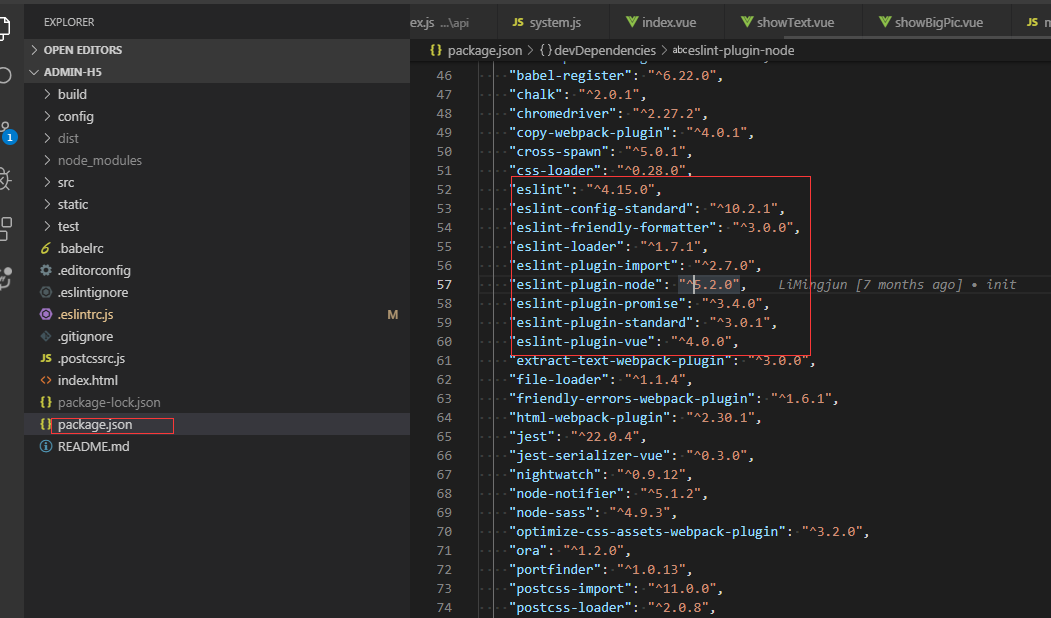
通常情况下vue项目都会添加eslint组件,我们可以查看webpack的配置文件package.json查看,也可以查看工程下是否有.eslintrc.js和.eslintignore查看到eslint是否开启。

当我们编写不符合eslint规范的代码时,启动项目会报错,比如
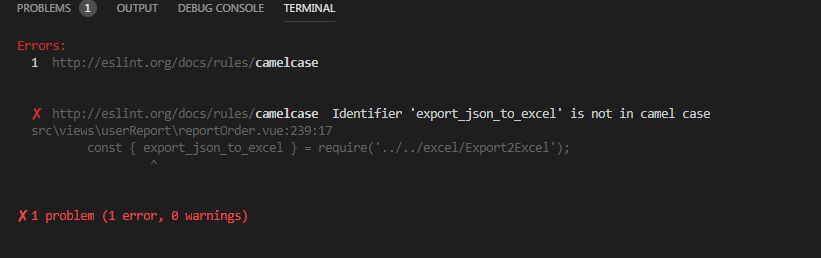
这个时候可以安装vscode eslint插件,就可以自动检测不符合规范的代码。打开vscode左侧扩展面板,搜索eslint,点击安装,重启后生效

安装好之后,还需要在vscode文件中进行设置:
通过 file->preferences->Settings 出现如下界面:

点击红框,则会出现配置文件
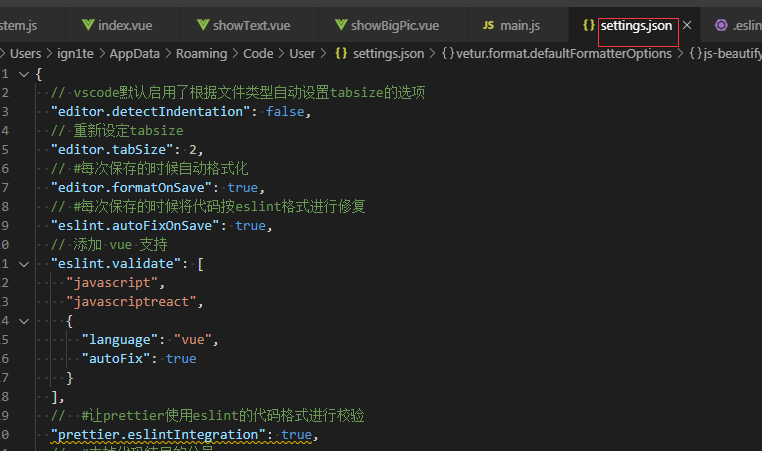
把以下代码复制到这个文件中:

{

  // vscode默认启用了根据文件类型自动设置tabsize的选项

  "editor.detectIndentation": false,

  // 重新设定tabsize

  "editor.tabSize": 2,

  // #每次保存的时候自动格式化

  "editor.formatOnSave": true,

  // #每次保存的时候将代码按eslint格式进行修复

  "eslint.autoFixOnSave": true,

  // 添加 vue 支持

  "eslint.validate": [

    "javascript",

    "javascriptreact",

    {

      "language": "vue",

      "autoFix": true

    }

  ],

  //  #让prettier使用eslint的代码格式进行校验

  "prettier.eslintIntegration": true,

  //  #去掉代码结尾的分号

  "prettier.semi": false,

  //  #使用带引号替代双引号

  "prettier.singleQuote": true,

  //  #让函数(名)和后面的括号之间加个空格

  "javascript.format.insertSpaceBeforeFunctionParenthesis": true,

  // #让vue中的js按编辑器自带的ts格式进行格式化

  "vetur.format.defaultFormatter.js": "vscode-typescript",

  "vetur.format.defaultFormatterOptions": {

    "js-beautify-html": {

      "wrap_attributes": "force-aligned"

      // #vue组件中html代码格式化样式

    }

  },

  "window.zoomLevel": 0,

  "explorer.confirmDelete": false,

  "explorer.confirmDragAndDrop": false,

  "editor.renderControlCharacters": true,

  "editor.renderWhitespace": "all"

}
然后在项目的.eslintrc.js中添加如下代码:
// https://eslint.org/docs/user-guide/configuring

module.exports = {

  root: true,

  parserOptions: {

    parser: 'babel-eslint'

  },

  env: {

    browser: true

  },

  extends: [

    // https://github.com/vuejs/eslint-plugin-vue#priority-a-essential-error-prevention

    // consider switching to `plugin:vue/strongly-recommended` or `plugin:vue/recommended` for stricter rules.

    'plugin:vue/essential',

    // https://github.com/standard/standard/blob/master/docs/RULES-en.md

    'standard'

  ],

  // required to lint *.vue files

  plugins: ['vue'],

  // add your custom rules here

  rules: {

    // allow async-await

    'no-console': 'off',

    indent: ['error', 2, { SwitchCase: 1 }],

    semi: ['error', 'always'],

    'space-before-function-paren': [

      'error',

      { anonymous: 'always', named: 'never' }

    ],

    'generator-star-spacing': 'off',

    // allow debugger during development

    'no-debugger': process.env.NODE_ENV === 'production' ? 'error' : 'off'

  }

}
ctrl + s保存代码后,便会自动修复格式不正确的代码
vscode如何安装eslint插件 代码自动修复的更多相关文章
- vscode安装eslint插件,代码统一自动修复
ESlint:是用来统一JavaScript代码风格的工具,不包含css.html等. 方法和步骤: 通常情况下vue项目都会添加eslint组件,我们可以查看webpack的配置文件package. ...
- 彻底删除vscode及安装的插件和个人配置信息
1.卸载vscode应用软件(在控制面板里面找不到改软件,所以只能进入应用所在文件夹进行卸载) ## 此步骤虽然删掉了应用软件,但是此时重新安装会发现之前下载的插件和个人配置信息都还会重新加载出来,所 ...
- vscode 上安装 leetcode插件
vscode 真是一款非常好的轻量级的代码编辑工具,无论windows还是ubuntu使用体验都非常好. leetcode用来练练脑子吧,不要老年痴呆了. 1. 安装vscode Ubuntu先去下载 ...
- vscode 中 vue项目使用eslint插件 检查代码
前言 本文章项目由vue-cli3创建 vscode版本1.36.1 eslint1.9.0 在网上找了一大堆文章,不知是什么原因,没有一篇可以直接使用的 折腾了许久,直接按eslint插件的说明,竟 ...
- vscode 添加eslint插件
1. 安装vscode中的eslint插件 Ctrl + Shift + P 调出控制台,输入install,再在插件版块查找ESLint,安装 2. 安装node,安装npm 3. 全局安装ESLi ...
- vscode中eslint插件的配置-prettier
用vue-cli构建vue项目,会有个eslint代码检测的安装 可vscode自带代码格式化是prettier格式(右键有格式化文件或alt+shift+f) 这时候要在vscode上装一个esli ...
- vscode的eslint插件不起作用
最近在用vue进行开发,但是vsCode中的eslint插件装上之后不起作用 1.vsCode打开“设置”,选择"settings.json" 2.输入一段脚本 "esl ...
- Visual Studio Code 使用 ESLint 增强代码风格检查
前言 在团队协作开发中,为了统一代码风格,避免一些低级错误,应该设有团队成员统一遵守的编码规范.很多语言都提供了Lint工具来实现这样的功能,JavaScript也有类似的工具:ESLint.除了可以 ...
- 在vscode中使用eslint
一.vs中安装eslint插件 二.npm 全局安装 eslint sudo npm i -g eslint 三.vs终端运行eslint --init 四.在vscode的setting中设置 ...
随机推荐
- MVC超链接调用控制器内的方法
<a href="hello/Layout?name=Tom"><h1><span>Hello</span>World</h1 ...
- Codeforces Round #200 (Div. 2)E
Read Time 题意:有一个数组,很多指针指在这个数组上,每次每个指针可以向左或向右移动一个位置.给出一些需要访问的位置,问访问用的最少时间. 一个指针只可能转一次方向.二分答案. #includ ...
- seldom之数据驱动
seldom之数据驱动 如果自动化某个功能,测试数据不一样而操作步骤是一样的,那么就可以使用参数化来节省测试代码. seldom是我在维护一个Web UI自动化测试框,这里跟大家分享seldom参数化 ...
- sql语句的基本用法总结
一.sql语法 select */列名1,列名2... from 表名[连接查询 内连接/左连接 on条件] 必选的 where 条件 子查询/in/exists/between ... and .. ...
- 后端程序员必备:书写高质量SQL的30条建议
前言 本文将结合实例demo,阐述30条有关于优化SQL的建议,多数是实际开发中总结出来的,希望对大家有帮助. 1.查询SQL尽量不要使用select *,而是select具体字段. 反例子: sel ...
- Axure rp8 注册码,亲测可以用! 可用给个赞呗!!
License:zdfans Key:fZw2VoYzXakllUuLVdTH13QYWnjD6NZrxgubQkaRyxD5+HNMqdr+WZKkaa6IoE5N
- JDK dump
1. 查看整个JVM内存状态 jmap -heap 1237(pid) 2.生成dump文件 jmap -dump:file=文件名.dump 1237(pid)
- JavaScript(9)--- 跨域
JavaScript(9)--- 跨域 一.跨域原理(同源策略) 在项目搭建的初期,因为现在项目基本上都是前后端分离,所以不可避免地会遇到跨域问题,而造成跨域的罪魁祸首就是浏览器的同源策略.所以要解决 ...
- GitLab私服在Ubuntu上搭建总结
1.前期准备: sudo apt-get update sudo apt-get install -y curl openssh-server ca-certificates sudo apt-get ...
- codeforces 1236 A. Bad Ugly Numbers
A. Bad Ugly Numbers time limit per test 1 second memory limit per test 256 megabytes input standard ...