
用Spring中的ResponseEntity文件批量压缩下载
我看了很多网上的demo,先生成ZIP压缩文件,然后再下载。
我这里是生成ZIP文件流 进行下载。(核心代码没多少,就是一些业务代码)
@RequestMapping(value = "/")

public ResponseEntity<byte[]> downloadInterviewFile() throws Exception {

    // 根据面试官主键编码 下载文件

    List<InterviewFile> interviewFiles =  this.interviewFileService.getAll(interviewfile);

    ByteArrayOutputStream byteOutPutStream = null;

    if (!interviewFiles.isEmpty()) {

        //单个文件名称

        String interviewFileName = "";

        //文件后缀

        String fileNameSuffix = "";

        //创建一个集合用于 压缩打包的参数

        List<Map<String, String>> parms = new ArrayList<>();

        //创建一个map集合

        Map<String, String> fileMaps =null;

        //得到存储文件盘符 例  D:

        String root = properties.getValue("upload.root");

        //创建一个字节输出流

        byteOutPutStream = new ByteArrayOutputStream();

        for (InterviewFile file : interviewFiles) {

            fileMaps = new HashMap<>();

            interviewFileName = file.getFileName();

            fileNameSuffix = file.getFileSuffix();

            //将单个存储路径放入

            fileMaps.put("filePath", root.concat(file.getFilePath()));

            //将单个文件名放入

            fileMaps.put("fileName", interviewFileName.concat("." + fileNameSuffix));

            //放入集合

            parms.add(fileMaps);

        }

        //压缩文件

        FileUtils.batchFileToZIP(parms, byteOutPutStream);

    }

    HttpHeaders headers = new HttpHeaders();

    String fileName = null;

    try {

        fileName = new String("附件.zip".getBytes("UTF-8"), "ISO-8859-1");

    } catch (UnsupportedEncodingException e) {

        e.printStackTrace();

    }

    headers.setContentType(MediaType.APPLICATION_OCTET_STREAM);

    headers.setContentDispositionFormData("attachment", fileName);// 文件名称

    ResponseEntity<byte[]> responseEntity = new ResponseEntity<byte[]>(byteOutPutStream.toByteArray(), headers, HttpStatus.CREATED);

    return responseEntity;

}
工具类
@RequestMapping(value = "/")

public ResponseEntity<byte[]> downloadInterviewFile() throws Exception {

    // 根据面试官主键编码 下载文件

    List<InterviewFile> interviewFiles =  this.interviewFileService.getAll(interviewfile);

    ByteArrayOutputStream byteOutPutStream = null;

    if (!interviewFiles.isEmpty()) {

        //单个文件名称

        String interviewFileName = "";

        //文件后缀

        String fileNameSuffix = "";

        //创建一个集合用于 压缩打包的参数

        List<Map<String, String>> parms = new ArrayList<>();

        //创建一个map集合

        Map<String, String> fileMaps =null;

        //得到存储文件盘符 例  D:

        String root = properties.getValue("upload.root");

        //创建一个字节输出流

        byteOutPutStream = new ByteArrayOutputStream();

        for (InterviewFile file : interviewFiles) {

            fileMaps = new HashMap<>();

            interviewFileName = file.getFileName();

            fileNameSuffix = file.getFileSuffix();

            //将单个存储路径放入

            fileMaps.put("filePath", root.concat(file.getFilePath()));

            //将单个文件名放入

            fileMaps.put("fileName", interviewFileName.concat("." + fileNameSuffix));

            //放入集合

            parms.add(fileMaps);

        }

        //压缩文件

        FileUtils.batchFileToZIP(parms, byteOutPutStream);

    }

    HttpHeaders headers = new HttpHeaders();

    String fileName = null;

    try {

        fileName = new String("附件.zip".getBytes("UTF-8"), "ISO-8859-1");

    } catch (UnsupportedEncodingException e) {

        e.printStackTrace();

    }

    headers.setContentType(MediaType.APPLICATION_OCTET_STREAM);

    headers.setContentDispositionFormData("attachment", fileName);// 文件名称

    ResponseEntity<byte[]> responseEntity = new ResponseEntity<byte[]>(byteOutPutStream.toByteArray(), headers, HttpStatus.CREATED);

    return responseEntity;

}
调用看不懂?那来个简单粗暴的
@RequestMapping(value = "/")

public ResponseEntity<byte[]> downloadInterviewFile() throws Exception {

    // ---------------------------压缩文件处理-------------------------------

    ByteArrayOutputStream byteOutPutStream = new ByteArrayOutputStream();

    // 创建一个集合用于 压缩打包的参数

    List<Map<String, String>> parms = new ArrayList<>();

    // 创建一个map集合

    Map<String, String> fileMaps = new HashMap<>();

    fileMaps.put("filePath", "D:/文件路径");

    fileMaps.put("fileName", "HRM-Package.txt");

    Map<String, String> fileMaps1 = new HashMap<>();

    fileMaps1.put("filePath", "D:/文件路径1");

    fileMaps1.put("fileName", "java.txt");

    // 放入集合

    parms.add(fileMaps);

    parms.add(fileMaps1);

    // 压缩文件

    FileUtils.batchFileToZIP(parms, byteOutPutStream);

    // ---------------------------压缩文件处理-------------------------------

    HttpHeaders headers = new HttpHeaders();

    String fileName = null;

    try {

        fileName = new String("附件.zip".getBytes("UTF-8"), "ISO-8859-1");

    } catch (UnsupportedEncodingException e) {

        e.printStackTrace();

    }

    headers.setContentType(MediaType.APPLICATION_OCTET_STREAM);

    headers.setContentDispositionFormData("attachment", fileName);// 文件名称

    ResponseEntity<byte[]> responseEntity = new ResponseEntity<byte[]>(byteOutPutStream.toByteArray(), headers,

            HttpStatus.CREATED);

    return responseEntity;

}
结果: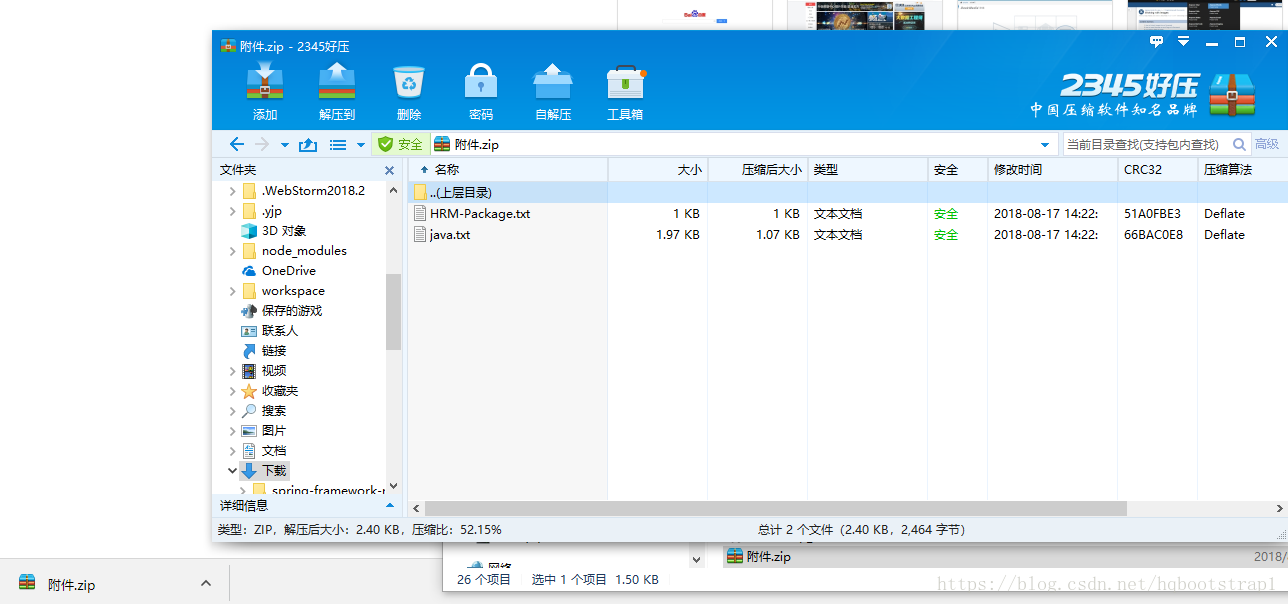
======================我是分割线======================
这个例子给我了我很大的帮助,因为他是利用ResponseEntity进行下载的,这个下载工具类很好,但是网上一般的例子是基于File的而不是基于byte[]数组的,我的文件是存到数据库中的,文件是用byte[]数组存储的,程序猿一定要深刻理解ZipOutputStream在压缩中的处理关键,话不多说,我直接上我改造的代码工具类
注:FileBank类只有两个属性fileName、fileBlob
public class ZipDownloadUtils {

    /**

     * 文件批量压缩

     *

     * @param parms

     */

    public static void batchFileToZIP(List<FileBank> parms, ByteArrayOutputStream byteOutPutStream) {

        ZipOutputStream zipOut = new ZipOutputStream(byteOutPutStream);

        try {

            for (FileBank value : parms) {

                // 使用指定名称创建新的 ZIP 条目 (通俗点就是文件名)

                ZipEntry zipEntry = new ZipEntry(value.getFileName());

                // 开始写入新的 ZIP 文件条目并将流定位到条目数据的开始处

                zipOut.putNextEntry(zipEntry);

                //直接写入到压缩输出流中即可

                zipOut.write(value.getFileBlob());

                zipOut.closeEntry();

            }

        } catch (FileNotFoundException e) {

            e.printStackTrace();

        } catch (IOException e) {

            e.printStackTrace();

        } finally {

            try {

                zipOut.close();

            } catch (IOException e) {

                e.printStackTrace();

            }

        }

    }

    /**

     * ResponseEntity下载文件

     *

     * @param fileName

     * @param byteOutPutStream

     */

    public static ResponseEntity<byte[]> downloadZIP(String fileName, ByteArrayOutputStream byteOutPutStream) {

        //下载文件

        //String fileName = "批量下载【备案材料】.zip";

        HttpHeaders headers = new HttpHeaders();

        try {

            fileName = new String("附件.zip".getBytes("UTF-8"), "ISO-8859-1");

        } catch (UnsupportedEncodingException e) {

            e.printStackTrace();

        }

        headers.setContentType(MediaType.APPLICATION_OCTET_STREAM);

        headers.setContentDispositionFormData("attachment", fileName);// 文件名称

        ResponseEntity<byte[]> responseEntity = new ResponseEntity<byte[]>(byteOutPutStream.toByteArray(), headers, HttpStatus.CREATED);

        return responseEntity;

    }

}
Controller中代码很简单:
//压缩文件

ByteArrayOutputStream byteOutPutStream = new ByteArrayOutputStream();

ZipDownloadUtils.batchFileToZIP(dataList, byteOutPutStream);    //dataList是一个List<FileBank>

//下载文件

String fileName = "批量下载【备案材料】.zip";

return ZipDownloadUtils.downloadZIP(fileName, byteOutPutStream);
最后:之所以总结这篇笔记是因为想要用最优雅的代码完成一个文件压缩下载的功能,网上很多用HttpServletResponse原生下载的例子,实在接受不了这么丑陋的代码(可读性奇差,不好维护和修改,通用性很差,代码量太大,等等各种问题不一而足),故而记下此文,即完成了任务又优雅(一个不追求优雅代码的程序员不是好程序员!!!)的实现了,终于可以安心睡觉了……
===============================================================================
如果您觉得此文有帮助,可以打赏点钱给我支付宝或扫描二维码


用Spring中的ResponseEntity文件批量压缩下载的更多相关文章
- Spring中MultipartHttpServletRequest实现文件上传
Spring中MultipartHttpServletRequest实现文件上传 转贴自:http://my.oschina.net/nyniuch/blog/185266 实现图片上传 用户必须能 ...
- Java批量压缩下载
最近做了一些有关批量压缩下载的功能,网上也找了一些资源,但都不是太全面,所以自己整理一份,已备不时之需. 直接上代码: // 获取项目路径 private static String WEBCLASS ...
- IE浏览器直接在页面中显示7z文件而不是下载问题解决
IE浏览器中输入7z文件的完整下载URL后,不是保存文件,而是直接在页面中显示(当然是乱码) 这是因为浏览器对不同的资源文件处理的方式不同,例如图片文件,一般会直接打开,所以我们可以不用7z,使用zi ...
- c# 实现文件批量压缩
今天改一个网站的功能,网站提供一些微信的素材,每个页面对应一套素材,如果会员一张一张下载,那么网站交互性就有点太差了.所以修改的内容就是提供一个按钮,点击按钮将这套图片和网站信息进行打包下载. 思路: ...
- Spring中的资源文件框架——Resource
摘要 Spring4 以后,官方推荐我们使用Java Config来代替applicationContext.xml,声明将Bean交给容器管理. 在Spring Boot中,Java Config的 ...
- springMVC实现基本文件夹压缩下载功能
将文件夹压缩后下载: @Slf4j public class Test { private static final String BASE_PATH = "/root/doc/" ...
- Spring中MultipartHttpServletRequest实现文件上传 生成缩略图
转贴自:http://my.oschina.net/nyniuch/blog/185266 实现图片上传 用户必须能够上传图片,因此需要文件上传的功能.比较常见的文件上传组件有Commons Fil ...
- Spring 中使用Properties文件
Spring提供了加载Properties文件的工具类:org.springframework.beans.factory.config.PropertyPlaceholderConfigurer. ...
- Spring中使用属性文件properties的两种方式
实际项目中,通常将可配置的参数放到属性文件中,例如数据库连接信息.redis连接信息等,便于统一管理.然后通过IoC框架spring将其加载到上下文中,使得程序可以直接使用. 创建mysql.prop ...
随机推荐
- windows下用libevent 开发一个echo服务
#include <stdio.h> #include <string.h> #include <errno.h> #include <iostream> ...
- PHP获取远程图片
<?php // // Function: 获取远程图片并把它保存到本地 // // // 确定您有把文件写入本地服务器的权限 // // // 变量说明: // $url 是远程图片的完整UR ...
- java多线程知识回顾(笔记)
线程创建的方式 有两种 第一种是继承Thread类 重写run方法 (个人偏向这一种实际中这种用的较多) 例如 public class MyThead extends Thread { int j= ...
- alsa-utils 的使用
ref : https://blog.csdn.net/outstanding_yzq/article/details/8126350 一.alsa-utils介绍 ALSA是kernel中的一个声 ...
- P1058 选择题
P1058 选择题 转跳点:
- hadoop-mapreduce的官方示例的测试执行方法
1.根据给出的精度参数计算 pi : hadoop jar /export/servers/hadoop-2.6.0-cdh5.14.0/share/hadoop/mapreduce/hadoop-m ...
- css 让多出的文字成省略号...
一,单行 white-space:nowrap; overflow:hidden;text-overflow: ellipsis; 二,多行 display: -webkit-box; overflo ...
- ROS常用库(三)API学习之常用common_msgs(上)
一.概述 common_msgs包含其他ROS软件包广泛使用的消息.这些消息包括动作消息(actionlib_msgs),诊断消息(diagnostic_msgs),几何图元(geometry_msg ...
- JS写一个漂亮的音乐播放器
先放上效果图: 正如图中所展示的播放器那样,我们用HTML+CSS+JS将这个效果实现出来. HTML页面布局 <div class="music"> <div ...
- html5,css3炫酷实例-元素
自动完成输入框下拉列表 使用的插件:jquery-ui 使用数据源实现文本框的自动完成功能 <link href="https://cdn.bootcss.com/jqueryui/1 ...