
项目SpringMVC+Spring+Mybatis 整合环境搭建(1)-> Spring+Mybatis搭建
目录结构
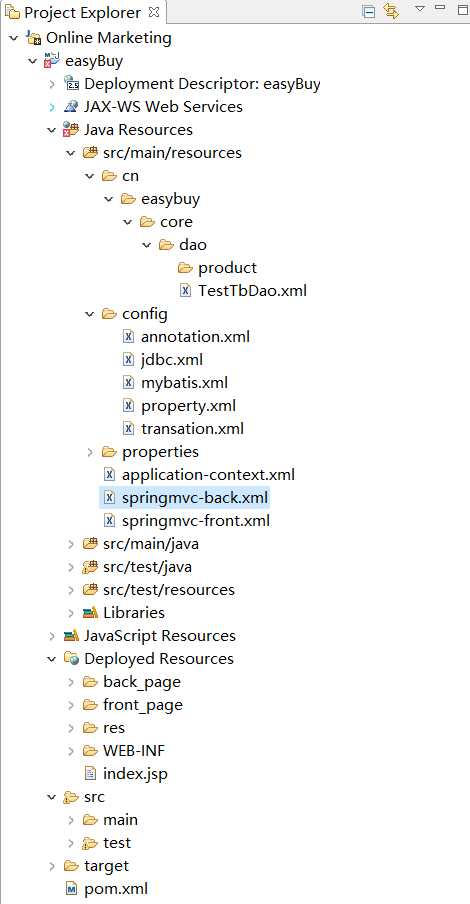
第一步:web.xml 先配置contextConfigLocation 对应的application-context.xml文件
打开webapp\WEB-INF\web.xml, 配置spring监听器和上下文
<?xml version="1.0" encoding="UTF-8"?>

<web-app xmlns:xsi="http://www.w3.org/2001/XMLSchema-instance"

	xmlns="http://java.sun.com/xml/ns/j2ee" xmlns:javaee="http://java.sun.com/xml/ns/javaee"

	xmlns:web="http://java.sun.com/xml/ns/javaee/web-app_2_5.xsd"

	xsi:schemaLocation="http://java.sun.com/xml/ns/j2ee http://java.sun.com/xml/ns/j2ee/web-app_2_4.xsd"

	id="WebApp_ID" version="2.4">

	<context-param>

		<param-name>contextConfigLocation</param-name>

		<param-value>classpath:application-context.xml</param-value>

	</context-param>

	<listener>

	<listener-class>org.springframework.web.context.ContextLoaderListener</listener-class>

	</listener>
第二步:在application-context.xml中配置
<?xml version="1.0" encoding="UTF-8"?>

<beans xmlns="http://www.springframework.org/schema/beans"

	xmlns:xsi="http://www.w3.org/2001/XMLSchema-instance" xmlns:aop="http://www.springframework.org/schema/aop"

	xmlns:tx="http://www.springframework.org/schema/tx" xmlns:jdbc="http://www.springframework.org/schema/jdbc"

	xmlns:context="http://www.springframework.org/schema/context"

	xsi:schemaLocation="

     http://www.springframework.org/schema/context http://www.springframework.org/schema/context/spring-context-3.0.xsd

     http://www.springframework.org/schema/beans http://www.springframework.org/schema/beans/spring-beans-3.0.xsd

     http://www.springframework.org/schema/jdbc http://www.springframework.org/schema/jdbc/spring-jdbc-3.0.xsd

     http://www.springframework.org/schema/tx http://www.springframework.org/schema/tx/spring-tx-3.0.xsd

     http://www.springframework.org/schema/aop http://www.springframework.org/schema/aop/spring-aop-3.0.xsd">

	<import resource="config/*.xml" />

</beans>
这样配置可以XML文件的解耦,以后我们可以根据需要在创建相应的XML放在config目录下就可以,不会影响到其他配置
第三步:在classpath:config/目录下配置扫描标签,取名annotation.xml
<?xml version="1.0" encoding="UTF-8"?>

<beans xmlns="http://www.springframework.org/schema/beans"

	xmlns:xsi="http://www.w3.org/2001/XMLSchema-instance" xmlns:aop="http://www.springframework.org/schema/aop"

	xmlns:tx="http://www.springframework.org/schema/tx" xmlns:jdbc="http://www.springframework.org/schema/jdbc"

	xmlns:context="http://www.springframework.org/schema/context"

	xsi:schemaLocation="

     http://www.springframework.org/schema/context http://www.springframework.org/schema/context/spring-context-3.0.xsd

     http://www.springframework.org/schema/beans http://www.springframework.org/schema/beans/spring-beans-3.0.xsd

     http://www.springframework.org/schema/jdbc http://www.springframework.org/schema/jdbc/spring-jdbc-3.0.xsd

     http://www.springframework.org/schema/tx http://www.springframework.org/schema/tx/spring-tx-3.0.xsd

     http://www.springframework.org/schema/aop http://www.springframework.org/schema/aop/spring-aop-3.0.xsd">

	<!--spring 扫包   @Service .....-->

	<context:component-scan base-package="cn.easybuy">

		<context:exclude-filter type="annotation" expression="org.springframework.stereotype.Controller"/>

	</context:component-scan>

    <context:annotation-config/>

</beans>
这里配置我们需要扫描的组件,指定扫描cn.easybuy 目录下的包,由于该项目希望 SpringMVC去管理 Controller,Spring去管理Service 达到一个三层解耦的效果,Mybatis去管理Dao ,所以我们不希望spring去扫Controller注解下的类,这里需要用到<context:exclude-filter /> 标签去排除。
第四步:在classpath:config/目录下配置读取property标签,取名property.xml
<?xml version="1.0" encoding="UTF-8"?>

<beans xmlns="http://www.springframework.org/schema/beans"

	xmlns:xsi="http://www.w3.org/2001/XMLSchema-instance" xmlns:aop="http://www.springframework.org/schema/aop"

	xmlns:tx="http://www.springframework.org/schema/tx" xmlns:jdbc="http://www.springframework.org/schema/jdbc"

	xmlns:context="http://www.springframework.org/schema/context"

	xsi:schemaLocation="

     http://www.springframework.org/schema/context http://www.springframework.org/schema/context/spring-context-3.0.xsd

     http://www.springframework.org/schema/beans http://www.springframework.org/schema/beans/spring-beans-3.0.xsd

     http://www.springframework.org/schema/jdbc http://www.springframework.org/schema/jdbc/spring-jdbc-3.0.xsd

     http://www.springframework.org/schema/tx http://www.springframework.org/schema/tx/spring-tx-3.0.xsd

     http://www.springframework.org/schema/aop http://www.springframework.org/schema/aop/spring-aop-3.0.xsd">

	<!-- 读取jdbc配置 -->

	<bean class="org.springframework.beans.factory.config.PropertyPlaceholderConfigurer">

		<property name="locations">

			<list>

				<!-- jdbc配置 -->

				<value>classpath:properties/jdbc.properties</value>

			</list>

		</property>

	</bean>

</beans>
这里用到PropertyPlaceholderConfigurer 可以帮我们去加载N个配置文件,以后我们还需要加载其他配置文件,只需要在里面添加即可,这里的jdbc.properties是存放我们数据库连接的一些信息
第五步:在classpath:config/目录下配置数据源C3p0标签,取名jdbc.xml
<?xml version="1.0" encoding="UTF-8"?>

<beans xmlns="http://www.springframework.org/schema/beans"

	xmlns:xsi="http://www.w3.org/2001/XMLSchema-instance" xmlns:aop="http://www.springframework.org/schema/aop"

	xmlns:tx="http://www.springframework.org/schema/tx" xmlns:jdbc="http://www.springframework.org/schema/jdbc"

	xmlns:context="http://www.springframework.org/schema/context"

	xsi:schemaLocation="

     http://www.springframework.org/schema/context http://www.springframework.org/schema/context/spring-context-3.0.xsd

     http://www.springframework.org/schema/beans http://www.springframework.org/schema/beans/spring-beans-3.0.xsd

     http://www.springframework.org/schema/jdbc http://www.springframework.org/schema/jdbc/spring-jdbc-3.0.xsd

     http://www.springframework.org/schema/tx http://www.springframework.org/schema/tx/spring-tx-3.0.xsd

     http://www.springframework.org/schema/aop http://www.springframework.org/schema/aop/spring-aop-3.0.xsd">

	<!-- c3p0-->

	<bean id="dataSource" class="com.mchange.v2.c3p0.ComboPooledDataSource">

		<property name="driverClass" value="${driverClass}"/>

		<property name="jdbcUrl" value="${jdbcUrl}"></property>

		<property name="user" value="${user}" />

		<property name="password" value="${password}"/>

	</bean>

</beans>
项目为什么用c3p0而不直接用jdbc?因为c3p0是一个数据库连接池,有两个优点:1.可以连接多个数据库 2.加入连接中断,会帮我们自动重连
第六步:在classpath:config/目录下配置Mybatis配置标签,取名mybatis.xml
<?xml version="1.0" encoding="UTF-8"?>

<beans xmlns="http://www.springframework.org/schema/beans"

	xmlns:xsi="http://www.w3.org/2001/XMLSchema-instance" xmlns:aop="http://www.springframework.org/schema/aop"

	xmlns:tx="http://www.springframework.org/schema/tx" xmlns:jdbc="http://www.springframework.org/schema/jdbc"

	xmlns:context="http://www.springframework.org/schema/context"

	xsi:schemaLocation="

     http://www.springframework.org/schema/context http://www.springframework.org/schema/context/spring-context-3.0.xsd

     http://www.springframework.org/schema/beans http://www.springframework.org/schema/beans/spring-beans-3.0.xsd

     http://www.springframework.org/schema/jdbc http://www.springframework.org/schema/jdbc/spring-jdbc-3.0.xsd

     http://www.springframework.org/schema/tx http://www.springframework.org/schema/tx/spring-tx-3.0.xsd

     http://www.springframework.org/schema/aop http://www.springframework.org/schema/aop/spring-aop-3.0.xsd">

	<!--mybatis  sessionFactory配置-->

	<bean id="sqlSessionFactory" class="org.mybatis.spring.SqlSessionFactoryBean">

		<property name="dataSource" ref="dataSource"/>

		<property name="mapperLocations" value="classpath:cn/easybuy/core/dao/*.xml"/>

		<property name="typeAliasesPackage" value="cn.easybuy.core.bean"/>

	</bean>

	<!-- 扫包  -->

	<bean class="org.mybatis.spring.mapper.MapperScannerConfigurer">

		<property name="basePackage"  value="cn.easybuy.core.dao"/>

	</bean>

</beans>
这里配置sessionFactory,用来帮我们创建session, mapperLocations 的值就是我们以后dao需要用的映射文件, typeAliasesPackage 的值是我们持久化用到的实体类,MapperScannerConfigurer会帮我们扫描cn.easybuy.core,dao下的所有类
第七步:classpath:config/目录下配置事务,取名transation.xml
<?xml version="1.0" encoding="UTF-8"?>

<beans xmlns="http://www.springframework.org/schema/beans"

	xmlns:xsi="http://www.w3.org/2001/XMLSchema-instance" xmlns:aop="http://www.springframework.org/schema/aop"

	xmlns:tx="http://www.springframework.org/schema/tx" xmlns:jdbc="http://www.springframework.org/schema/jdbc"

	xmlns:context="http://www.springframework.org/schema/context"

	xsi:schemaLocation="

     http://www.springframework.org/schema/context http://www.springframework.org/schema/context/spring-context-3.0.xsd

     http://www.springframework.org/schema/beans http://www.springframework.org/schema/beans/spring-beans-3.0.xsd

     http://www.springframework.org/schema/jdbc http://www.springframework.org/schema/jdbc/spring-jdbc-3.0.xsd

     http://www.springframework.org/schema/tx http://www.springframework.org/schema/tx/spring-tx-3.0.xsd

     http://www.springframework.org/schema/aop http://www.springframework.org/schema/aop/spring-aop-3.0.xsd">

	<!-- spring 事务 -->

	<bean id="transactionManager" class="org.springframework.jdbc.datasource.DataSourceTransactionManager">

		<property name="dataSource" ref="dataSource"/>

	</bean>

	<!-- 开启事务注解 -->

	<tx:annotation-driven transaction-manager="transactionManager"/>

</beans>
这里配置spring的事务,dataSource是我们上面配置的数据源,因为我们全程用注解操作,所以需要开启事务注解
第八步:在classpath:properties/目录下配置数据库信息,取名jdbc.properties
driverClass=com.mysql.jdbc.Driver

jdbcUrl=jdbc:mysql://localhost:3306/easyBuy?characterEncoding=UTF-8

user=root

password=root
这里存放一些我们数据库连接的信息,这里用到的是Mysql
项目SpringMVC+Spring+Mybatis 整合环境搭建(1)-> Spring+Mybatis搭建的更多相关文章
- Struts2+Spring+Hibernate整合开发(Maven多模块搭建)
Struts2+Spring+Hibernate整合开发(Maven多模块搭建) 0.项目结构 Struts2:web层 Spring:对象的容器 Hibernate:数据库持久化操作 1.父模块导入 ...
- mybatis整合hikariCP(非spring)
mybatis整合hikariCP(非spring) 一.配置hikariCP典型的配置文件hikariPool.properties jdbcUrl=jdbc:mysql://localhost:3 ...
- JavaEE权限管理系统的搭建(三)--------springmvc和mabatis整合环境搭建
本节介绍如何环境的搭建和配置: 首先要在父工程引入jar包依赖: <!-- 通过属性定义指定jar的版本 --> <properties> <spring.version ...
- 项目SpringMVC+Spring+Mybatis 整合环境搭建(2)-> 测试Spring+Mybatis 环境
测试前期准备 第一步:创建easybuy数据库,设置utf-8格式 第二步:创建表test_tb CREATE TABLE `test_tb` ( `id` int(11) NOT NULL AUTO ...
- Spring+SpringMVC+MyBatis整合基础篇(三)搭建步骤
作者:13GitHub:https://github.com/ZHENFENG13版权声明:本文为原创文章,未经允许不得转载. 框架介绍 Spring SpringMVC MyBatis easyUI ...
- Spring学习总结(五)——Spring整合MyBatis(Maven+MySQL)一
MyBatis-Spring 会帮助你将 MyBatis 代码无缝地整合到 Spring 中. 使用这个类库中的类, Spring 将会加载必要的MyBatis工厂类和 session 类. 这个类库 ...
- 【Spring 持久层】Spring 与 Mybatis 整合
持久层整合总述 1.Spring 框架为什么要与持久层技术进行整合? JavaEE开发需要持久层进行数据库的访问操作 JDBC.Hibernate.MyBatis 进行持久开发过程存在大量的代码冗余 ...
- IDEA环境下SSM整合------环境配置
声明:本文纯为个人笔记整理,如有不妥之处还望及时指出,欢迎转载! 只为解决操作问题,可以从第二幅图往后看! 一.做不出详细的概念叙述和文本设计,本文主要以实战步骤为主,少量解释为辅助,下面请大家牢记两 ...
- Spring Boot 整合 Dubbo和Zookeeper
Spring Boot 整合 Dubbo和Zookeeper Spring Boot 整合 Dubbo和Zookeeper 环境介绍 Zookeeper 安装 启动 Dubbo admin 搭建 创建 ...
随机推荐
- 0017 CSS 三大特性:层叠性、继承性、优先级
目标: 理解 能说出css样式冲突采取的原则 能说出那些常见的样式会有继承 应用 能写出CSS优先级的算法 能会计算常见选择器的叠加值 5.1 CSS层叠性 概念: 所谓层叠性是指多种CSS样式的叠加 ...
- Verilog门级建模
门级建模就是将逻辑电路图用HDL规定的文本语言表示出来,即调用Verilog语言中内置的基本门级元件描述逻辑图中的元件以及元件之间的连接关系. Verilog语言内置了12个基本门级元件模型,如下表所 ...
- 洛谷$1156$ 垃圾陷阱 $dp$
\(Sol\) \(f_{i,j}\)前\(i\)个垃圾,能活到时间\(j\)的最高垃圾高度.\(t_i\)表示第\(i\)个垃圾掉落的时间,\(g_i\)表示吃垃圾\(i\)能维持的时间,\(h_i ...
- Java高级特性——注解(Annotation)
文件地址:https://github.com/xiaozhengyu/StudyNotes.git
- selenium自动化之xpath定位*必会技能*
相信写过ui自动化,对xpath定位感觉会特别亲戚,那么下面给大家分享些我们常常在写脚本时易忽略的一些小细节和技巧.首先使用xpath定位时切忌 不要使用带有空格的属性 不要使用自动生成的id.cla ...
- win设置C、D、E等盘符图标为自定义的图片
1.选择一张jpg图片,在下面网站工具上,转为ico的图片(最好转64x64的清晰些). http://www.faviconico.org/favicon 2.在D盘下新建文本文件.txt,写入以下 ...
- Ubuntu管理软件源
在Ubuntu环境下,我们经常会使用apt-get(apt)命令下载各种软件,当所需软件在官方软件库中找不到时,我们需要添加第三方的软件源,或者由于位于海外的官方软件源下载速度过于感人时,需要添加国内 ...
- 二、Spring Cloud之注册中心 Eureka
前言 算是正式开始学习 spring cloud 的项目知识了,大概的知道Springcloud 是由众多的微服务组成的,所以我们现在一个一个的来学习吧. 注册中心,在微服务中算是核心了.所有的服务都 ...
- EntityFramework Core一劳永逸动态加载模型,我们要知道些什么呢?
前言 这篇文章源于一位问我的童鞋:在EntityFramework Core中如何动态加载模型呢?在学习EntityFramwork时关于这个问题已有对应园友给出答案,故没有过多研究,虽然最后解决了这 ...
- Python 任务自动化工具:nox 的配置与 API
英文 | Configuration & API 出处 | nox 官方文档 译者 | 豌豆花下猫@Python猫 Github地址:https://github.com/chinesehua ...