
笔记50 Mybatis快速入门(一)
一、Mybatis简介
MyBatis 是一款优秀的持久层框架,它支持定制化 SQL、存储过程以及高级映射。MyBatis 避免了几乎所有的 JDBC 代码和手动设置参数以及获取结果集。MyBatis 可以使用简单的 XML 或注解来配置和映射原生信息,将接口和 Java 的 POJOs(Plain Old Java Objects,普通的 Java对象)映射成数据库中的记录。
MyBatis 是支持普通 SQL查询,存储过程和高级映射的优秀持久层框架。MyBatis 消除了几乎所有的JDBC代码和参数的手工设置以及结果集的检索。MyBatis 使用简单的 XML或注解用于配置和原始映射,将接口和 Java 的POJOs(Plain Ordinary Java Objects,普通的 Java对象)映射成数据库中的记录。
每个MyBatis应用程序主要都是使用SqlSessionFactory实例的,一个SqlSessionFactory实例可以通过SqlSessionFactoryBuilder获得。SqlSessionFactoryBuilder可以从一个xml配置文件或者一个预定义的配置类的实例获得。
用xml文件构建SqlSessionFactory实例是非常简单的事情。推荐在这个配置中使用类路径资源(classpath resource),但你可以使用任何Reader实例,包括用文件路径或file://开头的url创建的实例。MyBatis有一个实用类----Resources,它有很多方法,可以方便地从类路径及其它位置加载资源。
二、入门
1.创建表

2.导入jar包

3.创建实体类
准备实体类Category,用于映射数据库中的表category。
 package mybatis.pojo;

 public class Category {

     private int id;

     private String name;

     public int getId() {

         return id;

     }

     public void setId(int id) {

         this.id = id;

     }

     public String getName() {

         return name;

     }

     public void setName(String name) {

         this.name = name;

     }

 }
4.配置文件mybatis-config.xml
在src目录下创建mybatis的主配置文件mybatis-config.xml (相当于hibernate.cfg.xml,如果没有hibernate基础请忽略本句)。
其作用主要是提供连接数据库用的驱动,数据库名称,编码方式,账号密码。
 <property name="driver"   value="com.mysql.jdbc.Driver" />

 <property name="url"      value="jdbc:mysql://localhost:3306/test2?characterEncoding=UTF-8" />

 <property name="username" value="root" />

 <property name="password" value="123456" />
以及别名,自动扫描mybatis.pojo下的类型,使得在后续配置文件Category.xml中使用resultType的时候,可以直接使用Category,而不必写全mybatis.Category
 <typeAliases>

         <package name="mybatis.pojo" />

 </typeAliases>
映射Category.xml
     <mappers>

         <mapper resource="mybatis/pojo/Category.xml" />

     </mappers>
mybatis-config.xml
 <?xml version="1.0" encoding="UTF-8" ?>

 <!DOCTYPE configuration

 PUBLIC "-//mybatis.org//DTD Config 3.0//EN"

 "http://mybatis.org/dtd/mybatis-3-config.dtd">

 <configuration>

     <typeAliases>

         <package name="mybatis.pojo" />

     </typeAliases>

     <environments default="development">

         <environment id="development">

             <transactionManager type="JDBC" />

             <dataSource type="POOLED">

                 <property name="driver" value="com.mysql.jdbc.Driver" />

                 <property name="url"

                     value="jdbc:mysql://localhost:3306/test2?characterEncoding=UTF-8" />

                 <property name="username" value="root" />

                 <property name="password" value="123456" />

             </dataSource>

         </environment>

     </environments>

     <mappers>

         <mapper resource="mybatis/pojo/Category.xml" />

     </mappers>

 </configuration>
5.配置文件Category.xml
在包mybatis.pojo下,新建文件Category.xml
 <?xml version="1.0" encoding="UTF-8"?>

 <!DOCTYPE mapper

     PUBLIC "-//mybatis.org//DTD Mapper 3.0//EN"

     "http://mybatis.org/dtd/mybatis-3-mapper.dtd">

 <mapper namespace="mybatis.pojo">

     <select id="listCategory" resultType="Category">

         select * from category

     </select>

 </mapper>
namespace="mybatis.pojo"表示命名空间是mybatis.pojo,在后续调用sql语句的时候,会用到它里面定义了一条sql语句:select * from category。这条sql语句用id: listCategory 进行标示以供后续代码调用。resultType="Category" 表示返回的数据和Category关联起来,这里本应该使用的是 mybatis.pojo.Category, 但是因为上一步配置了别名,所以直接使用Category就行了。
6.测试
<1>根据配置文件mybatis-config.xml得到sqlSessionFactory
<2>然后根据sqlSessionFactory得到session
<3>最后通过session的selectList方法,调用sql语句listCategory,listCategory这个就是在配置文件Category.xml中那条sql语句设置的id。执行完毕之后,得到一个Category集合,遍历即可看到数据。
 package mybatis.test;

 import java.io.IOException;

 import java.io.InputStream;

 import java.util.List;

 import org.apache.ibatis.session.SqlSession;

 import org.apache.ibatis.session.SqlSessionFactory;

 import org.apache.ibatis.session.SqlSessionFactoryBuilder;

 import mybatis.pojo.Category;

 public class test {

     public static void main(String[] args) throws IOException {

         String resource = "mybatis-config.xml";

         InputStream inputStream = org.apache.ibatis.io.Resources.getResourceAsStream(resource);

         SqlSessionFactory sqlSessionFactory = new SqlSessionFactoryBuilder().build(inputStream);

         SqlSession session = sqlSessionFactory.openSession();

         List<Category> cs = session.selectList("listCategory");

         for (Category c : cs) {

             System.out.println(c.getName());

         }

     }

 }
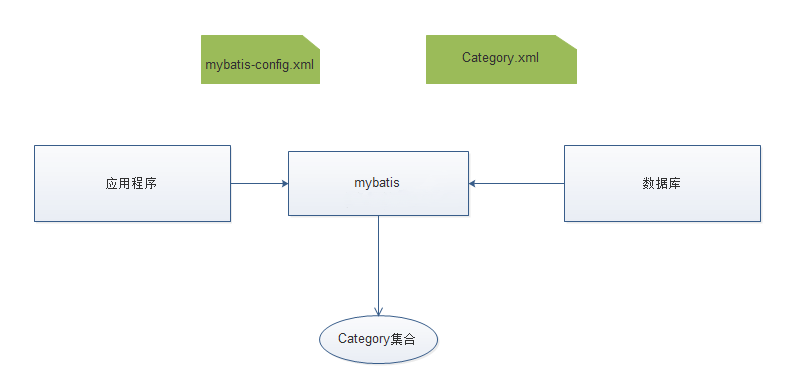
三、基本原理图
1. 应用程序找Mybatis要数据
2. Mybatis从数据库中找来数据
2.1 通过mybatis-config.xml 定位哪个数据库
2.2 通过Category.xml执行对应的select语句
2.3 基于Category.xml把返回的数据库记录封装在Category对象中
2.4 把多个Category对象装在一个Category集合中
3. 返回一个Category集合
笔记50 Mybatis快速入门(一)的更多相关文章
- MyBatis学习笔记(一)——MyBatis快速入门
转自孤傲苍狼的博客:http://www.cnblogs.com/xdp-gacl/p/4261895.html 一.Mybatis介绍 MyBatis是一个支持普通SQL查询,存储过程和高级映射的优 ...
- 笔记56 Mybatis快速入门(七)
相关概念介绍(二) 6.一级缓存 <1>在一个session里查询相同id的数据 package mybatis.annotation; import java.io.IOExceptio ...
- 笔记55 Mybatis快速入门(六)
相关概念介绍(一) 1.日志 有时候需要打印日志,知道mybatis执行了什么样的SQL语句,以便进行调试.这时,就需要开启日志,而mybatis自身是没有带日志的,使用的都是第三方日志,这里介绍如何 ...
- 笔记54 Mybatis快速入门(五)
Mybatis中注解的使用 1.XML方式的CRUD 新增加接口CategoryMapper ,并在接口中声明的方法上,加上注解对比配置文件Category.xml,其实就是把SQL语句从XML挪到了 ...
- 笔记53 Mybatis快速入门(四)
动态SQL 1.if 假设需要对Product执行两条sql语句,一个是查询所有,一个是根据名称模糊查询.那么按照现在的方式,必须提供两条sql语句:listProduct和listProductBy ...
- 笔记52 Mybatis快速入门(三)
一.更多查询 1.模糊查询 修改Category.xml,提供listCategoryByName查询语句select * from category where name like concat(' ...
- 笔记51 Mybatis快速入门(二)
Mybatis的CRUD 1.修改配置文件Category.xml,提供CRUD对应的sql语句. <?xml version="1.0" encoding="UT ...
- MyBatis学习总结(一)——MyBatis快速入门
一.Mybatis介绍 MyBatis是一个支持普通SQL查询,存储过程和高级映射的优秀持久层框架.MyBatis消除了几乎所有的JDBC代码和参数的手工设置以及对结果集的检索封装.MyBatis可以 ...
- MyBatis快速入门
一.Mybatis介绍 MyBatis是一个支持普通SQL查询,存储过程和高级映射的优秀持久层框架.MyBatis消除了几乎所有的JDBC代码和参数的手工设置以及对结果集的检索封装.MyBatis可以 ...
随机推荐
- 实用的Python(2)利用Python制作gif动图
一.简介 moviepy是一个专门用于视频剪辑制作的模块,可以自动化完成很多繁琐的视频剪辑处理工作,除了处理视频数据之外,moviepy中还内置了可以制作gif动图的功能,通过使用moviepy.ed ...
- Spyder中的一些快捷键
熟练spyder中的一些快捷键后,能极大提升code效率. 这里列出常用的快捷键.(注:在spyder导航栏Tools-Preferences-Keyboard shortcut中有所有的快捷键) T ...
- 【LeetCode】BFS || DFS [2017.04.10--2017.04.17]
[102] Binary Tree Level Order Traversal [Medium-Easy] [107] Binary Tree Level Order Traversal II [Me ...
- 初撩RESTful
1. 什么是RESTful? 一种软件架构风格,设计风格,用于客户端和服务端交互类的架构. 一组架构约束条件和原则 2. 什么是RESTful架构? 客户端通过http动词(get/post等)对服务 ...
- Jmeter的安装与环境配置
1.首先从jmeter的官网http://jmeter.apache.org/download_jmeter.cgi下载jmeter,目前最新版本为5.1,支持的JDK为1.8.. 然后进行解压. 2 ...
- elasticsearch启动问题
ES安装完一直启动不了,问题解决. 报错: ERROR: bootstrap checks failed system call filters failed to install; check th ...
- js手机滚屏效果
原文地址:https://github.com/yanhaijing/zepto.fullpage 第一步:基于移动端的浏览体验,在头部添加浏览器渲染的分辨率 <meta name=" ...
- 【2017 Multi-University Training Contest - Team 8】Hybrid Crystals
[Link]:http://acm.hdu.edu.cn/showproblem.php?pid=6140 [Description] 等价于告诉你有n个物品,每个物品的价值为-a[i]或a[i],或 ...
- spring boot基于DRUID数据源密码加密及数据源监控实现
前言 随着需求和技术的日益革新,spring boot框架是越来越流行,她也越来越多地出现在我们的项目中,当然最主要的原因还是因为spring boot构建项目实在是太爽了,构建方便,开发简单,而且效 ...
- 【前端技术】一篇文章搞掂:JS
待补充 //以下等价 if(val) if(val!=null&&val!=undefined&&val!="") //以下等价 if(!val) ...