
oauth2使用心得-----基本概念以及认证服务器搭建
应用场景
我们假设你有一个“云笔记”产品,并提供了“云笔记服务”和“云相册服务”,此时用户需要在不同的设备(PC、Android、iPhone、TV、Watch)上去访问这些“资源”(笔记,图片)
那么用户如何才能访问属于自己的那部分资源呢?此时传统的做法就是提供自己的账号和密码给我们的“云笔记”,登录成功后就可以获取资源了。但这样的做法会有以下几个问题:
- “云笔记服务”和“云相册服务”会分别部署,难道我们要分别登录吗?
- 如果有第三方应用程序想要接入我们的“云笔记”,难道需要用户提供账号和密码给第三方应用程序,让他记录后再访问我们的资源吗?
- 用户如何限制第三方应用程序在我们“云笔记”的授权范围和使用期限?难道把所有资料都永久暴露给它吗?
- 如果用户修改了密码收回了权限,那么所有第三方应用程序会全部失效。
- 只要有一个接入的第三方应用程序遭到破解,那么用户的密码就会泄露,后果不堪设想。
为了解决如上问题,oAuth 应用而生。
名词解释
- 第三方应用程序(Third-party application): 又称之为客户端(client),比如上节中提到的设备(PC、Android、iPhone、TV、Watch),我们会在这些设备中安装我们自己研发的 APP。又比如我们的产品想要使用 QQ、微信等第三方登录。对我们的产品来说,QQ、微信登录是第三方登录系统。我们又需要第三方登录系统的资源(头像、昵称等)。对于 QQ、微信等系统我们又是第三方应用程序。
- HTTP 服务提供商(HTTP service): 我们的云笔记产品以及 QQ、微信等都可以称之为“服务提供商”。
- 资源所有者(Resource Owner): 又称之为用户(user)。
- 用户代理(User Agent): 比如浏览器,代替用户去访问这些资源。
- 认证服务器(Authorization server): 即服务提供商专门用来处理认证的服务器,简单点说就是登录功能(验证用户的账号密码是否正确以及分配相应的权限)
- 资源服务器(Resource server): 即服务提供商存放用户生成的资源的服务器。它与认证服务器,可以是同一台服务器,也可以是不同的服务器。简单点说就是资源的访问入口,比如上节中提到的“云笔记服务”和“云相册服务”都可以称之为资源服务器。
交互过程

举个例子来说吧,你使用qq号登录知乎,肯定不能告诉知乎你的密码,那么怎么做呢?知乎返回授权页,用户授权知乎,然后知乎向qq申请令牌,知乎通过令牌去访问用户qq相关的资源,这样用户的密码不会向知乎暴露,知乎也访问了用户相关的qq信息。
客户端授权模式
客户端必须得到用户的授权(authorization grant),才能获得令牌(access token)。oAuth 2.0 定义了四种授权方式。
- implicit:简化模式,不推荐使用
- authorization code:授权码模式
- resource owner password credentials:密码模式
- client credentials:客户端模式
1、简化模式
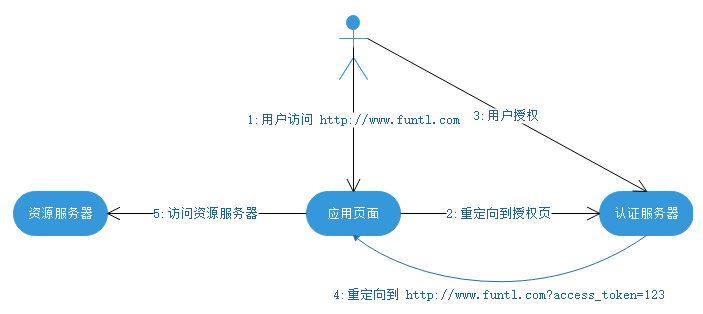
简化模式适用于纯静态页面应用。所谓纯静态页面应用,也就是应用没有在服务器上执行代码的权限(通常是把代码托管在别人的服务器上),只有前端 JS 代码的控制权。
这种场景下,应用是没有持久化存储的能力的。因此,按照 oAuth2.0 的规定,这种应用是拿不到 Refresh Token 的。其整个授权流程如下:
2、授权码模式
授权码模式适用于有自己的服务器的应用,它是一个一次性的临时凭证,用来换取 access_token 和 refresh_token。认证服务器提供了一个类似这样的接口:
https://www.baidu.com/exchange?code=&client_id=&client_secret=
需要传入 code、client_id 以及 client_secret。验证通过后,返回 access_token 和 refresh_token。一旦换取成功,code 立即作废,不能再使用第二次。流程图如下:
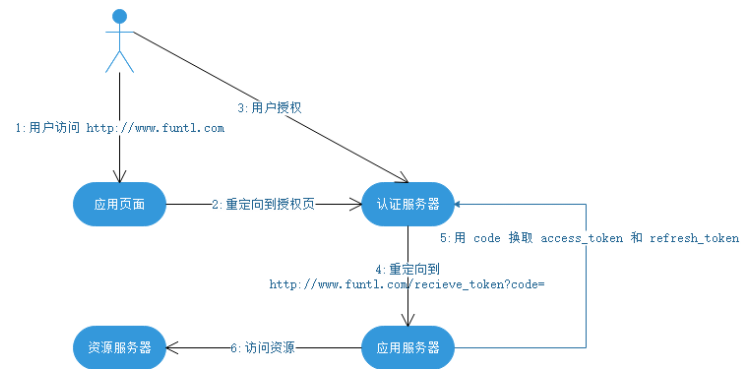
这个 code 的作用是保护 token 的安全性。上一节说到,简单模式下,token 是不安全的。这是因为在第 4 步当中直接把 token 返回给应用。而这一步容易被拦截、窃听。引入了 code 之后,即使攻击者能够窃取到 code,但是由于他无法获得应用保存在服务器的 client_secret,因此也无法通过 code 换取 token。而第 5 步,为什么不容易被拦截、窃听呢?这是因为,首先,这是一个从服务器到服务器的访问,黑客比较难捕捉到;其次,这个请求通常要求是 https 的实现。即使能窃听到数据包也无法解析出内容。
3、密码模式-----本文后续基于此种方式
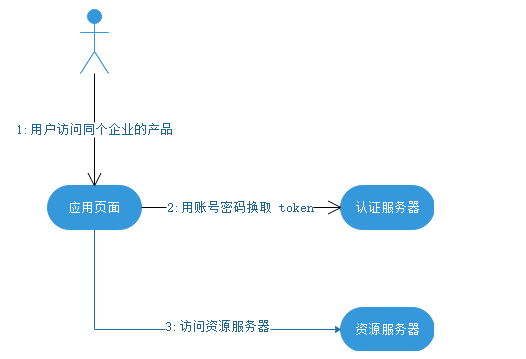
密码模式中,用户向客户端提供自己的用户名和密码。客户端使用这些信息,向 "服务商提供商" 索要授权。在这种模式中,用户必须把自己的密码给客户端,但是客户端不得储存密码。这通常用在用户对客户端高度信任的情况下,比如客户端是操作系统的一部分。
一个典型的例子是同一个企业内部的不同产品要使用本企业的 oAuth2.0 体系。在有些情况下,产品希望能够定制化授权页面。由于是同个企业,不需要向用户展示“xxx将获取以下权限”等字样并询问用户的授权意向,而只需进行用户的身份认证即可。这个时候,由具体的产品团队开发定制化的授权界面,接收用户输入账号密码,并直接传递给鉴权服务器进行授权即可。
4、客户端模式
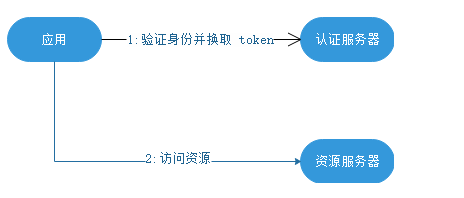
如果信任关系再进一步,或者调用者是一个后端的模块,没有用户界面的时候,可以使用客户端模式。鉴权服务器直接对客户端进行身份验证,验证通过后,返回 token。
代码模块
表结构
oauth_client_details-----客户端相关数据
CREATE TABLE `oauth_client_details` (

  `client_id` varchar(128) NOT NULL,

  `resource_ids` varchar(256) DEFAULT NULL,

  `client_secret` varchar(256) DEFAULT NULL,

  `scope` varchar(256) DEFAULT NULL,

  `authorized_grant_types` varchar(256) DEFAULT NULL,

  `web_server_redirect_uri` varchar(256) DEFAULT NULL,

  `authorities` varchar(256) DEFAULT NULL,

  `access_token_validity` int(11) DEFAULT NULL,

  `refresh_token_validity` int(11) DEFAULT NULL,

  `additional_information` varchar(4096) DEFAULT NULL,

  `autoapprove` varchar(256) DEFAULT NULL,

  PRIMARY KEY (`client_id`)

) ENGINE=InnoDB DEFAULT CHARSET=utf8;

client_secret:一定要为BycrPassWord后的串,因为oauth2会拿明文密码通过bycr加密后与数据库中数据进行比对。
authorized_grant_types:授权方式,本文以password为例
access_token_validity:token有效期
后台代码
1、pom.xml
<?xml version="1.0" encoding="UTF-8"?>

<project xmlns="http://maven.apache.org/POM/4.0.0" xmlns:xsi="http://www.w3.org/2001/XMLSchema-instance"

         xsi:schemaLocation="http://maven.apache.org/POM/4.0.0 http://maven.apache.org/xsd/maven-4.0.0.xsd">

    <modelVersion>4.0.0</modelVersion>

    <parent>

        <groupId>org.springframework.boot</groupId>

        <artifactId>spring-boot-starter-parent</artifactId>

        <version>2.1.6.RELEASE</version>

        <relativePath/> <!-- lookup parent from repository -->

    </parent>

    <groupId>com.ty</groupId>

    <artifactId>auth</artifactId>

    <version>0.0.1-SNAPSHOT</version>

    <name>auth</name>

    <description>Demo project for Spring Boot</description>

    <properties>

        <java.version>1.8</java.version>

    </properties>

    <dependencies>

        <dependency>

            <groupId>org.springframework.boot</groupId>

            <artifactId>spring-boot-starter</artifactId>

        </dependency>

        <dependency>

            <groupId>org.springframework.boot</groupId>

            <artifactId>spring-boot-starter-web</artifactId>

        </dependency>

        <dependency>

            <groupId>org.springframework.boot</groupId>

            <artifactId>spring-boot-starter-test</artifactId>

            <scope>test</scope>

        </dependency>

        <dependency>

            <groupId>org.springframework.cloud</groupId>

            <artifactId>spring-cloud-starter-oauth2</artifactId>

            <version>2.1.3.RELEASE</version>

        </dependency>

        <dependency>

            <groupId>mysql</groupId>

            <artifactId>mysql-connector-java</artifactId>

            <version>8.0.16</version>

        </dependency>

        <dependency>

            <groupId>org.springframework.boot</groupId>

            <artifactId>spring-boot-starter-jdbc</artifactId>

            <version>2.1.6.RELEASE</version>

        </dependency>

        <dependency>

            <groupId>org.springframework.boot</groupId>

            <artifactId>spring-boot-starter-data-redis</artifactId>

            <version>2.1.6.RELEASE</version>

        </dependency>

    </dependencies>

    <build>

        <plugins>

            <plugin>

                <groupId>org.springframework.boot</groupId>

                <artifactId>spring-boot-maven-plugin</artifactId>

            </plugin>

        </plugins>

    </build>

</project>
2、application.yml
spring:

  application:

    name: auth-server

  security:

    user:

      # 账号

      name: taoyong

      # 密码

      password: 123456

  datasource:

    url: jdbc:mysql://localhost:3306/mysql?useUnicode=true&characterEncoding=utf8&serverTimezone=GMT%2B8&useSSL=false

    driverClassName: com.mysql.jdbc.Driver

    username: alimayun

    password: ty123456

  redis:

    host: 127.0.0.1

    port: 6379

    password:

server:

  port: 8080
3、AuthorizationServerConfiguration
package com.ty.auth.config.auth;

import com.ty.auth.exception.handler.CustomWebResponseExceptionTranslator;

import com.ty.auth.store.CustomRedisToken;

import org.springframework.beans.factory.annotation.Autowired;

import org.springframework.context.annotation.Bean;

import org.springframework.context.annotation.Configuration;

import org.springframework.data.redis.connection.RedisConnectionFactory;

import org.springframework.security.authentication.AuthenticationManager;

import org.springframework.security.oauth2.config.annotation.configurers.ClientDetailsServiceConfigurer;

import org.springframework.security.oauth2.config.annotation.web.configuration.AuthorizationServerConfigurerAdapter;

import org.springframework.security.oauth2.config.annotation.web.configuration.EnableAuthorizationServer;

import org.springframework.security.oauth2.config.annotation.web.configurers.AuthorizationServerEndpointsConfigurer;

import org.springframework.security.oauth2.provider.ClientDetailsService;

import org.springframework.security.oauth2.provider.client.JdbcClientDetailsService;

import org.springframework.security.oauth2.provider.error.WebResponseExceptionTranslator;

import org.springframework.security.oauth2.provider.token.TokenStore;

import org.springframework.security.oauth2.provider.token.store.JdbcTokenStore;

import org.springframework.security.oauth2.provider.token.store.redis.RedisTokenStore;

import javax.sql.DataSource;

@Configuration

@EnableAuthorizationServer

public class AuthorizationServerConfiguration extends AuthorizationServerConfigurerAdapter {

    @Autowired

    public DataSource dataSource;

    //使用password模式必须要此bean

    @Autowired

    private AuthenticationManager authenticationManager;

    @Autowired

    private RedisConnectionFactory redisConnectionFactory;

    @Bean

    public TokenStore tokenStore() {

        // 基于redis实现,令牌保存到redis,并且可以实现redis刷新的功能

        return new CustomRedisToken(redisConnectionFactory, jdbcClientDetails());

    }

    @Bean

    public ClientDetailsService jdbcClientDetails() {

        // 基于 JDBC 实现,需要事先在数据库配置客户端信息

        return new JdbcClientDetailsService(dataSource);

    }

    @Override

    public void configure(AuthorizationServerEndpointsConfigurer endpoints) throws Exception {

        // 设置令牌

        endpoints.tokenStore(tokenStore());

        endpoints.authenticationManager(authenticationManager);

        endpoints.exceptionTranslator(new CustomWebResponseExceptionTranslator());

    }

    @Override

    public void configure(ClientDetailsServiceConfigurer clients) throws Exception {

        // 读取客户端配置

        clients.withClientDetails(jdbcClientDetails());

    }

}
4、WebSecurityConfiguration
package com.ty.auth.config.security;

import org.springframework.context.annotation.Bean;

import org.springframework.context.annotation.Configuration;

import org.springframework.security.authentication.AuthenticationManager;

import org.springframework.security.config.annotation.authentication.builders.AuthenticationManagerBuilder;

import org.springframework.security.config.annotation.method.configuration.EnableGlobalMethodSecurity;

import org.springframework.security.config.annotation.web.configuration.EnableWebSecurity;

import org.springframework.security.config.annotation.web.configuration.WebSecurityConfigurerAdapter;

import org.springframework.security.core.userdetails.UserDetails;

import org.springframework.security.core.userdetails.UserDetailsService;

import org.springframework.security.crypto.bcrypt.BCryptPasswordEncoder;

@Configuration

@EnableWebSecurity

@EnableGlobalMethodSecurity(prePostEnabled = true, securedEnabled = true, jsr250Enabled = true)

public class WebSecurityConfiguration extends WebSecurityConfigurerAdapter {

    @Bean

    public BCryptPasswordEncoder passwordEncoder() {

        // 设置默认的加密方式

        return new BCryptPasswordEncoder();

    }

    //password模式必须需要

    @Override

    @Bean

    public AuthenticationManager authenticationManagerBean() throws Exception {

        return super.authenticationManagerBean();

    }

    @Override

    protected void configure(AuthenticationManagerBuilder auth) throws Exception {

        //这里可以在数据库中做。主要就是实现UserDetailsService接口,自定义loadUserByUsername方法

        //auth.userDetailsService(xxx)

        auth.inMemoryAuthentication()

                // 在内存中创建用户并为密码加密

                .withUser("alimayun").password(passwordEncoder().encode("123456")).roles("USER")

                .and()

                .withUser("ty").password(passwordEncoder().encode("123456")).roles("ADMIN");

    }

}
5、ResourceServerConfigurer
package com.ty.auth.config.resource;

import com.ty.auth.exception.handler.CustomAccessDeniedHandler;

import com.ty.auth.exception.handler.MyAuthenticationEntryPoint;

import org.springframework.beans.factory.annotation.Autowired;

import org.springframework.context.annotation.Configuration;

import org.springframework.security.oauth2.config.annotation.web.configuration.EnableResourceServer;

import org.springframework.security.oauth2.config.annotation.web.configuration.ResourceServerConfigurerAdapter;

import org.springframework.security.oauth2.config.annotation.web.configurers.ResourceServerSecurityConfigurer;

import org.springframework.security.oauth2.provider.token.TokenStore;

//为了方便,直接把认证服务器也当做是一个资源服务器

@Configuration

@EnableResourceServer

public class ResourceServerConfigurer extends ResourceServerConfigurerAdapter {

    @Autowired

    private TokenStore tokenStore;

    @Override

    public void configure(ResourceServerSecurityConfigurer resources) throws Exception {

        resources.tokenStore(tokenStore).authenticationEntryPoint(new MyAuthenticationEntryPoint())

                .accessDeniedHandler(new CustomAccessDeniedHandler());

    }

}
6、异常类
CustomAccessDeniedHandler
package com.ty.auth.exception.handler;

import com.fasterxml.jackson.databind.ObjectMapper;

import org.springframework.beans.factory.annotation.Autowired;

import org.springframework.security.access.AccessDeniedException;

import org.springframework.security.web.access.AccessDeniedHandler;

import org.springframework.stereotype.Service;

import org.springframework.security.web.access.AccessDeniedHandler;

import javax.servlet.ServletException;

import javax.servlet.http.HttpServletRequest;

import javax.servlet.http.HttpServletResponse;

import java.io.IOException;

import java.util.Date;

import java.util.HashMap;

import java.util.Map;

public class CustomAccessDeniedHandler implements AccessDeniedHandler {

    @Autowired

    private ObjectMapper objectMapper;

    //权限不足异常处理类

    @Override

    public void handle(HttpServletRequest request, HttpServletResponse response, AccessDeniedException accessDeniedException) throws IOException, ServletException {

        response.setContentType("application/json;charset=UTF-8");

        Map<String, Object> map = new HashMap<>();

        map.put("resultCode", "400");

        map.put("resultMsg", accessDeniedException.getMessage());

        map.put("path", request.getServletPath());

        map.put("timestamp", String.valueOf(new Date().getTime()));

        response.setContentType("application/json");

        response.setStatus(HttpServletResponse.SC_UNAUTHORIZED);

        response.getWriter().write(objectMapper.writeValueAsString(map));

    }

}
MyAuthenticationEntryPoint
package com.ty.auth.exception.handler;

import com.fasterxml.jackson.databind.ObjectMapper;

import org.springframework.security.core.AuthenticationException;

import org.springframework.security.web.AuthenticationEntryPoint;

import org.springframework.stereotype.Service;

import javax.servlet.ServletException;

import javax.servlet.http.HttpServletRequest;

import javax.servlet.http.HttpServletResponse;

import java.io.IOException;

import java.util.Date;

import java.util.HashMap;

import java.util.Map;

public class MyAuthenticationEntryPoint implements AuthenticationEntryPoint {

    //认证无效,例如token无效等等

    @Override

    public void commence(HttpServletRequest request, HttpServletResponse response, AuthenticationException authException)

            throws IOException, ServletException {

        Map<String, Object> map = new HashMap<>();

        //通过自定义异常可以按照自己的意愿去返回这些异常信息,因为大部分企业级应用都是前后分离,对前端友好很重要!

        map.put("resultCode", "401");

        map.put("resultMsg", authException.getMessage());

        map.put("path", request.getServletPath());

        map.put("timestamp", String.valueOf(new Date().getTime()));

        response.setContentType("application/json");

        response.setStatus(HttpServletResponse.SC_UNAUTHORIZED);

        try {

        ObjectMapper mapper = new ObjectMapper();

        mapper.writeValue(response.getOutputStream(), map);

        } catch (Exception e) {

        throw new ServletException();

        }

    }

}
CustomWebResponseExceptionTranslator
package com.ty.auth.exception.handler;

import org.springframework.http.ResponseEntity;

import org.springframework.security.authentication.InternalAuthenticationServiceException;

import org.springframework.security.oauth2.common.exceptions.InvalidGrantException;

import org.springframework.security.oauth2.common.exceptions.InvalidTokenException;

import org.springframework.security.oauth2.common.exceptions.OAuth2Exception;

import org.springframework.security.oauth2.provider.error.WebResponseExceptionTranslator;

import org.springframework.stereotype.Service;

import javax.xml.transform.Result;

import java.util.HashMap;

import java.util.Map;

//这是获取token阶段出现异常部分

public class CustomWebResponseExceptionTranslator implements WebResponseExceptionTranslator {

    public ResponseEntity translate(Exception e) throws Exception {

        if (e instanceof InternalAuthenticationServiceException) {

            Map<String, Object> result = new HashMap<>();

            result.put("resultCode", "401");

            result.put("resultMsg", "用户不存在");

            return ResponseEntity.ok(result);

        }

        if (e instanceof InvalidGrantException) {

            Map<String, Object> result = new HashMap<>();

            result.put("resultCode", "401");

            result.put("resultMsg", "密码错误");

            return ResponseEntity.ok(result);

        }

        if (e instanceof InvalidTokenException) {

            Map<String, Object> result = new HashMap<>();

            result.put("resultCode", "401");

            result.put("resultMsg", "token未识别");

            return ResponseEntity.ok(result);

        }

        throw e;

    }

}
7、CustomRedisToken
package com.ty.auth.store;

import org.springframework.data.redis.connection.RedisConnectionFactory;

import org.springframework.security.oauth2.common.DefaultOAuth2AccessToken;

import org.springframework.security.oauth2.common.OAuth2AccessToken;

import org.springframework.security.oauth2.provider.ClientDetails;

import org.springframework.security.oauth2.provider.ClientDetailsService;

import org.springframework.security.oauth2.provider.OAuth2Authentication;

import org.springframework.security.oauth2.provider.OAuth2Request;

import org.springframework.security.oauth2.provider.token.store.redis.RedisTokenStore;

import java.util.Date;

public class CustomRedisToken extends RedisTokenStore {

    private ClientDetailsService clientDetailsService;

    public CustomRedisToken(RedisConnectionFactory connectionFactory, ClientDetailsService clientDetailsService) {

        super(connectionFactory);

        this.clientDetailsService = clientDetailsService;

    }

    //为什么需要刷新token的时间,比如默认1个小时,客户一直在操作,到了1个小时,让其登录,这种体验很差,应该是客户啥时候不请求服务器了,隔多长时间

    //认为其token失效

    // 其实这块可以看下源码,在客户端请求过来的时候,首先到达的是org.springframework.security.oauth2.provider.authentication.

    // OAuth2AuthenticationProcessingFilter。然后在请求校验完token有效之后,以当前时间刷新token,具体时间配置在数据库中~~~

    @Override

    public OAuth2Authentication readAuthentication(OAuth2AccessToken token) {

        OAuth2Authentication result = readAuthentication(token.getValue());

        if (result != null) {

            // 如果token没有失效  更新AccessToken过期时间

            DefaultOAuth2AccessToken oAuth2AccessToken = (DefaultOAuth2AccessToken) token;

            //重新设置过期时间

            int validitySeconds = getAccessTokenValiditySeconds(result.getOAuth2Request());

            if (validitySeconds > 0) {

                oAuth2AccessToken.setExpiration(new Date(System.currentTimeMillis() + (validitySeconds * 1000L)));

            }

            //将重新设置过的过期时间重新存入redis, 此时会覆盖redis中原本的过期时间

            storeAccessToken(token, result);

        }

        return result;

    }

    protected int getAccessTokenValiditySeconds(OAuth2Request clientAuth) {

        if (clientDetailsService != null) {

            ClientDetails client = clientDetailsService.loadClientByClientId(clientAuth.getClientId());

            Integer validity = client.getAccessTokenValiditySeconds();

            if (validity != null) {

                return validity;

            }

        }

        // default 12 hours.

        int accessTokenValiditySeconds = 60 * 60 * 12;

        return accessTokenValiditySeconds;

    }

}
测试
首先编写一个测试controller
package com.ty.auth.controller;

import org.springframework.web.bind.annotation.PostMapping;

import org.springframework.web.bind.annotation.RestController;

@RestController

public class TestController {

    @PostMapping("/hello")

    public String hello() {

        return "hello";

    }

}
1、打开postman,直接访问
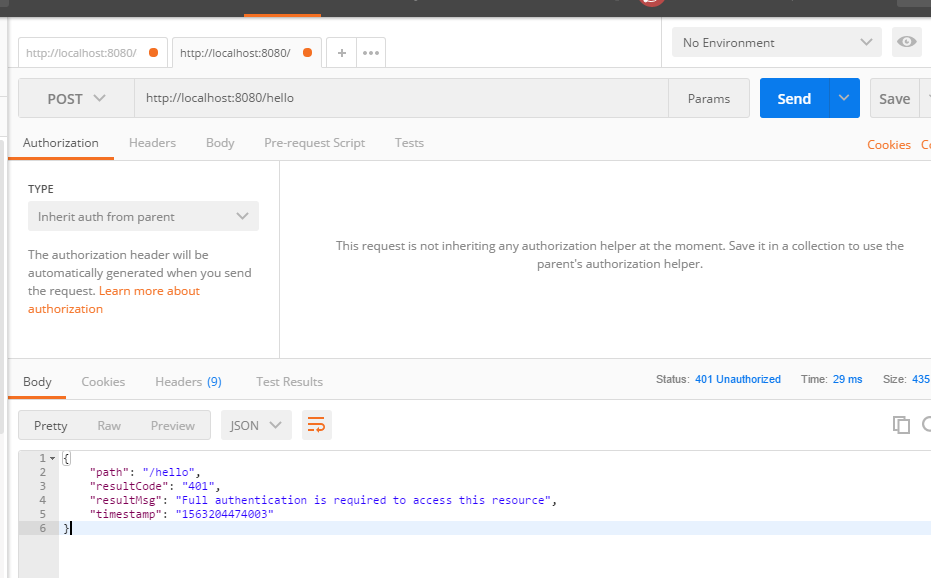
提示401,没有认证
2、请求token
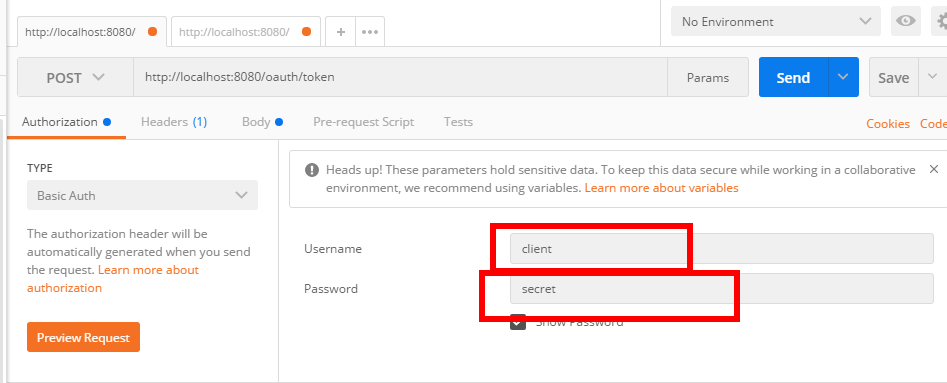
点击preview request,变成下面这样:
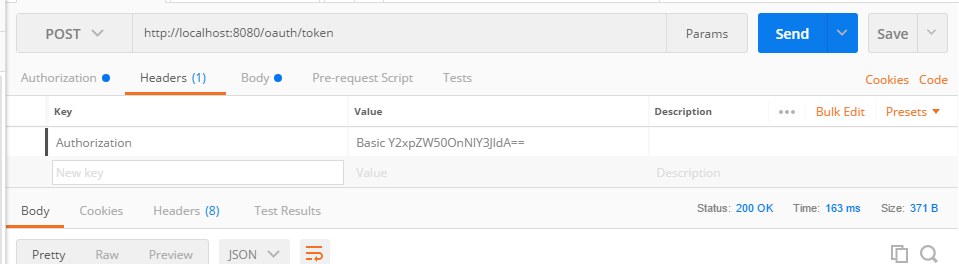
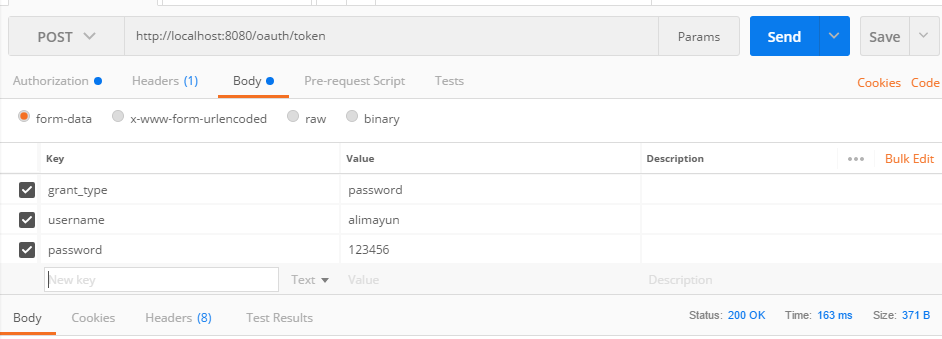

3、拿着token值访问/hello
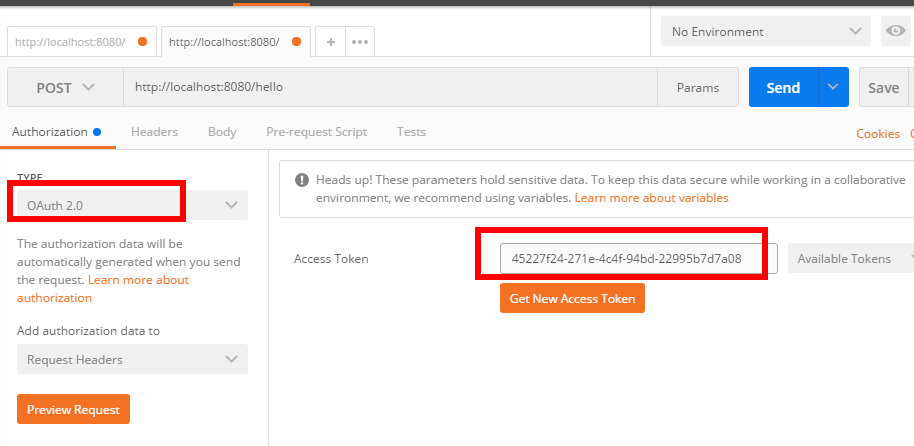
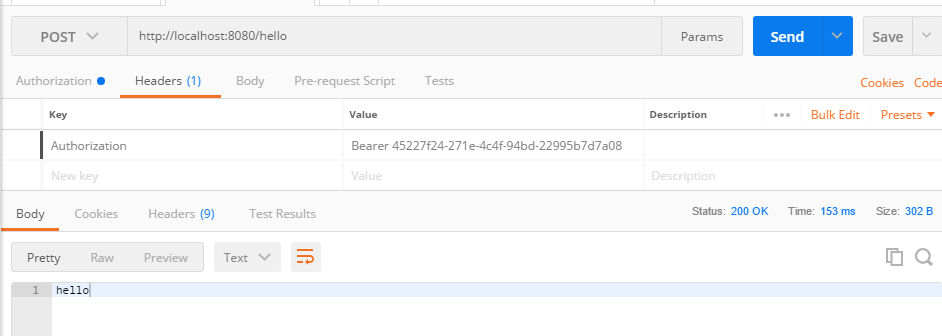
这就是一个简单的认证过程。token我设置默认是1800s过期,随着我不断请求,token有效期也会自动顺延
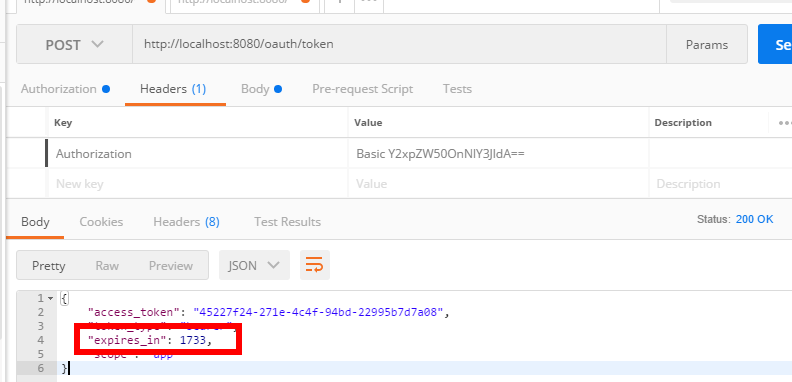
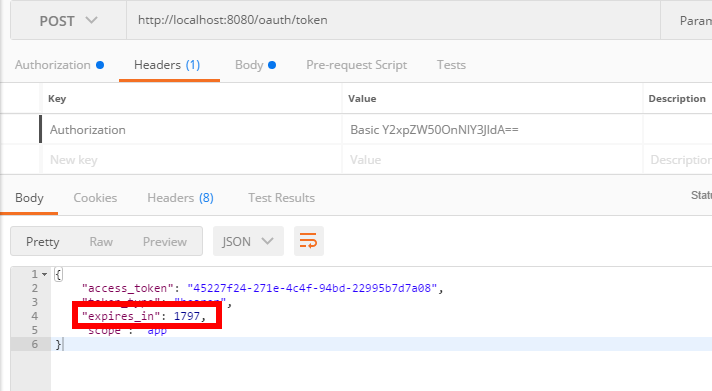
1733秒过期,过一会儿我再访问/hello,刷新token
oauth2使用心得-----基本概念以及认证服务器搭建的更多相关文章
- authpuppy 认证服务器搭建
此文仅限于搭建authpuppy认证服务器,不包含认证插件等安装,仅说明步骤以备下次安装忘记步骤.耽误时间. 环境:ubuntu10.04 软件版本:authpuppy-1.0.0-stable.tg ...
- 阶段5 3.微服务项目【学成在线】_day16 Spring Security Oauth2_05-SpringSecurityOauth2研究-搭建认证服务器
3 Spring Security Oauth2研究 3.1 目标 本项目认证服务基于Spring Security Oauth2进行构建,并在其基础上作了一些扩展,采用JWT令牌机制,并自定 义了用 ...
- SpringBoot实现OAuth2认证服务器
一.最简单认证服务器 1. pom依赖 <dependency> <groupId>org.springframework.boot</groupId> <a ...
- Spring Cloud实战 | 第九篇:Spring Cloud整合Spring Security OAuth2认证服务器统一认证自定义异常处理
本文完整代码下载点击 一. 前言 相信了解过我或者看过我之前的系列文章应该多少知道点我写这些文章包括创建 有来商城youlai-mall 这个项目的目的,想给那些真的想提升自己或者迷茫的人(包括自己- ...
- Spring cloud微服务安全实战-4-5搭建OAuth2认证服务器
现在可以访问我们的认证服务器,应用我们已经配置好了. 下面配置让用户可以访问我的认证服务器.再来重写一个方法. EndpointConfigure端点的配置. authenticationManage ...
- [Spring Cloud实战 | 第六篇:Spring Cloud Gateway+Spring Security OAuth2+JWT实现微服务统一认证授权
一. 前言 本篇实战案例基于 youlai-mall 项目.项目使用的是当前主流和最新版本的技术和解决方案,自己不会太多华丽的言辞去描述,只希望能勾起大家对编程的一点喜欢.所以有兴趣的朋友可以进入 g ...
- 【Spring Cloud & Alibaba 实战 | 总结篇】Spring Cloud Gateway + Spring Security OAuth2 + JWT 实现微服务统一认证授权和鉴权
一. 前言 hi,大家好~ 好久没更文了,期间主要致力于项目的功能升级和问题修复中,经过一年时间的打磨,[有来]终于迎来v2.0版本,相较于v1.x版本主要完善了OAuth2认证授权.鉴权的逻辑,结合 ...
- [EAP]将hostapd作为radius服务器搭建EAP认证环境
文章主要由以下几部分组成: 0.概念理解: WPA/WPA2,EAP,IEEE, 802.11i, WiFi联盟, 802.1x 1.编译hostapd 2.配置hostapd的conf文件 3.外接 ...
- Spring Boot Security OAuth2 实现支持JWT令牌的授权服务器
概要 之前的两篇文章,讲述了Spring Security 结合 OAuth2 .JWT 的使用,这一节要求对 OAuth2.JWT 有了解,若不清楚,先移步到下面两篇提前了解下. Spring Bo ...
随机推荐
- SpringCloud学习笔记(九):SpringCloud Config 分布式配置中心
概述 分布式系统面临的-配置问题 微服务意味着要将单体应用中的业务拆分成一个个子服务,每个服务的粒度相对较小,因此系统中会出现大量的服务.由于每个服务都需要必要的配置信息才能运行,所以一套集中式的.动 ...
- day20_函数的闭包 与 装饰器
#!/usr/bin/env python # -*- coding:utf-8 -*- # # 一些文章 # https://www.cnblogs.com/Vae1242/p/6944338.ht ...
- vue之.native修饰符
.native 修饰符就是用来注册元素的原生事件而不是组件自定义事件的 比如:自定义 Button.vue 组件 <template> <button type="butt ...
- 面试系列10 es生产集群的部署架构
如果你确实干过es,那你肯定了解你们生产es集群的实际情况,部署了几台机器?有多少个索引?每个索引有多大数据量?每个索引给了多少个分片?你肯定知道! 但是如果你确实没干过,也别虚,我给你说一个基本的版 ...
- nodejs和vuejs的关系
转自:https://blog.csdn.net/myKurt/article/details/79914078 nodejs类比Java中:JVM 详述: 就前端来说nodejs具有划时代的意义, ...
- spring:ApplicationContext的三个实现类
* ApplicationContest的三个常用实现类* ClassPathXmlApplicationContext:它可以加载类路径的配置文件,要求配置文件必须在类路径下,如果不在则加载不了* ...
- [记录]学习树莓派3B接DHT11和LCD1602和修改树莓派时区
前提 树莓派系统安装好 apache web 服务器,如未安装,可在树莓派内执行sudo apt-get install apache2 进行安装apache 也可以通过命令获取GPIO信息: gpi ...
- csscomb配置文件说明
{ "always-semicolon": true, // 总是显示分号 "block-indent": " ", // 代码块缩进,可以 ...
- 新一代云WAF:防御能力智能化,用户享有规则“自主权”
近日,在国际权威分析机构Frost & Sullivan发布的<2017年亚太区Web应用防火墙市场报告>中,阿里云以市场占有率45.8%的绝对优势连续两年领跑大中华区云WAF市场 ...
- 在DataWorks中实现指定UDF只能被指定账户访问
背景 之前写过一篇文章是关于“DataWorks和MaxCompute内部权限体系的区别”有兴趣的朋友可以点击阅读查看详情.但是还是有些同学会问,我如何在DataWorks中实现我的具体某个Resou ...