
Python - requests https请求的坑

#-*-coding:utf-8-*-

# Time:2017/9/25 20:41

# Author:YangYangJun

import requests

import ssl

from requests.auth import HTTPBasicAuth

def post_login():

    url = "https://www.url"

    values = {}

    values['username'] = 'username'

    values['password'] = 'password'

    response = requests.post(url,values)

    print response.text

def get_login():

    url = "https://www.url"

    values = {}

    values['username'] = 'username'

    values['password'] = 'password'

    #geturl = url + '?' + values

    response = requests.get(url, values)

    print response.content

def post_loginHttps1():

    url = "https://www.url"

    values = {}

    values['username'] = 'username'

    values['password'] = 'password'

    #临时解决https的方法1

    response = requests.post(url,values,verify=False)

    print response.text

def post_loginHttps2():

    #解决https方法2

    ssl._create_default_https_context = ssl._create_unverified_context

    url = "https://www.url"

    values = {}

    values['username'] = 'username'

    values['password'] = 'password'

    #临时解决https的问题

    response = requests.post(url,values,verify=True)

    print response.text

if __name__ == '__main__':

    post_login()

    #get_login()

    post_loginHttps1()

    # post_loginHttps2()

    #出现下面错误的原因主要是因为打开了fiddler,关闭fiddler即可。

#     raise SSLError(e, request=request)

# requests.exceptions.SSLError: HTTPSConnectionPool(host='www.yiyao.cc', port=443): Max retries exceeded with url: /user/loginWeb (Caused by SSLError(SSLError(1, u'[SSL: CERTIFICATE_VERIFY_FAILED] certificate verify failed (_ssl.c:661)'),))

#
知乎:https://www.zhihu.com/question/40025043 有介绍解决的办法,如上代码,方法一:关闭校验,方法二:导入其他库,定义ssl._create_default_https_context = ssl._create_unverified_context。
其实根本原因是打开了fiddler,关闭即可,如果不关闭,方法一也可以,方法二还是不好使。故执行时要关闭 fiddler是最保险的。
同时如果打开了fiddler,访问https网站时,页面可能会提示不信任无法加载的提示,这是fiddler证书不受信任的问题。解决办法如下。
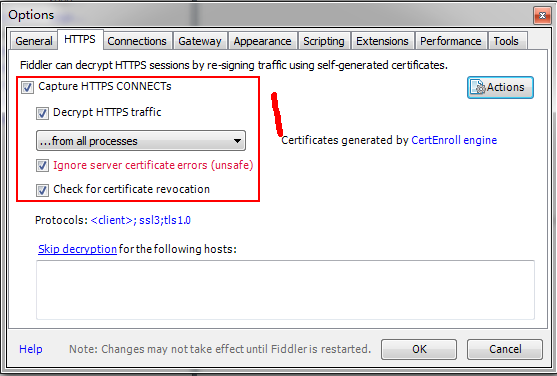
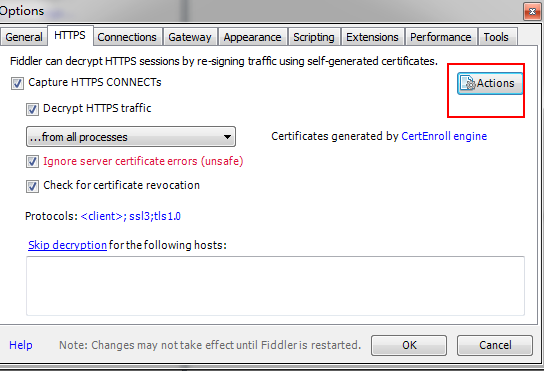
然后选择export root .....
然后桌面会生成一个
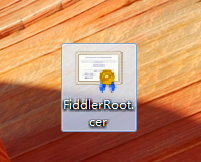
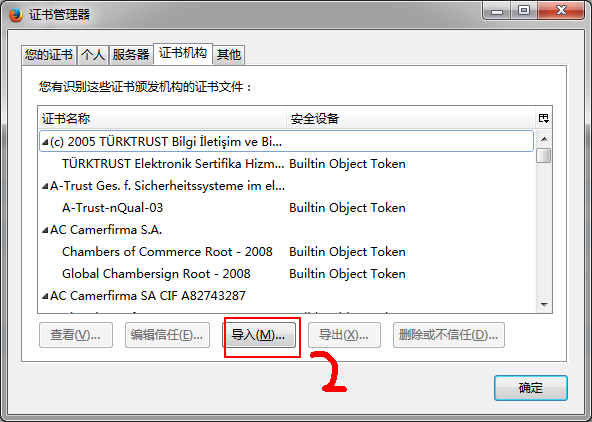
然后通过 不同浏览器的证书导入即可
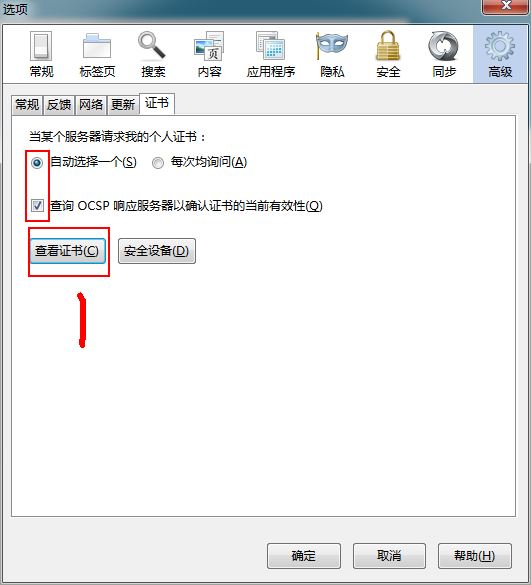
选择证书执行导入。
Python - requests https请求的坑的更多相关文章
- python爬虫 - python requests网络请求简洁之道
http://blog.csdn.net/pipisorry/article/details/48086195 requests简介 requests是一个很实用的Python HTTP客户端库,编写 ...
- python requests http请求
导入模块 import requests import json header = {'Content-Type': 'application/json'} data = {"} data ...
- python requests发起请求,报“Max retries exceeded with url”
需要高频率重复调用一个接口,偶尔会出现"Max retries exceeded with url" 在使用requests多次访问同一个ip时,尤其是在高频率访问下,http连接 ...
- python requests https 访问出错
错误提示: /usr/local/lib/python2.7/site-packages/requests/packages/urllib3/util/ssl_.py:100: InsecurePla ...
- Python - requests发送请求报错:UnicodeEncodeError: 'latin-1' codec can't encode characters in position 13-14: 小明 is not valid Latin-1. Use body.encode('utf-8') if you want to send it encoded in UTF-8.
背景 在做接口自动化的时候,Excel作为数据驱动,里面存了中文,通过第三方库读取中文当请求参数传入 requests.post() 里面,就会报错 UnicodeEncodeError: 'lati ...
- python + requests发起请求,接口返回400,报错“Unexpected character encountered while parsing value: G. Path”
完整报错信息如下: {'errors': {'': ["Unexpected character encountered while parsing value: G. Path '', l ...
- [错误记录]python requests库 Response 判断坑
在requests访问之后, 我直接判断resp的值, 如下: if resp: do something 发现当Response 为500的时候没有进入if分支, 检查源码,发现Response重写 ...
- Python+requests维持会话
Python+requests维持会话 一.使用Python+requests发送请求,为什么要维持会话? 我们是通过http协议来访问web网页的,而http协议是无法维持会话之间的状态.比如说我们 ...
- Python常见问题 - python3 使用requests发送HTTPS请求报certificate verify failed 错误
当你使用 requests 发送HTTPS请求时 requests.get(url, parmas=parmas, headers=header, cookies=cookie) 出现了以下错误 HT ...
随机推荐
- bzoj2120 / P1903 [国家集训队]数颜色 / 维护队列(带修改莫队)
P1903 [国家集训队]数颜色 / 维护队列 带修改的莫队 在原有指针$(l,r)$上又添加了时间指针$t$ 贴一段dalao的解释 带修改的莫队,和原版莫队相比,多了一个时间轴 原版莫队是将区间( ...
- div容器中内容垂直居中
#box{ width:200px; height:200px; line-height: 200px; vertical-align: middle; margin: 5px; background ...
- vue.JS 介绍
vueJS 介绍 首先,vueJS 是我很早之前就想要接触学习的东西,但是呢,一直没时间,主要是在学校,事太多,没心思定下心来学习,我学生生涯的最后一个假期的第一天晚上,万事开头难,那就先写点儿什么东 ...
- 关于sql中in 和 exists 的效率问题
在用in的地方可以使用freemark标签代替,例如: 将 <#if assistantList??&& (assistantList?size > 0)> AND ...
- history 基本用法
设置记录保存的数量,默认1000: /etc/profile 记录保存文件,可用来查看或修改记录: ~/.bash_history 如果是root用户就是在/root/.bash_history 直接 ...
- 论证与测试 + 用EA画uml
论证与测试,谁才是真正的不二法门 第十三次作业的时候,我们开始使用Junit对代码进行测试,主要是测试代码的覆盖率,以及分支的覆盖率.(主要是检查JSF写的是否是符合规范,……). 这里我给出我测试的 ...
- QML的Window与ApplicationWindow
ApplicationWindow需要导入QtQuick.Controls Window需要导入QtQuick.Window . 默认不可见,需要设置visible:true才可见. 主要区别就是Ap ...
- topcoder srm 440 div1
problem1 link 二分答案,然后计算总时间.跟$T$比较确定要增大答案还是减小答案. problem2 link 可以看作是以‘*’所在位置为根的树.所以每个非根节点都有一个父节点. 那么每 ...
- 题解——Codeforces Round #507 (based on Olympiad of Metropolises) T2(模拟)
T2还是模拟 枚举一下第一个放哪里 然后贪心的反转即可 虽然我也不会证,但是这题肯定有解qwq #include <cstdio> #include <algorithm> # ...
- Ubuntu 更新系统版本以及查看当前系统版本的命令
1. Ubuntu 查看当前系统版本: lsb_release -a 2. Ubuntu 更新系统版本的命令: sudo do-release-upgrade