
C# 控件
.ascx:Web窗体用户控件。用来存放独立的用户控件,可提供众多页面使用:
<%@ Control Language="C#" AutoEventWireup="true" CodeBehind="WebUserControl1.ascx.cs" Inherits="WebApplication1.WebUserControl1" %>

<asp:DropDownList ID="DropDownList1" runat="server">

    <asp:ListItem>---请选择---</asp:ListItem>

    <asp:ListItem Value="gx">广西</asp:ListItem>

    <asp:ListItem Value="sh">上海</asp:ListItem>

    <asp:ListItem Value="zz">镇江</asp:ListItem>

</asp:DropDownList>
控件的使用:直接将ascx文件拖过去即可。
Web用户自定义控件(公共控件的构建和引用):
City.ASCX:

<%@ Control Language="C#" AutoEventWireup="true" CodeBehind="City.ascx.cs" Inherits="WebApplication1.City" %>

<asp:DropDownList ID="DropDownList1" runat="server" AutoPostBack="True" OnSelectedIndexChanged="selectedChanged">

    <asp:ListItem>上海</asp:ListItem>

    <asp:ListItem>江苏</asp:ListItem>

    <asp:ListItem>南京</asp:ListItem>

    <asp:ListItem>镇江</asp:ListItem>

</asp:DropDownList>

////////////////////////////////////////////////////////////////////

City.ASCX.CS:

protected void Page_Load(object sender, EventArgs e)

        {

            //

        }

        public string CityID

        {

            get

            {

                return this.DropDownList1.SelectedValue;

            }

            set

            {

                this.DropDownList1.SelectedValue = value;

            }

        }

        public event EventHandler CitySelected = null;  // 第一步:声明事件

        // 第二步:激发事件

        protected void selectedChanged(object sender, EventArgs e)

        {

            if (this.CitySelected != null)

            {

                this.CitySelected(this, null);

            }

        }

////////////////////////////////////////////////////////////////////

WebForm1.ASPX:

<%@ Page Language="C#" AutoEventWireup="true" CodeBehind="WebForm1.aspx.cs" Inherits="WebApplication1.WebForm1" %>

<%@ Register Src="~/City.ascx" TagPrefix="uc1" TagName="City" %>

<!DOCTYPE html>

<html xmlns="http://www.w3.org/1999/xhtml">

<head runat="server">

<meta http-equiv="Content-Type" content="text/html; charset=utf-8"/>

    <title></title>

</head>

<body>

    <form id="form1" runat="server">

    <div>

        <!-- 处理时间之注册委托 -->

        <uc1:City runat="server" id="City" OnCitySelected="showCity" />

        <asp:Literal ID="Literal1" runat="server"></asp:Literal>

    </div>

    </form>

</body>

</html>

////////////////////////////////////////////////

WebForm1.ASPX.CS:

protected void Page_Load(object sender, EventArgs e)

        {

            //

        }

        // 处理事件之执行委托

        public void showCity(object sender,EventArgs e)

        {

            this.Literal1.Text = this.City.CityID;

        }
实现用户自定义的另一种方法:
ASCX:

<%@ Control Language="C#" AutoEventWireup="true" CodeBehind="City.ascx.cs" Inherits="WebApplication1.City" %>

<asp:DropDownList ID="DropDownList1" runat="server" AutoPostBack="True" OnSelectedIndexChanged="DropDS">

    <asp:ListItem>a</asp:ListItem>

    <asp:ListItem>b</asp:ListItem>

    <asp:ListItem>c</asp:ListItem>

    <asp:ListItem>d</asp:ListItem>

</asp:DropDownList>

////////////////////////////////////////////////////////////////////

ASCX.CS:

protected void Page_Load(object sender, EventArgs e)

        {

            //

        }

        public delegate void CitySelectedEventHadler(string CityID);  // 声明委托

        public event CitySelectedEventHadler CitySelected = null;  // 声明事件

        // 激发事件

        protected void DropDS(object sender, EventArgs e)

        {

            if (this.CitySelected != null)

            {

                string args = this.DropDownList1.SelectedValue;

                this.CitySelected(args);

            }

        }

/////////////////////////////////////////////////////////////

ASPX:

<%@ Page Language="C#" AutoEventWireup="true" CodeBehind="WebForm1.aspx.cs" Inherits="WebApplication1.WebForm1" %>

<%@ Register Src="~/City.ascx" TagPrefix="uc1" TagName="City" %>

<!DOCTYPE html>

<html xmlns="http://www.w3.org/1999/xhtml">

<head runat="server">

<meta http-equiv="Content-Type" content="text/html; charset=utf-8"/>

    <title></title>

</head>

<body>

    <form id="form1" runat="server">

    <div>

        <!-- 处理事件:委托注册 -->

        <uc1:City runat="server" id="City" OnCitySelected="showCity" />

        <asp:Literal ID="Literal1" runat="server"></asp:Literal>

    </div>

    </form>

</body>

</html>

//////////////////////////////////////////////////

ASPX.CS:

protected void Page_Load(object sender, EventArgs e)

        {

            //

        }

        // 处理事件:执行委托

        public void showCity(string id)

        {

            this.Literal1.Text = id;

        }
泛型方法(常用):
City.ASCX:

<%@ Control Language="C#" AutoEventWireup="true" CodeBehind="City.ascx.cs" Inherits="WebApplication1.City" %>

<asp:DropDownList ID="DropDownList1" runat="server" AutoPostBack="True" OnSelectedIndexChanged="DropDownSelected">

    <asp:ListItem>a</asp:ListItem>

    <asp:ListItem>b</asp:ListItem>

    <asp:ListItem>c</asp:ListItem>

</asp:DropDownList>

////////////////////////////////////////////////////////////

City.ascx.cs:

protected void Page_Load(object sender, EventArgs e)

        {

            //

        }

        public event EventHandler<CityEventArgs> CitySelected = null;

        protected void DropDownSelected(object sender, EventArgs e)

        {

            if (this.CitySelected != null)

            {

                CityEventArgs args = new CityEventArgs();

                args.CityID = this.DropDownList1.SelectedValue;

                this.CitySelected(this, args);  // 等价于 this.CitySelected(this, new CityEventArgs() { CityID = this.DropDownList1.SelectedValue });

            }

        }

/////////////////////////////////////////////////////////////////

class.cs:

using System;

using System.Collections.Generic;

using System.Linq;

using System.Web;

namespace WebApplication1.App_Code

{

    public class Class1

    {

    }

    public class CityEventArgs : EventArgs

    {

        public string CityID { get; set; }

    }

}

//////////////////////////////////////////////////////////

Webfrom1.aspx:

<%@ Page Language="C#" AutoEventWireup="true" CodeBehind="WebForm1.aspx.cs" Inherits="WebApplication1.WebForm1" %>

<%@ Register Src="~/City.ascx" TagPrefix="uc1" TagName="City" %>

<!DOCTYPE html>

<html xmlns="http://www.w3.org/1999/xhtml">

<head runat="server">

<meta http-equiv="Content-Type" content="text/html; charset=utf-8"/>

    <title></title>

</head>

<body>

    <form id="form1" runat="server">

    <div>

        <uc1:City runat="server" id="City"/>

        <asp:Literal ID="Literal1" runat="server"></asp:Literal>

    </div>

    </form>

</body>

</html>

////////////////////////////////////////////////////////////

Webfrom1.aspx.cs:

protected void Page_Load(object sender, EventArgs e)

        {

            this.City.CitySelected += City_CitySelected;

        }

        private void City_CitySelected(object sender, App_Code.CityEventArgs e)

        {

            this.Literal1.Text = e.CityID;

        }
用户编程加载控件使用LoadControl("city.ascx");
用户自定义控件前端样式/验证等:
City.ascx:

<%@ Control Language="C#" AutoEventWireup="true" CodeBehind="City.ascx.cs" Inherits="WebApplication1.City" %>

用户名:<asp:TextBox ID="TextBox1" runat="server"></asp:TextBox><asp:Button ID="Button1" runat="server" Text="Button" OnClientClick="return check();" />

<script type="text/javascript">

    function check() {

        var t1 = document.getElementById("<%= TextBox1.ClientID%>");  // 获取当前控件的ID

        if (!t1.value) {

            alert("用户名不为空");

            return false;

        }

    }

</script>

//////////////////////////////////////////////////////////////

WebForm1.aspx:

<%@ Page Language="C#" AutoEventWireup="true" CodeBehind="WebForm1.aspx.cs" Inherits="WebApplication1.WebForm1" %>

<%@ Register Src="~/City.ascx" TagPrefix="uc1" TagName="City" %>

<!DOCTYPE html>

<html xmlns="http://www.w3.org/1999/xhtml">

<head runat="server">

<meta http-equiv="Content-Type" content="text/html; charset=utf-8"/>

    <title></title>

</head>

<body>

    <form id="form1" runat="server">

    <div>

        <uc1:City runat="server" ID="City" />

    </div>

    </form>

</body>

</html>
后端验证:
主要分为下面这6种:
RequiredFieldValidator:必填认证。ControlToValidator属性可以设置他验证的ID。
CompareValidator:比较(常用语两个密码是否一致比较)。ControlToValidator是本身ID,ControlToCompare是参照的标本(样本可以不写,例如年龄只需要检测是否为整形,即operrator=DataTypeCheck和Type=Integer即可。又如果年龄只需要比较大小,那么,即operrator=GreaterThanEqual(大于等于)/GreaterThan(大于)/LessThanEqual(小于等于)/LessThan(小于)、Type=Integer和ValueToCompare=18(数值)即可)。operrator表示比较的方法(Equal表示相等)
RangeValidator:范围比较。MaximumValue最大值,MinimumValue最小值 。
RegularExpressionValidator:正则表达式验证。ValidationExpression写正则表达式(有常用的正则表达式)。
CustomValidator:编写代码来验证(上面的各种方法都不能实现的情况下适用)。编写代码验证有两种(server端和client端),server端方法是调用方法的属性是ServerValidate;client端调用script的方法的属性是ClientValidationFunction。
注:
1.上面的控件都有一个外观选项设置:display默认是static表示静态的,就是位置固定。改为Dynamic表示动态的,效果就是前一个控件不显示,后面一个控件会占用前一个控件的位置。
2.如果取消验证,不仅仅是单单的button按钮就可以进行取消,button按钮的属性CauseValidation=false才能进行取消验证。
3.(验证控件/button)控件的分组能够实现在同一个页面进行相同功能的分组操作(互不干扰),(验证控件/button)属性ValidationGroup。
案例:

WebForm1.aspx:

<%@ Page Language="C#" AutoEventWireup="true" CodeBehind="WebForm1.aspx.cs" Inherits="WebApplication1.WebForm1" %>

<!DOCTYPE html>

<html xmlns="http://www.w3.org/1999/xhtml">

<head runat="server">

<meta http-equiv="Content-Type" content="text/html; charset=utf-8"/>

    <title></title>

    <script type="text/javascript">

        // 使用CustomValidator验证方式的client端验证函数

        function CheckDate(sender, args) {

            // args.Value和args.IsValid并没有提示,但是方式仍然是这样写。不显示是因为js客户端没有这个属性

            var i = parseInt(args.Value);

            args.IsValid = i %  == ;

        }

    </script>

</head>

<body>

    <form id="form1" runat="server">

    <div>

        用户名:<asp:TextBox ID="TextBox1" runat="server"></asp:TextBox>

        <asp:RequiredFieldValidator ID="RequiredFieldValidator1" runat="server" ControlToValidate="TextBox1" Display="Dynamic" ErrorMessage="用户名不能为空"></asp:RequiredFieldValidator>

        <br />

        密码:<asp:TextBox ID="TextBox2" runat="server"></asp:TextBox>

        <asp:RequiredFieldValidator ID="RequiredFieldValidator2" runat="server" ControlToValidate="TextBox2" Display="Dynamic" ErrorMessage="密码不能为空"></asp:RequiredFieldValidator>

        <br />

        确认密码:<asp:TextBox ID="TextBox3" runat="server"></asp:TextBox>

        <asp:RequiredFieldValidator ID="RequiredFieldValidator3" runat="server" ControlToValidate="TextBox3" Display="Dynamic" ErrorMessage="确认密码不能为空"></asp:RequiredFieldValidator>

        <asp:CompareValidator ID="CompareValidator1" runat="server" ControlToCompare="TextBox2" ControlToValidate="TextBox3" Display="Dynamic" ErrorMessage="密码不一致"></asp:CompareValidator>

        <br />

        Email:<asp:TextBox ID="TextBox4" runat="server"></asp:TextBox>

        <asp:RegularExpressionValidator ID="RegularExpressionValidator1" runat="server" ControlToValidate="TextBox4" ErrorMessage="Email格式不正确" ValidationExpression="\w+([-+.']\w+)*@\w+([-.]\w+)*\.\w+([-.]\w+)*"></asp:RegularExpressionValidator>

        <br />

        需要后台C#代码验证(判断偶数):<asp:TextBox ID="TextBox5" runat="server"></asp:TextBox>

        <asp:CustomValidator ID="CustomValidator1" runat="server" ControlToValidate="TextBox5" ErrorMessage="一定要是偶数" OnServerValidate="ServerValidation"></asp:CustomValidator>

        <br />

        <asp:Button ID="Button1" runat="server" Text="Button" />

        <asp:Button ID="Button2" runat="server" CausesValidation="False" Text="取消" />

    </div>

    </form>

</body>

</html>

////////////////////////////////////////////////////////////

WebForm1.aspx.cs:

using System;

using System.Collections.Generic;

using System.Linq;

using System.Web;

using System.Web.UI;

using System.Web.UI.WebControls;

namespace WebApplication1

{

    public partial class WebForm1 : System.Web.UI.Page

    {

        protected void Page_Load(object sender, EventArgs e)

        {

        }

        // 使用CustomValidator验证方式的server端验证函数

        protected void ServerValidation(object source, ServerValidateEventArgs args)

        {

            if (string.IsNullOrEmpty(args.Value))

            {

                // 判断是否为空

                args.IsValid = false;  // 如果为空,那么返回false

            }

            else

            {

                int i = int.Parse(args.Value);

                args.IsValid = i %  == ;  // 判断是否为偶数

            }

        }

    }

}
系统控件:
Button:点击按钮
ProgressBar:滚动条
ComboBox:下拉列表。
  该下拉列表默认是可以改变的。DropDownStyle=DropDownList表示不可修改,表示下拉列表。
  空间含有SelectedIndexChanged用来设置响应函数。
  SelectIndex:用来获取选择下标索引。
  SelectItem:用来获取选中的项。
  Items.Insert(索引, "插入内容")
  Item.Clear():清空数据。
ToolStrip:菜单列表
Label:标题
Timer:定时器。
  Enabled:用来显示定时器是否是开启状态。
  Interval:表示设计的时间单位,默认为100毫秒。
WebBrowser:浏览器控件
SerialPort:串口控件
  DataBits:数据位
  PortName:端口名称
  ReadBufferSize:读取缓冲区的大小
Panel:控件的容器。作用:例如将四个单选按钮区分成两组
GroupBox:组框
StatusStrip:状态栏
pktruebox:图片框
  image:选择好导入图片
TextBox
  textbox.Text:获取字符串
  textbox.Lines:按行读取字符串
相关内容具体可看:https://www.cnblogs.com/namejr/p/10560604.html
pictureBox:画图控件
  point:描绘,可以添加函数。
Literal:显示文本的控件
  Mode:可以进行设置属性,当属性是Encode的时候,就会对传递进去的输入进行编码
ImageButton:图片button(和img标签相似)
  click:绑定点击事件。例如:可以获取点击的坐标(e.X,e.Y)
LinkButton:链接button(和a标签相似)
DROPDOWNLIST:下拉选项,相当于html中的select
  SelectedIndexChanged:改变选择条件出发该属性。下面案例使用button按钮进行选择变化,其实使用该属性也可以满足必要的需求。
  AppendDataBoundItems:保留原来的属性,进行添加
ASPX:

<div>

        <asp:DropDownList ID="DropDownList1" runat="server">

            <asp:ListItem Value="beijing">北京</asp:ListItem>

            <asp:ListItem Value="shanghai">上海</asp:ListItem>

            <asp:ListItem Value="nanjing">南京</asp:ListItem>

        </asp:DropDownList><asp:Button ID="Button1" runat="server" Text="Button" OnClick="Button1_Click" /><asp:Label ID="Label1" runat="server" Text="Label"></asp:Label>

    </div>

//////////////////////////////////////

CS:

protected void Page_Load(object sender, EventArgs e)

        {

            if (!Page.IsPostBack)

            {

                // 添加方法

                ListItem item = new ListItem("天津", "tianjin");

                this.DropDownList1.Items.Add(item);

                //

                this.DropDownList1.Items.Add(new ListItem() { Text = "合肥", Value="hefei" });

                //

                this.DropDownList1.Items.AddRange(new ListItem[]{

                    new ListItem(){Text="广西",Value="guangxi"},

                    new ListItem(){Text="玉林",Value="yulin"},

                    new ListItem(){Text="广东",Value="guangdong"},

                    new ListItem(){Text="中山",Value="zhongshan"}

                });

            }

        }

        protected void Button1_Click(object sender, EventArgs e)

        {

            this.Label1.Text = this.DropDownList1.SelectedItem.Text;  // 选择选中的属性

        }
ListBox/DropDownList/RadioButtonList/CheckBoxList的简单使用
ASPX:

<div>

        <!-- list选择列表,固定size=4的select -->

        <asp:ListBox ID="ListBox1" runat="server"></asp:ListBox>

        <!-- list选择列表,固定size=1的select -->

        <asp:DropDownList ID="DropDownList1" runat="server"></asp:DropDownList>

        <!-- 单选按钮 -->

        <asp:RadioButtonList ID="RadioButtonList1" runat="server"></asp:RadioButtonList>

        <!-- 多选按钮 -->

        <asp:CheckBoxList ID="CheckBoxList1" runat="server"></asp:CheckBoxList>

    </div>

///////////////////////////////////////////////////////////////////

CS:

protected void Page_Load(object sender, EventArgs e)

        {

            ListItem[] citys = new ListItem[]{

                new ListItem(){Text="广西",Value="guangxi"},

                new ListItem(){Text="江苏",Value="jiangsu"},

                new ListItem(){Text="上海",Value="shanghai"},

                new ListItem(){Text="广东",Value="guangdong"}

            };

            /*

            // 单个添加

            this.ListBox1.DataSource = citys;

            this.ListBox1.DataBind();

            this.DropDownList1.DataSource = citys;

            this.DropDownList1.DataBind();

            this.RadioButtonList1.DataSource = citys;

            this.RadioButtonList1.DataBind();

            this.CheckBoxList1.DataSource = citys;

            this.CheckBoxList1.DataBind();

            */

            //

            // 代码循环添加

            List<ListControl> listCtrls = new List<ListControl>();

            this.FindControls(this,listCtrls);

            foreach (ListControl item in listCtrls)

            {

                item.DataSource = citys;

                item.DataBind();

            }

        }

        // 用来查找到需要的对应的control控件(ListControl)

        public void FindControls(Control contr, List<ListControl> listcontrol)

        {

            foreach (Control item in contr.Controls)

            {

                if (item is ListControl)

                {

                    listcontrol.Add(item as ListControl);

                }

                else if (item.Controls.Count > )

                {

                    FindControls(item, listcontrol);

                }

            }

        }

        /*

         * 泛型版本

        public void FindControls<T>(Control contr, List<T> listcontrol) where T:Control

        {

            foreach (Control item in contr.Controls)

            {

                if (item is T)

                {

                    listcontrol.Add(item as T);

                }

                else if (item.Controls.Count > 0)

                {

                    FindControls<T>(item, listcontrol);

                }

            }

        }*/
HyperLink:超链接
  navigateURL:导航
  target:打开页面的方式
Calendar:日历
  selectedchanged:修改日期触发
  selectionMode:默认单选日期
  DayRender:当每次服务器像用户输出某一天的时候会触发的事件(可以说是每点击触发的时候)
案例:

ASPX:

<div>

        <asp:Calendar ID="Calendar1" runat="server" BackColor="White" BorderColor="#3366CC" BorderWidth="1px" CellPadding="" DayNameFormat="Shortest" Font-Names="Verdana" Font-Size="8pt" ForeColor="#003399" Height="200px" OnDayRender="Calendar_DayRender" OnSelectionChanged="Calendar_selected" SelectionMode="DayWeekMonth" Width="220px">

            <DayHeaderStyle BackColor="#99CCCC" ForeColor="#336666" Height="1px" />

            <NextPrevStyle Font-Size="8pt" ForeColor="#CCCCFF" />

            <OtherMonthDayStyle ForeColor="#999999" />

            <SelectedDayStyle BackColor="#009999" Font-Bold="True" ForeColor="#CCFF99" />

            <SelectorStyle BackColor="#99CCCC" ForeColor="#336666" />

            <TitleStyle BackColor="#003399" BorderColor="#3366CC" BorderWidth="1px" Font-Bold="True" Font-Size="10pt" ForeColor="#CCCCFF" Height="25px" />

            <TodayDayStyle BackColor="#99CCCC" ForeColor="White" />

            <WeekendDayStyle BackColor="#CCCCFF" />

        </asp:Calendar>

    </div>

        <asp:Label ID="Label1" runat="server" Text="Label"></asp:Label>

CS:

protected void Calendar_selected(object sender, EventArgs e)

        {

            this.Label1.Text = this.Calendar1.SelectedDate.ToString();

        }

        //

        protected void Calendar_DayRender(object sender, DayRenderEventArgs e)

        {

            DateTime day1 = new DateTime(, , );

            DateTime day2 = new DateTime(, , );

            if (e.Day.Date > day1 && e.Day.Date < day2)

            {

                e.Day.IsSelectable = true;  // 可选日期

                e.Cell.Attributes.Add("onmouseover", "this.style.backgroundColor='yellow'");  // 添加属性

                e.Cell.Attributes.Add("onclick", string.Format("showDate('{0}')", e.Day.Date.ToString("yyyy-MM-dd")));  // 绑定script事件

                e.Cell.Controls.Add(new Literal() { Text = "可用来添加当天备注" });

            }

            else

            {

                e.Day.IsSelectable = false;  // 日期不可选

            }

        }
AdRotator:可用来添加广告位。
  advertisementFile:指定文件。
创建xml和添加AdRotator环境,示例地址:https://www.cnblogs.com/namejr/p/10630730.html

ASPX:

<div>

        <asp:AdRotator ID="AdRotator1" runat="server" AdvertisementFile="~/ad.xml" />

    </div>

as.xml:

<?xml version="1.0" encoding="utf-8" ?>

<Advertisements xmlns="http://schemas.microsoft.com/AspNet/AdRotator-Advertisement-File-1.2">

  <!-- 广告1 -->

  <Ad xmlns="">

    <Width></Width>

    <Height></Height>

    <!-- 广告内容 -->

    <AlternateText>广告1</AlternateText>

    <!-- 图片地址 -->

    <ImageUrl>~/image/.JPG</ImageUrl>

    <!-- 显示概率 -->

    <Impressions></Impressions>

    <!-- 内联文件 -->

    <NavigateUrl>~/WebForm2.aspx</NavigateUrl>

  </Ad>

</Advertisements>
XML控件,可以用来糅合文件和样式。(注:xml有两种方式,一种是xml文件(用来存放数据),一种是样式(用xslt转换为xml样式))
  DocumentSource:绑定数据源(xml文件)。
  TransformSource:转换形式(XSLT文件)。
  注:只有DocumentSource会原封不动输出里面的内容,使用配合TransformSource才能输出想要的效果。
Substitution:网页加载动态执行绑定函数,可用来做获取缓存信息。
  MethodName:绑定函数(绑定的函数接收HttpContext类型,返回string,而且函数必须为可访问的静态函数)
ASPX:

<div>

        <!-- Substitution动态获取页面信息 -->

        <asp:Substitution ID="Substitution1" runat="server" MethodName="MNFunc" /><br />

        <!-- 方法二 -->

        <%=this.F1() %><br />

        <!-- 方法三 -->

        <% this.F2(, ); %>

    </div>

////////////////////////////

CS:

protected void Page_Load(object sender, EventArgs e)

        {

            //

        }

        // 动态获取缓存信息

        // 方法一:Substitution

        public static string MNFunc(HttpContext context)

        {

            return "hello";

        }

        // 方法二

        public string F1()

        {

            return "hi";

        }

        // 方法三

        public void F2(int a, int b)

        {

            Response.Write(a + b);

        }
BulletedList:列表(ul下的li/ol)
  BulletStyle:设置显示的样式。
  BulletImageURL:设置小图标。
  displayMode:这个有点重要,当设置为text的时候,只是显示文本。当设置为Linkbutton的时候可以当做按钮来使用。当设置为hyperLink为超级链接(当设置为超级链接时,text表示显示文本,value表示链接地址)。
  click:点击事件(当displaymode设置为linkbutton的情况下才能使用)。
string.Format("下标:{0},内容:{1},值:{2}", e.Index, this.BulletedList1.Items[e.Index].Text, this.BulletedList1.Items[e.Index].Value)
HiddenField:隐藏文本内容甚至是源代码(等同于control.Visible)
MultiView:这个控件和Panel有点类似,因为都是容器控件。MultiView和View进行配合使用,每个MultiView只能显示多个中的一个View。
  ActiveViewIndex:选中显示View控件的下标。
  ActiveViewChanged:更改事件。
ASPX:

<div>

        <asp:MultiView ID="MultiView1" runat="server" ActiveViewIndex="" OnActiveViewChanged="AVChanged">

            <asp:View ID="View1" runat="server">

                第一步:<asp:Button ID="Button1" runat="server" Text="下一步" OnClick="Button1_Click" />

            </asp:View>

            <asp:View ID="View2" runat="server">

                第二步:<asp:Button ID="Button2" runat="server" Text="下一步" OnClick="Button2_Click" />

            </asp:View>

            <asp:View ID="View3" runat="server">

                返回第一步:<asp:Button ID="Button3" runat="server" Text="完成" OnClick="Button3_Click" />

            </asp:View>

        </asp:MultiView>

        <asp:Literal ID="Literal1" runat="server"></asp:Literal>

    </div>

///////////////////////////////////////////////////////////////

CS:

protected void Page_Load(object sender, EventArgs e)

        {

            //

        }

        protected void Button1_Click(object sender, EventArgs e)

        {

            this.MultiView1.ActiveViewIndex = ;  // 选中1的下标显示

        }

        protected void Button2_Click(object sender, EventArgs e)

        {

            this.MultiView1.ActiveViewIndex = ;

        }

        protected void Button3_Click(object sender, EventArgs e)

        {

            this.MultiView1.ActiveViewIndex = ;

        }

        protected void AVChanged(object sender, EventArgs e)

        {

            this.Literal1.Text = this.MultiView1.GetActiveView().ID;  // 获取当前选中的View控件的ID

            //this.MultiView1.GetActiveView().Controls.Add();  // 可以动态添加控件

        }
Wizard:向导控件。
  StepType:设置显示的属性。auto:自动;Complete:结束了;Finish:完成了;Start:开始;Step:中间,有上一步和下一步。
  allowReturn:是否允许返回上一步。
  ActiveStepChanged:当前事件改变触发该事件。
  CancelButtonClick:取消按钮事件。
  FinishButtonClick:完成按钮。
  NextButtonClick:下一步按钮
  SideBarButtonClick:完成按钮
  PreviousButtonClick:上一步按钮
ImageMap:图像事件,用户可以点击图像区域触发事件。
  imageURL:图片链接地址。
  HotSpots:热点区域。CircleHotSpot:圆形热点区域。RectangleHotSpot:矩形热点区域()。PolygonHotSpot:多边形(不规则)热点区域。
  Click:点击触发该事件。
  HotSpotMode:热点模式。PostBack回放。Navigate导航(如果使用导航,那么在每块热点区域应该设置对用的navigateUrl)。Inactive禁用。
ASPX:

<div>

        <asp:ImageMap ID="ImageMap1" runat="server" HotSpotMode="PostBack" ImageUrl="~/files/27a0ae74-4dc8-4bf6-95b2-38bca7eb99a5.JPG" OnClick="ImageClick">

            <asp:RectangleHotSpot Bottom="" PostBackValue="top" Right="" />

            <asp:RectangleHotSpot Bottom="" PostBackValue="buttom" Right="" Top="" />

        </asp:ImageMap><asp:Label ID="Label1" runat="server" Text="Label"></asp:Label>

    </div>

///////////////////////////////////////////////////////////

CS:

protected void ImageClick(object sender, ImageMapEventArgs e)

        {

            this.Label1.Text = e.PostBackValue;  // 获取回调值

        }
splitContainer:菜单,左右两边结构。
SqlDataSource:数据库控件查询。可以进行数据库的配置,便于关联数据库。
  Filtering:数据库过滤。
  Deleted:删除事件。可以终止事件,以免显示到前台。
  Deleting:删除前响应的事件。
  inserted:插入事件。可以终止事件,以免显示到前台。
  inserting:插入前响应的事件。
  seleted:查询事件。可以终止事件,以免显示到前台。
  selecting:查询前响应的事件。
  updated:更新事件。可以终止事件,以免显示到前台。
  updating:更新前响应的事件。
  databinding:数据绑定。
案例:

基本的插入、删除、更新(只使用insert,不使用inserting):

WebForm.aspx:

<%@ Page Language="C#" AutoEventWireup="true" CodeBehind="WebForm1.aspx.cs" Inherits="WebApplication3.WebForm1" %>

<!DOCTYPE html>

<html xmlns="http://www.w3.org/1999/xhtml">

<head runat="server">

<meta http-equiv="Content-Type" content="text/html; charset=utf-8"/>

    <title></title>

</head>

<body>

    <form id="form1" runat="server">

    <div>

        <!-- 在进行“设计”SqlDataSource之前,应当先进行connectionStrings配置 -->

        <asp:SqlDataSource ID="SqlDataSource1" runat="server" ConnectionString="<%$ ConnectionStrings:pc_testConnectionString %>" DeleteCommand="DELETE FROM [Category] WHERE [CategoryID] = @CategoryID" InsertCommand="INSERT INTO [Category] ([CategoryID], [CategoryName]) VALUES (@CategoryID, @CategoryName)" SelectCommand="SELECT * FROM [Category]" UpdateCommand="UPDATE [Category] SET [CategoryName] = @CategoryName WHERE [CategoryID] = @CategoryID">

            <DeleteParameters>

                <asp:Parameter Name="CategoryID" Type="Int32" />

            </DeleteParameters>

            <InsertParameters>

                <asp:Parameter Name="CategoryID" Type="Int32" />

                <asp:Parameter Name="CategoryName" Type="String" />

            </InsertParameters>

            <UpdateParameters>

                <asp:Parameter Name="CategoryName" Type="String" />

                <asp:Parameter Name="CategoryID" Type="Int32" />

            </UpdateParameters>

        </asp:SqlDataSource>

        <asp:GridView ID="GridView1" runat="server" AutoGenerateColumns="False" DataKeyNames="CategoryID" DataSourceID="SqlDataSource1">

            <Columns>

                <asp:BoundField DataField="CategoryID" HeaderText="CategoryID" ReadOnly="True" SortExpression="CategoryID" />

                <asp:BoundField DataField="CategoryName" HeaderText="CategoryName" SortExpression="CategoryName" />

            </Columns>

        </asp:GridView>

        ID:<asp:TextBox ID="TextBoxID" runat="server"></asp:TextBox>

        NAME:<asp:TextBox ID="TextBoxName" runat="server"></asp:TextBox>

        <br />

        <asp:Button ID="Button1" runat="server" Text="INSERT" OnClick="Button1_Click" />

        <asp:Button ID="Button2" runat="server" Text="DELETE" OnClick="Button2_Click" />

        <asp:Button ID="Button3" runat="server" Text="UPDATE" OnClick="Button3_Click" style="height: 21px" />
     <asp:Literal ID="Literal1" runat="server"></asp:Literal>

    </div>

    </form>

</body>

</html>

、、、、、、、、、、、、、、、、、、、、、、、、、、、、、、、、、、、、、、、、、、、、、、、、、、、、、、、、、、、、、

WebForm.aspx.CS:

using System;

using System.Collections.Generic;

using System.Linq;

using System.Web;

using System.Web.UI;

using System.Web.UI.WebControls;

namespace WebApplication3

{

    public partial class WebForm1 : System.Web.UI.Page

    {

        protected void Page_Load(object sender, EventArgs e)

        {

        }

        protected void Button1_Click(object sender, EventArgs e)

        {

            // 插入数据

            this.SqlDataSource1.InsertParameters["CategoryID"].DefaultValue = this.TextBoxID.Text;

            this.SqlDataSource1.InsertParameters["CategoryName"].DefaultValue = this.TextBoxName.Text;

            this.SqlDataSource1.Insert();

        }

        protected void Button2_Click(object sender, EventArgs e)

        {

            // 删除操作

            this.SqlDataSource1.DeleteParameters["CategoryID"].DefaultValue = this.TextBoxID.Text;

            this.SqlDataSource1.Delete();

        }

        protected void Button3_Click(object sender, EventArgs e)

        {

            // 更新

            this.SqlDataSource1.UpdateParameters["CategoryID"].DefaultValue = this.TextBoxID.Text;

            this.SqlDataSource1.UpdateParameters["CategoryName"].DefaultValue = this.TextBoxName.Text;

            this.SqlDataSource1.Update();

        }

    }

}

/////////////////////////////////////////////////////////////////////////////////////////////////////////////

使用inserting:

WebForm.aspx.CS:

using System;

using System.Collections.Generic;

using System.Linq;

using System.Web;

using System.Web.UI;

using System.Web.UI.WebControls;

namespace WebApplication3

{

    public partial class WebForm1 : System.Web.UI.Page

    {

        protected void Page_Load(object sender, EventArgs e)

        {

        }

        protected void Button1_Click(object sender, EventArgs e)

        {

            // 插入数据

            this.SqlDataSource1.Insert();

        }

        protected void Button2_Click(object sender, EventArgs e)

        {

            // 删除操作

            this.SqlDataSource1.Delete();

        }

        protected void Button3_Click(object sender, EventArgs e)

        {

            // 更新

            this.SqlDataSource1.Update();

        }

        protected void SqlDataSource1_inserting(object sender, SqlDataSourceCommandEventArgs e)

        {

            // 执行inserting操作,insert不需要再进行绑定参数

            e.Command.Parameters["@CategoryID"].Value = this.TextBoxID.Text;

            e.Command.Parameters["@CategoryName"].Value = this.TextBoxName.Text;
       // inserting的好处:可以在插入之前进行取消操作
        if (e.Command.Parameters["@CategoryName"].Value.ToString().Length < 2)
{
this.Literal1.Text = "NAME不能小于2个字符。";
e.Cancel = true; // 取消插入
}
}
     protected void SqlDataSource1_updateing(object sender, SqlDataSourceCommandEventArgs e)

        {

            // 更新

            e.Command.Parameters["@CategoryID"].Value = this.TextBoxID.Text;

            e.Command.Parameters["@CategoryName"].Value = this.TextBoxName.Text;

        }

        protected void SqlDataSource1_deleteing(object sender, SqlDataSourceCommandEventArgs e)

        {

            // 删除

            e.Command.Parameters["@CategoryID"].Value = this.TextBoxID.Text;

        }
     protected void SqlDataSource1_inserted(object sender, SqlDataSourceStatusEventArgs e)
    {
      // 使用inserted可以终止事件,不会显示到前台去
      if (e.Exception != null)
      {
        // 如果错误事件不为空,执行下面操作
        this.Literal1.Text = string.Format("{0}出错了.", e.Exception.Message);  // 如果有错误信息,将会进行显示
        e.ExceptionHandled = true;  // 处理错误事件,到此为止。
      }else
      {
        this.Literal1.Text = string.Format("成功,影响了{0}行.", e.AffectedRows);  // 查看影响了几行
      }
    }
    }

}
contextMenuStrip:鼠标右键菜单属性,用来添加右键菜单/列表。
  可以绑定到任何控件的contextMenuStrip属性上。
主题:
在项目根目录可以设置主题,主要用来改变整个网站的样式布局:
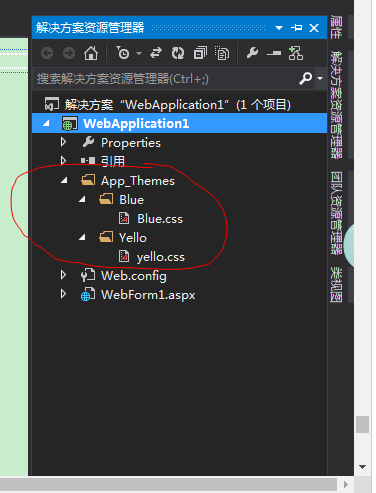
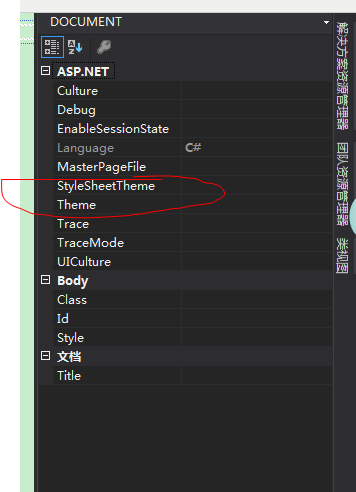
主体的使用
皮肤skin的使用:
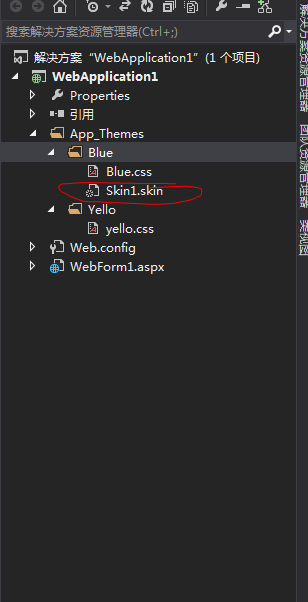
对于同一种控件如何使用两种皮肤:
Skin1.skin:

<!-- Calendar:这种当做默认皮肤 -->

<asp:Calendar runat="server" BackColor="White" BorderColor="#999999" CellPadding="" DayNameFormat="Shortest" Font-Names="Verdana" Font-Size="8pt" ForeColor="Black" Height="180px" Width="200px">

    <DayHeaderStyle BackColor="#CCCCCC" Font-Bold="True" Font-Size="7pt" />

    <NextPrevStyle VerticalAlign="Bottom" />

    <OtherMonthDayStyle ForeColor="#808080" />

    <SelectedDayStyle BackColor="#666666" Font-Bold="True" ForeColor="White" />

    <SelectorStyle BackColor="#CCCCCC" />

    <TitleStyle BackColor="#999999" BorderColor="Black" Font-Bold="True" />

    <TodayDayStyle BackColor="#CCCCCC" ForeColor="Black" />

    <WeekendDayStyle BackColor="#FFFFCC" />

</asp:Calendar>

<!-- Calendar:因为同一种控件不能使用两种皮肤,所以可以起一个别名SkinID -->

<asp:Calendar SkinId="C1" runat="server" BackColor="#FFFFCC" BorderColor="#FFCC66" BorderWidth="1px" DayNameFormat="Shortest" Font-Names="Verdana" Font-Size="8pt" ForeColor="#663399" Height="200px" ShowGridLines="True" Width="220px">

    <DayHeaderStyle BackColor="#FFCC66" Font-Bold="True" Height="1px" />

    <NextPrevStyle Font-Size="9pt" ForeColor="#FFFFCC" />

    <OtherMonthDayStyle ForeColor="#CC9966" />

    <SelectedDayStyle BackColor="#CCCCFF" Font-Bold="True" />

    <SelectorStyle BackColor="#FFCC66" />

    <TitleStyle BackColor="#990000" Font-Bold="True" Font-Size="9pt" ForeColor="#FFFFCC" />

    <TodayDayStyle BackColor="#FFCC66" ForeColor="White" />

</asp:Calendar>

////////////////////////////////////////////////////////////////////////////////////

WebForm1.aspx:
<!-- 主题也是需要的 -->

<%@ Page Language="C#" AutoEventWireup="true" CodeBehind="WebForm1.aspx.cs" Inherits="WebApplication1.WebForm1" StyleSheetTheme="" Theme="Blue" %>

<!DOCTYPE html>

<html xmlns="http://www.w3.org/1999/xhtml">

<head runat="server">

<meta http-equiv="Content-Type" content="text/html; charset=utf-8"/>

    <title></title>

</head>

<body>

    <form id="form1" runat="server">

    <div>

        <!-- 使用默认皮肤 -->

        <asp:Calendar ID="Calendar1" runat="server"></asp:Calendar>

        <asp:Calendar ID="Calendar2" runat="server"></asp:Calendar>

        <!-- 使用SkinID="C1"皮肤 -->

        <asp:Calendar ID="Calendar3" runat="server" SkinID="C1"></asp:Calendar>

    </div>

    </form>

</body>

</html>
控件中的冷知识:
1.每个control中的enableViewState都是用来保存状态的,想要优化可将其设置为false。如果只是为了缓存信息可以做下面操作:
protected void Page_Load(object sender, EventArgs e)

        {

            this.ViewState["key"] = "";

            this.ViewState.Add("key1", );

        }
C# 控件的更多相关文章
- JS调用Android、Ios原生控件
在上一篇博客中已经和大家聊了,关于JS与Android.Ios原生控件之间相互通信的详细代码实现,今天我们一起聊一下JS调用Android.Ios通信的相同点和不同点,以便帮助我们在进行混合式开发时, ...
- HTML5 progress和meter控件
在HTML5中,新增了progress和meter控件.progress控件为进度条控件,可表示任务的进度,如Windows系统中软件的安装.文件的复制等场景的进度.meter控件为计量条控件,表示某 ...
- 百度 flash html5自切换 多文件异步上传控件webuploader基本用法
双核浏览器下在chrome内核中使用uploadify总有302问题,也不知道如何修复,之所以喜欢360浏览器是因为帮客户控制渲染内核: 若页面需默认用极速核,增加标签:<meta name=& ...
- JS与APP原生控件交互
"热更新"."热部署"相信对于混合式开发的童鞋一定不陌生,那么APP怎么避免每次升级都要在APP应用商店发布呢?这里就用到了混合式开发的概念,对于电商网站尤其显 ...
- UWP开发必备:常用数据列表控件汇总比较
今天是想通过实例将UWP开发常用的数据列表做汇总比较,作为以后项目开发参考.UWP开发必备知识点总结请参照[UWP开发必备以及常用知识点总结]. 本次主要讨论以下控件: GridView:用于显示数据 ...
- 【踩坑速记】开源日历控件,顺便全面解析开源库打包发布到Bintray/Jcenter全过程(新),让开源更简单~
一.写在前面 自使用android studio开始,就被它独特的依赖方式:compile 'com.android.support:appcompat-v7:25.0.1'所深深吸引,自从有了它,麻 ...
- 对百度WebUploader开源上传控件的二次封装,精简前端代码(两句代码搞定上传)
前言 首先声明一下,我这个是对WebUploader开源上传控件的二次封装,底层还是WebUploader实现的,只是为了更简洁的使用他而已. 下面先介绍一下WebUploader 简介: WebUp ...
- Windows API 设置窗口下控件Enable属性
参考页面: http://www.yuanjiaocheng.net/webapi/create-crud-api-1-put.html http://www.yuanjiaocheng.net/we ...
- VB.NET设置控件和窗体的显示级别
前言:在用VB.NET开发射频检测系统ADS时,当激活已存在的目标MDI子窗体时,被其他子窗体遮住了,导致目标MDI子窗体不能显示. 这个问题怎么解决呢?网上看到一篇帖子VB.NET设置控件和窗体的显 ...
- Win10 UWP开发系列——开源控件库:UWPCommunityToolkit
在开发应用的过程中,不可避免的会使用第三方类库.之前用过一个WinRTXamlToolkit.UWP,现在微软官方发布了一个新的开源控件库—— UWPCommunityToolkit 项目代码托管在G ...
随机推荐
- ESP8266上报数据到中国移动物联网平台HTTP
#include <HttpPacket.h> #include <ArduinoJson.h> #include <ESP8266WiFi.h> HttpPack ...
- LVS+OSPF+FULLNAT集群架构
OSPF:OSPF(Open Shortest Path First开放式最短路径优先)是一个内部网关协议(Interior Gateway Protocol,简称IGP),用于在单一自治系统(aut ...
- $_SERVER['URI']
WordPress通过301重定向实现非首先域(非www)跳转向本来是一个很简单事情,由于没弄清楚$_SERVER['HTTP_X_REWRITE_URL'] 和$_SERVER['REQUEST_U ...
- 继承and派生
1.什么是继承?(python2与python3) 在程序中继承是一种新建子类的方式,新创建的类称之为子类\派生类,被继承 的类称之为父类\基类\超类 继承描述的是一种遗传关系,儿子可以重用爹的属性 ...
- Collection集合复习方法回顾
Collection集合方法: add() //添加元素 remove() //移除元素 size() //返回集合长度 ...
- nginx 之 proxy_pass详解
在nginx中配置proxy_pass代理转发时,如果在proxy_pass后面的url加/,表示绝对根路径:如果没有/,表示相对路径,把匹配的路径部分也给代理走. 假设下面四种情况分别用 h ...
- Vue 之 Vue.nextTick()
异步更新队列 可能你还没有注意到,Vue 异步执行 DOM 更新.只要观察到数据变化,Vue 将开启一个队列,并缓冲在同一事件循环中发生的所有数据改变.如果同一个 watcher 被多次触发,只会一次 ...
- 链表 c实现
linklist.h #ifndef _LINKLIST_H_ #define _LINKLIST_H_ typedef int data_t; typedef struct node{ data_t ...
- mybatis的工作原理
MyBatis的框架架构 看到Mybatis的框架图,可以清晰的看到Mybatis的整体核心对象,我更喜欢用自己的图来表达Mybatis的整个的执行流程.如下图所示: 原理详解: MyBatis应用程 ...
- java网络编程ServerSocket类 和Socket类的常用构造方法及其方法
Socket类Socket(InetAddress address, int port) 创建一个流套接字并将其连接到指定 IP 地址的指定端口号.Socket(String host, int po ...