
高级OPENGL, 利用uniform块接口
1.找到需要的uniform块的索引, 将程序对象的该uniform块索引绑定uniform 缓冲对象的绑定点
2.建立uniform缓冲对象,对象绑定GL_UNIFORM_BUFFER缓冲目标,为缓冲分配内存,将缓冲对象绑定到特定的绑定点,定义绑定点的缓冲范围
3.在渲染循环外绑定uniform块内不需更新的uniform,在渲染循环内绑定uniform块中需要更新的uniform
4.按正常思维,在渲染循环外或内,绑定不再uniform块中的uniform
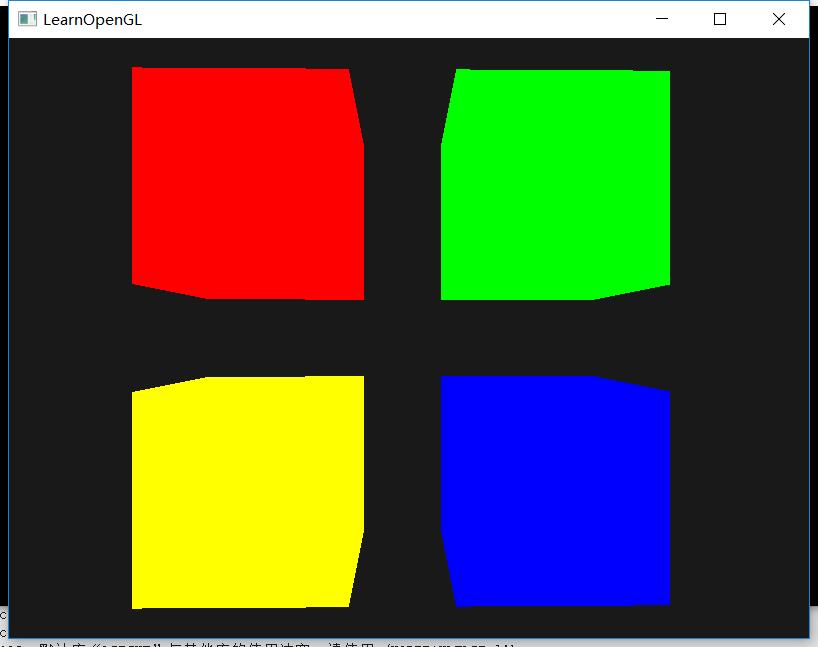
下面是一个例子,将四个立方体平移到窗口的4个角,每个立方体显示不同的颜色
 //输入变量gl_FragCoord能让我们读取当前片段的窗口空间坐标,并获取它的深度值,但是它是一个只读(Read-only)变量。

 #define GLEW_STATIC

 #include <GL/glew.h>

 #include <GLFW/glfw3.h>

 #define STB_IMAGE_IMPLEMENTATION

 #include "stb_image.h"

 #include <glm/glm.hpp>

 #include <glm/gtc/matrix_transform.hpp>

 #include <glm/gtc/type_ptr.hpp>

 #include "Shader.h"

 #include "camera.h"

 //#include "Model.h"

 #include <fstream>

 #include <iostream>

 using namespace std;

 void framebuffer_size_callback(GLFWwindow* window, int width, int height);

 void mouse_callback(GLFWwindow* window, double xpos, double ypos);

 void scroll_callback(GLFWwindow* window, double xoffset, double yoffset);

 void processInput(GLFWwindow *window);

 unsigned int loadTexture(const char *path);

 // settings

 const unsigned int SCR_WIDTH = ;

 const unsigned int SCR_HEIGHT = ;

 // camera

 Camera camera(glm::vec3(0.0f, 0.0f, 3.0f));

 float lastX = (float)SCR_WIDTH / 2.0;

 float lastY = (float)SCR_HEIGHT / 2.0;

 bool firstMouse = true;

 // timing

 float deltaTime = 0.0f;

 float lastFrame = 0.0f;

 int main()

 {

     // glfw: initialize and configure

     // ------------------------------

     glfwInit();

     glfwWindowHint(GLFW_CONTEXT_VERSION_MAJOR, );

     glfwWindowHint(GLFW_CONTEXT_VERSION_MINOR, );

     glfwWindowHint(GLFW_OPENGL_PROFILE, GLFW_OPENGL_CORE_PROFILE);

 #ifdef __APPLE__

     glfwWindowHint(GLFW_OPENGL_FORWARD_COMPAT, GL_TRUE); // uncomment this statement to fix compilation on OS X

 #endif

                                                          // glfw window creation

                                                          // --------------------

     GLFWwindow* window = glfwCreateWindow(SCR_WIDTH, SCR_HEIGHT, "LearnOpenGL", NULL, NULL);

     if (window == NULL)

     {

         std::cout << "Failed to create GLFW window" << std::endl;

         glfwTerminate();

         return -;

     }

     glfwMakeContextCurrent(window);

     glfwSetFramebufferSizeCallback(window, framebuffer_size_callback);

     glfwSetCursorPosCallback(window, mouse_callback);

     glfwSetScrollCallback(window, scroll_callback);

     // tell GLFW to capture our mouse

     glfwSetInputMode(window, GLFW_CURSOR, GLFW_CURSOR_DISABLED);

     // glad: load all OpenGL function pointers

     // ---------------------------------------

     glewExperimental = GL_TRUE;

     if (glewInit() != GLEW_OK)

     {

         cout << "Failed to initialize GLEW!" << endl;

         return -;

     }

     // configure global opengl state

     // -----------------------------

     glEnable(GL_DEPTH_TEST);

     glDepthFunc(GL_LESS);

     // build and compile shaders

     // -------------------------

     Shader shaderRed("E:\\C++\\High_level_GLSL\\1.7ver1.txt", "E:\\C++\\High_level_GLSL\\1.7frag1.txt");

     Shader shaderGreen("E:\\C++\\High_level_GLSL\\1.7ver1.txt", "E:\\C++\\High_level_GLSL\\1.7frag2.txt");

     Shader shaderBlue("E:\\C++\\High_level_GLSL\\1.7ver1.txt", "E:\\C++\\High_level_GLSL\\1.7frag3.txt");

     Shader shaderYellow("E:\\C++\\High_level_GLSL\\1.7ver1.txt", "E:\\C++\\High_level_GLSL\\1.7frag4.txt");

     // set up vertex data (and buffer(s)) and configure vertex attributes

     // ------------------------------------------------------------------

     float cubeVertices[] = {

         // positions          // texture Coords

         -0.5f, -0.5f, -0.5f,

         0.5f, -0.5f, -0.5f,

         0.5f,  0.5f, -0.5f,

         0.5f,  0.5f, -0.5f,

         -0.5f,  0.5f, -0.5f,

         -0.5f, -0.5f, -0.5f,

         -0.5f, -0.5f,  0.5f,

         0.5f, -0.5f,  0.5f,

         0.5f,  0.5f,  0.5f,

         0.5f,  0.5f,  0.5f,

         -0.5f,  0.5f,  0.5f,

         -0.5f, -0.5f,  0.5f,

         -0.5f,  0.5f,  0.5f,

         -0.5f,  0.5f, -0.5f,

         -0.5f, -0.5f, -0.5f,

         -0.5f, -0.5f, -0.5f,

         -0.5f, -0.5f,  0.5f,

         -0.5f,  0.5f,  0.5f,

         0.5f,  0.5f,  0.5f,

         0.5f,  0.5f, -0.5f,

         0.5f, -0.5f, -0.5f,

         0.5f, -0.5f, -0.5f,

         0.5f, -0.5f,  0.5f,

         0.5f,  0.5f,  0.5f,

         -0.5f, -0.5f, -0.5f,

         0.5f, -0.5f, -0.5f,

         0.5f, -0.5f,  0.5f,

         0.5f, -0.5f,  0.5f,

         -0.5f, -0.5f,  0.5f,

         -0.5f, -0.5f, -0.5f,

         -0.5f,  0.5f, -0.5f,

         0.5f,  0.5f, -0.5f,

         0.5f,  0.5f,  0.5f,

         0.5f,  0.5f,  0.5f,

         -0.5f,  0.5f,  0.5f,

         -0.5f,  0.5f, -0.5f

     };

     float TexVertices[] = {

         // positions          // texture Coords

         0.0f, 0.0f,

         1.0f, 0.0f,

         1.0f, 1.0f,

         1.0f, 1.0f,

         0.0f, 1.0f,

         0.0f, 0.0f,

         0.0f, 0.0f,

         1.0f, 0.0f,

         1.0f, 1.0f,

         1.0f, 1.0f,

         0.0f, 1.0f,

         0.0f, 0.0f,

         1.0f, 0.0f,

         1.0f, 1.0f,

         0.0f, 1.0f,

         0.0f, 1.0f,

         0.0f, 0.0f,

         1.0f, 0.0f,

         1.0f, 0.0f,

         1.0f, 1.0f,

         0.0f, 1.0f,

         0.0f, 1.0f,

         0.0f, 0.0f,

         1.0f, 0.0f,

         0.0f, 1.0f,

         1.0f, 1.0f,

         1.0f, 0.0f,

         1.0f, 0.0f,

         0.0f, 0.0f,

         0.0f, 1.0f,

         0.0f, 1.0f,

         1.0f, 1.0f,

         1.0f, 0.0f,

         1.0f, 0.0f,

         0.0f, 0.0f,

         0.0f, 1.0f

     };

     // cube VAO

     unsigned int cubeVAO, cubeVBO;

     glGenVertexArrays(, &cubeVAO);

     glGenBuffers(, &cubeVBO);

     glBindVertexArray(cubeVAO);

     glBindBuffer(GL_ARRAY_BUFFER, cubeVBO);

     glBufferData(GL_ARRAY_BUFFER, sizeof(cubeVertices), NULL, GL_STATIC_DRAW);

     glBufferSubData(GL_ARRAY_BUFFER, , sizeof(cubeVertices), &cubeVertices);

     glEnableVertexAttribArray();

     glVertexAttribPointer(, , GL_FLOAT, GL_FALSE,  * sizeof(float), (void*));

     glBindVertexArray();

     //first ,we get the relevant block indices

     unsigned int uniformBlockIndexRed = glGetUniformBlockIndex(shaderRed.ID, "Matrices");

     unsigned int uniformBlockIndexGreen = glGetUniformBlockIndex(shaderGreen.ID, "Matrices");

     unsigned int uniformBlockIndexBlue = glGetUniformBlockIndex(shaderBlue.ID, "Matrices");

     unsigned int uniformBlockIndexYellow = glGetUniformBlockIndex(shaderYellow.ID, "Matrices");

     //then we link each uniform block to this uniform binding point

     glUniformBlockBinding(shaderRed.ID, uniformBlockIndexRed, );

     glUniformBlockBinding(shaderGreen.ID, uniformBlockIndexGreen, );

     glUniformBlockBinding(shaderBlue.ID, uniformBlockIndexBlue, );

     glUniformBlockBinding(shaderYellow.ID, uniformBlockIndexYellow, );

     //Now actually create the buffer

     unsigned int uboMatrices;

     glGenBuffers(, &uboMatrices);

     glBindBuffer(GL_UNIFORM_BUFFER, uboMatrices);

     glBufferData(GL_UNIFORM_BUFFER,  * sizeof(glm::mat4), NULL, GL_STATIC_DRAW);

     glBindBuffer(GL_UNIFORM_BUFFER, );

     //define the range of the buffer that links to a uniform binging point

     glBindBufferRange(GL_UNIFORM_BUFFER, , uboMatrices, ,  * sizeof(glm::mat4));

     //store the projection matrix (we only do this once now)(note: we're not using Zoom anymore by changeing the FOV)

     glm::mat4 projection = glm::perspective(45.0f, (float)SCR_WIDTH / (float)SCR_HEIGHT, 0.1f, 100.0f);

     glBindBuffer(GL_UNIFORM_BUFFER, uboMatrices);

     glBufferSubData(GL_UNIFORM_BUFFER, , sizeof(glm::mat4), glm::value_ptr(projection));

     glBindBuffer(GL_UNIFORM_BUFFER, );

     //unsigned int frontTexture = loadTexture("greenWall.jpg");

     //unsigned int backTexture = loadTexture("greenWall.jpg");

     //shader.use();

     //shader.setInt("frontTexture", 0);

     ////shader.setInt("backTexture", backTexture);

     //glUniform1i(glGetUniformLocation(shader.ID, "frontTexture"), 1);

     ////创建一个uniform缓冲对象

     //unsigned int uboExampleBlock;

     //glGenBuffers(1, &uboExampleBlock);

     //glBindBuffer(GL_UNIFORM_BUFFER, uboExampleBlock);

     //glBufferData(GL_UNIFORM_BUFFER, 152, NULL, GL_STATIC_DRAW);        //分配152字节的缓冲内存

     //glBindBuffer(GL_UNIFORM_BUFFER, 0);

     ////为了将Uniform块绑定到一个特定的绑定点中,我们需要调用glUniformBlockBinding函数,

     ////它的第一个参数是一个程序对象,之后是一个Uniform块索引和链接到的绑定点,

     ////Uniform块索引(uniform bloack index )是着色器中已定义Uniform块的位置值索引,这可以通过调用glGetUniformBlockIndex来获取

     ////它接受一个程序对象和uniform块的名称

     //unsigned int lights_index = glGetUniformBlockIndex(shader.ID, "Light");

     //glUniformBlockBinding(shader.ID, lights_index, 2);

     //

     ////接下来,我们还需要绑定Uniform缓冲对象到相同的绑定点上,这可以使用glBindBufferBase或glBindBufferRange来完成

     //glBindBufferBase(GL_UNIFORM_BUFFER, 2, uboExampleBlock);    //该函数需要一个目标,一个绑定点索引和一个uniform缓冲对象作为它的参数

     ////glBindBufferRange(GL_UNIFORM_BUFFER, 2, uboExampleBlock, 0, 152);

     ////向uniform缓冲中添加数据

     //glBindBuffer(GL_UNIFORM_BUFFER, uboExampleBlock);

     //int b = true;    //GLSL中的bool是4字节的,所以我们将它存为一个integer

     //glBufferSubData(GL_UNIFORM_BUFFER, 144, 4, &b);

     //glBindBuffer(GL_UNIFORM_BUFFER, 0);

     // render loop

     // -----------

     while (!glfwWindowShouldClose(window))

     {

         // per-frame time logic

         // --------------------

         float currentFrame = glfwGetTime();

         deltaTime = currentFrame - lastFrame;

         lastFrame = currentFrame;

         processInput(window);

         glClearColor(0.1f, 0.1f, 0.1f, 1.0f);

         glClear(GL_COLOR_BUFFER_BIT | GL_DEPTH_BUFFER_BIT | GL_STENCIL_BUFFER_BIT); // don't forget to clear the stencil buffer!

         //set the view and projection matrix in the uniform block

         glm::mat4 view = camera.GetViewMatrix();

         glBindBuffer(GL_UNIFORM_BUFFER, uboMatrices);

         glBufferSubData(GL_UNIFORM_BUFFER, sizeof(glm::mat4), sizeof(glm::mat4), glm::value_ptr(view));

         glBindBuffer(GL_UNIFORM_BUFFER, );

         //draw 4 cubes

         //RED

         glBindVertexArray(cubeVAO);

         shaderRed.use();

         glm::mat4 model;

         model = glm::translate(model, glm::vec3(-0.75f, 0.75f, 0.0f));    //move top-left

         shaderRed.setMat4("model", model);

         glDrawArrays(GL_TRIANGLES, , );

         //GREEN

         shaderGreen.use();

         model = glm::mat4();

         model = glm::translate(model, glm::vec3(0.75f, 0.75f, 0.0f));    //move top-right

         shaderGreen.setMat4("model", model);

         glDrawArrays(GL_TRIANGLES, , );

         shaderYellow.use();

         model = glm::mat4();

         model = glm::translate(model, glm::vec3(-0.75f, -0.75f, 0.0f));    //move bottom-left

         shaderYellow.setMat4("model", model);

         glDrawArrays(GL_TRIANGLES, , );

         shaderBlue.use();

         model = glm::mat4();

         model = glm::translate(model, glm::vec3(0.75f, -0.75f, 0.0f));    //move bottom-right

         shaderBlue.setMat4("model", model);

         glDrawArrays(GL_TRIANGLES, , );

         glfwSwapBuffers(window);

         glfwPollEvents();

     }

     // optional: de-allocate all resources once they've outlived their purpose:

     // ------------------------------------------------------------------------

     glDeleteVertexArrays(, &cubeVAO);

     glDeleteBuffers(, &cubeVBO);

     glfwTerminate();

     return ;

 }

 // process all input: query GLFW whether relevant keys are pressed/released this frame and react accordingly

 // ---------------------------------------------------------------------------------------------------------

 void processInput(GLFWwindow *window)

 {

     if (glfwGetKey(window, GLFW_KEY_ENTER) == GLFW_PRESS)

         glfwSetWindowShouldClose(window, true);

     if (glfwGetKey(window, GLFW_KEY_W) == GLFW_PRESS)

         camera.ProcessKeyboard(FORWARD, deltaTime);

     if (glfwGetKey(window, GLFW_KEY_S) == GLFW_PRESS)

         camera.ProcessKeyboard(BACKWARD, deltaTime);

     if (glfwGetKey(window, GLFW_KEY_A) == GLFW_PRESS)

         camera.ProcessKeyboard(LEFT, deltaTime);

     if (glfwGetKey(window, GLFW_KEY_D) == GLFW_PRESS)

         camera.ProcessKeyboard(RIGHT, deltaTime);

 }

 // glfw: whenever the window size changed (by OS or user resize) this callback function executes

 // ---------------------------------------------------------------------------------------------

 void framebuffer_size_callback(GLFWwindow* window, int width, int height)

 {

     // make sure the viewport matches the new window dimensions; note that width and

     // height will be significantly larger than specified on retina displays.

     glViewport(, , width, height);

 }

 // glfw: whenever the mouse moves, this callback is called

 // -------------------------------------------------------

 void mouse_callback(GLFWwindow* window, double xpos, double ypos)

 {

     if (firstMouse)

     {

         lastX = xpos;

         lastY = ypos;

         firstMouse = false;

     }

     float xoffset = xpos - lastX;

     float yoffset = lastY - ypos; // reversed since y-coordinates go from bottom to top

     lastX = xpos;

     lastY = ypos;

     camera.ProcessMouseMovement(xoffset, yoffset);

 }

 // glfw: whenever the mouse scroll wheel scrolls, this callback is called

 // ----------------------------------------------------------------------

 void scroll_callback(GLFWwindow* window, double xoffset, double yoffset)

 {

     camera.ProcessMouseScroll(yoffset);

 }

 // utility function for loading a 2D texture from file

 // ---------------------------------------------------

 unsigned int loadTexture(char const * path)

 {

     unsigned int textureID;

     glGenTextures(, &textureID);

     int width, height, nrComponents;

     unsigned char *data = stbi_load(path, &width, &height, &nrComponents, );

     if (data)

     {

         GLenum format;

         if (nrComponents == )

             format = GL_RED;

         else if (nrComponents == )

             format = GL_RGB;

         else if (nrComponents == )

             format = GL_RGBA;

         glBindTexture(GL_TEXTURE_2D, textureID);

         glTexImage2D(GL_TEXTURE_2D, , format, width, height, , format, GL_UNSIGNED_BYTE, data);

         glGenerateMipmap(GL_TEXTURE_2D);

         glTexParameteri(GL_TEXTURE_2D, GL_TEXTURE_WRAP_S, GL_REPEAT);

         glTexParameteri(GL_TEXTURE_2D, GL_TEXTURE_WRAP_T, GL_REPEAT);

         glTexParameteri(GL_TEXTURE_2D, GL_TEXTURE_MIN_FILTER, GL_LINEAR_MIPMAP_LINEAR);

         glTexParameteri(GL_TEXTURE_2D, GL_TEXTURE_MAG_FILTER, GL_LINEAR);

         stbi_image_free(data);

     }

     else

     {

         std::cout << "Texture failed to load at path: " << path << std::endl;

         stbi_image_free(data);

     }

     return textureID;

 }
学习网址:https://learnopengl-cn.github.io/04%20Advanced%20OpenGL/08%20Advanced%20GLSL/
高级OPENGL, 利用uniform块接口的更多相关文章
- OpenGL ES 中Uniform块
1.采用uniform Block的原因如果你的程序中包含了多个着色器,而且这些着色器使用了相同的Uniform变量,你就不得不为每个着色器分别管理这些变量.Uniform变量的location是在程 ...
- CSharpGL(33)使用uniform块来优化对uniform变量的读写
CSharpGL(33)使用uniform块来优化对uniform变量的读写 +BIT祝威+悄悄在此留下版了个权的信息说: Uniform块 如果shader程序变得比较复杂,那么其中用到的unifo ...
- 利用jQuery扩展接口为jQuery框架定义了两个自定义函数,然后调用这两个函数
<!DOCTYPE html PUBLIC "-//W3C//DTD XHTML 1.0 Transitional//EN" "http://www.w3.org/ ...
- 利用阿里大于接口发短信(Delphi版)
阿里大于是阿里通信旗下产品,融合了三大运营商的通信能力,提供包括短信.语音.流量直充.私密专线.店铺手机号等个性化服务.每条四分五,价钱还算公道,经老农测试,响应速度非常快,基本上是秒到.官方文档提供 ...
- 第三百三十五节,web爬虫讲解2—Scrapy框架爬虫—豆瓣登录与利用打码接口实现自动识别验证码
第三百三十五节,web爬虫讲解2—Scrapy框架爬虫—豆瓣登录与利用打码接口实现自动识别验证码 打码接口文件 # -*- coding: cp936 -*- import sys import os ...
- java实现利用httpclient访问接口
HTTP协议时Internet上使用的很多也很重要的一个协议,越来越多的java应用程序需要通过HTTP协议来访问网络资源. HTTPClient提供的主要功能: 1.实现了所有HTTP的方法(GET ...
- 利用Fiddler拦截接口请求并篡改数据
近期在测试一个下单的项目,出于安全角度考虑,测试了一个场景,那就是利用工具对接口进行拦截并篡改数据.将接口一拦截并篡改数据后,发现收货满满.开发默默接受了我的建议,并对代码进行了修改. 对于fiddl ...
- 利用Kettle转储接口数据
1. 项目背景 1.1. 项目背景 数据接口 API:应用程序接口(Application Program Interface)的简称,是实现计算机软件之间数据通信的工具.同时API也是一种 ...
- UVa 1103 (利用连通块来判断字符) Ancient Messages
本题就是灵活运用DFS来求连通块来求解的. 题意: 给出一幅黑白图像,每行相邻的四个点压缩成一个十六进制的字符.然后还有题中图示的6中古老的字符,按字母表顺序输出这些字符的标号. 分析: 首先图像是被 ...
随机推荐
- Oracle中sysdba身份和dba角色区别
sysdba身份登陆可以打开,关闭数据库,创建SPFILE,对数据库进行恢复操作等,而这些是DBA角色无法实现的:sysdba 是系统权限,dba是用户对象权限: sysdba,是管理oracle实例 ...
- python map 常见用法
python map 常见用法2017年02月01日 19:32:41 淇怪君 阅读数:548版权声明:欢迎转载,转载请注明出处 https://blog.csdn.net/Tifficial/art ...
- python day07作业
- natapp 穿透访问 vue项目 Invalid Host header
由于要近期开发微信小程序,所以今天了解了一下这个netapp 内网映射这个东西,所以一开始自己就在网上看,然后想把环境部署起来,参考https://natapp.cn/ ,看了一分钟教程以后,然后自己 ...
- Ubuntu16.04安装&创建虚拟环境
一.linux环境 Ubuntu16.04 二.安装和配置虚拟环境 安装虚拟环境 sudo pip install virtualenv sudo pip install virtualenvwrap ...
- vue拓展题
本文档基于vue-cli技术栈总结了 vue-cli工程 vue.js核心知识 vue-router路由 vuex状态管理器 axios等http请求 移动端适配 Tab切换等常用功能 vue与原生a ...
- 手机端touch事件封装
var touchEvent={ /*单次触摸事件*/ tap:function(element,fn){ var startTx, startTy; element.addEventListener ...
- 二分法检索(binary search)(又名二进制搜索)
定义: 二分法检索的基本思想是设字典中的元素从小到大有序地存放在数组(array)中.首先将给定值key与字典中间位置上元素的关键码(key)比较,如果相等,则检索成功:否则,若key小,则在字典前半 ...
- C++学习(三十二)(C语言部分)之 栈
栈测试代码笔记如下: #include<stdio.h> #include<string.h> #include <stdlib.h> #define SIZE 1 ...
- 铁三测试题——权限、你是管理员吗?——WP
权限 [题目描述]:你是管理员吗? [解题链接]:http://ctf4.shiyanbar.com/web/root/index.php 首先看题,提到“权限”,“管理员”,这就是说涉及到管理员的账 ...