
Cocos Creator经典游戏制作之:信使(The Messenger)
版权申明:
- 本文原创首发于以下网站:
- 博客园『优梦创客』的空间:https://www.cnblogs.com/raymondking123
- 优梦创客的官方博客:https://91make.top
- 优梦创客的游戏讲堂:https://91make.ke.qq.com
- 『优梦创客』的微信公众号:umaketop
- 您可以自由转载,但必须加入完整的版权声明!
游戏原图
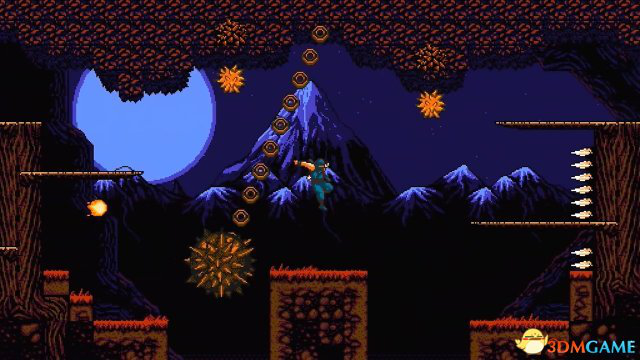
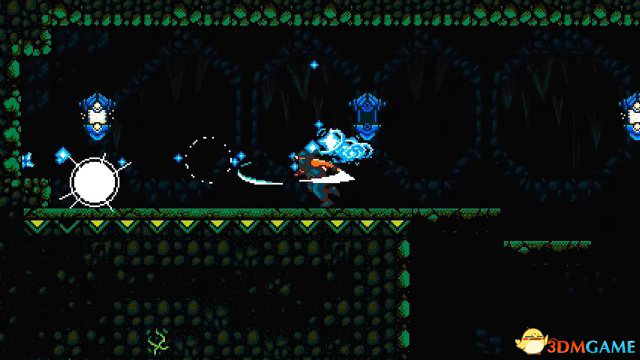
游戏介绍
- 《信使(The Messenger)》是一款横版过关冒险游戏,此游戏在IGN上获得了8.0分的不错成绩,IGN编辑MITCHELL SALTZMAN认为《信使》拥有很多想带给玩家的内容。它是一款2D动作平台游戏,拥有华丽的美学,从8位风格无缝过渡到16位,游戏拥有一些搞笑的幽默场景,巧妙的对白,以及一个最佳的复古"芯片风”音乐。
- 《信使(The Messenger)》无论从哪一方面来看都是受到了FC时代《忍者龙剑传》的影响,这款游戏的发行商Devolver Digital还邀请到了FC《忍者龙剑传》初代的制作人吉沢秀雄进行体验。
游戏规则介绍
- 游戏的操作与FC上的忍龙基本一致,左右移动、跳、落(从平台上落下)、攻击
游戏开发过程
搭建游戏UI界面
- 在assets上创建一个文件夹名为Scence,这个文件夹用来存放场景,新建一个场景Scence改名为Game
- 在Canvas上建一个Background节点,在这个节点上插入Sprite(图片精灵)组件,把背景图片拖进去,调整大小,这个就是游戏的背景
- 在Canvas上新建节点Ground、Platform、Wall、Pitfall、Save、Lame,分别用来放置地面、平台、墙、陷阱、保存点、灯
创建主角
- 将一张忍者的图片拉至Canvas节点下,并重命名为Player
制作动画特效
- 在资源管理器的assets文件夹下创建一个子文件夹Animation,用来存放各种动画
- 选择Player,在动画编辑器中点击按钮《添加Animation组件》为Player节点添加动画组件
- 在点击按钮《新建Clip文件》为Player创建动画
- 单击动画编辑器左上角的书写图标按钮开始编辑动画
- 将主角的往右跑的4张图片组合成主角右跑动画(序列帧动画)

- 再创建主角左跑动画、攻击动画、爬墙动画······
写脚本
Player脚本
创建Player脚本
- 在资源管理器的assets文件夹下创建一个子文件夹Script,用来存放各种脚本
- 在资源管理器的Script文件夹下创建一个JavaScript脚本,重命名为Player
- 将脚本Player挂在Player对象上
编辑Player脚本
定义玩家属性
properties: {

    camera: { //摄像机

        type: cc.Node, //属性类型

        default: null, //默认值

    },

    jumpHeight: 200, //跳跃高度

    playerState: 2, //玩家状态 0站立 1跳 2落 3爬墙

    isRun: false,  //是否跑动

    playerDirection: 1, //玩家方向 0左 1右

    mayJump: true, //能否跳跃

    speed: 0, //速度

    hp: 5, //生命值

    time: 0, //时间

    shinState: 0, //攀爬状态 0为不动 1为上爬 2为下滑

    isAttack: false, //是攻击状态

    whetherSpringback: true, //是否回弹

},
给玩家创建各种能力(函数)
- 攻击
attack() {

    this.isAttack = true; //是攻击状态

    if (this.playerDirection == 0) { //如果玩家方向为左

        this.getComponent(cc.Animation).play("主角左攻动画");

    } else { //否则

        this.getComponent(cc.Animation).play("主角右攻动画");

    }

    this.node.getComponent(cc.BoxCollider).size = cc.size(140, 87); //获取主角的碰撞器,并设置包围盒大小(扩大包围盒,因为攻击时人物的包围盒要把刀包围进去)

},
- 左移
leftMove() {

    this.node.x -= 10

},
- 右移
rightMove() {

    this.node.x += 10;

},
- 攀爬,触碰墙壁进入爬墙状态后可使用爬墙方法
shin() {

    if (this.shinState == 1) { //如果人物攀爬状态为上爬

        this.node.y += 3;

    } else if (this.shinState == 2) { //否则,就是人物状态为下滑

        this.node.y -= 9;

    }

},
- 跳跃,在平台、地面、空中时可执行
jumpAction: null,

jump() {

    this.jumpAction = cc.moveBy(0.5, cc.v2(0, this.jumpHeight)).easing(cc.easeCubicActionOut());

    this.node.runAction(this.jumpAction);

},
- 爬墙跳,此方法只有攀爬在墙壁上时可使用
jumpDistance: null,

wallJump: null,

WallJump() {

    if (this.playerDirection == 0) {

        this.jumpDistance = 200;

    } else {

        this.jumpDistance = -200;

    }

    this.wallJump = cc.moveBy(0.5, cc.v2(this.jumpDistance, this.jumpHeight)).easing(cc.easeCubicActionOut());

    this.node.runAction(this.wallJump);

},
- 翻跳上地面,当与墙壁结束碰撞时执行,用于结束攀爬进入站立状态
WallGroundJump() {

    if (this.playerDirection == 0) {

        this.jumpDistance = -100;

        this.getComponent(cc.Animation).play("主角左跳动画");

    } else {

        this.jumpDistance = 100;

        this.getComponent(cc.Animation).play("主角右跳动画");

    }

    var WallJump = cc.moveBy(0.25, cc.v2(this.jumpDistance, this.jumpHeight / 2));

    this.node.runAction(WallJump);

},
- 落下,这是一个被动方法,只要玩家在空中且没有上升力,此方法就一直执行
drop(speed) {

    this.node.y += speed;

},
主角的碰撞处理
- 碰撞开始
onCollisionEnter: function (other, self) { //处理碰撞的方法

    if (other.node.group == "Ground" || other.node.group == "Platform") { //如果玩家碰到的是节点分组中的地面,或平台

        this.otherObject = other; //获取另一个对象(玩家碰撞的对象)

        if (this.speed < -30) { //如果速度过快

            this.hp = 0; //摔死

        }

        if (self.node.getComponent("Player").playerState == 2 && other.node.y < self.node.y) { //如果玩家状态为下落

            self.node.getComponent("Player").playerState = 0; //玩家状态变为站立

            self.node.y = other.node.y + other.node.height / 2 + 42; //回弹,防止人物脚陷入地面

            if (this.isRun) { //如果是跑动状态

                if (this.playerDirection == 0) { //如果玩家方向为左

                    this.getComponent(cc.Animation).play("主角左跑动画");

                } else { //否则,就是玩家方向为右

                    this.getComponent(cc.Animation).play("主角右跑动画");

                }

            } else { //否则就是玩家不是跑动状态

                if (this.playerDirection == 0) { //如果玩家方向为左

                    this.getComponent(cc.Animation).play("主角左立动画");

                } else { //否则,就是玩家方向为右

                    this.getComponent(cc.Animation).play("主角右立动画");

                }

            }

        } else if (self.node.getComponent("Player").shinState == 2) {

            self.node.getComponent("Player").playerState = 0; //玩家状态变为站立

            if (self.node.getComponent("Player").playerDirection == 0) {

                self.node.x += 20;

                this.getComponent(cc.Animation).play("主角左立动画");

            } else {

                self.node.x -= 20;

                this.getComponent(cc.Animation).play("主角右立动画");

            }

        }

    } else if (other.node.group == "Wall") { //如果玩家碰到的是节点分组中的墙壁

        if (this.isAttack) { //如果是攻击状态

            this.isRun = false; //停止跑动

            if (this.playerDirection == 0) { //如果人物方向为左

                this.node.x += 50; //攻击到墙壁往右回弹

            } else { //否则(人物方向为右)

                this.node.x -= 50; //攻击到墙壁往左回弹

            }

        } else {

            if (self.node.getComponent("Player").playerState == 0) {

                self.node.y += 20;

            }

            this.node.stopAction(this.wallJump);

            self.node.getComponent("Player").playerState = 3; //玩家状态变为爬墙

            this.isRun = false;

            this.shinState = 0; //攀爬状态为不动

            if (this.playerDirection == 0) { //如果人物方向为左

                self.node.x = other.node.x + other.node.width / 2 + 25; //回弹,防止人物陷入墙壁

                this.getComponent(cc.Animation).play("主角左贴动画");

            } else { //否则,就是人物方向为右

                self.node.x = other.node.x - other.node.width / 2 - 25; //回弹,防止人物陷入墙壁

                this.getComponent(cc.Animation).play("主角右贴动画");

            }

        }

    } else if (other.node.group == "Pitfall") { //如果玩家碰到的是节点分组中的陷阱

        this.hp = 0;

        this.time = 0;

    } else if (other.node.group == "Save") { //如果玩家碰到的是节点分组中的保存点

        this.playerX = this.node.x;

        this.playerY = this.node.y;

    }

},
- 碰撞过程中
onCollisionStay: function (other, self) {

    if (other.node.group == "Lamp") {

        if (this.isAttack) {

            this.mayJump = true;

            this.node.getComponent(cc.BoxCollider).size = cc.size(55, 87); //获取主角的碰撞器,并设置包围盒大小(缩小包围盒,因为攻击到灯后结束攻击人物收刀后碰撞范围变小)

            this.isAttack = false;

            this.time = 0;

        }

    }

},
- 碰撞结束时
onCollisionExit: function (other, self) {

    if (this.hp > 0) {

        if (other.node.group == "Ground" || other.node.group == "Platform") { //如果玩家与地面或平台碰撞结束

            if (self.node.getComponent("Player").playerState == 0) { //如果玩家状态为站立

                self.node.getComponent("Player").playerState = 2; //玩家状态变为下落

                if (this.playerDirection == 0) { //如果玩家方向为左

                    this.getComponent(cc.Animation).play("主角左落动画");

                } else { //否则,就是玩家方向为右

                    this.getComponent(cc.Animation).play("主角右落动画");

                }

            }

        } else if (other.node.group == "Wall" && self.node.getComponent("Player").playerState == 3) {

            this.playerState = 1; //玩家状态设为跳

            this.WallGroundJump(); //玩家执行翻跳上地面

            this.speed = 100; //刚起跳时速度快

            this.mayJump = false; //能跳设为false

        }

    }

},
在update中刷新玩家
update(dt) {

    if (this.hp == 0) { //如果玩家生命值为0,就是死了

        if (this.time == 0) {

            this.getComponent(cc.Animation).play("主角爆炸动画");

        }

        if (this.time < 0.4) {

            this.time += dt;

        } else if (this.time >= 0.4) {

            this.node.x = this.playerX;

            this.node.y = this.playerY + 30;

            this.speed = 0;

            this.playerState = 2;

            this.time = 0;

            this.isRun = false;

            this.hp = 5;

        }

    } else { //否则,就是活着

        //this.camera.x = this.node.x;

        //if (this.camera.x > this.node.x + 100) {

            this.camera.x = this.node.x //+ 100;

        //} else if (this.camera.x < this.node.x - 100) {

            this.camera.x = this.node.x //- 100;

        //}

        if (this.camera.y > this.node.y + 100) {

            this.camera.y = this.node.y + 100;

        } else if (this.camera.y < this.node.y - 100) {

            this.camera.y = this.node.y - 100;

        if (this.isAttack) { //是否是攻击状态

            this.time += dt; //计时

            if (this.time > 0.3) { //当时间大于0.3秒

                this.node.getComponent(cc.BoxCollider).size = cc.size(55, 87); //获取主角的碰撞器,并设置包围盒大小(缩小包围盒,因为攻击结束人物收刀后碰撞范围变小)

                this.isAttack = false; //将攻击状态变为false

                this.time = 0; //时间归零

                if (this.playerState == 0) { //如果玩家是站立状态

                    if (this.isRun) { //如果玩家是跑动的的

                        if (this.playerDirection == 0) { //如果玩家方向为左

                            this.getComponent(cc.Animation).play("主角左跑动画");

                        } else { //否则(就是玩家方向为右)

                            this.getComponent(cc.Animation).play("主角右跑动画");

                        }

                    } else { //否则(就是站在不动)

                        if (this.playerDirection == 0) { //如果玩家方向为左

                            this.getComponent(cc.Animation).play("主角左立动画");

                        } else { //否则(就是玩家方向为右)

                            this.getComponent(cc.Animation).play("主角右立动画");

                        }

                    }

                } else { //否则(就是在空中)

                    if (this.playerDirection == 0) { //如果玩家方向为左

                        this.getComponent(cc.Animation).play("主角左落动画");

                    } else { //否则(就是玩家方向为右)

                        this.getComponent(cc.Animation).play("主角右落动画");

                    }

                }

            }

        if (this.isRun) { //如果能跑动

            if (this.playerDirection == 0) { //如果玩家方向是左

                this.leftMove(); //向左跑

            } else { //否则

                this.rightMove(); //向右跑

            }

        if (this.playerState == 0) { //如果玩家状态为站立

            this.speed = 0; //速度归零

            this.mayJump = true; //能跳跃

        } else if (this.playerState == 1) { //如果玩家状态为跳

            this.speed -= dt * 400; //速度越来越慢

            if (this.speed <= 0) { //如果速度减少到小于等于0

                this.speed = 0; //速度归零

                this.node.stopAction(this.jumpAction); //停止跳

                this.playerState = 2; //玩家状态变为下落

            }

        } else if (this.playerState == 2) { //如果玩家状态为下落

            this.speed -= dt * 30; //下落状态下速度随时间变得越来越快

            this.drop(this.speed); //执行下落

        } else if (this.playerState == 3) { //如果玩家状态为爬墙

            this.speed = 0; //速度归零

            this.mayJump = true; //能跳跃

            this.shin(); //攀爬

        }

    }

},
Game脚本
创建Game脚本
- 在资源管理器的Script文件夹下创建一个JavaScript脚本,重命名为Game
- 将脚本Game挂在Canvas上
编辑Game脚本
在onLoad中开启碰撞监听、监听系统事件
onLoad() {

    var manager = cc.director.getCollisionManager(); //获取碰撞组件

    manager.enabled = true; //开启碰撞监听

    //manager.enabledDebugDraw = true; //开启碰撞组件Debug

    this.playerJS = this.Player.getComponent("Player"), //获取玩家脚本

    //系统事件,当键被按下时调用keyDown回调函数处理

    cc.systemEvent.on(cc.SystemEvent.EventType.KEY_DOWN, this.keyDown, this);

    //系统事件,当键弹起时调用keyUp回调函数处理

    cc.systemEvent.on(cc.SystemEvent.EventType.KEY_UP, this.keyUp, this);

},
创建keyDown于keyUp方法用来控制玩家
- keyDown方法
playerJS: null, //玩家脚本

keyDown(event) {

    if (this.playerJS.hp > 0) { //如果玩家hp大于0,就是玩家活着

        switch (event.keyCode) {

            case cc.macro.KEY.a:

                if (this.playerJS.isRun == false) { //如果能跑动是错误的

                    if (this.playerJS.playerState != 3) { //如果玩家不为爬墙

                        this.playerJS.isRun = true; //能跑动设为true

                        this.playerJS.playerDirection = 0; //玩家方向设为左

                        if (this.playerJS.playerState == 0) { //如果玩家狀態為站立

                            this.Player.getComponent(cc.Animation).play("主角左跑动画");

                        }

                    } else if (this.playerJS.playerDirection == 1) {

                        this.playerJS.playerState = 1; //玩家状态设为跳

                        this.playerJS.WallJump(); //玩家执行爬墙跳

                        this.playerJS.playerDirection = 0; //玩家方向设为左

                        this.playerJS.speed = 200; //刚起跳时速度快

                        this.playerJS.mayJump = false; //能跳设为false

                        this.Player.getComponent(cc.Animation).play("主角左跳动画");

                    }

                }

                break;

            case cc.macro.KEY.d:

                if (this.playerJS.isRun == false) { //如果能跑动是错误的

                    if (this.playerJS.playerState != 3) { //如果玩家不为爬墙

                        this.playerJS.isRun = true; //能跑动设为true

                        this.playerJS.playerDirection = 1; //玩家方向设为右

                        if (this.playerJS.playerState == 0) { //如果玩家狀態為站立

                            this.Player.getComponent(cc.Animation).play("主角右跑动画");

                        }

                    } else if (this.playerJS.playerDirection == 0) {

                        this.playerJS.playerState = 1; //玩家状态设为跳

                        this.playerJS.WallJump(); //玩家执行爬墙跳

                        this.playerJS.playerDirection = 1; //玩家方向设为右

                        this.playerJS.speed = 200; //刚起跳时速度快

                        this.playerJS.mayJump = false; //能跳设为false

                        this.Player.getComponent(cc.Animation).play("主角右跳动画");

                    }

                }

                break;

            case cc.macro.KEY.w:

                if (this.playerJS.playerState != 3) { //如果玩家状态不为爬墙

                    if (this.playerJS.mayJump) { //如果能跳

                        this.playerJS.playerState = 1; //玩家状态设为跳

                        this.playerJS.jump(); //玩家执行跳

                        this.playerJS.speed = 200; //刚起跳时速度快

                        this.playerJS.mayJump = false; //能跳设为false

                        if (this.playerJS.playerDirection == 0) { //如果玩家方向为左

                            this.Player.getComponent(cc.Animation).play("主角左跳动画");

                        } else { //否则,就是玩家方向为右

                            this.Player.getComponent(cc.Animation).play("主角右跳动画");

                        }

                    }

                } else { //否则,就是玩家为爬墙状态

                    this.playerJS.shinState = 1; //攀爬状态设为上爬

                    if (this.playerJS.playerDirection == 0) { //如果玩家方向为左

                        this.Player.getComponent(cc.Animation).play("主角左爬动画");

                    } else { //否则,就是玩家方向为右

                        this.Player.getComponent(cc.Animation).play("主角右爬动画");

                    }

                }

                break;

            case cc.macro.KEY.s:

                if (this.playerJS.playerState == 0) { //如果玩家状态为站立

                    if (this.playerJS.otherObject.node.group == "Ground") { //如果玩家依附在地面上

                        //蹲下

                    } else if (this.playerJS.otherObject.node.group == "Platform") { //如果玩家依附在平台上

                        //this.Player.y -= 30; //玩家y坐标减,为了快速从平台上落下(此语句可有可无)

                        this.playerJS.playerState = 2; //玩家状态变为下落状态

                        if (this.playerJS.playerDirection == 0) { //如果玩家方向为左

                            this.Player.getComponent(cc.Animation).play("主角左落动画");

                        } else { //否则,就是玩家方向为右

                            this.Player.getComponent(cc.Animation).play("主角右落动画");

                        }

                    }

                } else if (this.playerJS.playerState == 3) { //如果玩家状态为爬墙

                    this.playerJS.shinState = 2 //攀爬状态设为下滑

                    if (this.playerJS.playerDirection == 0) { //如果玩家方向为左

                        this.Player.getComponent(cc.Animation).play("主角左爬动画");

                    } else { //否则,就是玩家方向为右

                        this.Player.getComponent(cc.Animation).play("主角右爬动画");

                    }

                }

                break;

            case cc.macro.KEY.j:

                if (this.playerJS.isAttack == false) { //如果玩家攻击状态为false(已经是攻击状态不能再攻击,必须等攻击结束才能再次攻击)

                    if (this.playerJS.playerState != 3) //如果玩家不为爬墙状态(不能在爬墙时攻击)

                    {

                        this.playerJS.attack(); //玩家执行攻击

                    }

                }

                break;

        }

    }

},
- keyUp方法
keyUp(event) {

    if (this.playerJS.hp > 0) { //如果玩家hp大于0,就是玩家活着

        switch (event.keyCode) {

            case cc.macro.KEY.a:

                if (this.playerJS.isRun && this.playerJS.playerDirection == 0) { //如果在跑动,并且玩家方向朝左

                    this.playerJS.isRun = false; //能跑动设为false

                    if (this.playerJS.playerState == 0) { //如果玩家狀態為站立

                        this.Player.getComponent(cc.Animation).play("主角左立动画");

                    }

                }

                break;

            case cc.macro.KEY.d:

                if (this.playerJS.isRun && this.playerJS.playerDirection == 1) { //如果在跑动,并且玩家方向朝右

                    this.playerJS.isRun = false; //能跑动设为false

                    if (this.playerJS.playerState == 0) { //如果玩家狀態為站立

                        this.Player.getComponent(cc.Animation).play("主角右立动画");

                    }

                }

                break;

            case cc.macro.KEY.w:

                if (this.playerJS.playerState != 3) { //如果玩家状态不为爬墙

                    if (this.playerJS.playerState == 1) { //如果玩家状态为跳,并且速度大于100

                        if (this.playerJS.speed > 100) {

                            this.playerJS.speed = 50; //玩家速度变慢

                        }

                    }

                } else { //否则,就是玩家为爬墙状态

                    this.playerJS.shinState = 0; //攀爬状态设为不动

                    if (this.playerJS.playerDirection == 0) { //如果玩家方向为左

                        this.Player.getComponent(cc.Animation).play("主角左贴动画");

                    } else { //否则,就是玩家方向为右

                        this.Player.getComponent(cc.Animation).play("主角右贴动画");

                    }

                }

                break;

            case cc.macro.KEY.s:

                if (this.playerJS.playerState == 3) {

                    this.playerJS.shinState = 0; //攀爬状态设为不动

                    if (this.playerJS.playerDirection == 0) { //如果玩家方向为左

                        this.Player.getComponent(cc.Animation).play("主角左贴动画");

                    } else { //否则,就是玩家方向为右

                        this.Player.getComponent(cc.Animation).play("主角右贴动画");

                    }

                }

                break;

        }

    }

},
项目链接
https://github.com/VRVVR/ccz.git
Cocos Creator经典游戏制作之:信使(The Messenger)的更多相关文章
- Cocos Creator采坑:原来使用Cocos Creator做游戏,是有服务器!!!
我傻傻的以为,我们没有服务器. 今天上传测试代码,测试才发现! 原来我们真的是有服务器的!只不过是一个本地的服务器~!需要服务器打开,然后,扫码才能访问!! 为了证明我们是有服务器的,我做了一下测试 ...
- cocos creator 小游戏区域截图功能实现
截图是游戏中非常常见的一个功能,在cocos中可以通过摄像机和 RenderTexture 可以快速实现一个截图功能,具体API可参考:https://docs.cocos.com/creator/m ...
- cocos creator主程入门教程(一)—— 初识creator
五邑隐侠,本名关健昌,10年游戏生涯,现隐居五邑.本系列文章以TypeScript为介绍语言. 我们在cocos creator新建一个Hello TypeScript项目,都会有一个assets/S ...
- cocos creator 入门理解点
简单解释, [来源:官方文档] Cocos是触控科技推出的游戏开发一站式解决方案,包含了从新建立项.游戏制作.到打包上线的全套流程.开发者可以通过cocos快速生成代码.编辑资源和动画,最终输出适合于 ...
- 新编辑器Cocos Creator发布:对不起我来晚了!
1月19日,由Cocos创始人王哲亲手撰写的一篇Cocos Creator新品发布稿件在朋友圈被行业人士疯狂转载,短短数小时阅读量突破五位数.Cocos Creator被誉为“注定将揭开Cocos开发 ...
- cocos creator制作微信小游戏
2019-05-30 22:11:47 基础: javaScript基础 https://www.bilibili.com/video/av34087791?from=search&sei ...
- 教你使用Cocos Creator制作国旗头像生成器,附源码!
关注「编程小王子」公众号回复[头像生成器]获得源码! 下面我重点介绍一下Cocos Creator H5头像生成的实现方法: 获取手机相册图片 在 Cocos Creator 中加载相册图片 Coco ...
- cocos creator实现棋牌游戏滑动选牌的功能
最近在玩cocos creator,打算学着做一款类似双扣游戏的棋牌,名字叫文成三星,比双扣还要多一扣,因为需要三幅牌,在我们老家比较流行这种玩法. 目前实现了绝大部分的逻辑效果如下: 有一点不好的体 ...
- Cocos Creator—定制H5游戏首页loading界面
Cocos Creator从1.0版本发布到现在也有一年多了,按理说一些常见的问题网上都有解决方案,例如"如何自定义首页加载进度条界面"这种普遍需求,应该所有人都会遇到的,因此也有 ...
随机推荐
- CDQZ集训DAY6 日记
又炸了. 早上起来其他竞赛生也走了,食堂做饭做的挺潦草,但为什么四川烧麦的馅是米啊??!! 起来看题总觉得都似曾相识.第一题打完40分暴力后想拿莫队搞到70分,但发现能想到的莫队维护都是nsqrt(n ...
- MyBatis从入门到精通:第一章测试代码
package tk.mybatis.simple.mapper; import org.apache.ibatis.io.Resources; import org.apache.ibatis.se ...
- POJ2533&&SP1799 The Bottom of a Graph(tarjan+缩点)
POJ2553 SP1799 我们知道单独一个强连通分量中的所有点是满足题目要求的 但如果它连出去到了其他点那里,要么成为新的强连通分量,要么失去原有的符合题目要求的性质 所以只需tarjan缩点求出 ...
- 数据结构-二叉树(1)以及前序、中序、后序遍历(python实现)
上篇文章我们介绍了树的概念,今天我们来介绍一种特殊的树--二叉树,二叉树的应用很广,有很多特性.今天我们一一来为大家介绍. 二叉树 顾名思义,二叉树就是只有两个节点的树,两个节点分别为左节点和右节点, ...
- 个人永久性免费-Excel催化剂功能第100波-透视多行数据为多列数据结构
在数据处理过程中,大量的非预期格式结构需要作转换,有大家熟知的多维转一维(准确来说应该是交叉表结构的数据转二维表标准数据表结构),也同样有一些需要透视操作的数据源,此篇同样提供更便捷的方法实现此类数据 ...
- 个人永久性免费-Excel催化剂功能第86波-人工智能之图像OCR文本识别全覆盖
在上一年中,Excel催化剂已经送上一波人工智能系列功能,鉴于部分高端用户的需求,再次给予实现了复杂的图像OCR识别,包含几乎所有日常场景,让公司个人手头的图像非结构化数据瞬间变为可进行结构化处理分析 ...
- Kafka工作流程分析
Kafka工作流程分析 生产过程分析 写入方式 producer采用推(push)模式将消息发布到broker,每条消息都被追加(append)到分区(patition)中,属于顺序写磁盘(顺序写磁盘 ...
- 前端响应式のmedia文件分离
响应式cssのmedia文件分离 media简介 1.媒体查询,添加自CSS3 2.一个媒体查询由一个可选的媒体类型和零个或多个使用媒体功能的限制了样式表范围的表达式组成,允许内容的呈现针对一个特定范 ...
- Python基础总结之第三天开始重新认识‘字符串’(新手可相互督促)
年薪20万的梦想,又进了一步... 戏好多 ’字符串‘开始啦~ 字符串的定义:字符串可以用英文单引号或双引号又或者三引号包围起来. 为毛有单引号,还要有双引号和三引号??? 看案例吧: 字符串的其他使 ...
- sql上传木马
第十周笔记—SQLmap和sql注入上传木马 目录 第十周笔记—SQLmap和sql注入上传木马 SQL注入 上传木马 SQLmap 六大模块 命令 参数 三种请求方式 取得系统shell sqlma ...