
从flink-example分析flink组件(3)WordCount 流式实战及源码分析
前面介绍了批量处理的WorkCount是如何执行的
<从flink-example分析flink组件(1)WordCount batch实战及源码分析>
<从flink-example分析flink组件(2)WordCount batch实战及源码分析----flink如何在本地执行的?>
这篇从WordCount的流式处理开始
/**
* Implements the "WordCount" program that computes a simple word occurrence
* histogram over text files in a streaming fashion.
*
* <p>The input is a plain text file with lines separated by newline characters.
*
* <p>Usage: <code>WordCount --input <path> --output <path></code><br>
* If no parameters are provided, the program is run with default data from
* {@link WordCountData}.
*
* <p>This example shows how to:
* <ul>
* <li>write a simple Flink Streaming program,
* <li>use tuple data types,
* <li>write and use user-defined functions.
* </ul>
*/
public class WordCount { // *************************************************************************
// PROGRAM
// ************************************************************************* public static void main(String[] args) throws Exception { // Checking input parameters
final ParameterTool params = ParameterTool.fromArgs(args); // set up the execution environment
final StreamExecutionEnvironment env = StreamExecutionEnvironment.getExecutionEnvironment(); // make parameters available in the web interface
env.getConfig().setGlobalJobParameters(params); // get input data
DataStream<String> text;
if (params.has("input")) {
// read the text file from given input path
text = env.readTextFile(params.get("input"));
} else {
System.out.println("Executing WordCount example with default input data set.");
System.out.println("Use --input to specify file input.");
// get default test text data
text = env.fromElements(WordCountData.WORDS);
} DataStream<Tuple2<String, Integer>> counts =
// split up the lines in pairs (2-tuples) containing: (word,1)
text.flatMap(new Tokenizer())
// group by the tuple field "0" and sum up tuple field "1"
.keyBy(0).sum(1); //1 // emit result
if (params.has("output")) {
counts.writeAsText(params.get("output"));
} else {
System.out.println("Printing result to stdout. Use --output to specify output path.");
counts.print();
} // execute program
env.execute("Streaming WordCount");//2
} // *************************************************************************
// USER FUNCTIONS
// ************************************************************************* /**
* Implements the string tokenizer that splits sentences into words as a
* user-defined FlatMapFunction. The function takes a line (String) and
* splits it into multiple pairs in the form of "(word,1)" ({@code Tuple2<String,
* Integer>}).
*/
public static final class Tokenizer implements FlatMapFunction<String, Tuple2<String, Integer>> { @Override
public void flatMap(String value, Collector<Tuple2<String, Integer>> out) {
// normalize and split the line
String[] tokens = value.toLowerCase().split("\\W+"); // emit the pairs
for (String token : tokens) {
if (token.length() > 0) {
out.collect(new Tuple2<>(token, 1));
}
}
}
} }
整个执行流程如下图所示:
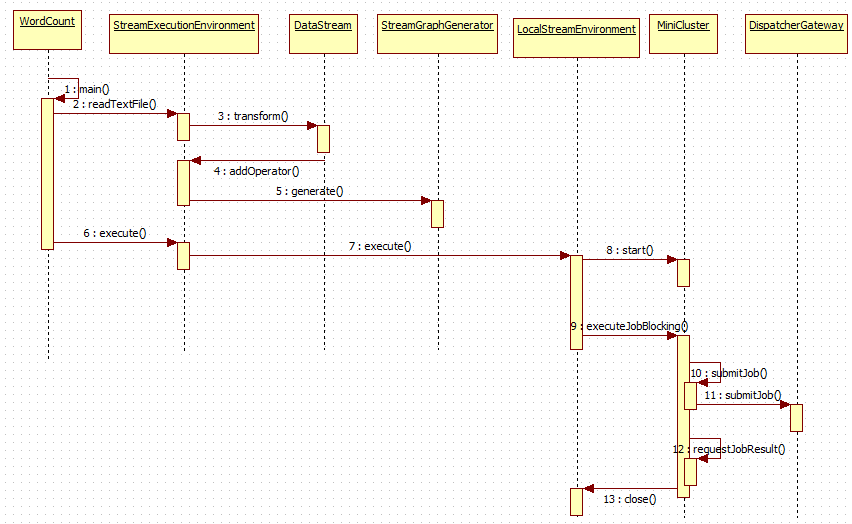
第1~4步:main方法读取文件,增加算子
    private <OUT> DataStreamSource<OUT> createFileInput(FileInputFormat<OUT> inputFormat,

                                                        TypeInformation<OUT> typeInfo,

                                                        String sourceName,

                                                        FileProcessingMode monitoringMode,

                                                        long interval) {

        Preconditions.checkNotNull(inputFormat, "Unspecified file input format.");

        Preconditions.checkNotNull(typeInfo, "Unspecified output type information.");

        Preconditions.checkNotNull(sourceName, "Unspecified name for the source.");

        Preconditions.checkNotNull(monitoringMode, "Unspecified monitoring mode.");

        Preconditions.checkArgument(monitoringMode.equals(FileProcessingMode.PROCESS_ONCE) ||

                interval >= ContinuousFileMonitoringFunction.MIN_MONITORING_INTERVAL,

            "The path monitoring interval cannot be less than " +

                    ContinuousFileMonitoringFunction.MIN_MONITORING_INTERVAL + " ms.");

        ContinuousFileMonitoringFunction<OUT> monitoringFunction =

            new ContinuousFileMonitoringFunction<>(inputFormat, monitoringMode, getParallelism(), interval);

        ContinuousFileReaderOperator<OUT> reader =

            new ContinuousFileReaderOperator<>(inputFormat);

        SingleOutputStreamOperator<OUT> source = addSource(monitoringFunction, sourceName)

                .transform("Split Reader: " + sourceName, typeInfo, reader);                //1

        return new DataStreamSource<>(source);

    }
增加算子的方法,当调用execute方法时,此时增加的算子会被执行。
    /**

     * Adds an operator to the list of operators that should be executed when calling

     * {@link #execute}.

     *

     * <p>When calling {@link #execute()} only the operators that where previously added to the list

     * are executed.

     *

     * <p>This is not meant to be used by users. The API methods that create operators must call

     * this method.

     */

    @Internal

    public void addOperator(StreamTransformation<?> transformation) {

        Preconditions.checkNotNull(transformation, "transformation must not be null.");

        this.transformations.add(transformation);

    }
第5步:产生StreamGraph,从而可以得到JobGraph,即将Stream程序转换成JobGraph
        // transform the streaming program into a JobGraph

        StreamGraph streamGraph = getStreamGraph();

        streamGraph.setJobName(jobName);

        JobGraph jobGraph = streamGraph.getJobGraph();

        jobGraph.setAllowQueuedScheduling(true);
第6~8步启动MiniCluster,为执行job做准备
/**

     * Starts the mini cluster, based on the configured properties.

     *

     * @throws Exception This method passes on any exception that occurs during the startup of

     *                   the mini cluster.

     */

    public void start() throws Exception {

        synchronized (lock) {

            checkState(!running, "MiniCluster is already running");

            LOG.info("Starting Flink Mini Cluster");

            LOG.debug("Using configuration {}", miniClusterConfiguration);

            final Configuration configuration = miniClusterConfiguration.getConfiguration();

            final boolean useSingleRpcService = miniClusterConfiguration.getRpcServiceSharing() == RpcServiceSharing.SHARED;

            try {

                initializeIOFormatClasses(configuration);

                LOG.info("Starting Metrics Registry");

                metricRegistry = createMetricRegistry(configuration);

                // bring up all the RPC services

                LOG.info("Starting RPC Service(s)");

                AkkaRpcServiceConfiguration akkaRpcServiceConfig = AkkaRpcServiceConfiguration.fromConfiguration(configuration);

                final RpcServiceFactory dispatcherResourceManagreComponentRpcServiceFactory;

                if (useSingleRpcService) {

                    // we always need the 'commonRpcService' for auxiliary calls

                    commonRpcService = createRpcService(akkaRpcServiceConfig, false, null);

                    final CommonRpcServiceFactory commonRpcServiceFactory = new CommonRpcServiceFactory(commonRpcService);

                    taskManagerRpcServiceFactory = commonRpcServiceFactory;

                    dispatcherResourceManagreComponentRpcServiceFactory = commonRpcServiceFactory;

                } else {

                    // we always need the 'commonRpcService' for auxiliary calls

                    commonRpcService = createRpcService(akkaRpcServiceConfig, true, null);

                    // start a new service per component, possibly with custom bind addresses

                    final String jobManagerBindAddress = miniClusterConfiguration.getJobManagerBindAddress();

                    final String taskManagerBindAddress = miniClusterConfiguration.getTaskManagerBindAddress();

                    dispatcherResourceManagreComponentRpcServiceFactory = new DedicatedRpcServiceFactory(akkaRpcServiceConfig, jobManagerBindAddress);

                    taskManagerRpcServiceFactory = new DedicatedRpcServiceFactory(akkaRpcServiceConfig, taskManagerBindAddress);

                }

                RpcService metricQueryServiceRpcService = MetricUtils.startMetricsRpcService(

                    configuration,

                    commonRpcService.getAddress());

                metricRegistry.startQueryService(metricQueryServiceRpcService, null);

                ioExecutor = Executors.newFixedThreadPool(

                    Hardware.getNumberCPUCores(),

                    new ExecutorThreadFactory("mini-cluster-io"));

                haServices = createHighAvailabilityServices(configuration, ioExecutor);

                blobServer = new BlobServer(configuration, haServices.createBlobStore());

                blobServer.start();

                heartbeatServices = HeartbeatServices.fromConfiguration(configuration);

                blobCacheService = new BlobCacheService(

                    configuration, haServices.createBlobStore(), new InetSocketAddress(InetAddress.getLocalHost(), blobServer.getPort())

                );

                startTaskManagers();

                MetricQueryServiceRetriever metricQueryServiceRetriever = new RpcMetricQueryServiceRetriever(metricRegistry.getMetricQueryServiceRpcService());

                dispatcherResourceManagerComponents.addAll(createDispatcherResourceManagerComponents(

                    configuration,

                    dispatcherResourceManagreComponentRpcServiceFactory,

                    haServices,

                    blobServer,

                    heartbeatServices,

                    metricRegistry,

                    metricQueryServiceRetriever,

                    new ShutDownFatalErrorHandler()

                ));

                resourceManagerLeaderRetriever = haServices.getResourceManagerLeaderRetriever();

                dispatcherLeaderRetriever = haServices.getDispatcherLeaderRetriever();

                webMonitorLeaderRetrievalService = haServices.getWebMonitorLeaderRetriever();

                dispatcherGatewayRetriever = new RpcGatewayRetriever<>(

                    commonRpcService,

                    DispatcherGateway.class,

                    DispatcherId::fromUuid,

                    20,

                    Time.milliseconds(20L));

                resourceManagerGatewayRetriever = new RpcGatewayRetriever<>(

                    commonRpcService,

                    ResourceManagerGateway.class,

                    ResourceManagerId::fromUuid,

                    20,

                    Time.milliseconds(20L));

                webMonitorLeaderRetriever = new LeaderRetriever();

                resourceManagerLeaderRetriever.start(resourceManagerGatewayRetriever);

                dispatcherLeaderRetriever.start(dispatcherGatewayRetriever);

                webMonitorLeaderRetrievalService.start(webMonitorLeaderRetriever);

            }

            catch (Exception e) {

                // cleanup everything

                try {

                    close();

                } catch (Exception ee) {

                    e.addSuppressed(ee);

                }

                throw e;

            }

            // create a new termination future

            terminationFuture = new CompletableFuture<>();

            // now officially mark this as running

            running = true;

            LOG.info("Flink Mini Cluster started successfully");

        }

    }
第9~12步 执行job
    /**

     * This method runs a job in blocking mode. The method returns only after the job

     * completed successfully, or after it failed terminally.

     *

     * @param job  The Flink job to execute

     * @return The result of the job execution

     *

     * @throws JobExecutionException Thrown if anything went amiss during initial job launch,

     *         or if the job terminally failed.

     */

    @Override

    public JobExecutionResult executeJobBlocking(JobGraph job) throws JobExecutionException, InterruptedException {

        checkNotNull(job, "job is null");

        final CompletableFuture<JobSubmissionResult> submissionFuture = submitJob(job);

        final CompletableFuture<JobResult> jobResultFuture = submissionFuture.thenCompose(

            (JobSubmissionResult ignored) -> requestJobResult(job.getJobID()));

        final JobResult jobResult;

        try {

            jobResult = jobResultFuture.get();

        } catch (ExecutionException e) {

            throw new JobExecutionException(job.getJobID(), "Could not retrieve JobResult.", ExceptionUtils.stripExecutionException(e));

        }

        try {

            return jobResult.toJobExecutionResult(Thread.currentThread().getContextClassLoader());

        } catch (IOException | ClassNotFoundException e) {

            throw new JobExecutionException(job.getJobID(), e);

        }

    }
先上传jar包文件,此时需要DispatcherGateway来执行上转任务,异步等待结果执行完毕
总结:
batch和stream的执行流程很相似,又有不同。
不同:Stream传递的是DataStream,Batch传递的是DataSet
相同:都转换成JobGraph执行
从flink-example分析flink组件(3)WordCount 流式实战及源码分析的更多相关文章
- SpringCloudGateway微服务网关实战与源码分析 - 中
实战 路由过滤器工厂 路由过滤器允许以某种方式修改传入的HTTP请求或传出的HTTP响应.路由过滤器的作用域是特定的路由.SpringCloud Gateway包括许多内置的GatewayFilter ...
- Vue3中的响应式对象Reactive源码分析
Vue3中的响应式对象Reactive源码分析 ReactiveEffect.js 中的 trackEffects函数 及 ReactiveEffect类 在Ref随笔中已经介绍,在本文中不做赘述 本 ...
- Flink sql 之AsyncIO与LookupJoin的几个疑问 (源码分析)
本文源码基于flink 1.14 被同事问到几个关于AsyncIO和lookUp维表的问题所以翻了下源码,从源码的角度解惑这几个问题 对于AsyncIO不了解的可以看看之前写的这篇 <Flin ...
- bootstrap_栅格系统_响应式工具_源码分析
-----------------------------------------------------------------------------margin 为负 使盒子重叠 等高 等高 ...
- Netty源码分析 (十二)----- 心跳服务之 IdleStateHandler 源码分析
什么是心跳机制? 心跳说的是在客户端和服务端在互相建立ESTABLISH状态的时候,如何通过发送一个最简单的包来保持连接的存活,还有监控另一边服务的可用性等. 心跳包的作用 保活Q:为什么说心跳机制能 ...
- 从flink-example分析flink组件(1)WordCount batch实战及源码分析
上一章<windows下flink示例程序的执行> 简单介绍了一下flink在windows下如何通过flink-webui运行已经打包完成的示例程序(jar),那么我们为什么要使用fli ...
- SpringCloudAlibaba注册中心与配置中心之利器Nacos实战与源码分析(上)
不断踩坑并解决问题是每个程序员进阶到资深的必要经历并以此获得满足感,而不断阅读开源项目源码和总结思想是每个架构师成长最佳途径.本篇拉开SpringCloud Alibaba最新版本实战和原理序幕,以工 ...
- SpringCloudAlibaba分布式流量控制组件Sentinel实战与源码分析(上)
概述 定义 Sentinel官网地址 https://sentinelguard.io/zh-cn/index.html 最新版本v1.8.4 Sentinel官网文档地址 https://senti ...
- SpringCloud Gateway微服务网关实战与源码分析-上
概述 定义 Spring Cloud Gateway 官网地址 https://spring.io/projects/spring-cloud-gateway/ 最新版本3.1.3 Spring Cl ...
随机推荐
- Laravel:php artisan key:generate三种报错解决方案,修改默认PHP版本(宝塔面板)
为了兼容N多个网站,服务器上有3个PHP版本5.3/5.6/7.2.宝塔默认为5.3,但是laravel5.7并不支持,所以在创建线上 .env 环境配置文件,初始化应用配置时候报错了. cp .en ...
- 安装metasploitable3的经验总结
一个月没有写学习记录了,但是这一个月一直没闲着,抽空写写自己装metasploitable3的经验教训(提示:只要你的环境配置没错,步骤没错,多试几次就会成功了,我总共测试了15次,,短的耗时30分钟 ...
- 关于Git 的管理凭据操作
1.桌面-->2.我的电脑-->3.右击选择属性-->4.控制面板主页-->5.在用户账户和家庭安全下,选择添加或删除用户账户-->转到“主用户账户”页面-->6. ...
- 有关Html页面节点的简单理解
这是之前研究web前端的一点经验,主要针对刚入门还没怎么研究的朋友. 因为我发现我在用js,css参与过网站开发项目后仍然没有理解文本节点与普通节点的差别,所以记下来拿来分享一下. 先上结论:< ...
- PWN菜鸡入门之栈溢出 (2)—— ret2libc与动态链接库的关系
准备知识引用自https://www.freebuf.com/articles/rookie/182894.html 0×01 利用思路 ret2libc 这种攻击方式主要是针对 动态链接(Dynam ...
- PATA 1036. Boys vs Girls (25)
https://www.patest.cn/contests/pat-a-practise/1036 #include <bits/stdc++.h> using namespace st ...
- spring源码深度解析— IOC 之 bean 创建
在 Spring 中存在着不同的 scope,默认是 singleton ,还有 prototype.request 等等其他的 scope,他们的初始化步骤是怎样的呢?这个答案在这篇博客中给出. s ...
- 抽丝剥茧分析asyncio事件调度的核心原理
先来看一下一个简单的例子 例1: async def foo(): print('enter foo ...') await bar() print('exit foo ...') async def ...
- Java 添加、读取、删除PPT文档属性
文档属性是一些描述性的信息,它未包含在文件的实际内容中,但提供了有关文件的信息,可用来帮助查找和整理文件.以下示例中将介绍通过Java程序来添加PPT文档属性.读取.删除PPT文档中已有属性的方法. ...
- Linux中修改远程地址
首先跳转到本地用户root,如果不是的话可能没有权限 第一步:安装ssh服务 执行命令:yum install openssh-server (因为我已经安装过了,所以显示的是已安装) 第二步:修改S ...