
【Android】Binder的Oneway拦截
在某些虚拟化,免安装,打点,环境检测,拦截器等场景,针对
Android系统服务接口的拦截是常用的技术方案。通常只是针对正向的接口调用,如果涉及被动的服务回调拦截,则实现起来就有些许麻烦。

说明
由于我们容器产品的特性,需要将应用完整的运行起来,所以必须要对各系统服务(超过100+系统服务)通信进行拦截过滤,修正和还原接口通信的数据。让系统和应用可以无感知运行,实现免安装运行的效果。
整个方案基本上都聚焦在服务模块主动调用的拦截上,系统回调的拦截涉及较少,但随着功能的深入,越来越需要对服务回调的接口(Binder for Oneway)进行拦截。在这里将整个通用的拦截方案和实现过程分享出来,希望对大家有益。
原理
Binder的Oneway回调机制,即应用进程向系统服务注册回调(通常注册和取消注册成对出现),当服务端有相应时间时,可以直接回调给改Binder对象实例。
如常见的AMS服务接口:
// source code: /frameworks/base/core/java/android/app/IActivityManager.aidl

interface IActivityManager {

	// ...

	Intent registerReceiver(IApplicationThread caller,

                          String callerPackage,

                          IIntentReceiver receiver,

                          IntentFilter filter,

                          String requiredPermission,

                          int userId,

                          int flags

                         );

  void unregisterReceiver(in IIntentReceiver receiver);

  // ...

}
我们的目标:
- 拦截
AMS的registerReceiver方法,将参数receiver通过Proxy创建一个新的扩展类对象传递出去。 - 为了参数校验通过,所以对象的类名是合法的(如:
android.content.IIntentReceiver) - 服务端实际拿到的是我们扩展的接口对象,因此当服务端,通过Binder数据还原成服务端的同名对象。
- 当服务端有事件回调时,则我们扩展的接口对象优先处理,然后再像原对象调用传递。
- 当应用注销回调时,同样需要将我们扩展的对象通知服务端解除。
1.0 方案:源码导入
由于通常系统接口类(如:IActivityManager.aidl,IPackageManager.aidl等)均为隐藏类,因此很自然的想法是将系统的aidl源文件导入到工程中。
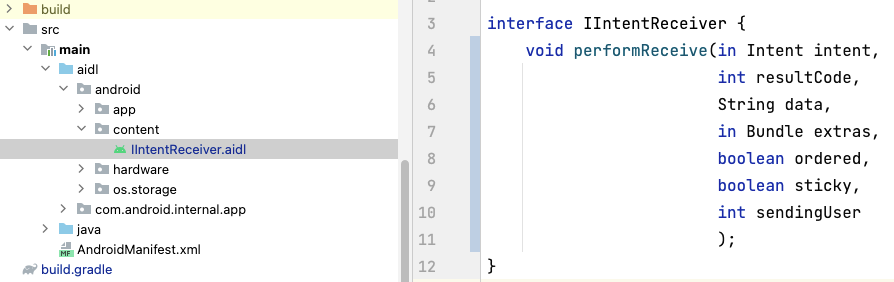
配置好目录:
    sourceSets {

        main {

            aidl.srcDirs = ['src/main/aidl']

        }

    }
编译后我们就可以连接该类,并进行继承扩展了,如:
public class StubIntentReceiver extends IIntentReceiver.Stub {

    Object mOrigin;

    protected StubIntentReceiver(Object org) {

        this.mOrigin = org;

    }

    private static Method sMethod_performReceive;

    public void performReceive(Intent intent, int resultCode, String data, Bundle extras, boolean ordered, boolean sticky, int sendingUser) throws RemoteException {

        // TODO something here ...

        if (null == sMethod_performReceive) {

            sMethod_performReceive = ReflectUtils.getDeclaredMethod(

                    mOrigin, "performReceive",

                    Intent.class, int.class, String.class, Bundle.class, boolean.class, boolean.class, int.class

            );

        }

        sMethod_performReceive.invoke(mOrigin, intent, resultCode, data, extras, ordered, sticky, sendingUser);

    }

}
对于IIntentReceiver.aidl的回调接口来说,这样就可以解决了,因为他满足了几个特性:
- 足够简单,就只有一个函数。
- 足够稳定,从
9.0~14.0接口名和参数都一致。
然而更多的接口并非如此,接口类函数不仅仅是多个,而且不同版本类方法各异,同函数参数也都不相同,这才是常态,所以我们自然的解决方案就是:flavor。
2.0 方案:Flavor
既然每个版本可能不一致,那就编译多版本就可以解决了,如:

这样确实能解决多版本系统接口变化的问题,但同时带来了新的问题:
- 多版本的编译,维护,加载运行导致工作量成倍增加,是个灾难。
- 通常接口中我们感兴趣的只是其中一部分,其他的接口则是直接放过。
- 很多系统接口参数又是继承于
Parcelable的对象,而该对象又为隐藏类,因此又需要继续导入关联的类确保编译运行正常,导致越来越臃肿。 - 某些接口厂商还会在该类定制新的接口,无法做到默认兼容。
3.0 方案:接口模板
我们对于复杂的方案生来恐惧,越复杂越做不稳定,所以我们的目标:
- 无需多版本编译,一套代码适配所有版本。
- 仅需处理我们关心的接口,对于其他接口默认可放过。
于是我们通过编译后的源码我们目标锁定在Binder的onTransact函数,如:
public interface IIntentReceiver extends android.os.IInterface

{

  /** Local-side IPC implementation stub class. */

  public static abstract class Stub extends android.os.Binder implements android.content.IIntentReceiver

  {

    private static final java.lang.String DESCRIPTOR = "android.content.IIntentReceiver";

    /** Construct the stub at attach it to the interface. */

    @Override

    public boolean onTransact(int code,

                              android.os.Parcel data,

                              android.os.Parcel reply,

                              int flags

                             ) throws android.os.RemoteException

    {

      java.lang.String descriptor = DESCRIPTOR;

      switch (code)

      {

        case TRANSACTION_performReceive:

        {

            data.enforceInterface(DESCRIPTOR);

						Intent _arg0;

            if (0 != data.readInt()) {

                _arg0 = Intent.CREATOR.createFromParcel(data);

            } else {

                _arg0 = null;

            }

            int _arg1 = data.readInt();

            String _arg2 = data.readString();

            Bundle _arg3;

            if (0 != data.readInt()) {

                _arg3 = (Bundle)Bundle.CREATOR.createFromParcel(data);

            } else {

                _arg3 = null;

            }

            boolean _arg4 = 0 != data.readInt();

            boolean _arg5 = 0 != data.readInt();

            int _arg6 = data.readInt();

          	// call function here !!!

            this.performReceive(_arg0, _arg1, _arg2, _arg3, _arg4, _arg5, _arg6);

            reply.writeNoException();

            return true;

        }

        default:

        {

          return super.onTransact(code, data, reply, flags);

        }

      }

    }

  }
于是我们的方案:

- 定义目标接口类(如:
IIntentReceiver.aidl),该接口无方法,仅保持名字一致,目的只是为了编译出IIntentReceiver.class类。 - 定义扩展类继承于接口代理类。
- 重载实现
onTransact方法,仅处理感兴趣的code(aidl文件编译后函数对应的编号),其他的默认调用原对象方法。
于是我们扩展实现类为:
import android.content.IIntentReceiver;

import android.content.Intent;

import android.os.Bundle;

import android.os.IBinder;

import android.os.Parcel;

import android.text.TextUtils;

public class OnewayIIntentReceiver extends IIntentReceiver.Stub {

    private final Object mArgument;

    private static int TRANSACTION_performReceive = -1;

    public OnewayIIntentReceiver(Object org) {

        mArgument = org;

        if (TRANSACTION_performReceive < 0) {

            TRANSACTION_performReceive = ReflectUtils.getMethodCode(org, "TRANSACTION_performReceive");

        }

    }

    @Override

    public boolean onTransact(int code, Parcel data, Parcel reply, int flags) throws android.os.RemoteException {

        if (TRANSACTION_performReceive == code) {

            data.enforceInterface(getInterfaceDescriptor());

            Intent _arg0;

            if (0 != data.readInt()) {

                _arg0 = Intent.CREATOR.createFromParcel(data);

            } else {

                _arg0 = null;

            }

            int _arg1 = data.readInt();

            String _arg2 = data.readString();

            Bundle _arg3;

            if (0 != data.readInt()) {

                _arg3 = (Bundle)Bundle.CREATOR.createFromParcel(data);

            } else {

                _arg3 = null;

            }

            boolean _arg4 = 0 != data.readInt();

            boolean _arg5 = 0 != data.readInt();

            int _arg6 = data.readInt();

            // do call origin

            Method method = ReflectUtils.getDeclaredMethod(

                    mArgument.mOrigin, "performReceive",

                    Intent.class, int.class, String.class, Bundle.class, boolean.class, boolean.class, int.class

            );

            method.invoke(mOrigin, _arg0, _arg1, _arg2, _arg3, _arg4, _arg5, _arg6);

            reply.writeNoException();

            return true;

        }

        return doTransact(code, data, reply, flags);

    }

    public boolean doTransact(int code, Parcel data, Parcel reply, int flags) {

        Method method = ReflectUtils.getDeclaredMethod(

                mOrigin, "onTransact",

                int.class, Parcel.class, Parcel.class, int.class

            );

        }

        try {

            return (Boolean) method.invoke(mOrigin, code, data, reply, flags);

        } catch (Throwable e) {

            Logger.e(e);

        }

        return false;

    }

}
至此,我们找到了相对简单,兼容性好的系统接口回调的拦截方案。
如果该服务为Native实现,则需要参考我们的另一篇文章 ☞ 深入Binder拦截 ☜ 来解决。
【Android】Binder的Oneway拦截的更多相关文章
- [转]Android Binder设计与实现 - 设计篇
摘要 Binder是Android系统进程间通信(IPC)方式之一.Linux已经拥有管道,system V IPC,socket等IPC手段,却还要倚赖Binder来实现进程间通信,说明Binder ...
- (转)Android Binder设计与实现 – 设计篇
原文地址(貌似已打不开):Android Binder设计与实现 – 设计篇 ------------------------------------------------------------- ...
- 图解Android - Binder 和 Service
在 Zygote启动过程 一文中我们说道,Zygote一生中最重要的一件事就是生下了 System Server 这个大儿子,System Server 担负着提供系统 Service的重任,在深入了 ...
- Android Binder设计与实现 - 设计篇
要 Binder是Android系统进程间通信(IPC)方式之一.Linux已经拥有管道,system V IPC,socket等IPC手段,却还要倚赖Binder来实现进程间通信,说明Binder具 ...
- Android Binder机制详解:手写IPC通信
想要掌握一样东西,最好的方式就是阅读理解它的源码.想要掌握Android Binder,最好的方式就是写一个AIDL文件,然后查看其生成的代码.本文的思路也是来自于此. 简介 Binder是Andro ...
- Android开发之漫漫长途 Ⅷ——Android Binder(也许是最容易理解的)
该文章是一个系列文章,是本人在Android开发的漫漫长途上的一点感想和记录,我会尽量按照先易后难的顺序进行编写该系列.该系列引用了<Android开发艺术探索>以及<深入理解And ...
- Android Binder IPC详解-Android学习之旅(96)
linux内存空间与BInder Driver Android进程和linux进程一样,他们只运行在进程固有的虚拟空间中.一个4GB的虚拟地址空间,其中3GB是用户空间,1GB是内核空间 ,用户空间是 ...
- ANDROID BINDER机制浅析
Binder是Android上一种IPC机制,重要且较难理解.由于Linux上标准IPC在灵活和可靠性存在一定不足,Google基于OpenBinder的设计和构想实现了Binder. 本文只简单介绍 ...
- (原创)Android Binder设计与实现 - 实现篇(1)
本文属于原创作品,转载请注明出处并放于明显位置,原文地址:http://www.cnblogs.com/albert1017/p/3849585.html 前言 在学习Android的Binder机制 ...
- 图文详解 Android Binder跨进程通信机制 原理
图文详解 Android Binder跨进程通信机制 原理 目录 目录 1. Binder到底是什么? 中文即 粘合剂,意思为粘合了两个不同的进程 网上有很多对Binder的定义,但都说不清楚:Bin ...
随机推荐
- JDK8 ::用法(双冒号)
JDK8中有双冒号的用法,就是把方法当做参数传到stream内部,使stream的每个元素都传入到该方法里面执行一下. List<String> lt = Arrays.asList(&q ...
- Makefile 简单学习
一.Makefile 简介 Makefile 是一种常用于编译的脚本语言.它可以更好更方便的管理你的项目的代码编译,节约编译时间(没改动的文件不编译).注意 Makefile 文件命令必须是 Make ...
- GitHub互赞快速涨星,最简单的涨星方法
各位代码们,是不是厌倦了在GitHub上孤独地刷着自己的项目页面,眼巴巴地等待那星星数的涨幅?今天给大家安利一个超级实用的新玩意儿--涨星互助平台,一个让你的GitHub项目星星数飞起来的秘密基地! ...
- CircleIndicator组件,使指示器风格更加多样化
UI界面是应用程序可视化必不可少的部分.设计精致的UI界面可以使得整个可视化应用程序给用户留下深刻的印象,是改善用户界面体验最直接的方式. ArkUI开发框架为开发者提供了丰富的UI原生组件,如Nav ...
- C 语言注释和变量详解
C 语言中的注释 C语言中可以使用注释来解释代码并使其更具可读性.它还可以在测试替代代码时防止执行. 单行注释 单行注释以两个斜杠 (//) 开头. // 和行末之间的任何文本都会被编译器忽略(不会被 ...
- 自动编号工具类:NumAutoUtils详解
在软件开发中,经常需要生成唯一的编号,例如订单号.发票号.实验编号等.为了简化这一过程,本文将介绍一个Java工具类NumAutoUtils,它可以帮助我们生成带有前缀和日期的自动编号. 概述 Num ...
- Git 11 设置项目提交人
前面介绍了可以给 Git 设置全局提交人,这样当前电脑所有项目提交人都会变成设置的值. 但实际开发中有时候需要给不同项目设置不同提交人. 比如工作的项目是一个提交人,自己维护的开源项目又是另一个提交人 ...
- 直播预告丨Hello HarmonyOS进阶课程第四课——ArkUI动画开发
为了帮助初识HarmonyOS的开发者快速入门,我们曾推出Hello HarmonyOS系列课程,从最基础的配置IDE和创建Hello World开始,详细介绍HarmonyOS基础.开发环境搭建.I ...
- 不常用的技能-【手动编译java类】
jdk版本:1.7 冒号分割jar包,1.8 分号分割jar包 javac -classpath fastjson-1.2.24.jar:jedis-2.9.0.jar Test.javajava - ...
- 开源在线表单工具 HeyForm 使用教程
HeyForm 是一个非常出色的开源在线表单工具,可以通过直观的拖拽式编辑器,快速构建出美观实用的表单. HeyForm 的功能非常丰富: 支持丰富的输入类型,从基础的文本.数字到高级的图片选择.日期 ...