
ftl生成模板并从前台下载
1.生成模板的工具类
package com.jesims.busfundcallnew.util;

import freemarker.template.Configuration;

import freemarker.template.Template;

import org.activiti.engine.impl.bpmn.data.Data;

import java.io.*;

import java.text.SimpleDateFormat;

import java.util.Date;

import java.util.Map;

public class WordUtil {

    public static  void createWord(Map<String,Object> dataMap, String templateName, String filePath, String fileName){

        try {

            //创建配置实例

            Configuration configuration = new Configuration();

            //设置编码

            configuration.setDefaultEncoding("UTF-8");

            //设置编码

            //configuration.setDefaultEncoding("UTF-8");

////            ftl模板文件统一放至 com.lun.template 包下面

//            configuration.setClassForTemplateLoading(this.getClass(), "com.jesims.modules.freemarker.entity");

//            request.getSession().getServletContext().getRealPath("/WEB-INF/ftl")  获取文件夹下面的所有模版

//             configuration.setDirectoryForTemplateLoading(new File(request.getSession().getServletContext().getRealPath("/WEB-INF/ftl")));

            configuration.setDirectoryForTemplateLoading(new File("C:\\Project\\huajinziben\\hjzb2\\src\\main\\webapp\\WEB-INF\\attachment"));// 本地模板路径

            //获取模板

            Template template = configuration.getTemplate(templateName);

            //输出文件

            File outFile = new File(filePath+File.separator+fileName);

            //如果输出目标文件夹不存在,则创建

            if (!outFile.getParentFile().exists()){

                outFile.getParentFile().mkdirs();

            }

            //将模板和数据模型合并生成文件

            Writer out = new BufferedWriter(new OutputStreamWriter(new FileOutputStream(outFile),"UTF-8"));

            //生成文件

            template.process(dataMap, out);

            //关闭流

            out.flush();

            out.close();

        } catch (Exception e) {

            e.printStackTrace();

        }

    }
public static void download (HttpServletResponse response,String pathName,String fileName){
    OutputStream outputStream = null;
    BufferedInputStream bis = null;
    BufferedOutputStream bos = null;
    InputStream inStream = null;
    try {
        // 读到流中
        File file = new File(pathName);
        inStream = new FileInputStream(file);
        response.setContentType("application/vnd.openxmlformats-officedocument.spreadsheetml.sheet;charset=utf-8");
        response.setHeader("Content-Disposition", "attachment;filename=" + new String((fileName + ".doc").getBytes(), "iso-8859-1"));
        outputStream = response.getOutputStream();
        bis = new BufferedInputStream(inStream);
        bos = new BufferedOutputStream(outputStream);
        byte[] buff = new byte[8192];
        int bytesRead;
        while (-1 != (bytesRead = bis.read(buff, 0, buff.length))) {
            bos.write(buff, 0, bytesRead);
        }
    } catch (Exception e) {
        e.printStackTrace();
    } finally {
        try {
            if (null != bis) {
                bis.close();
            }
            if (null != bos) {
                bos.close();
            }
            if (null != outputStream) {
                outputStream.flush();
                outputStream.close();
            }
        } catch (IOException e) {
        }
    }

}
}
2.调用
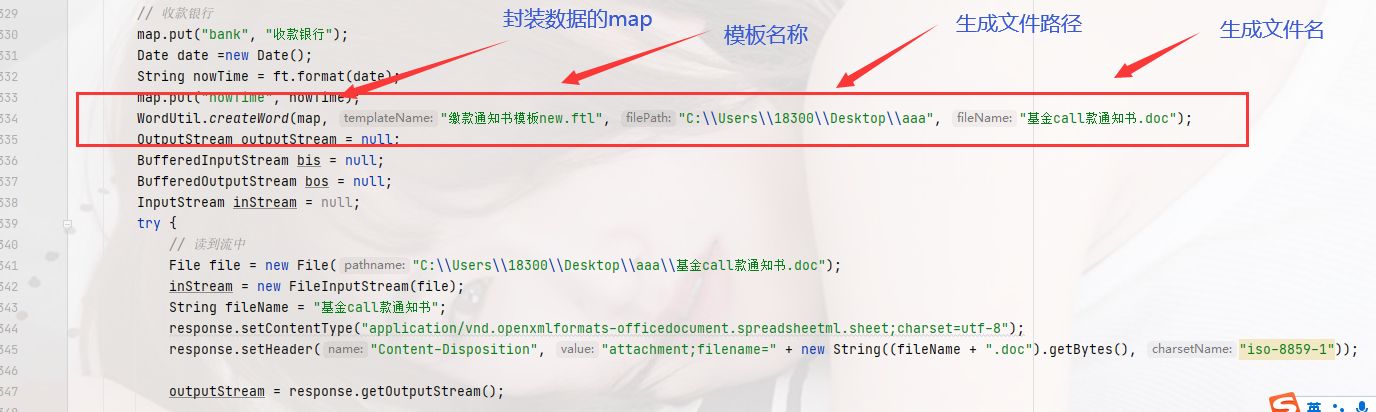
3.定义好模板

4.转成ftl文件
首先转成 Word 2003 XML 文档
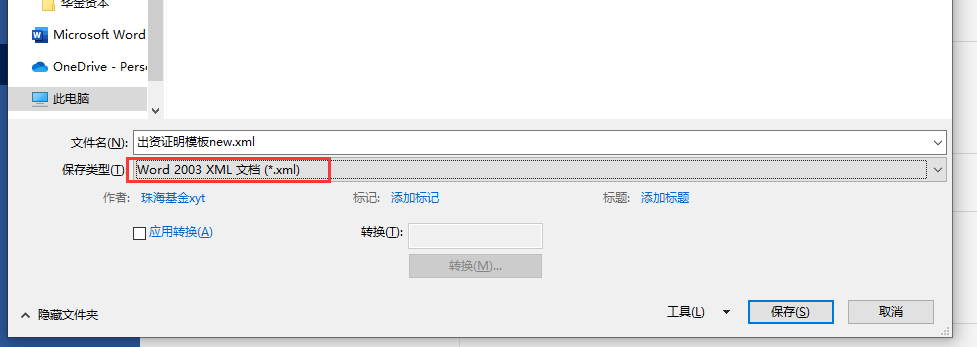
然后将 xml后缀改为 ftl
5.替换关键字
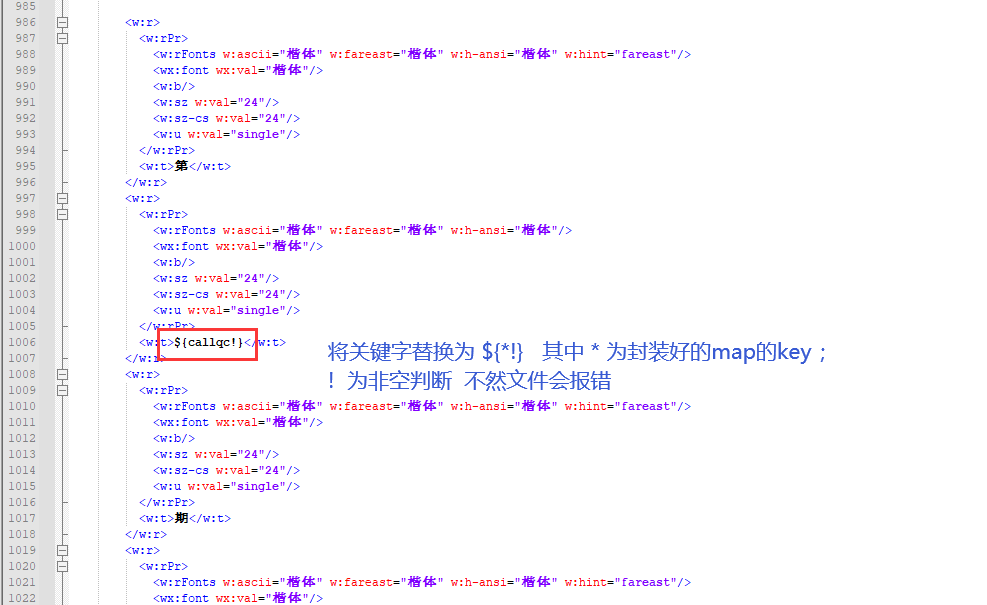
6.前端调用并下载word
前端 绑定点击事件:

注 :前端下载 需要用
window.location.href
 不然不能下载

下载word
OutputStream outputStream = null;

        BufferedInputStream bis = null;

        BufferedOutputStream bos = null;

        InputStream inStream = null;

        try {

            // 读到流中

            File file = new File("C:\\Users\\18300\\Desktop\\aaa\\基金call款通知书.doc"); //文件路径+文件名称

            inStream = new FileInputStream(file);

            String fileName = "基金call款通知书";// 生成的文件名称

            response.setContentType("application/vnd.openxmlformats-officedocument.spreadsheetml.sheet;charset=utf-8");

            response.setHeader("Content-Disposition", "attachment;filename=" + new String((fileName + ".doc").getBytes(), "iso-8859-1"));

            outputStream = response.getOutputStream();

            bis = new BufferedInputStream(inStream);

            bos = new BufferedOutputStream(outputStream);

            byte[] buff = new byte[8192];

            int bytesRead;

            while (-1 != (bytesRead = bis.read(buff, 0, buff.length))) {

                bos.write(buff, 0, bytesRead);

            }

        } catch (Exception e) {

            e.printStackTrace();

        } finally {

            try {

                if (null != bis) {

                    bis.close();

                }

                if (null != bos) {

                    bos.close();

                }

                if (null != outputStream) {

                    outputStream.flush();

                    outputStream.close();

                }

            } catch (IOException e) {

            }

        }
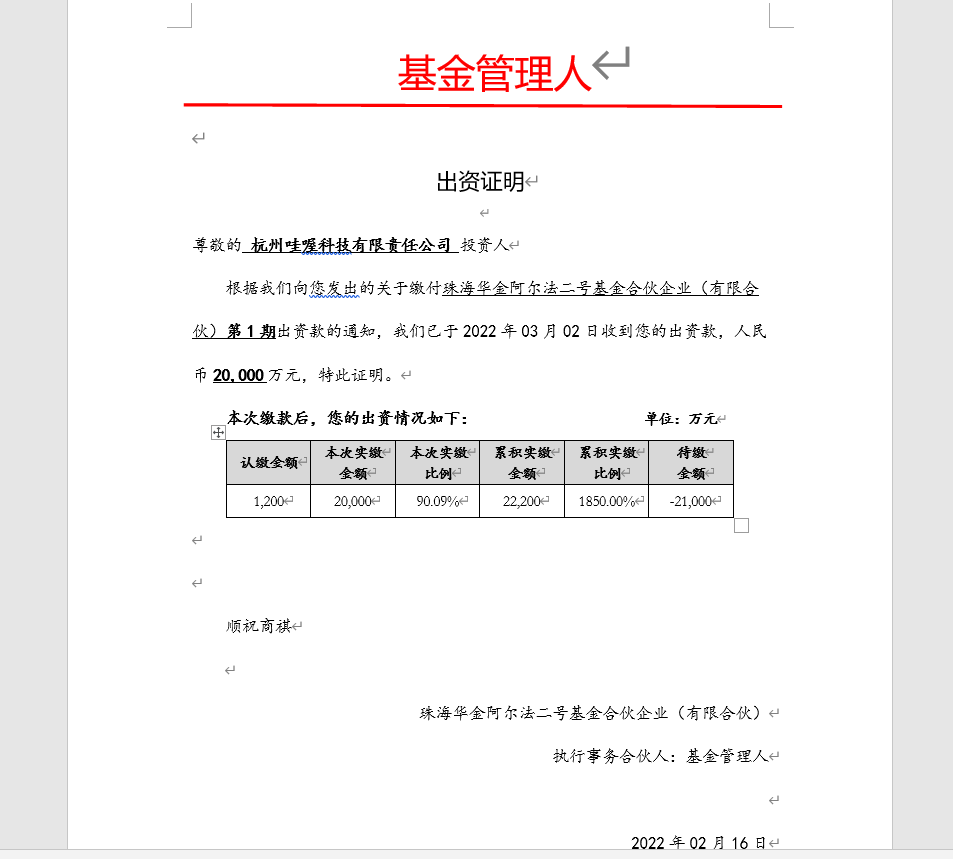
7.导出结果
ftl生成模板并从前台下载的更多相关文章
- JXL生成Excel,并提供下载(2:提供下载)
实现效果: 项目中使用JXL生成Excel,使生成的Excel可以让用户下载,如下图 一.生成Excel 二.提供下载 实现思路: 1.页面使用form表单提交方式(Ajax提交方式,我这里不行) 2 ...
- mybatis配eclise模板,mybatis快速生成模板
eclipse中mybatis得mapper文件不提示(mybatis-3-mapper.dtd,mybatis-3-config.dtd) 1.下载该文件到你的硬盘文件夹下 2.windows -- ...
- 20款时尚的 WordPress 企业模板【免费主题下载】
在这篇文章中,我们收集了20款时尚的 WordPress 企业模板.WordPress 作为最流行的博客系统,插件众多,易于扩充功能.安装和使用都非常方便,而且有许多第三方开发的免费模板,安装方式简单 ...
- [BILL WEI]stimulsoft reports DEMO自动生成模板
stimulsoft reports是一款强大的报表开发工具,能够开发各式各样的报表. 对于初学者而言,任何报表开发,刚开始都是去模仿,熟练掌握之后,自己才能独立开发,而在报表开发实际过程中, 我们所 ...
- ionic生成apk使用build命令下载gradle-2.2.1-all.zip卡,解决方案
ionic生成apk使用build命令下载gradle-2.2.1-all.zip卡,解决方案 直接使用ionic build android命令,自动下载gradle-2.2.1-all.zip超慢 ...
- C# T4 模板 数据库实体类生成模板(带注释,娱乐用)
说明:..,有些工具生成实体类没注释,不能和SqlServer的MS_Description属性一起使用,然后照着网上的资源,随便写了个生成模板,自娱自乐向,其实卵用都没有参考教程 1.htt ...
- springboot mail整合freemark实现动态生成模板
目标:1:springboot 整合 mail2: mail 使用freemark 实现模板动态生成(就是通过字符串生成模板,不需要在工程中写入固定模板)3: springboot 整合aop 实现日 ...
- uniapp - 更改项目生成模板、页面
每次生成项目目录都需要删除一些再添加太麻烦了,就想着能不能修改一下模板 - 当然自定义模板也能实现 好了,被我找到了. 修改以后源文件名称和格式覆盖回去即可,重新启动hbuilderx 这里可以修改e ...
- Android Studio 配置快速生成模板代码
前言 Android studio 有提供快速生成模板代码的功能,其实这个功能也可以自定义配置.此篇博客将讲解如何使用此功能 进入Settings 选择 Editor > Live Templa ...
- 【CF1443E】Long Permutation 题解(排列生成模板)
原题链接 题意简介 给定一个长度为 n 的排列 {1,2,3,...,n} .现有两种操作: 对某个区间 [l,r] 求和 将排列往后推 x 次 (按字典序) 其中 \(n,q \leq 2\time ...
随机推荐
- 配置审计(Config)变配报警设置
简介: 本文作者[紫极zj],本篇将主要介绍通过配置审计的自定义规则等服务,对负载均衡进行预警行为的相关介绍. 前言 配置审计(Config)将您分散在各地域的资源整合为全局资源列表,可便捷地搜索全局 ...
- ICBU可控文本生成技术详解
简介: 文本生成(Text Generation)是自然语言处理(Natural Language Processing,NLP)领域的一项重要且具有挑战的任务.顾名思义,文本生成任务的目的是生成近 ...
- dotnet C# 通过 Vortice 将 ID2D1CommandList 作为特效的输入源
使用 Direct2D 过程中将可以使用到 Direct2D 强大的特效功能,比如给某些界面绘制内容添加特效支持.本文将告诉大家如何通过 Vortice 将 ID2D1CommandList 作为特效 ...
- JavaScript数组Array方法介绍,使用示例及ES6拓展
数组定义 有次序和编号的一组值 类似数组对象 函数agruments对象,字符串,DOM元素集 实例属性 Array.prototype.length length可以赋值,用以改变数组长度 arr. ...
- 9.3K+ Star!一个面向中小型企业设计的开源运维平台!
大家好,我是Java陈序员. 我们在日常开发中,会有很多的应用环境,开发环境.测试环境.回归环境.生产环境等等. 这些环境,需要部署在一台台的服务器上,有的可能是物理机,有的可能是云服务器. 那么,这 ...
- 【Oracle】导出全库备份,导入指定的schema并替换现有的表
需求:开发环境,每天晚上做了全库导出备份.由于误操作,现在要恢复指定的schema下的所有表,操作思路如下: 1.全库导出备份的语句 expdp system/oracle full=y dumpfi ...
- golang url解析
package main import "fmt" import "net/url" import "strings" func main( ...
- golang sort —— 排序算法
该包实现了四种基本排序算法:插入排序.归并排序.堆排序和快速排序. 但是这四种排序方法是不公开的,它们只被用于sort包内部使用.所以在对数据集合排序时不必考虑应当选择哪一种排序方法,只要实现了sor ...
- MySQL 字段截取拼接
@ 目录 前言 需求: 拼接函数: 截取函数: 总结 前言 请各大网友尊重本人原创知识分享,谨记本人博客:南国以南i. 提示:以下是本篇文章正文内容,下面案例可供参考 需求: 将数据库中的某一个字段的 ...
- C++ Virtual Functions
Virtual这个关键字在多态中扮演一个绝对重要的角色,只要member functions声明的前面加上virtual的关键字,他就会成为 Virtual member functions.任何一个 ...