
【ElasticSearch】数据迁移方案
一、需求背景
ES环境要从单机迁移到集群上面
现在已有的数据也要搬过去,有几个索引三四千万数据大概
二、实现方案
有两种,使用ElasticDump和LogStash的ES插件
1、ElasticDump迁移工具
相关资料
资料参考:

https://blog.csdn.net/weixin_43833817/article/details/110387932

https://zhuanlan.zhihu.com/p/489364187
脚本编写帮助参考:
https://blog.csdn.net/qq_39680564/article/details/118539979
官方NPM文档:
https://www.npmjs.com/package/elasticdump
下载安装迁移工具,windows 和linux无限制
npm install elasticdump -g
几个重要参数:
1、读取 + 写入 目标地址或者目标索引

--input

                    Source location (required)

--input-index

                    Source index and type

                    (default: all, example: index/type)

--output

                    Destination location (required)

--output-index

                    Destination index and type

                    (default: all, example: index/type)

2、指定每批次最大传输的文档对象数量

--limit

                    How many objects to move in batch per operation

                    limit is approximate for file streams

                    (default: 100)

3、指定读写的端口

--inputSocksPort, --outputSocksPort

                    Socks5 host port

--inputSocksProxy, --outputSocksProxy

                    Socks5 host address

4、强制版本?

--force-os-version

                    Forces the OpenSearch version used by elasticsearch-dump.

                    (default: 7.10.2)

5、处理版本?

--handleVersion

                    Tells elastisearch transport to handle the `_version` field if present in the dataset

                    (default : false)

6、是否忽略读写错误

--ignore-errors

                    Will continue the read/write loop on write error

                    (default: false)

--ignore-es-write-errors

                    Will continue the read/write loop on a write error from elasticsearch

                    (default: true)

6、帮助页面

--help

                    This page

7、重试次数与重试延迟时限

--retryAttempts

                    Integer indicating the number of times a request should be automatically re-attempted before failing

                    when a connection fails with one of the following errors `ECONNRESET`, `ENOTFOUND`, `ESOCKETTIMEDOUT`,

                    ETIMEDOUT`, `ECONNREFUSED`, `EHOSTUNREACH`, `EPIPE`, `EAI_AGAIN`

                    (default: 0)

--retryDelay

                    Integer indicating the back-off/break period between retry attempts (milliseconds)

                    (default : 5000)
传输命令:
- 无账户密码可不设置
- 注意传输限制到 -limit参数最高只能到查询的上限1万
- 如果不设置索引名称,默认将迁移整个ES过去
elasticdump --input=http://用户:密码@源ES地址/源索引 --output=http://用户:密码@目标ES地址/目标索引 --type=settings

elasticdump --input=http://用户:密码@源ES地址/源索引 --output=http://用户:密码@目标ES地址/目标索引 --type=mapping

elasticdump --input=http://用户:密码@源ES地址/源索引 --output=http://用户:密码@目标ES地址/目标索引 --type=data --limit=10000
工具特性分析:
1、方便快捷,只要装了Npm,不限制平台,客户端也能操作
2、应该是基于Http请求调用实现,数据传输量小,百万内的数据迁移时间还可以,千万的时间就很长了
2、LogStash的ES插件
关于插件的参数文档,太难找到了:
https://www.elastic.co/guide/en/logstash/7.3/plugins-outputs-elasticsearch.html

https://www.elastic.co/guide/en/logstash/7.3/plugins-inputs-elasticsearch.html
下载安装LogStash,需要部署在服务端
wget https://artifacts.elastic.co/downloads/logstash/logstash-7.3.2.tar.gz
解压放到目录中
# 解压Logstash包

tar -xf logstash-7.3.2.tar.gz

# 创建存放目录

mkdir /home/es

# 移动logstash到存放目录

mv logstash-7.3.2 /home/es/

# 重命名logstash目录

cd /home/es/

mv logstash-7.3.2/ logstash
LogStash只负责传输数据,索引不存在时会按ES默认配置新建
所以要保持源ES的索引配置,需要手动先在目标ES上建好
获取索引的配置信息:GET /索引名称/_settings?pretty

获取索引的Mapping信息:GET /索引名称/_mapping?pretty

在目标ES上配置索引

PUT /索引名称

{

  "settings": {

    "number_of_shards" : "8",

    "number_of_replicas" : "1"

  },

  "mappings" : {

    "properties" : { ... }

  }

}
编写迁移配置文件 xxx.conf:
vim /home/es/logstash/config/xxxx.conf
配置内容:
input{

    elasticsearch{

        hosts => ["源ES的IP地址:端口号"]

        index => "索引名称"

        user => "源ES用户名"

        password => "源ES密码"

    }

}

output{

    elasticsearch{

        hosts => ["目标集群ES的IP地址:端口号", "集群节点2", "集群节点3", ...]

        index => "索引名称"

        user => "集群ES用户名"

        password => "集群ES用户密码"

    }

}
迁移执行,指定迁移配置参数:
/home/es/logstash/bin/logstash -f /home/es/logstash/config/xxxx.conf --path.logs /home/es/logstash/logs/xxxx --path.data /home/es/logstash/data/xxxx
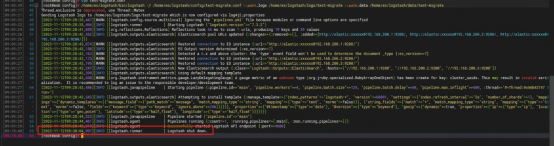
传输时不会打印传输信息,传输完毕时显示Logstash执行结束
工具特性分析:
1、一般来说是ELK一个整体,一定是在服务端部署的
2、传输速度快,支持千万级数据量
3、只负责传数据,索引本身是不管的,要手动去建好索引
2023年11月23日 10:57更新
MySQL或者任意支持JDBC的关系型数据库见此插件文档:
https://www.elastic.co/guide/en/logstash/7.3/plugins-inputs-jdbc.html
靠,还要从mysql上迁移到es这边,花半个早上把这事处理了
插件的配置文件写法:
也就是说关系型数据库可以根据jdbc驱动实现读取,但是需要自己提供驱动包
有个字段的报错要处理,日期解析失败,这里就调整SQL查询解决,利用日期函数给予正常字符
input {

  jdbc {

    jdbc_driver_library => "/home/logstash-7.3.2/lib/mysql-connector-java-8.0.29.jar"

    jdbc_driver_class => "com.mysql.cj.jdbc.Driver"

    jdbc_connection_string => "jdbc:mysql://192.168.200.16:3306/perception_fusion?useSSL=false"

    jdbc_user => "root"

    jdbc_password => "nccd16"

    jdbc_default_timezone => "Asia/Shanghai"

    statement => "SELECT `id`, `mac`, `result_id`, `weight_name`, `weight_detail`, `detail`, DATE_FORMAT(`timeline`, '%Y-%m-%d %H:%i:%s')  AS `timeline` FROM aca_ru_scordetail"

  }

}

output {

  elasticsearch {

    hosts => ["http://192.168.200.150:9200"]

    user => "elastic"

    password => "123456"

    index => "aca_ru_scordetail"

  }

}
迁移过来的文档:
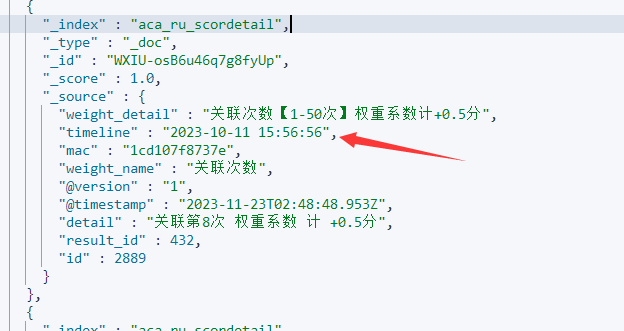
但是字段又对不上了,同事又让我继续看问题,百度了下
补上两个参数:
- lowercase_column_names => false 不要转小写
- manage_template => false 不要ES自动配置索引模版
在SQL的时候就指定好驼峰名称即可
input {

  jdbc {

    jdbc_driver_library => "/home/logstash-7.3.2/lib/mysql-connector-java-8.0.29.jar"

    jdbc_driver_class => "com.mysql.cj.jdbc.Driver"

    jdbc_connection_string => "jdbc:mysql://192.168.200.16:3306/perception_fusion?useSSL=false"

    jdbc_user => "root"

    jdbc_password => "nccd16"

    jdbc_default_timezone => "Asia/Shanghai"

    lowercase_column_names => false

    statement => "SELECT `id`, `mac`, `result_id` AS `resultId`, `weight_name` AS `weightName`, `weight_detail` AS `weightDetail`, `detail`, DATE_FORMAT(`timeline`, '%Y-%m-%d %H:%i:%s')  AS `timeline` FROM aca_ru_scordetail"

  }

}

output {

  elasticsearch {

    hosts => ["http://192.168.200.150:9200"]

    user => "elastic"

    password => "123456"

    index => "aca_ru_scordetail"

    manage_template => false

  }

}
【ElasticSearch】数据迁移方案的更多相关文章
- HBase 数据迁移方案介绍
一.前言 HBase数据迁移是很常见的操作,目前业界主要的迁移方式主要分为以下几类: 图1.HBase数据迁移方案 从上面图中可看出,目前的方案主要有四类,Hadoop层有一类,HBase层有三类.下 ...
- HBase 数据迁移方案介绍 (转载)
原文地址:https://www.cnblogs.com/ballwql/p/hbase_data_transfer.html 一.前言 HBase数据迁移是很常见的操作,目前业界主要的迁移方式主要分 ...
- 4.HBASE数据迁移方案(之snapshot):
4.HBASE数据迁移方案: 4.1 Import/Export 4.2 distcp 4.3 CopyTable 4.4 snapshot 快照方式迁移(以USER_info:user_lo ...
- 运维脚本-elasticsearch数据迁移python3脚本
elasticsearch数据迁移python3脚本 #!/usr/bin/python3 #elsearch 数据迁移脚本 #迁移工具路径 import time,os #下面命令是用到了一个go语 ...
- HBase 数据迁移方案介绍(转载)
原文链接:https://www.cnblogs.com/ballwql/p/hbase_data_transfer.html 一.前言 HBase数据迁移是很常见的操作,目前业界主要的迁移方式主要分 ...
- Redis数据迁移方案
场景 Redis实例A ---> Redis实例B,整库全量迁移 方案一: mac环境 brew install npm npm install redis-dump -g 针对RedisA: ...
- Fastdfs数据迁移方案
1. 方案背景描述 环境迁移,需要迁移旧环境的fastdfs集群的数据到新环境,由于之前数据迁移仅仅是针对mysql和mongodb,对fastdfs数据的迁移了解甚少,本文档主要是针对fas ...
- 多es 集群数据迁移方案
前言 加入新公司的第二个星期的星期二 遇到另一个项目需要技术性支持:验证es多集群的数据备份方案,需要我参与验证,在这个项目中需要关注到两个集群的互通性.es集群是部署在不同的k8s环境中,K8s环境 ...
- elasticsearch数据迁移——elasticsearch-dump使用
先安装好nodejs和nodejs的包管理工具npm.然后安装elasticsearch-dump: npm install elasticdump 下面迁移数据: 先在目的地址创建一个index来储 ...
- centos下Elasticsearch数据迁移与备份
########### ### 共享创建es官方网站就一句话 ######## 1.下载 文件共享 .. rpm -i http://mirror.symnds.com/distributions ...
随机推荐
- Windows文件管理优化-实用电脑软件(一)
RX文件管理器 (稀奇古怪的小软件,我推荐,你点赞!) 日后更新涉及:电脑.维护.清理.小工具.手机.APP.IOS.从WEB.到到UI.从开发,设计:诚意寻找伙伴(文编类.技术类.思想类)共编,共进 ...
- 算法学习笔记(10): BSGS算法及其扩展算法
BSGS算法及其扩展算法 BSGS算法 所谓 Baby Step, Giant Step 算法,也就是暴力算法的优化 用于求出已知 \(a, b, p\), 且 \(p\) 为质数 时 \(a^x \ ...
- The solution of P3012
problem & blog 很明显是个 DP. 于是我们定义 \(dp_{i,j,k}\) 为末尾的字符的 ASCII 码为 \(i\),有 \(j\) 个大写字母,\(k\) 个小写字母. ...
- vs code 中开发 .net5 mvc
asp.net core mvc ------------ 安装vscode-solution-explorer,C# 2个扩展.遇到yes就点yes. 新建一个文件夹:D:\repos\Net5Mv ...
- 网站_域名_DNS_端口_web访问过程
网站基本概念 服务器:能够提供服务器的机器,取决于机器上所安装的服务软件 web服务器:提供web服务(网站访问),需要安装web服务软件,Apache,tomcat,iis等 域名 (Domain ...
- java.sql.SQLException: Connection is read-only. Queries leading to data modification are not
java.sql.SQLException: Connection is read-only. Queries leading to data modification are not 产生的原因:事 ...
- Sealos 5.0 正式发布,云本应该是操作系统
把所有资源抽象成一个整体,一切皆应用,这才是云应该有的样子. 2018 年 8 月 15 日 Sealos 提交了第一行代码. 随后开源社区以每年翻倍的速度高速增长. 2022 年我们正式创业,经历一 ...
- Gitbook的安装和部署
安装 npm install gitbook-cli -g gitbook命令: gitbook init //初始化目录文件 gitbook help //列出gitbook所有的命令 gitboo ...
- mapreduce的shuffle机制
1.1 概述: mapreduce中,map阶段处理的数据如何传递给reduce阶段,是mapreduce框架中最关键的一个流程,这个流程就叫shuffle:(从map的输出到reduce的输入) s ...
- SpringBoot整合模版引擎freemarker实战
Freemarker相关maven依赖 <dependency> <groupId>org.springframework.boot</groupId> <a ...