
记录--你知道Vue中的Scoped css原理么?
这里给大家分享我在网上总结出来的一些知识,希望对大家有所帮助

追忆Scoped
偶然想起了一次面试,二面整体都聊完了,该做的算法题都做出来了,该背的八股文也背的差不多了,面试官频频点头,似乎对我的基础和项目经验都很是满意。嗯,我内心os本次面试应该十拿九稳了。
突然,面试官说:「我的主技术栈是React,Vue写的很少,对Vue中style样式中的scoped有点兴趣,你知道vue中为什么有这个么?」
我不假思索:「哦, 这个主要是为了做样式隔离,避免组件间和父子组件间的样式覆盖问题。有点类似React中使用的StyleModule,也是可以避免不同组件间样式覆盖问题。」
回答完之后我又开始暗自得意,回答的多么巧妙,既回答了问题,又表明自己对React也是有一点了解的。
可能面试官看出了我的得意之色,点点头之后又问出了一个问题:「知道是怎么实现的么?」
我先茫然的盯着面试官的脸看了两秒钟,然后在我已有的知识库中搜索,搜索一遍又一遍,发现这可能是我的一个盲区,我确实不太清楚实现原理啊!!
面试官可能看出了我对于此的知识匮乏,很和善的说「我就是感兴趣,随便问问」。
啊,事已至此,我只能对面试官露出一个尴尬却不失礼貌的微笑说「这块我确实没有仔细思考过,我下来会详细研究一下这款,具体是如何现在scoped的。」
「好,那本次面试就到这里吧,回去等通知吧!」面试官和蔼的说。
虽然最后面试顺利通过,但是这个问题我觉得还是有必要记录下:”Vue中Style中的Scoped属性是如何实现样式隔离的?“
初见Scoped
我们初次见到scoped应该是在Vue Loader中的Scoped Css文档中。
子组件的根元素
使用 scoped 后,父组件的样式将不会渗透到子组件中。
深度作用选择器
如果你希望 scoped 样式中的一个选择器能够作用得“更深”,例如影响子组件,你可以使用 >>> 操作符:
<style scoped>

.a >>> .b { /* ... */ }

</style>
上述代码会编译成:
.a[data-v-f3f3eg9] .b { /* ... */ }
注意:像Sass之类的预处理器无法正确解析>>>。这种情况下可以使用/deep/或::v-deep操作符取而代之,两者都是>>>的别名,同样可以正常工作。
实战Scoped
style标签无scoped标识
<style lang="less" >

.demo {

  a {

    color: red;

  }

}

</style>
编译之后
.demo a {

  color: red;

}
style表现中有scoped标识
<style lang="less" scoped>

.demo {

  a {

    color: red;

  }

}

</style>
编译之后
.demo a[data-v-219e4e87] {

  color: red;

}
父子组件中同时修改a标签样式
// 子组件

<style scoped>

a {

  color: green;

}

</style>

// 父组件

<style lang="less" scoped>

.demo {

  a {

    color: red;

  }

}

</style>
编译完之后,父组件样式对子组件样式没有影响
/* 子组件 a 标签样式 */

a[data-v-458323f2] {

  color: green;

}

/* 父组件 a 标签样式 */

.demo a[data-v-219e4e87] {

  color: red;

}
如果想父组件对子组件的样式产生影响,就需要使用更深级的选择器 >>> 或 /deep/或 ::v-deep使父组件的样式对子组件产生影响。
<style lang="less" scoped>

.demo {

  /deep/ a {

    color: red;

  }

}

</style>
编译完之后
a[data-v-458323f2] {

  color: green;

}

.demo[data-v-ca3944e4] a {

  color: red;

}
我们可以看到 编译后的 /deep/ a被替换成了 a标签,实现了父组件对子组件样式的修改。
解密Scoped实现
回顾初见Scoped,我们是在vue-loader的说明文档中了解到的scoped的用法,所以我们从vue-loader包入手,发现compiler.ts中:
try {

  // Vue 3.2.13+ ships the SFC compiler directly under the `vue` package

  // making it no longer necessary to have @vue/compiler-sfc separately installed.

  compiler = require('vue/compiler-sfc')

} catch (e) {

  try {

    compiler = require('@vue/compiler-sfc')

  } catch (e) {

  }

}
可以看到compiler的引用在@vue/compiler-sfc包中,@vue/compiler-sfc包的compileStyle.ts文件中有一个doCompileStyle()函数,然后我们大致看下这个函数的作用:
export function doCompileStyle(

  options: SFCAsyncStyleCompileOptions

): SFCStyleCompileResults {

// 只保留了部分主要流程代码

  const plugins = (postcssPlugins || []).slice()

  plugins.unshift(cssVarsPlugin({ id: id.replace(/^data-v-/, ''), isProd }))

  if (trim) {

    plugins.push(trimPlugin())

  }

  if (scoped) {

    //   引入了scoped插件

    plugins.push(scopedPlugin(id))

  }

  try {

    //   调用postcss

    result = postcss(plugins).process(source, postCSSOptions)

  } catch (e) {

  }

}
doCompileStyle()主要做了一件事,就是按需引入postcss需要的插件,其中就有scoped的插件。这个scoped插件应该就是Scoped Css的核心了。
我们看下scopedPlugin插件都做了什么
const scopedPlugin = () => {

 return {

    postcssPlugin: 'vue-sfc-scoped',

    Rule(rule) {

      processRule(id, rule)

    }

}

function processRule(id: string, rule: Rule) {

/* import selectorParser from 'postcss-selector-parser'

* 通过 postcss-selector-parser 获取css AST

*/

  rule.selector = selectorParser(selectorRoot => {

    selectorRoot.each(selector => {

      rewriteSelector(id, selector, selectorRoot)

    })

  }).processSync(rule.selector)

}

function rewriteSelector(

  id: string,

  selector: selectorParser.Selector,

  selectorRoot: selectorParser.Root

) {

  let node: selectorParser.Node | null = null

  let shouldInject = true

  // find the last child node to insert attribute selector

  selector.each(n => {

    // DEPRECATED ">>>" and "/deep/" combinator

    if (

      n.type === 'combinator' &&

      (n.value === '>>>' || n.value === '/deep/')

    ) {

      n.value = ' '

      n.spaces.before = n.spaces.after = ''

      // warn(

      //   `the >>> and /deep/ combinators have been deprecated. ` +

      //     `Use :deep() instead.`

      // )

    //   可以结束本次循环

      return false

    }

    if (n.type === 'pseudo') {

      const { value } = n

      // deep: inject [id] attribute at the node before the ::v-deep

      // combinator.

      if (value === ':deep' || value === '::v-deep') {

        if (n.nodes.length) {

          // .foo ::v-deep(.bar) -> .foo[xxxxxxx] .bar

          // replace the current node with ::v-deep's inner selector

          let last: selectorParser.Selector['nodes'][0] = n

          n.nodes[0].each(ss => {

            selector.insertAfter(last, ss)

            last = ss

          })

          // insert a space combinator before if it doesn't already have one

          const prev = selector.at(selector.index(n) - 1)

          if (!prev || !isSpaceCombinator(prev)) {

            selector.insertAfter(

              n,

              selectorParser.combinator({

                value: ' '

              })

            )

          }

          selector.removeChild(n)

        } else {

          // DEPRECATED usage in v3

          // .foo ::v-deep .bar -> .foo[xxxxxxx] .bar

          // warn(

          //   `::v-deep usage as a combinator has ` +

          //     `been deprecated. Use :deep(<inner-selector>) instead.`

          // )

          const prev = selector.at(selector.index(n) - 1)

          if (prev && isSpaceCombinator(prev)) {

            selector.removeChild(prev)

          }

          selector.removeChild(n)

        }

        return false

      }

    }

    if (n.type !== 'pseudo' && n.type !== 'combinator') {

      node = n

    }

  })

  if (node) {

    ;(node as selectorParser.Node).spaces.after = ''

  } else {

    // For deep selectors & standalone pseudo selectors,

    // the attribute selectors are prepended rather than appended.

    // So all leading spaces must be eliminated to avoid problems.

    selector.first.spaces.before = ''

  }

  if (shouldInject) {

    //  给seletor的node节点添加属性 id

    selector.insertAfter(

      // If node is null it means we need to inject [id] at the start

      // insertAfter can handle `null` here

      node as any,

      selectorParser.attribute({

        attribute: id,

        value: id,

        raws: {},

        quoteMark: `"`

      })

    )

  }

}
上述是保留了主要流程的插件代码,至此,我们可以得出scoped的实现方案就是通过postcss插件这种形式实现。
大家如果没有理解上述插件的原理,下面我提供个简单的插件代码,方便大家在node平台上运行理解。
简易流程:
const postcss = require('postcss');

// 解析Css AST

const selectorParser = require('postcss-selector-parser');

postcss([

{

    postcssPlugin: 'post-test-plugin',

    Rule(rule) {

        console.log(rule.selector, 'rule.selector');

        rule.selector = selectorParser(selectorRoot => {

            selectorRoot.each(selector => {

                let node = null;

                selector.each(n => {

                    if(n.type === 'combinator'  && n.value === '/deep/') {

                        n.value = ' ';

                        return false;

                    }

                    if(n.type !=='pseudo' && n.type !=='combinator') {

                        node= n;

                    }

                })

                selector.insertAfter(

                    node,

                    selectorParser.attribute({

                        attribute: '123456',

                    })

                )

            })

        }).processSync(rule.selector)

        console.log(rule.selector, 'after ruleSelector');

    }

}

]).process(`/deep/ a { color: red }; b:hover{ color: blue }`).then(res =>{

    console.log(res.css); // [123456]  a { color: red }; b[123456]:hover{ color: blue }

});
关于Debug的一个小技巧
上述解密部分有的朋友可能会疑惑,怎么就能刚好定位到这些文件呢?这里给大家分享一个debug的小技巧,主要适用于vscode编辑器。以本次scoped分析为例:
通过源码我们大概分析出可能是compiler-sfc包中的插件进行的scoped操作,那么我们直接在猜测位置打下断点如图所示:

然后打开package.json文件,在scripts命令行上有调试按钮,点击调试选择build命令:
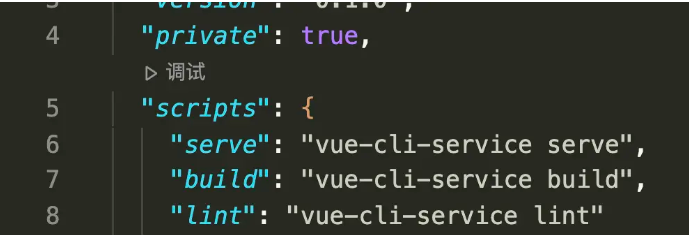
然后自动开始执行npm run build,定位到我们刚才打的断点那里:
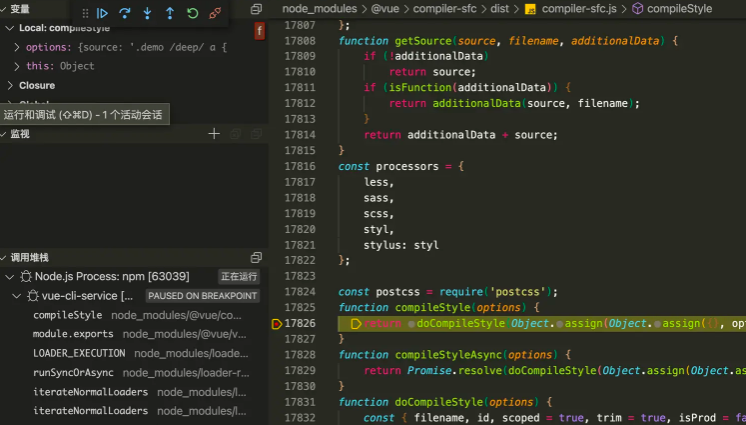
左侧有调用堆栈和当前变量以及调试按钮,然后就可以一步步进行调试啦。
至此,Vue的Scoped Css对你来说应该不再陌生了吧,如果还是有疑惑,可以按照上述步骤自行调试解惑哦~
本文转载于:
https://juejin.cn/post/7254083731488849957
如果对您有所帮助,欢迎您点个关注,我会定时更新技术文档,大家一起讨论学习,一起进步。

记录--你知道Vue中的Scoped css原理么?的更多相关文章
- Vue中的scoped及穿透方法
何为scoped? 在vue文件中的style标签上,有一个特殊的属性:scoped.当一个style标签拥有scoped属性时,它的CSS样式就只能作用于当前的组件,也就是说,该样式只能适用于当前组 ...
- Vue中的scoped和scoped穿透
1.什么是scoped 在Vue文件中的style标签上有一个特殊的属性,scoped.当一个style标签拥有scoped属性时候,它的css样式只能用于当前的Vue组件,可以使组件的样式不相互污染 ...
- Vue中的scoped及穿透方法(修改第三方组件局部的样式)
何为scoped? 在vue文件中的style标签上,有一个特殊的属性:scoped.当一个style标签拥有scoped属性时,它的CSS样式就只能作用于当前的组件,也就是说,该样式只能适用于当前组 ...
- vue中的css作用域、vue中的scoped坑点
一.css作用域 之前一直很困扰css的作用域问题,即使是模块化编程下,在对应的模块的js中import css进来,这个css仍然是全局的.导致在css中需要加上对应模块的html的id/class ...
- vue中的scoped分析以及在element-UI和vux中的应用
vue使用了单文件组件方式来解耦视图即.vue后缀文件名 单文件组件组成部分: <template> </template> <script> </scrip ...
- vue中使用animate.css
一:使用animate.css的使用 1.安装npm install animate.css --save 2.在main.js中引入import animate from 'animate.css' ...
- VUE中 style scoped 修改原有样式
作用域CSS 当<style>标记具有该scoped属性时,其CSS将仅应用于当前组件的元素.这类似于Shadow DOM中的样式封装.它有一些警告,但不需要任何polyfill.通过使用 ...
- vue中使用animate.css动画库
1.安装: npm install animate.css --save 2.引入及使用: //main.js中 import animated from 'animate.css' Vue.use( ...
- 在vue中使用animate.css
animate.css是一款前端动画库,相似的有velocity-animate 用法: 首先 npm install animate.css --save 然后在vue文件的script中引入: i ...
- vue中html、css、js 分离
在正常的创建和引用vue文件都是html.css.js三者在一起的,这样写起来虽然方便了,但是页面比较大或者代码比较多的情况下,即使使用组件有时代码也比较多,简单来说查找不变不利于编程,大的来说影像优 ...
随机推荐
- IIS创建和管理虚拟网站
实验介绍: 本文会详细介绍创建虚拟站点的三种方法 一:IP地址建立站点 1.打开安装了IIS的windows,进入ip配置页面. 添加几个ip,我这里添加的是192.168.1.209,192.168 ...
- Power BI 9 DAY
图形决策树
- NC50614 取石子游戏 1
题目链接 题目 题目描述 有一种有趣的游戏,玩法如下: 玩家:2人: 道具:N颗石子: 规则: 游戏双方轮流取石子:每人每次取走若干颗石子(最少取1颗,最多取K颗):石子取光,则游戏结束:最后取石子的 ...
- NC15479 最短路
题目链接 题目 题目描述 企鹅国中有 \(N\) 座城市,编号从 \(1\) 到 \(N\) . 对于任意的两座城市 \(i\) 和 \(j\),企鹅们可以花费 \((i\,\,xor\,\, j)* ...
- 古猫先生 SATA系列博文转载
SATA专题文章列表 SATA系列专题之一:浅析Physical Layer物理层OOB信号 SATA系列专题之二:2.0 Link layer链路层概述 SATA系列专题之二: 2.1 Link l ...
- 如何实现一款好用的云图(word-cloud)生成工具?
创作背景 可以随时生成一副很酷的云图,一直是个人的梦想. 很久以前,写过一个简单版本:http://houbb.github.io/tools/wordCloud.html. 效果如下: 不过存在一些 ...
- 【framework】Activity启动流程
1 前言 ATMS启动流程 介绍了 ActivityTaskManagerService(ATMS)的启动和初始化流程,本文将介绍 Activity 的启动流程.由于 Activity 启动流程复杂, ...
- kmp、z算法、exkmp
一.kmp算法 1.基本概念 模式串:P 匹配串:T kmp算法精髓:找打一个最大的x,使得T[s+1,...,s+k]的后x个字符,和P的前x个字符相同. 2.next数组 next数组:记录模式串 ...
- 之前练手使用基于gin的go web项目
目录结构: `-- demo |-- cmd | |-- api.go | `-- root.go |-- common | `-- consts | `-- consts.go |-- config ...
- 《A Hierarchical Framework for Relation Extraction with Reinforcement Learning》论文阅读笔记
代码 原文地址 摘要 现有的大多数方法在确定关系类型之前,需要先识别出所有的实体,这样就忽略了实体提及和关系类型之间的交互.本文提出了一种新颖的联合抽取范式,把相关实体看作是关系的参数( 首先检测一个 ...