
tensorflow.js 视频图片多目标检测
前言:
Tensorflow.js 官方提供了很多常用模型库,涵盖了平时开发中大部分场景的模型。例如,前面提到的图片识别,除此之外还有人体姿态识别,目标物体识别,语音文字等识别。其中一些可能是 Python 转换而来,但都是开发人员用海量数据或资源训练的,个人觉得准确度能满足大部分功能开发要求。这里要介绍的是目标物体识别模型 ——CooSSD。
目标检测在机器视觉中已经很常见了,就是模型可以对图片或者视频中的物体进行识别,并预测其最大概率的名称和展示概率值。以下就先以 Github 上 Coo-SSD 图片目标检测为例,最后再弄一个视频的目标实时识别。
demo 运行:
tensorflow.js 提供的例子是通过 yarn,由于我本地环境原因,就以 npm 和 parcel 运行其效果。先本地创建项目文件夹,然后再分别创建 index.html, script.js, package.json 和添加几张图片。
1. 依赖包安装
(1). package.json 配置,安装 tfjs-backend-cpu, tfjs-backend-webgl 和模型
{

  "name": "tfjs-coco-ssd-demo",

  "version": "1.0.0",

  "description": "",

  "main": "index.js",

  "dependencies": {

    "@tensorflow-models/coco-ssd": "^2.2.2",

    "@tensorflow/tfjs-backend-cpu": "^3.3.0",

    "@tensorflow/tfjs-backend-webgl": "^3.3.0",

    "@tensorflow/tfjs-converter": "^3.3.0",

    "@tensorflow/tfjs-core": "^3.3.0",

    "stats.js": "^0.17.0"

  },

  "scripts": {

    "test": "echo \"Error: no test specified\" && exit 1"

  },

  "author": "",

  "license": "ISC",

  "browserslist": [

    "last 1 Chrome version"

  ]

}
(2). 命令切换到项目目录,运行 npm install
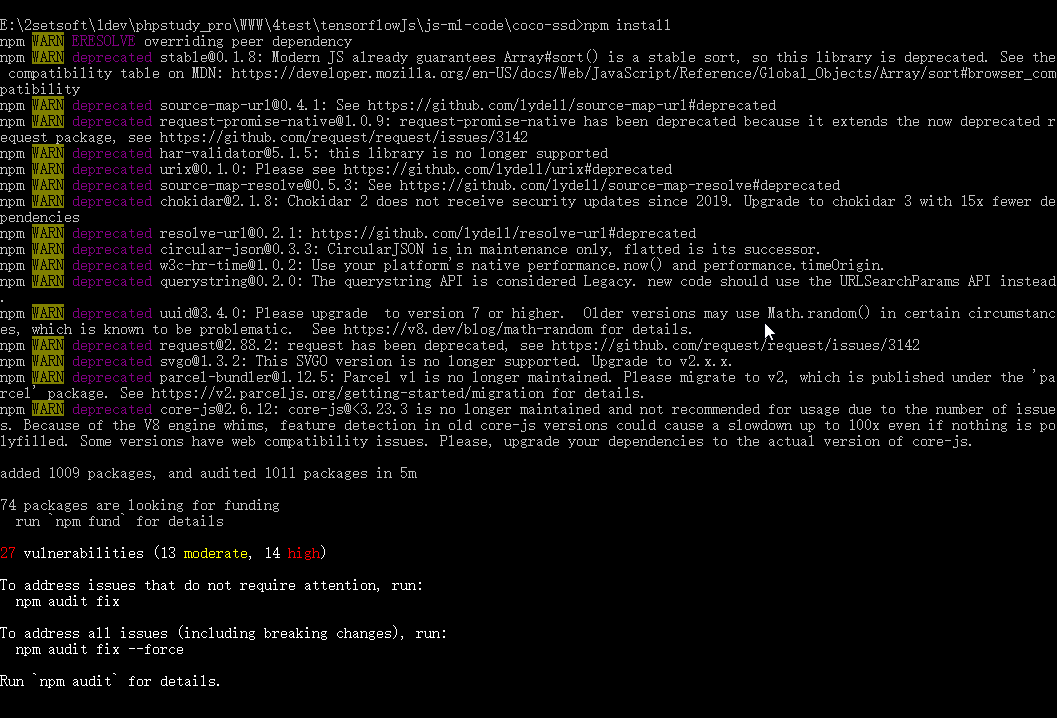
2. 代码:
(1). index.html
<h1>TensorFlow.js Object Detection</h1>

<select id='base_model'>

	<option value="lite_mobilenet_v2">SSD Lite Mobilenet V2</option>

	<option value="mobilenet_v1">SSD Mobilenet v1</option>

	<option value="mobilenet_v2">SSD Mobilenet v2</option>

</select>

<button type="button" id="run">Run</button>

<button type="button" id="toggle">Toggle Image</button>

<div>

<img id="image" />

<canvas id="canvas" width="600" height="399"></canvas>

</div>

<script src="script.js"></script>
(2). script.js
import '@tensorflow/tfjs-backend-cpu';

import '@tensorflow/tfjs-backend-webgl';

import * as cocoSsd from '@tensorflow-models/coco-ssd';

import imageURL from './image3.jpg';

import image2URL from './image5.jpg';

let modelPromise;

window.onload = () => modelPromise = cocoSsd.load();

const button = document.getElementById('toggle');

button.onclick = () => {

  image.src = image.src.endsWith(imageURL) ? image2URL : imageURL;

};

const select = document.getElementById('base_model');

select.onchange = async (event) => {

  const model = await modelPromise;

  model.dispose();

  modelPromise = cocoSsd.load(

      {base: event.srcElement.options[event.srcElement.selectedIndex].value});

};

const image = document.getElementById('image');

image.src = imageURL;

const runButton = document.getElementById('run');

runButton.onclick = async () => {

  const model = await modelPromise;

  console.log('model loaded');

  console.time('predict1');

  const result = await model.detect(image);

  console.timeEnd('predict1');

  const c = document.getElementById('canvas');

  const context = c.getContext('2d');

  context.drawImage(image, 0, 0);

  context.font = '10px Arial';

  console.log(result);

  console.log('number of detections: ', result.length);

  for (let i = 0; i < result.length; i++) {

    context.beginPath();

    context.rect(...result[i].bbox);

    context.lineWidth = 1;

    context.strokeStyle = 'green';

    context.fillStyle = 'green';

    context.stroke();

    context.fillText(

        result[i].score.toFixed(3) + ' ' + result[i].class, result[i].bbox[0],

        result[i].bbox[1] > 10 ? result[i].bbox[1] - 5 : 10);

  }

};
(3). 切换到项目目录,运行 parcel index.html
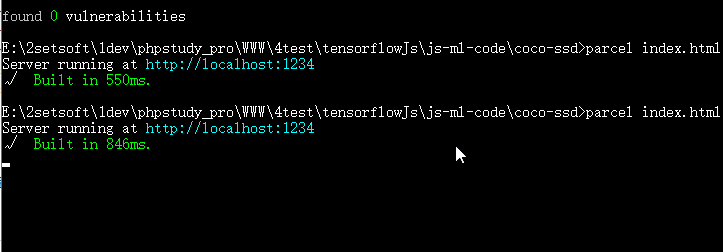
3. 运行效果
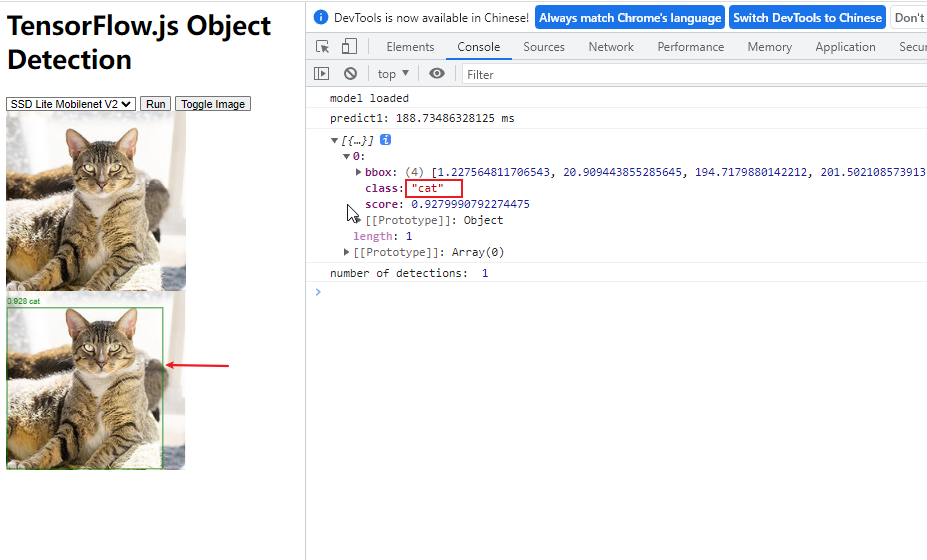
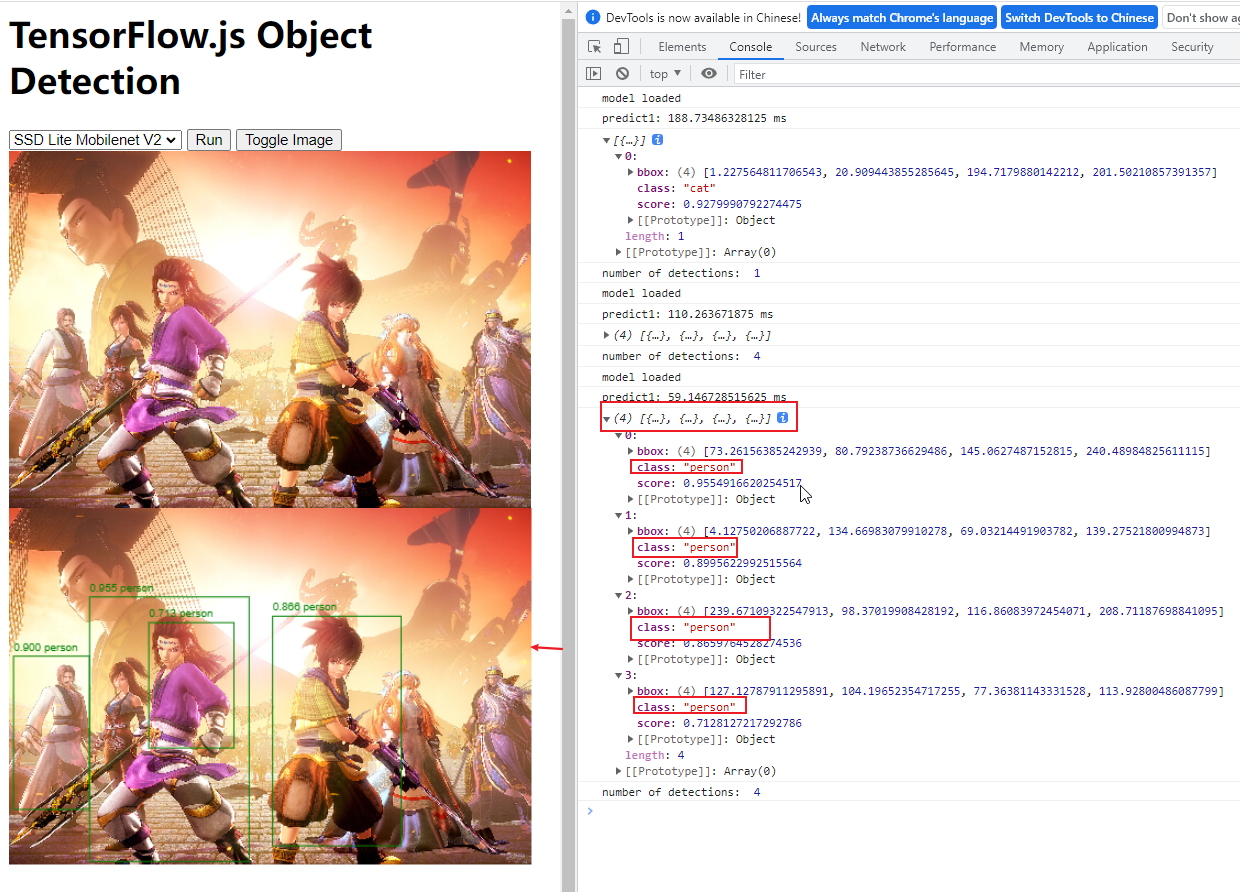
检测视频目标:
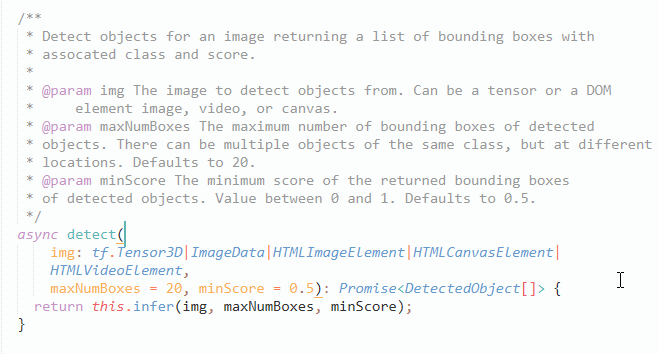
经过上面 demo 的图片检测发现,用于对某资源 (图片,视频) 进行检测的函数是 detect ()。查看该函数所处 Coco-SSD 文件发现,detect 函数接收三个参数,第一个参数可以是 tensorflow 张量,也可以分别是 DOM 里的图片,视频,画布等 HTML 元素,第二第三个参数分别用于过滤返回结果的最大识别目标数和最小概率目标,而返回自然就是一个 box, 按概率值降序排列。
1. 实现流程:
(1). 给视频标签添加播放监听
(2). 页面渲染完成加载 Coco-SSD 模型
(3). 模型加载成功轮询识别视频 (video 标签)
(4). 监听到视频播放停止关闭轮询检测
2. 编码:
(1). html 部分
<style>

    #big-box {

        position: relative;

    }

    #img-box {

        position: absolute;

        top: 0px;

        left: 0px;

    }

    #img-box div {

        position: absolute;

        /*border: 2px solid #f00;*/

        pointer-events: none;

    }

    #img-box div .className {

        position: absolute;

        top: 0;

        /* background: #f00; */

        color: #fff;

    }

    #myPlayer {

        max-width: 600px;

        width: 100%;

    }

</style>

<div id="showBox">等待模型加载...</div>

<br>

<div id="big-box">

    <video id="myPlayer" muted="true" autoplay src="persons.mp4" controls="" playsinline="" webkit-playsinline=""></video>

    <div id="img-box"></div>

</div>

<script src="persons.js"></script>
(2). js 部分
import '@tensorflow/tfjs-backend-cpu';

import '@tensorflow/tfjs-backend-webgl';

import * as cocoSsd from '@tensorflow-models/coco-ssd';

var myModel = null;

var V = null;

var requestAnimationFrameIndex = null;

var myPlayer = document.getElementById("myPlayer");

var videoHeight = 0;

var videoWidth = 0;

var clientHeight = 0;

var clientWidth = 0;

var modelLoad = false;

var videoLoad = false;

window.onload = function () {

    myPlayer.addEventListener("canplay", function () {

        videoHeight = myPlayer.videoHeight;

        videoWidth = myPlayer.videoWidth;

        clientHeight = myPlayer.clientHeight;

        clientWidth = myPlayer.clientWidth;

        V = this;

        videoLoad = true;

    })

    loadModel();

}

function loadModel() {

    if (modelLoad) {

        return;

    }

    cocoSsd.load().then(model => {

        var showBox = document.getElementById("showBox");

        showBox.innerHTML = "载入成功";

        myModel = model;

        detectImage();

        modelLoad = true;

    });

}

function detectImage() {

    var showBox = document.getElementById("showBox");

    // 分类名

    var classList = [];

    // 分类颜色框

    var classColorMap = ["red", "green", "blue", "white"];

    // 颜色角标

    var colorCursor = 0;

    showBox.innerHTML = "检测中...";

    if (videoLoad) {

        myModel.detect(V).then(predictions => {

            showBox.innerHTML = "检测结束";

            const $imgbox = document.getElementById('img-box');

            $imgbox.innerHTML = ""

            predictions.forEach(box => {

            	if (classList.indexOf(box.class) != -1) {

            		classList.push(box.class);

            	}

            	console.log(box);

            	var borderColor = classColorMap[colorCursor%4];

// console.log(colorCursor);

// console.log(borderColor);

                const $div = document.createElement('div')

                //$div.className = 'rect';

                $div.style.border = "2px solid "+borderColor;

                var heightScale = (clientHeight / videoHeight);

                var widthScale = (clientWidth / videoWidth)

                var transformTop = box.bbox[1] * heightScale;

                var transformLeft = box.bbox[0] * widthScale;

                var transformWidth = box.bbox[2] * widthScale;

                var transformHeight = box.bbox[3] * heightScale;

                var score = box.score.toFixed(3);

                $div.style.top = transformTop + 'px'

                $div.style.left = transformLeft + 'px'

                $div.style.width = transformWidth + 'px'

                $div.style.height = transformHeight + 'px'

                $div.innerHTML = `<span class='className'>${box.class} ${score}</span>`

                $imgbox.appendChild($div)

                colorCursor++;

            })

            setTimeout(function () {

                detectImage();

            }, 10);

        });

    }

}
3. 演示效果

tensorflow.js 视频图片多目标检测的更多相关文章
- tensorflow利用预训练模型进行目标检测(三):将检测结果存入mysql数据库
mysql版本:5.7 : 数据库:rdshare:表captain_america3_sd用来记录某帧是否被检测.表captain_america3_d用来记录检测到的数据. python模块,包部 ...
- TensorFlow + Keras 实战 YOLO v3 目标检测图文并茂教程
运行步骤 1.从 YOLO 官网下载 YOLOv3 权重 wget https://pjreddie.com/media/files/yolov3.weights 下载过程如图: 2.转换 Darkn ...
- tensorflow利用预训练模型进行目标检测(四):检测中的精度问题以及evaluation
一.tensorflow提供的evaluation Inference and evaluation on the Open Images dataset:https://github.com/ten ...
- tensorflow利用预训练模型进行目标检测(二):预训练模型的使用
一.运行样例 官网链接:https://github.com/tensorflow/models/blob/master/research/object_detection/object_detect ...
- tensorflow利用预训练模型进行目标检测(一):安装tensorflow detection api
一.tensorflow安装 首先系统中已经安装了两个版本的tensorflow,一个是通过keras安装的, 一个是按照官网教程https://www.tensorflow.org/install/ ...
- YOLO_Online 将深度学习最火的目标检测做成在线服务实战经验分享
YOLO_Online 将深度学习最火的目标检测做成在线服务 第一次接触 YOLO 这个目标检测项目的时候,我就在想,怎么样能够封装一下让普通人也能够体验深度学习最火的目标检测项目,不需要关注技术细节 ...
- AI佳作解读系列(二)——目标检测AI算法集杂谈:R-CNN,faster R-CNN,yolo,SSD,yoloV2,yoloV3
1 引言 深度学习目前已经应用到了各个领域,应用场景大体分为三类:物体识别,目标检测,自然语言处理.本文着重与分析目标检测领域的深度学习方法,对其中的经典模型框架进行深入分析. 目标检测可以理解为是物 ...
- 第三十二节,使用谷歌Object Detection API进行目标检测、训练新的模型(使用VOC 2012数据集)
前面已经介绍了几种经典的目标检测算法,光学习理论不实践的效果并不大,这里我们使用谷歌的开源框架来实现目标检测.至于为什么不去自己实现呢?主要是因为自己实现比较麻烦,而且调参比较麻烦,我们直接利用别人的 ...
- Python实现YOLO目标检测
作者:R语言和Python学堂 链接:https://www.jianshu.com/p/35cfc959b37c 1. 什么是目标检测? YOLO目标检测的一个示例 啥是目标检测? 拿上图 (用YO ...
- 【目标检测】用Fast R-CNN训练自己的数据集超详细全过程
目录: 一.环境准备 二.训练步骤 三.测试过程 四.计算mAP 寒假在家下载了Fast R-CNN的源码进行学习,于是使用自己的数据集对这个算法进行实验,下面介绍训练的全过程. 一.环境准备 我这里 ...
随机推荐
- 项目打包后配置到node服务器
1.将项目进行打包 npm run build项目根目录下会多出一个打包好的由.js .html .css文件组成的dist文件夹,如图 2.搭建node微型服务器 新建文件夹命名"no ...
- 2022-06-16:给定一个数组arr,含有n个数字,都是非负数, 给定一个正数k, 返回所有子序列中,累加和最小的前k个子序列累加和。 假设K不大,怎么算最快? 来自亚马逊。
2022-06-16:给定一个数组arr,含有n个数字,都是非负数, 给定一个正数k, 返回所有子序列中,累加和最小的前k个子序列累加和. 假设K不大,怎么算最快? 来自亚马逊. 答案2022-06- ...
- 2022-05-06:给你一个整数数组 arr,请你将该数组分隔为长度最多为 k 的一些(连续)子数组。分隔完成后,每个子数组的中的所有值都会变为该子数组中的最大值。 返回将数组分隔变换后能够得到的元
2022-05-06:给你一个整数数组 arr,请你将该数组分隔为长度最多为 k 的一些(连续)子数组.分隔完成后,每个子数组的中的所有值都会变为该子数组中的最大值. 返回将数组分隔变换后能够得到的元 ...
- 如何通过Java代码将 PDF文档转为 HTML格式
虽然PDF文件适合用于打印和发布,但不适合所有类型的文档.例如,包含复杂图表和图形的文档可能无法在PDF中呈现得很好.但是HTML文件可以在任何可运行浏览器的计算机上进行阅读并显示.并且HTML还具有 ...
- Python从0到1丨带你认识图像平滑的三种线性滤波
摘要:常用于消除噪声的图像平滑方法包括三种线性滤波(均值滤波.方框滤波.高斯滤波)和两种非线性滤波(中值滤波.双边滤波),本文将详细讲解三种线性滤波方法. 本文分享自华为云社区<[Python从 ...
- 人工智能导论——口罩佩戴检测详解(附带MTCNN论文精读)
人工智能导论--口罩佩戴检测详解(附带MTCNN论文精读) 一.问题重述 随着人类的科技不断进步,病毒也在随之更新迭代:在19年席卷全球的新冠肺炎疫情给人们的生活带来了极大的灾难,造成了无数的人因此失 ...
- 远程desk工具利用总结
NO.1 Todesk 根据目标软件安装情况有以下两种利用方法 1.目标机已有完整版todesk. 1)改配置文件. 老版本可替换至本地查看密码(此法在最近更新的几个版本中已经失效),新版本只可更改密 ...
- Springboot+actuator+prometheus+Grafana集成
本次示例以Windows示例 推荐到官网去下载:Windows版的应用程序 下载最新版 prometheus-2.37.8.windows-amd64 压缩包:解压就行 下载最新版 grafana-9 ...
- 大家都说Java有三种创建线程的方式!并发编程中的惊天骗局!
在Java中,创建线程是一项非常重要的任务.线程是一种轻量级的子进程,可以并行执行,使得程序的执行效率得到提高.Java提供了多种方式来创建线程,但许多人都认为Java有三种创建线程的方式,它们分别是 ...
- Elasticsearch 6.x 配置search-guard 插件
前言 es之前版本一直无用户验证功能,不过官方有提供一x-pack,但是问题是付费.在es的6.3.2版本中,已经集成了x-pack,虽然es团队已经对x-pack开源,但是在该版本中如果需要使用 ...