
springBoot集成RPC
需求 : 项目开发到尾期,仓库系统需要对接我们这边的制造系统,
为的是制造系统所使用物料时,需向仓库系统发送请求物料信息,所以需要调用
仓库接口.
使用技术: RPC
数据传输格式: json
开发环境:springboot
1.如何向仓库发送数据?
注意:发送的数据格式为json 例如 [{"sex":"nan","name":"1111"}] 对象外面需要 [] 直接上代码
这里转换json 其实有很多种方法 只要是 [{}] array格式即可
1.1发送数据
 @Test

    void contexts() throws Throwable {

        Product product = new Product();

        product.setName("1111");

        product.setSex("nan");

        JSONArray jsonArray = new JSONArray();

        jsonArray.add(JSONUtil.parse(product));

        RpcClientUtil.postJsonRPC("http://127.0.0.1:8888/acceptSigned", jsonArray,"acceptSigned");

    }
1.2 RpcClientUtil.java 工具类方便发送数据自定义封装即可
import com.googlecode.jsonrpc4j.JsonRpcHttpClient;
import java.net.URL;

/**
 * address:要送数据到哪个地址
 * params : json数据
 * methodName: 接口的方法名字
 */
public class RpcClientUtil {
    public static String postJsonRPC(String address, Object params, String methodName) throws Throwable {
        URL url = null;
        JsonRpcHttpClient jsonRpcHttpClient = null;
        String result = null;
        try {
            url = new URL(address);
            jsonRpcHttpClient = new JsonRpcHttpClient(url);
            result = jsonRpcHttpClient.invoke(methodName, params, String.class);
        } catch (Exception e) {
            throw e;
        }  finally {
            url = null;
            jsonRpcHttpClient = null;
        }
        return result;
    }

}
2.仓库如何接收数据?
需要编写接口 @JsonRpcService(value = "acceptSigned") acceptSigned 远程地址拼接用的
例如 http://127.0.0.1:8888/acceptSigned
2.1接口AcceptSignedAPI.java
package com.example.rpctest.service;

import com.googlecode.jsonrpc4j.JsonRpcService;

@JsonRpcService(value = "acceptSigned")

public interface AcceptSignedAPI {

    public void acceptSigned(Object o);

}
2.2 接口实现类 注意使用 @AutoJsonRpcServiceImpl 方法名为 acceptSigned
package com.example.rpctest.service.impl;

import com.example.rpctest.service.AcceptSignedAPI;

import com.googlecode.jsonrpc4j.spring.AutoJsonRpcServiceImpl;

import org.springframework.stereotype.Service;

@Service

@AutoJsonRpcServiceImpl

public class AcceptSignedImpl implements AcceptSignedAPI {

    @Override

    public void acceptSigned(Object o) {

        System.out.println("222"+o);

    }

}
maven 依赖


<?xml version="1.0" encoding="UTF-8"?>

<project xmlns="http://maven.apache.org/POM/4.0.0" xmlns:xsi="http://www.w3.org/2001/XMLSchema-instance"

         xsi:schemaLocation="http://maven.apache.org/POM/4.0.0 https://maven.apache.org/xsd/maven-4.0.0.xsd">

    <modelVersion>4.0.0</modelVersion>

    <parent>

        <groupId>org.springframework.boot</groupId>

        <artifactId>spring-boot-starter-parent</artifactId>

        <version>2.5.0</version>

        <relativePath/> <!-- lookup parent from repository -->

    </parent>

    <groupId>com.example</groupId>

    <artifactId>rpctest</artifactId>

    <version>0.0.1-SNAPSHOT</version>

    <name>rpctest</name>

    <description>Demo project for Spring Boot</description>

    <properties>

        <java.version>1.8</java.version>

    </properties>

    <dependencies>

        <dependency>

            <groupId>org.springframework.boot</groupId>

            <artifactId>spring-boot-starter-web</artifactId>

        </dependency>

        <dependency>

            <groupId>org.projectlombok</groupId>

            <artifactId>lombok</artifactId>

            <optional>true</optional>

        </dependency>

        <dependency>

            <groupId>org.springframework.boot</groupId>

            <artifactId>spring-boot-starter-test</artifactId>

            <scope>test</scope>

        </dependency>

        <!--rpc-->

        <dependency>

            <groupId>com.github.briandilley.jsonrpc4j</groupId>

            <artifactId>jsonrpc4j</artifactId>

            <version>1.5.3</version>

        </dependency>

        <!-- https://mvnrepository.com/artifact/cn.hutool/hutool-core -->

        <dependency>

            <groupId>cn.hutool</groupId>

            <artifactId>hutool-all</artifactId>

            <version>5.6.6</version>

        </dependency>

        <dependency>

            <groupId>com.fasterxml.jackson.core</groupId>

            <artifactId>jackson-databind</artifactId>

            <version>2.12.3</version>

        </dependency>

        <dependency>

            <groupId>com.alibaba</groupId>

            <artifactId>fastjson</artifactId>

            <version>1.2.72</version>

        </dependency>

        <dependency>

            <groupId>org.apache.httpcomponents</groupId>

            <artifactId>httpclient</artifactId>

            <version>4.5.10</version>

        </dependency>

    </dependencies>

    <build>

        <plugins>

            <plugin>

                <groupId>org.springframework.boot</groupId>

                <artifactId>spring-boot-maven-plugin</artifactId>

                <configuration>

                    <excludes>

                        <exclude>

                            <groupId>org.projectlombok</groupId>

                            <artifactId>lombok</artifactId>

                        </exclude>

                    </excludes>

                </configuration>

            </plugin>

        </plugins>

    </build>

</project>
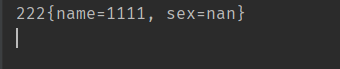
注意发送数据格式如下

成功接收
springBoot集成RPC的更多相关文章
- RabbitMQ学习笔记(一):安装及Springboot集成
前言 MQ,即消息队列Message Queue的缩写. RabbitMQ 是MQ的一种,就像招商银行是银行的一种一样.主要是用来实现应用程序的异步和解耦,同时也能起到消息缓冲,消息分发的作用. 消息 ...
- dubbo实战之二:与SpringBoot集成
欢迎访问我的GitHub https://github.com/zq2599/blog_demos 内容:所有原创文章分类汇总及配套源码,涉及Java.Docker.Kubernetes.DevOPS ...
- 国产时序数据库IotDB安装、与SpringBoot集成
一.简介: 本文将完成一个真实业务中的设备上报数据的一个例子,完整的展示后台服务接收到设备上报的数据后,将数据添加到时序数据库,并且将数据查询出来的一个例子.本文所有代码已经上传GitHub:http ...
- 【springBoot】springBoot集成redis的key,value序列化的相关问题
使用的是maven工程 springBoot集成redis默认使用的是注解,在官方文档中只需要2步; 1.在pom文件中引入即可 <dependency> <groupId>o ...
- SpringBoot集成security
本文就SpringBoot集成Security的使用步骤做出解释说明.
- springboot集成Actuator
Actuator监控端点,主要用来监控与管理. 原生端点主要分为三大类:应用配置类.度量指标类.操作控制类. 应用配置类:获取应用程序中加载的配置.环境变量.自动化配置报告等与SpringBoot应用 ...
- SpringBoot集成Shiro并用MongoDB做Session存储
之前项目鉴权一直使用的Shiro,那是在Spring MVC里面使用的比较多,而且都是用XML来配置,用Shiro来做权限控制相对比较简单而且成熟,而且我一直都把Shiro的session放在mong ...
- SpringBoot集成redis的key,value序列化的相关问题
使用的是maven工程 springBoot集成redis默认使用的是注解,在官方文档中只需要2步; 1.在pom文件中引入即可 <dependency> <groupId>o ...
- springboot集成mybatis(二)
上篇文章<springboot集成mybatis(一)>介绍了SpringBoot集成MyBatis注解版.本文还是使用上篇中的案例,咱们换个姿势来一遍^_^ 二.MyBatis配置版(X ...
- springboot集成mybatis(一)
MyBatis简介 MyBatis本是apache的一个开源项目iBatis, 2010年这个项目由apache software foundation迁移到了google code,并且改名为MyB ...
随机推荐
- ASP.NET Core 选项
目录 1,选项接口 2,注入配置与IOptions 3,IOptionsSnapshot 首先要了解 ASP.NET Core 中的配置,请点击这里了解:https://www.cnblogs.com ...
- C++ //类模板与友元 //全局函数类内实现 -直接在类内声名由于即可 //全局函数类外实现 -需要提前让编译器知道全局函数的存在
1 //类模板与友元 2 //全局函数类内实现 -直接在类内声名由于即可 3 //全局函数类外实现 -需要提前让编译器知道全局函数的存在 4 5 #include <iostream> 6 ...
- MYSQL中正则表达式检索数据库
1.MySQL中使用通配符检索数据库,之外还可以使用正则表达式来检索数据. 使用通配符 '_' 和 '%'的区别如下, 使用通配符的技巧:一般的来说 通配符可以处理数据,但是消耗内存较大 ...
- 基于TLSR8359的2.4G私有协议多发一收方案解析
一 简析 1.简介 泰凌微的2.4G私有协议芯片在市场应用十分广泛. 2.特性 无线传输距离远 功耗低,接口丰富 自带mcu功能,可实现mcu+2.4G的私有功能 二 源码解析 1.原理图 框图如下所 ...
- HiSi 3516CV500 NNIE(Neural Network Inference Engine) 摸鱼记录(1) --- 环境搭建
PS:要转载请注明出处,本人版权所有. PS: 这个只是基于<我自己>的理解, 如果和你的原则及想法相冲突,请谅解,勿喷. 前置说明 本文作为本人csdn blog的主站的备份.(Bl ...
- 【leetcode 952. 按公因数计算最大组件大小】【欧拉筛+并查集】
import java.util.ArrayList; import java.util.Arrays; import java.util.List; class Solution { List< ...
- web前端工程化合集
这里给大家分享我在网上总结出来的一些知识,希望对大家有所帮助 一.Git 1. git 和 svn 的区别 git 和 svn 最大的区别在于 git 是分布式的,而 svn 是集中式的.因此我们不能 ...
- 一文搞懂idea中的根目录和路径(以Mybatis为例)
一文搞懂idea中的根目录和路径(以Mybatis为例) 在 IntelliJ IDEA 中,项目结构和组织比较灵活,允许用户根据项目需求进行定制. 1.根目录概念: 1.1 项目根目录(Projec ...
- kali linux安装vmware tools过程详解
版权声明:本文为博主原创文章,遵循 CC 4.0 by-sa 版权协议,转载请附上原文出处链接和本声明. 本文链接:https://blog.csdn.net/robacco/article/deta ...
- .NET开源、免费、强大的交互式绘图库
前言 今天大姚给大家分享一款.NET开源(采用MIT许可证).免费.强大的交互式绘图库,该库能够轻松地实现大型数据集的交互式显示.使用几行代码即可快速创建折线图.柱状图.饼图.散点图等不同类型的图表: ...