
【framework】DisplayContent简介
1 前言
DisplayContent 用于管理屏幕,一块屏幕对应一个 DisplayContent 对象,虽然手机只有一个显示屏,但是可以创建多个 DisplayContent 对象,如投屏时,可以创建一个虚拟的 DisplayContent。
关于其父类及祖父类的介绍,见 → WindowContainer简介、ConfigurationContainer简介,其父容器的介绍见 → RootWindowContainer简介。
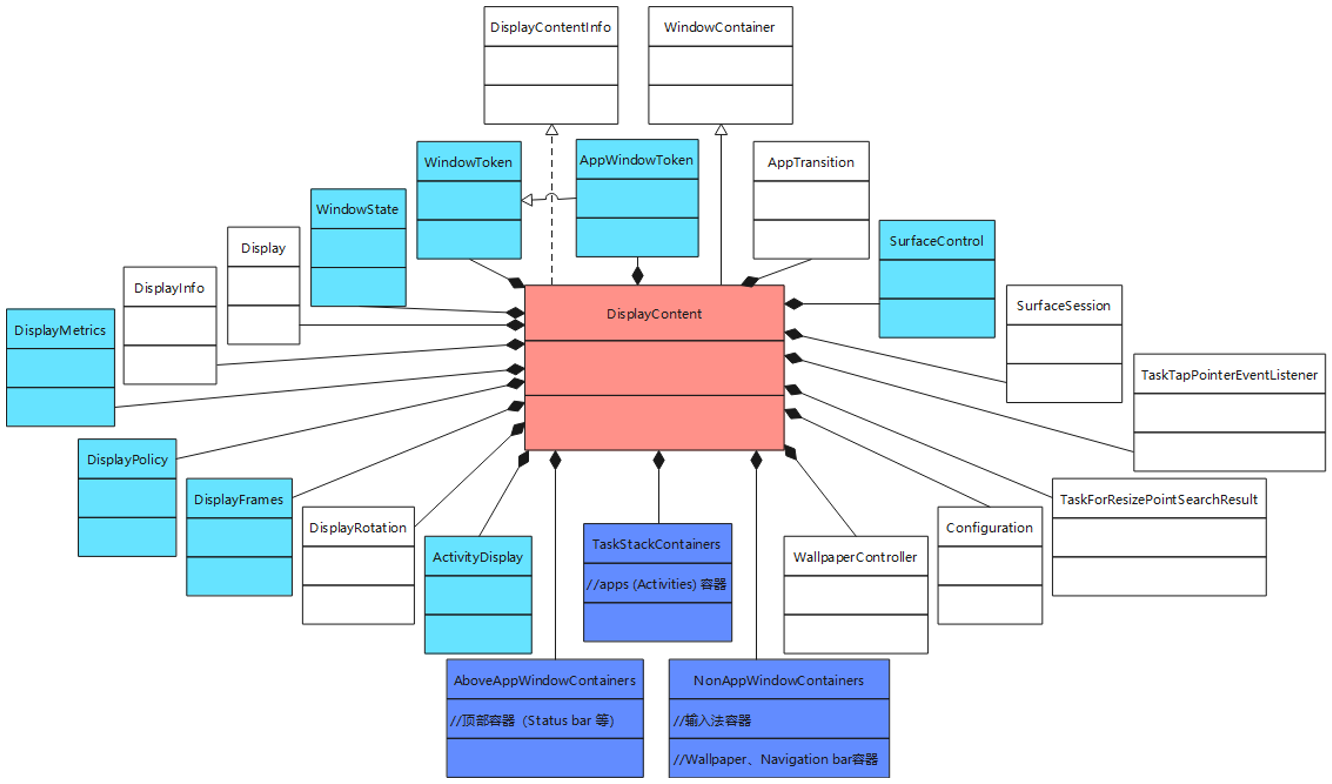
DisplayContent 的子容器类型为 DisplayChildWindowContainer,其子类有:TaskStackContainers、AboveAppWindowContainers、NonAppWindowContainers。实现的对象有:
- mTaskStackContainers:apps (Activities) 容器
- mAboveAppWindowsContainers:顶部容器(如:Status bar 等)
- mBelowAppWindowsContainers:NonAppWindowContainers 类型,底部容器(如:Wallpaper、Navigation bar 等)
- mImeWindowsContainers:NonAppWindowContainers 类型,输入法容器
2 源码
源码地址→/frameworks/base/services/core/java/com/android/server/wm/DisplayContent.java
(1)类定义
//DisplayChildWindowContainer 为子节点类型

class DisplayContent extends WindowContainer<DisplayContent.DisplayChildWindowContainer> implements WindowManagerPolicy.DisplayContentInfo
(2)主要属性
private final int mDisplayId

boolean isDefaultDisplay

ActivityDisplay mAcitvityDisplay

//apps (Activities) 容器

private final TaskStackContainers mTaskStackContainers = new TaskStackContainers(mWmService)

//顶部容器(如:Status bar 等)

private final AboveAppWindowContainers mAboveAppWindowsContainers = new AboveAppWindowContainers("mAboveAppWindowsContainers", mWmService)

//底部容器(如:Wallpaper、Navigation bar 等)

private final NonAppWindowContainers mBelowAppWindowsContainers = new NonAppWindowContainers("mBelowAppWindowsContainers", mWmService)

//输入法容器

private final NonAppWindowContainers mImeWindowsContainers = new NonAppWindowContainers("mImeWindowsContainers", mWmService)

final ArraySet<AppWindowToken> mOpeningApps = new ArraySet<>()

final ArraySet<AppWindowToken> mClosingApps = new ArraySet<>()

final ArraySet<AppWindowToken> mChangingApps = new ArraySet<>()

private final HashMap<IBinder, WindowToken> mTokenMap = new HashMap()

int mInitialDisplayWidth = 0

int mInitialDisplayHeight = 0

int mInitialDisplayDensity = 0

int mBaseDisplayWidth = 0

int mBaseDisplayHeight = 0

int mBaseDisplayDensity = 0

private final DisplayInfo mDisplayInfo = new DisplayInfo()

private final Display mDisplay

private final DisplayMetrics mDisplayMetrics = new DisplayMetrics()

private final DisplayPolicy mDisplayPolicy

private DisplayRotation mDisplayRotation

DisplayFrames mDisplayFrames

final DisplayMetrics mRealDisplayMetrics = new DisplayMetrics();

private final DisplayMetrics mTmpDisplayMetrics = new DisplayMetrics();

private final DisplayMetrics mCompatDisplayMetrics = new DisplayMetrics()

float mCompatibleScreenScale

private int mRotation = 0

private int mLastOrientation = SCREEN_ORIENTATION_UNSPECIFIED;

private int mLastWindowForcedOrientation = SCREEN_ORIENTATION_UNSPECIFIED;

private int mLastKeyguardForcedOrientation = SCREEN_ORIENTATION_UNSPECIFIED;

private Rect mBaseDisplayRect = new Rect()

final ArrayList<WindowToken> mExitingTokens = new ArrayList<>()

final TaskTapPointerEventListener mTapDetector

final DockedStackDividerController mDividerControllerLocked

final PinnedStackController mPinnedStackControllerLocked

WallpaperController mWallpaperController

private final SurfaceSession mSession = new SurfaceSession()

WindowState mCurrentFocus = null;

WindowState mLastFocus = null

ArrayList<WindowState> mLosingFocus = new ArrayList<>()

AppWindowToken mFocusedApp = null

private SurfaceControl mOverlayLayer;

private SurfaceControl mWindowingLayer

private InputMonitor mInputMonitor

private boolean mLastHasContent

WindowState mInputMethodWindow

WindowState mInputMethodTarget

boolean mInputMethodTargetWaitingAnim

private final PointerEventDispatcher mPointerEventDispatcher

private final InsetsStateController mInsetsStateController

private WindowState mParentWindow

private Point mLocationInParentWindow = new Point()

private SurfaceControl mParentSurfaceControl

private InputWindowHandle mPortalWindowHandle

private final float mWindowCornerRadius
(3)构造方法
DisplayContent(Display display, WindowManagerService service, ActivityDisplay activityDisplay) {

    //Display相关

    mDisplay = display

    mDisplayId = display.getDisplayId()

    display.getDisplayInfo(mDisplayInfo)

    display.getMetrics(mDisplayMetrics)

    //壁纸

    mWallpaperController = new WallpaperController(mWmService, this)

    //输入相关(点击、触摸等)

    final InputChannel inputChannel =        mWmService.mInputManager.monitorInput("PointerEventDispatcher" + mDisplayId, mDisplayId)

    mInputMonitor = new InputMonitor(service, mDisplayId)

    mPointerEventDispatcher = new PointerEventDispatcher(inputChannel)

    mTapDetector = new TaskTapPointerEventListener(mWmService, this);

    registerPointerEventListener(mTapDetector);

    registerPointerEventListener(mWmService.mMousePositionTracker)

    //策略

    mDisplayPolicy = new DisplayPolicy(service, this)

    mDisplayRotation = new DisplayRotation(service, this)

    //添加子容器

    super.addChild(mBelowAppWindowsContainers, null)

    super.addChild(mTaskStackContainers, null)

    super.addChild(mAboveAppWindowsContainers, null)

    super.addChild(mImeWindowsContainers, null)

    //将该对象添加到根容器中

    mWmService.mRoot.addChild(this, null)

}
(4)获取/注入属性
//mDisplayId

int getDisplayId()

//mWindowCornerRadius

float getWindowCornerRadius()

//mTokenMap.get(binder)

WindowToken getWindowToken(IBinder binder)

//mDisplay

public Display getDisplay()

//mDisplayInfo

DisplayInfo getDisplayInfo()

//mDisplayMetrics

DisplayMetrics getDisplayMetrics()

//mDisplayPolicy

DisplayPolicy getDisplayPolicy()

//mInsetsStateController

InsetsStateController getInsetsStateController()

//mDisplayRotation

public DisplayRotation getDisplayRotation()

//mDisplayRotation = displayRotation

void setDisplayRotation(DisplayRotation displayRotation)

//mRotation

int getRotation()

//mRotation = newRotation

//mDisplayRotation.setRotation(newRotation)

void setRotation(int newRotation)

//mLastOrientation

int getLastOrientation()

//mLastWindowForcedOrientation

int getLastWindowForcedOrientation()
(5)消费者
//w 为 WindowState 类型

private final Consumer<WindowState> mUpdateWindowsForAnimator = w -> {

    //mWmService.mWindowPlacerLocked.debugLayoutRepeats("updateWindowsAndWallpaperLocked 5", pendingLayoutChanges)

}

private final Consumer<WindowState> mUpdateWallpaperForAnimator = w -> {

    //final AnimationAdapter anim = w.mAppToken != null ? w.mAppToken.getAnimation() : w.getAnimation()

    //final TaskStack stack = w.getStack()

    //stack.setAnimationBackground(winAnimator, color)

}

private final Consumer<WindowState> mScheduleToastTimeout = w -> {

    //final Handler handler = mWmService.mH

    //handler.sendMessageDelayed(handler.obtainMessage(WINDOW_HIDE_TIMEOUT, w), w.mAttrs.hideTimeoutMilliseconds)

}

private final Consumer<WindowState> mPerformLayout = w -> {

    //w.resetContentChanged()

    //w.prelayout()

    //mDisplayPolicy.layoutWindowLw(w, null, mDisplayFrames)

    //w.updateLastInsetValues()

    //w.mAppToken.layoutLetterbox(w)

}

private final Consumer<WindowState> mPerformLayoutAttached = w -> {

    //w.resetContentChanged()

    //w.prelayout()

    //mDisplayPolicy.layoutWindowLw(w, w.getParentWindow(), mDisplayFrames)

}

private final Consumer<WindowState> mApplyPostLayoutPolicy = w -> {

    //mDisplayPolicy.applyPostLayoutPolicyLw(w, w.mAttrs, w.getParentWindow(), mInputMethodTarget)

}

private final Consumer<WindowState> mApplySurfaceChangesTransaction = w -> {

    //mWallpaperController.updateWallpaperVisibility()

    //w.handleWindowMovedIfNeeded()

    //w.resetContentChanged()

    //mWmService.mH.obtainMessage(REPORT_LOSING_FOCUS, this).sendToTarget()

    //w.updateResizingWindowIfNeeded()

}
其中,Consumer 类如下:
public interface Consumer<T> {

    void accept(T t);

    default Consumer<T> andThen(Consumer<? super T> after) {

        Objects.requireNonNull(after);

        return (T t) -> { accept(t); after.accept(t); };

    }

}
(6)谓词
//w 为 WindowState 类型

private final Predicate<WindowState> mComputeImeTargetPredicate = w -> {

    //return w.canBeImeTarget()

}
其中,Predicate 接口如下:
public interface Predicate<T> {

    boolean test(T t);

    //与运算:return (t) -> test(t) && other.test(t)

    default Predicate<T> and(Predicate<? super T> other)

    //非运算:return (t) -> !test(t)

    default Predicate<T> negate()

    //或运算:return (t) -> test(t) || other.test(t)

    default Predicate<T> or(Predicate<? super T> other)

    //判等运算:return object -> targetRef.equals(object)

    static <T> Predicate<T> isEqual(Object targetRef)

}
(7)函数
private final ToBooleanFunction<WindowState> mFindFocusedWindow = w -> {

    //mTmpWindow = w

}
其中,ToBooleanFunction 接口如下:
public interface ToBooleanFunction<T> {

    boolean apply(T value);

}
(8)Token 相关
//getWindowToken(binder).asAppWindowToken()

AppWindowToken getAppWindowToken(IBinder binder)

//final WindowToken token = removeWindowToken(binder)

//final AppWindowToken appToken = token.asAppWindowToken()

//appToken.onRemovedFromDisplay()

void removeAppToken(IBinder binder)

//final WindowToken token = mTokenMap.remove(binder)

WindowToken removeWindowToken(IBinder binder)

//addWindowToken(token.token, token)

void reParentWindowToken(WindowToken token)
(9)Orientation 相关
//mDisplayRotation.respectAppRequestedOrientation()

boolean handlesOrientationChangeFromDescendant()

//updateOrientationFromAppTokens(false)

boolean updateOrientationFromAppTokens()

//updateOrientationFromAppTokens(forceUpdate)

//computeScreenConfiguration(config)

Configuration updateOrientationFromAppTokens(Configuration currentConfig, IBinder freezeDisplayToken, boolean forceUpdate)
(10)Rotation 相关
//updateRotationAndSendNewConfigIfNeeded()

void resumeRotationLocked()

//final int rotation = mDisplayRotation.rotationForOrientation(lastOrientation, oldRotation)

boolean rotationNeedsUpdate()

//sendNewConfiguration()

boolean updateRotationAndSendNewConfigIfNeeded()

//updateRotationUnchecked(false)

boolean updateRotationUnchecked()

//final int rotation = mDisplayRotation.rotationForOrientation(lastOrientation, oldRotation)

//mWmService.mH.sendNewMessageDelayed(WindowManagerService.H.WINDOW_FREEZE_TIMEOUT, this, WINDOW_FREEZE_TIMEOUT_DURATION)

//setLayoutNeeded()

boolean updateRotationUnchecked(boolean forceUpdate)

//mDisplayRotation.setRotation(rotation)

//updateDisplayAndOrientation(getConfiguration().uiMode, null)

void applyRotationLocked(final int oldRotation, final int rotation)
(11)其他方法
//mWmService.mDisplayReady && mDisplayReady

boolean isReady()

//mWmService.mH.obtainMessage(SEND_NEW_CONFIGURATION, this).sendToTarget()

void sendNewConfiguration()

//mDisplayPolicy.updateConfigurationAndScreenSizeDependentBehaviors();

//mDisplayRotation.configure(width, height, shortSizeDp, longSizeDp);

//mDisplayFrames.onDisplayInfoUpdated(mDisplayInfo, calculateDisplayCutoutForRotation(mDisplayInfo.rotation))

void configureDisplayPolicy()

//mWmService.mPolicy.adjustConfigurationLw(config, keyboardPresence, navigationPresence)

void computeScreenConfiguration(Configuration config)
声明:本文转自【framework】DisplayContent简介
【framework】DisplayContent简介的更多相关文章
- 实体框架(Entity Framework)简介
实体框架(Entity Framework)简介 简称EF,与ADO.NET关系 ADO.NET Entity Framework 是微软以 ADO.NET 为基础所发展出来的对象关系对应 (O/R ...
- iOS - 系统经常使用框架(framework)的简介
系统框架(framework)的简介 ImageIO - 该框架的接口可用于导入或导出图像数据及图像元数据 CoreTelephony - 获取IMSI号,SIM卡背面的号码是SIM卡的电子串号, ...
- .NET Entity Framework入门简介及简单操作
Entity Framework是微软借鉴ORM思想开发自己的一个ORM框架. ORM就是将数据库表与实体对象(相当于三层中的Model类)相互映射的一种思想. 最大的优点就是非常方便的跨数据库平台. ...
- Spring Framework体系结构简介
说明:以下转自Spring官方文档,用的版本为4.3.11版本. 一.引用官方文档 2.2.1核心集装箱 所述核心容器由以下部分组成spring-core, spring-beans,spring-c ...
- 2、ASP.NET MVC入门到精通——Entity Framework入门
实体框架(Entity Framework)简介 简称EF 与ADO.NET关系 ADO.NET Entity Framework 是微软以 ADO.NET 为基础所发展出来的对象关系对应 (O/R ...
- C# 泛型简介
摘要:本文讨论泛型处理的问题空间.它们的实现方式.该编程模型的好处,以及独特的创新(例如,约束.一般方法和委托以及一般继承).此外,本文还讨论 .NET Framework 如何利用泛型. 下载 Ge ...
- Robot Framework测试框架学习笔记
一.Robot Framework框架简介 Robot Framework是一种基于Python的可扩展关键字驱动自动化测试框架,通常用于端到端的可接收测试和可接收测试驱动的开发.可以 ...
- 实体框架(Entity Framework)
实体框架(Entity Framework) 实体框架(Entity Framework)简介 ADO.NET Entity Framework 是微软以 ADO.NET 为基础所发展出来的对象关系对 ...
- 七、Framework类库
1.Framework类库简介 .Net Framework类库包含Framework类库(Framework Class Library,FCL).FCL是一组DLL程序集的统称,其中含有数千个类型 ...
- 小试---EF5.0简介
简介 实体框架Entity Framework 是 ADO.NET 中的一组支持开发面向数据的软件应用程序的技术.是微软的一个ORM框架.简单的说就是把关系型数据库映射成面向对象模型. 一篇更加详细的 ...
随机推荐
- CentOS下PHP7安装mysqlnd模块
单独安装mysqlnd驱动 如果是centos下的yum安装方式,那么可以参考后续操作. 因为mysqlnd是mysql原生的驱动,如果已经安装了php-mysql,则需要先卸载,否则会遇到冲突. 先 ...
- mysql-字符函数-拼接-长度-切片-替换
- [转帖]L4LB for Kubernetes: Theory and Practice with Cilium+BGP+ECMP
http://arthurchiao.art/blog/k8s-l4lb/ Published at 2020-04-10 | Last Update 2020-08-22 1. Problem De ...
- [转帖]tidb的分区表
https://docs.pingcap.com/zh/tidb/v6.5/partitioned-table 分区类型 本节介绍 TiDB 中的分区类型.当前支持的类型包括 Range 分区.Ran ...
- vim工具极简总结
vim工具总结 背景 很多操作记不住. 想着总结当笔记使用. 备忘 基本总结 vim somefile 打开/新建文件 i/a/insert按键 进入插入模式 insert 连续两次 进入替换模式 e ...
- [转帖]/etc/profile和/etc/environment的区别
时间 2019-11-07 标签 profile environment 区别 繁體版 原文 https://my.oschina.net/u/2885925/blog/2989579 /etc ...
- 银河麒麟(Ubuntu)无法上网问题的解决方法
最近部门借了几台银河麒麟的服务器. 因为有特殊用途, 不允许连接互联网,所以没办法只能搭建一个小的局域网进行处理. 但是发现在搭建过程中遇到了一些坑, 之前协助同事解决odoo问题时也遇到过, 当时本 ...
- IIS 实现autoindex的简单方法 能够下载文件等.
之前使用nginx 的autoindex on 的参数 能够实现了 nginx的 目录浏览查看文件 但是那是linux上面的 windows 上面很多 使用的 其实是 iis的居多 然后看了下 其实也 ...
- SingleNode HDFS 搭建过程
背景 1. 纯粹测试 2. 未考虑安全和授权以及数据处理. 3. 单节点最简单的部署, 验证功能连接的可能性 资料获取以及环境变量的设置 获取最新的安装文件 https://downloads.apa ...
- 行云部署成长之路--慢SQL优化之旅 | 京东云技术团队
当项目的SQL查询慢得像蜗牛爬行时,用户的耐心也在一点点被消耗,作为研发,我们可不想看到这样的事.这篇文章将结合行云部署项目的实践经验,带你走进SQL优化的奇妙世界,一起探索如何让那些龟速的查询飞 ...