
centos7 yum搭建lamp
环境
系统:centos7
安装apache
#yum 安装apache
[root@localhost ~]# yum install httpd httpd-devel

#启动httpd服务
[root@localhost ~]# systemctl start httpd
[root@localhost ~]# systemctl status httpd

#防火墙设置80端口开放
[root@localhost ~]# firewall-cmd --permanent --zone=public --add-service=http
success
[root@localhost ~]# firewall-cmd --permanent --zone=public --add-service=https
success
[root@localhost ~]# firewall-cmd --reload
success

#查看80端口监听
[root@localhost ~]# netstat -tulp

#浏览器测试

安装mysql
#查看安装包
[root@localhost ~]# yum provides mysql

#安装mysql
[root@localhost ~]# yum install mariadb -y

#安装mysql安装包
[root@nmserver-7 ~]# yum install mariadb mariadb-server mariadb-libs mariadb-devel
#启动服务
[root@nmserver-7 ~]#systemctl start mysql
#数据库安全设置
[root@localhost ~]# mysql_secure_installation
NOTE: RUNNING ALL PARTS OF THIS SCRIPT IS RECOMMENDED FOR ALL MariaDB

      SERVERS IN PRODUCTION USE!  PLEASE READ EACH STEP CAREFULLY!

In order to log into MariaDB to secure it, we'll need the current

password for the root user.  If you've just installed MariaDB, and

you haven't set the root password yet, the password will be blank,

so you should just press enter here.

Enter current password for root (enter for none):

OK, successfully used password, moving on...

Setting the root password ensures that nobody can log into the MariaDB

root user without the proper authorisation.

Set root password? [Y/n] y

New password:

Re-enter new password:

Password updated successfully!

Reloading privilege tables..

 ... Success!

By default, a MariaDB installation has an anonymous user, allowing anyone

to log into MariaDB without having to have a user account created for

them.  This is intended only for testing, and to make the installation

go a bit smoother.  You should remove them before moving into a

production environment.

Remove anonymous users? [Y/n] y

 ... Success!

Normally, root should only be allowed to connect from 'localhost'.  This

ensures that someone cannot guess at the root password from the network.

Disallow root login remotely? [Y/n] n

 ... skipping.

By default, MariaDB comes with a database named 'test' that anyone can

access.  This is also intended only for testing, and should be removed

before moving into a production environment.

Remove test database and access to it? [Y/n] y

 - Dropping test database...

 ... Success!

 - Removing privileges on test database...

 ... Success!

Reloading the privilege tables will ensure that all changes made so far

will take effect immediately.

Reload privilege tables now? [Y/n] y

 ... Success!

Cleaning up...

All done!  If you've completed all of the above steps, your MariaDB

installation should now be secure.

Thanks for using MariaDB!
#登陆数据库测试
[root@localhost ~]# mysql -uroot -p

安装php
#安装php
[root@localhost ~]# yum -y install php

#安装php拓展包
[root@localhost ~]# yum install php-mysql
[root@localhost ~]# yum install -y php-gd php-ldap
[root@localhost ~]# yum install -y php-gd php-odbc php-pear
[root@localhost ~]# yum install -y php-xml php-xmlrpc
[root@localhost ~]# yum install -y php-mbstring php-snmp php-soap curl curl-devel php-bcmath
测试
#网站发布目录为:
/var/www/html
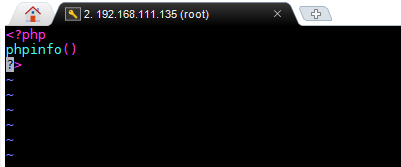
#创建一个php文件并编辑:phpinfo
[root@localhost html]# touch phpinfo.php
[root@localhost html]# vim phpinfo.php
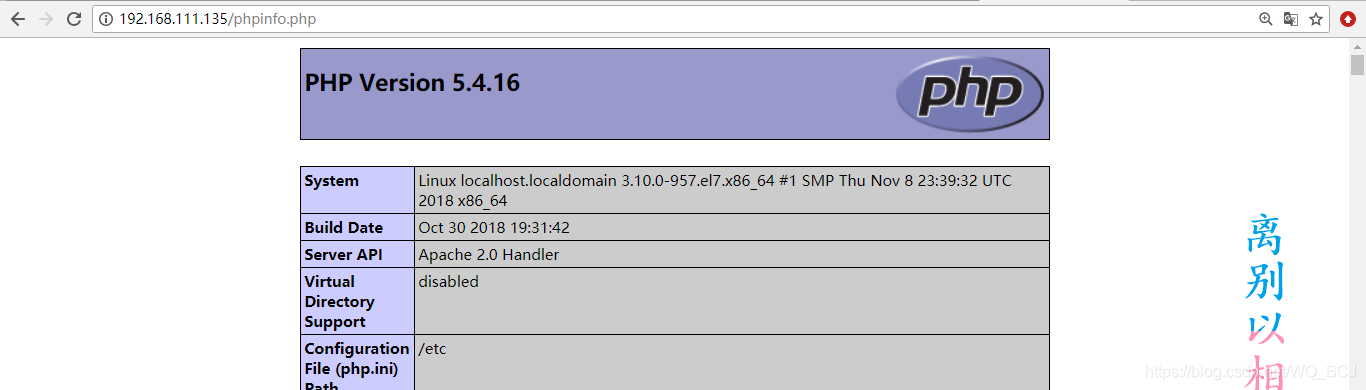
#浏览器访问
centos7 yum搭建lamp的更多相关文章
- centos7 yum搭建lamp环境
=============================================== 2018/1/14_第1次修改 ccb_warlock == ...
- yum搭建 Lamp环境
yum搭建Lamp yum install -y httpd yum install -y nano rpm 安装 Php7 相应的 yum源 rpm -Uvh https://dl.fedorapr ...
- 利用yum搭建lamp环境并进一步创建博客
用yum搭建lamp环境 第一.安装apache yum -y install httpd 第二.安装mariadb Yum -y mariadb mariadb-server 第三.安装php Yu ...
- centos7用yum搭建LAMP环境
用yum快速搭建LAMP平台 实验环境: [root@nmserver- html]# cat /etc/redhat-release CentOS release (AltArch) [root@n ...
- CentOS7下搭建LAMP+FreeRadius+Daloradius Web管理
注意:本文所有命令均在root命令下执行. freeradius服务官网:http://freeradius.org/ daloradius Web管理页面官网:https://sourceforge ...
- centos7 yum搭建lnmp环境及配置wordpress超详细教程
yum安装lnmp环境是最方便,最快捷的一种方法.源码编译安装需要花费大量的人类时间,当然源码编译可以个性化配置一些其它功能.目前来说,yum安装基本满足我们搭建web服务器的需求. 本文是我根据近期 ...
- CentOS 7 yum搭建 LAMP
CentOS 7 搭建LAMP环境 1. Apache 安装 Apache 的软件包名称叫做httpd,因此安装Apache,使用以下命令 [root@localhost ~]# yum -y ins ...
- centos7.3搭建lamp实现使用wordpress
``` 环境说明: 在同一台主机上实现LAMP(Linux + Apache + MariaDB + PHP) CentOS 7.3.Apache 2.4.6.MariaDB 5.5.52.PHP 5 ...
- CentOS7.X 搭建LAMP
第一部分搭建LAMP基础环境 1.检查CentOS是否为7.x版本 2.安装LAMP中的apache,采用yum源方法安装 yum install httpd httpd-devel A ...
随机推荐
- 2012年游戏软件开发独立本科段01B0815自考科目教材
代码-----------教材名----------------------------版本----------作者 03708--------中国近现代史纲要----------------高教08 ...
- Jenkins - Linux下启动Jenkins报错hudson.WebAppMain#contextDestroyed: Shutting down a Jenkins instance that was still starting up
报错截图 在Linux下直接运行jenkins.war报错,导致启动失败 报错原因 运行端口已被其他进程占用 解决方法 换个启动端口就可以啦!
- [UNCTF2020]BetterCpu WriteUp
这题不同前一题虚拟机ezvm一样,指令很多而且复杂,需要通过写文档和脚本来化简过程. 直接丢进IDA7.2(如果使用IDA7.0则虚拟机的emulator部分会分析出错)查看. 进入main函数后按F ...
- 常见mysql后台线程
1.IO THREAD MySQL有很多后台线程 其中包括了负责IO的相关线程IO THREAD 1. 参数innodb_write_io_threads 写线程 默认四个,负责数据块的写入 2 ...
- cephonebox发布
前言 现在已经是2016年收官的一个月了,之前一直想做一个calamari的集成版本,之所以有这个想法,是因为,即使在已经打好包的情况下,因为各种软件版本的原因,造成很多人无法配置成功,calamar ...
- Hive 报错Class path contains multiple SLF4J bindings.
进入hive报错信息如下 SLF4J: Class path contains multiple SLF4J bindings. SLF4J: Found binding in [jar:file:/ ...
- linux的time命令
查看程序执行时间
- 面试阿里,首先要掌握的 Java 泛型,帮你一次性搞懂!
引言 泛型是Java中一个非常重要的知识点,在Java集合类框架中泛型被广泛应用.本文我们将从零开始来看一下Java泛型的设计,将会涉及到通配符处理,以及让人苦恼的类型擦除. 泛型基础 泛型类 我们首 ...
- [从源码学设计]蚂蚁金服SOFARegistry之网络封装和操作
[从源码学设计]蚂蚁金服SOFARegistry之网络封装和操作 目录 [从源码学设计]蚂蚁金服SOFARegistry之网络封装和操作 0x00 摘要 0x01 业务领域 1.1 SOFARegis ...
- 思维导图MindManager的过滤主题功能如何使用
MindManager是一款多功能思维导图工具软件.但有的思维导图繁杂,用户只需要查看自己感兴趣的主题该怎么办呢?接下来,我就为大家详细介绍MindManager思维导图2020版的过滤主题功能,可以 ...