
kubernetes生产实践之mysql
简介
kubedb mysql 生命周期及特性
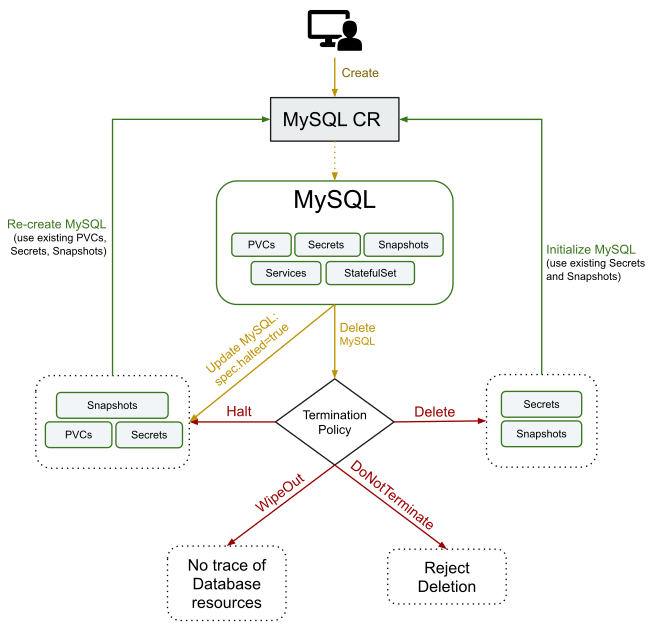
Supported MySQL Features

Features	Availability

Clustering	✓

Persistent Volume	✓

Instant Backup	✓

Scheduled Backup	✓

Initialize using Snapshot	✓

Initialize using Script (*.sql, *sql.gz and/or *.sh)	✓

Custom Configuration	✓

Using Custom docker image	✓

Builtin Prometheus Discovery	✓

Using Prometheus operator	✓
查看kubedb支持的mysql版本
[root@qd01-stop-k8s-master001 mysql]# kubectl get mysqlversions

NAME        VERSION   DB_IMAGE                 DEPRECATED   AGE

5.7.25-v1   5.7.25    kubedb/mysql:5.7.25-v1                17h

5.7.29      5.7.29    kubedb/mysql:5.7.29                   17h

5.7.31      5.7.31    kubedb/mysql:5.7.31                   17h

8.0.14-v1   8.0.14    kubedb/mysql:8.0.14-v1                17h

8.0.20      8.0.20    kubedb/mysql:8.0.20                   17h

8.0.21      8.0.21    kubedb/mysql:8.0.21                   17h

8.0.3-v1    8.0.3     kubedb/mysql:8.0.3-v1                 17h
编写配置文件
mode: GroupReplication
group.name可以使用这个网站生成:https://www.uuidgenerator.net/version4
apiVersion: kubedb.com/v1alpha2

kind: MySQL

metadata:

  name: mysql-group-test

  namespace: op

spec:

  version: "8.0.21"

  replicas: 3

  topology:

    mode: GroupReplication

    group:

      name: "d7f38430-d9ee-464b-af43-da9efa26fe02"

      baseServerID: 100

  storageType: Durable

  storage:

    storageClassName: "rbd"

    accessModes:

      - ReadWriteOnce

    resources:

      requests:

        storage: 50Gi

  terminationPolicy: Halt
安装Mysql
[root@qd01-stop-k8s-master001 mysql]# kubectl apply -f mysql-cluster-install.yaml

mysql.kubedb.com/mysql-group-test created

[root@qd01-stop-k8s-master001 mysql]# kubectl get po,ep,svc -n op

NAME                     READY   STATUS    RESTARTS   AGE

pod/mysql-group-test-0   2/2     Running   0          14m

pod/mysql-group-test-1   2/2     Running   0          9m41s

pod/mysql-group-test-2   2/2     Running   0          4m19s

NAME                                 ENDPOINTS                                                     AGE

endpoints/mysql-group-test           100.64.147.157:3306                                           14m

endpoints/mysql-group-test-pods      100.64.122.198:3306,100.64.147.157:3306,100.98.174.219:3306   14m

endpoints/mysql-group-test-standby   100.98.174.219:3306                                           14m

NAME                               TYPE        CLUSTER-IP      EXTERNAL-IP   PORT(S)    AGE

service/mysql-group-test           ClusterIP   10.108.25.179   <none>        3306/TCP   14m

service/mysql-group-test-pods      ClusterIP   None            <none>        3306/TCP   14m

service/mysql-group-test-standby   ClusterIP   10.101.164.49   <none>        3306/TCP   14m
可以使用kubectl describe查看mysql集群详细信息
[root@qd01-stop-k8s-master001 mysql]# kubectl describe mysql mysql-group-test -n op

Name:         mysql-group-test

Namespace:    op

Labels:       <none>

Annotations:  <none>

API Version:  kubedb.com/v1alpha2

Kind:         MySQL

Metadata:

  Creation Timestamp:  2021-03-11T02:03:38Z

  Finalizers:

    kubedb.com

  Generation:  2

  Managed Fields:

    API Version:  kubedb.com/v1alpha2

    Fields Type:  FieldsV1

    fieldsV1:

      f:metadata:

        f:annotations:

          .:

          f:kubectl.kubernetes.io/last-applied-configuration:

      f:spec:

        .:

        f:replicas:

        f:storage:

          .:

          f:accessModes:

          f:resources:

            .:

            f:requests:

              .:

              f:storage:

          f:storageClassName:

        f:storageType:

        f:terminationPolicy:

        f:topology:

          .:

          f:group:

            .:

            f:baseServerID:

            f:name:

          f:mode:

        f:version:

    Manager:      kubectl-client-side-apply

    Operation:    Update

    Time:         2021-03-11T02:03:38Z

    API Version:  kubedb.com/v1alpha2

    Fields Type:  FieldsV1

    fieldsV1:

      f:metadata:

        f:finalizers:

      f:spec:

        f:authSecret:

          .:

          f:name:

      f:status:

        .:

        f:conditions:

        f:observedGeneration:

        f:phase:

    Manager:         operator

    Operation:       Update

    Time:            2021-03-11T02:03:39Z

  Resource Version:  7283091

  UID:               38d0b2c8-2d56-4fcf-ba3b-dff211d8a63d

Spec:

  Auth Secret:

    Name:  mysql-group-test-auth

  Pod Template:

    Controller:

    Metadata:

    Spec:

      Affinity:

        Pod Anti Affinity:

          Preferred During Scheduling Ignored During Execution:

            Pod Affinity Term:

              Label Selector:

                Match Labels:

                  app.kubernetes.io/instance:    mysql-group-test

                  app.kubernetes.io/managed-by:  kubedb.com

                  app.kubernetes.io/name:        mysqls.kubedb.com

              Namespaces:

                op

              Topology Key:  kubernetes.io/hostname

            Weight:          100

            Pod Affinity Term:

              Label Selector:

                Match Labels:

                  app.kubernetes.io/instance:    mysql-group-test

                  app.kubernetes.io/managed-by:  kubedb.com

                  app.kubernetes.io/name:        mysqls.kubedb.com

              Namespaces:

                op

              Topology Key:  failure-domain.beta.kubernetes.io/zone

            Weight:          50

      Resources:

        Limits:

          Cpu:     500m

          Memory:  1Gi

        Requests:

          Cpu:               500m

          Memory:            1Gi

      Service Account Name:  mysql-group-test

  Replicas:                  3

  Storage:

    Access Modes:

      ReadWriteOnce

    Resources:

      Requests:

        Storage:         50Gi

    Storage Class Name:  rbd

  Storage Type:          Durable

  Termination Policy:    Halt

  Topology:

    Group:

      Base Server ID:  100

      Name:            d7f38430-d9ee-464b-af43-da9efa26fe02

    Mode:              GroupReplication

  Version:             8.0.21

Status:

  Conditions:

    Last Transition Time:  2021-03-11T02:03:39Z

    Message:               The KubeDB operator has started the provisioning of MySQL: op/mysql-group-test

    Reason:                DatabaseProvisioningStartedSuccessfully

    Status:                True

    Type:                  ProvisioningStarted

    Last Transition Time:  2021-03-11T02:21:17Z

    Message:               All desired replicas are ready.

    Reason:                AllReplicasReady

    Status:                True

    Type:                  ReplicaReady

    Last Transition Time:  2021-03-11T02:03:49Z

    Message:               The MySQL: op/mysql-group-test is accepting client requests.

    Observed Generation:   2

    Reason:                DatabaseAcceptingConnectionRequest

    Status:                True

    Type:                  AcceptingConnection

    Last Transition Time:  2021-03-11T02:21:17Z

    Message:               The MySQL: op/mysql-group-test is ready.

    Observed Generation:   2

    Reason:                ReadinessCheckSucceeded

    Status:                True

    Type:                  Ready

    Last Transition Time:  2021-03-11T02:21:18Z

    Message:               The MySQL: op/mysql-group-test is successfully provisioned.

    Observed Generation:   2

    Reason:                DatabaseSuccessfullyProvisioned

    Status:                True

    Type:                  Provisioned

  Observed Generation:     2

  Phase:                   Ready

Events:

  Type    Reason      Age    From             Message

  ----    ------      ----   ----             -------

  Normal  Successful  17m    KubeDB Operator  Successfully created governing service

  Normal  Successful  17m    KubeDB Operator  Successfully created service for primary/standalone

  Normal  Successful  17m    KubeDB Operator  Successfully created service for secondary replicas

  Normal  Successful  17m    KubeDB Operator  Successfully created database auth secret

  Normal  Successful  17m    KubeDB Operator  Successfully created StatefulSet

  Normal  Successful  17m    KubeDB Operator  Successfully created appbinding

  Normal  Successful  17m    KubeDB Operator  Successfully patched StatefulSet

  Normal  Successful  17m    KubeDB Operator  Successfully patched StatefulSet

  Normal  Successful  13m    KubeDB Operator  Successfully patched StatefulSet

  Normal  Successful  11m    KubeDB Operator  Successfully patched StatefulSet

  Normal  Successful  7m39s  KubeDB Operator  Successfully patched StatefulSet

  Normal  Successful  102s   KubeDB Operator  Successfully patched StatefulSet

  Normal  Successful  16s    KubeDB Operator  Successfully patched StatefulSet

  Normal  Successful  16s    KubeDB Operator  Successfully patched StatefulSet

  Normal  Successful  16s    KubeDB Operator  Successfully patched StatefulSet
从以上输出可以看到,集群部署完毕。
验证数据库
1、获取root用户名密码
[root@qd01-stop-k8s-master001 mysql]# kubectl get secrets -n op mysql-group-test-auth  -o jsonpath='{.data.\username}' | base64 -d

root

[root@qd01-stop-k8s-master001 mysql]# kubectl get secrets -n op mysql-group-test-auth  -o jsonpath='{.data.\password}' | base64 -d

8(wVGGRfF4iQq1Zt
2、查看mysql pod 列表
[root@qd01-stop-k8s-master001 mysql]# kubectl get pods -n op -l app.kubernetes.io/instance=mysql-group-test  -o jsonpath='{range.items[*]}{.metadata.name} ........... {.status.podIP} ............ {.metadata.name}.my-group-gvr.{.metadata.namespace}{"\t\n"}{end}'

mysql-group-test-0 ........... 100.64.147.157 ............ mysql-group-test-0.my-group-gvr.op

mysql-group-test-1 ........... 100.98.174.219 ............ mysql-group-test-1.my-group-gvr.op

mysql-group-test-2 ........... 100.64.122.198 ............ mysql-group-test-2.my-group-gvr.op

[root@qd01-stop-k8s-master001 mysql]# kubectl get svc -n op

NAME                       TYPE        CLUSTER-IP      EXTERNAL-IP   PORT(S)    AGE

mysql-group-test           ClusterIP   10.108.25.179   <none>        3306/TCP   43m

mysql-group-test-pods      ClusterIP   None            <none>        3306/TCP   43m

mysql-group-test-standby   ClusterIP   10.101.164.49   <none>        3306/TCP   43m
3、现在可以使用获取到的信息连接数据库
[root@qd01-stop-k8s-master001 mysql]# kubectl exec -it -n op mysql-group-test-0 -c mysql -- mysql -u root --password="8(wVGGRfF4iQq1Zt"  --host=10.108.25.179  -e "select 1;"

mysql: [Warning] Using a password on the command line interface can be insecure.

+---+

| 1 |

+---+

| 1 |

+---+
4、检查集群状态
[root@qd01-stop-k8s-master001 mysql]# kubectl exec -it -n op mysql-group-test-0 -c mysql -- mysql -u root --password="8(wVGGRfF4iQq1Zt"  --host=10.108.25.179  -e "show status like '%primary%'"

mysql: [Warning] Using a password on the command line interface can be insecure.

+----------------------------------+--------------------------------------+

| Variable_name                    | Value                                |

+----------------------------------+--------------------------------------+

| group_replication_primary_member | 596744e1-820e-11eb-8425-f2f48f05462c |

+----------------------------------+--------------------------------------+

[root@qd01-stop-k8s-master001 mysql]# kubectl exec -it -n op mysql-group-test-0 -c mysql -- mysql -u root --password="8(wVGGRfF4iQq1Zt"  --host=10.108.25.179  -e "select * from performance_schema.replication_group_members"

mysql: [Warning] Using a password on the command line interface can be insecure.

+---------------------------+--------------------------------------+---------------------------------------------+-------------+--------------+-------------+----------------+

| CHANNEL_NAME              | MEMBER_ID                            | MEMBER_HOST                                 | MEMBER_PORT | MEMBER_STATE | MEMBER_ROLE | MEMBER_VERSION |

+---------------------------+--------------------------------------+---------------------------------------------+-------------+--------------+-------------+----------------+

| group_replication_applier | 18b45cbd-820f-11eb-8060-9a70fb141a1f | mysql-group-test-1.mysql-group-test-pods.op |        3306 | ONLINE       | SECONDARY   | 8.0.21         |

| group_replication_applier | 1dd5699c-8210-11eb-b13a-9a07d15a7e1f | mysql-group-test-2.mysql-group-test-pods.op |        3306 | ONLINE       | SECONDARY   | 8.0.21         |

| group_replication_applier | 596744e1-820e-11eb-8425-f2f48f05462c | mysql-group-test-0.mysql-group-test-pods.op |        3306 | ONLINE       | PRIMARY     | 8.0.21         |

+---------------------------+--------------------------------------+---------------------------------------------+-------------+--------------+-------------+----------------+
5、故障测试
我现在把PRIMARY的mysql-group-test-0 pod删除,然后再查看集群信息,mysql-group-test-1会提升为PRIMARY
[root@qd01-stop-k8s-master001 ~]# kubectl delete po  mysql-group-test-0 -n op

[root@qd01-stop-k8s-master001 ~]# kubectl exec -it -n op mysql-group-test-0 -n op -c mysql -- mysql -u root --password="8(wVGGRfF4iQq1Zt"  --host=10.108.25.179  -e "select * from performance_schema.replication_group_members"

mysql: [Warning] Using a password on the command line interface can be insecure.

+---------------------------+--------------------------------------+---------------------------------------------+-------------+--------------+-------------+----------------+

| CHANNEL_NAME              | MEMBER_ID                            | MEMBER_HOST                                 | MEMBER_PORT | MEMBER_STATE | MEMBER_ROLE | MEMBER_VERSION |

+---------------------------+--------------------------------------+---------------------------------------------+-------------+--------------+-------------+----------------+

| group_replication_applier | 18b45cbd-820f-11eb-8060-9a70fb141a1f | mysql-group-test-1.mysql-group-test-pods.op |        3306 | ONLINE       | PRIMARY     | 8.0.21         |

| group_replication_applier | 1dd5699c-8210-11eb-b13a-9a07d15a7e1f | mysql-group-test-2.mysql-group-test-pods.op |        3306 | ONLINE       | SECONDARY   | 8.0.21         |

+---------------------------+--------------------------------------+---------------------------------------------+-------------+--------------+-------------+----------------+

等待一段时间 mysql-group-test-0起来以后,角色就变成SECONDARY

[root@qd01-stop-k8s-master001 ~]# kubectl exec -it -n op mysql-group-test-0 -c mysql -- mysql -u root --password="8(wVGGRfF4iQq1Zt"  --host=10.108.25.179  -e "select * from performance_schema.replication_group_members"

mysql: [Warning] Using a password on the command line interface can be insecure.

+---------------------------+--------------------------------------+---------------------------------------------+-------------+--------------+-------------+----------------+

| CHANNEL_NAME              | MEMBER_ID                            | MEMBER_HOST                                 | MEMBER_PORT | MEMBER_STATE | MEMBER_ROLE | MEMBER_VERSION |

+---------------------------+--------------------------------------+---------------------------------------------+-------------+--------------+-------------+----------------+

| group_replication_applier | 18b45cbd-820f-11eb-8060-9a70fb141a1f | mysql-group-test-1.mysql-group-test-pods.op |        3306 | ONLINE       | PRIMARY     | 8.0.21         |

| group_replication_applier | 1dd5699c-8210-11eb-b13a-9a07d15a7e1f | mysql-group-test-2.mysql-group-test-pods.op |        3306 | ONLINE       | SECONDARY   | 8.0.21         |

| group_replication_applier | 596744e1-820e-11eb-8425-f2f48f05462c | mysql-group-test-0.mysql-group-test-pods.op |        3306 | ONLINE       | SECONDARY   | 8.0.21         |

+---------------------------+--------------------------------------+---------------------------------------------+-------------+--------------+-------------+----------------+
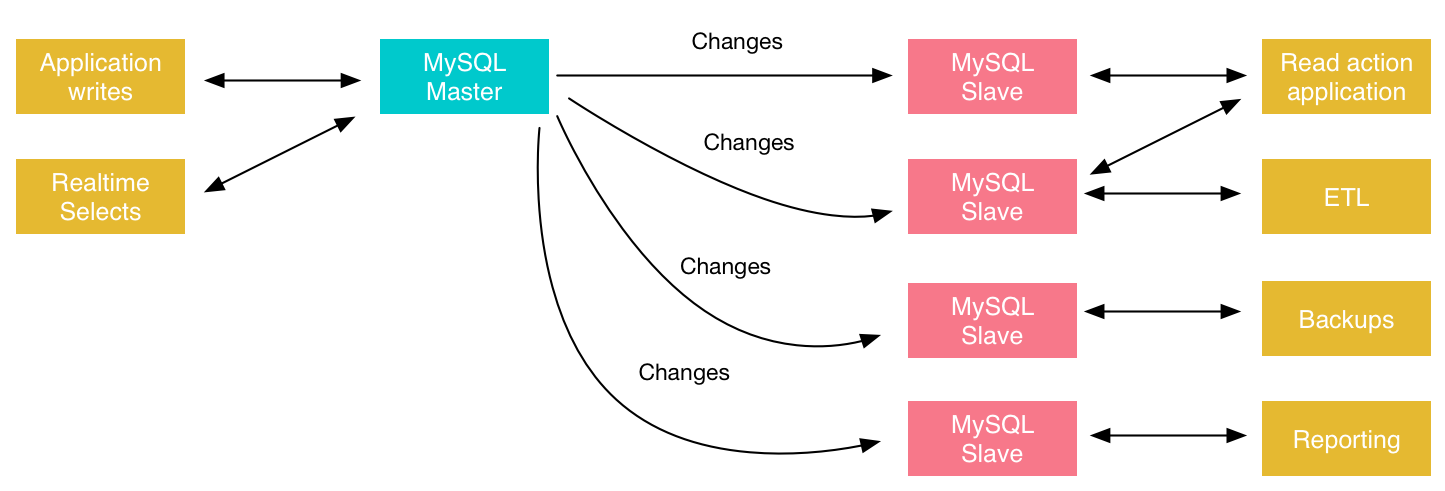
注意:因为本文部署是使用的是GroupReplication模式(目前kubed只支持这种模式),只能从PRIMARY节点写入数据,所有节点都可以读取数据;如下图所示。

如果想使用集群模式,参见以前的文章
kubernetes生产实践之mysql的更多相关文章
- (转)Kubernetes部署WordPress+MySQL
转:http://www.showerlee.com/archives/2336 这部分我们结合之前的k8s知识点给大家展示如何使用kubernetes部署wordpress+MySQL, 并利用NF ...
- kubernetes下安装mysql
参考文档:https://blog.csdn.net/sealir/article/details/81177747 注:有mysql安装在k8s集群内,集群外且通过k8s service endpo ...
- kubernetes案例 tomcat+mysql
该文章参考<kubernetes 权威指南> 环境: [root@master tomcat-mysql]# kubectl get nodesNAME STATUS AG ...
- Kubernetes 中部署 MySQL 集群
文章转载自:https://www.cnblogs.com/ludongguoa/p/15319861.html 一般情况下 Kubernetes 可以通过 ReplicaSet 以一个 Pod 模板 ...
- kubernetes生产实践之redis-cluster
方案一 自定义yaml文件安装redis cluster 背景 在Kubernetes中部署Redis集群面临挑战,因为每个Redis实例都依赖于一个配置文件,该文件可以跟踪其他集群实例及其角色.为此 ...
- kubernetes生产实践之mongodb
简介 先看下生命周期图 kubedb支持的mongodb版本 [root@qd01-stop-k8s-master001 mysql]# kubectl get mongodbversions NAM ...
- Linux、docker、kubernetes、MySql、Shell、kafka、RabbitMQ运维快餐
检查端口占用 lsof -i:[port] netstat -anp |grep [port] 监控网络客户TCP连接数 netstat -anp | grep tcp |wc -l 获取某进程中运行 ...
- 企业运维 | MySQL关系型数据库在Docker与Kubernetes容器环境中快速搭建部署主从实践
[点击 关注「 WeiyiGeek」公众号 ] 设为「️ 星标」每天带你玩转网络安全运维.应用开发.物联网IOT学习! 希望各位看友[关注.点赞.评论.收藏.投币],助力每一个梦想. 本章目录 目录 ...
- [译]Kubernetes 分布式应用部署和人脸识别 app 实例
原文地址:KUBERNETES DISTRIBUTED APPLICATION DEPLOYMENT WITH SAMPLE FACE RECOGNITION APP 原文作者:skarlso 译文出 ...
随机推荐
- Databricks 第11篇:Spark SQL 查询(行转列、列转行、Lateral View、排序)
本文分享在Azure Databricks中如何实现行转列和列转行. 一,行转列 在分组中,把每个分组中的某一列的数据连接在一起: collect_list:把一个分组中的列合成为数组,数据不去重,格 ...
- 7.Topic交换机之模拟文件分类
标题 : 7.Topic交换机之模拟文件分类 目录 : RabbitMQ 序号 : 7 Password = "123456", AutomaticRecoveryEnabled ...
- boomworks 1999~2009
大众软件 PC定时执行专家 4.0 (PCTaskTimer) - 功能强大.简单易用的定时执行软件.具有功能多.体积小.消耗资源少的特点. 超级网际搜索(SuperSearch) - 免费.快速.高 ...
- Netty(四)基于Netty 的简易版RPC
3.1 RPC 概述 下面的这张图,大概很多小伙伴都见到过,这是 Dubbo 官网中的一张图描述了项目架构的演进过程 它描述了每一种架构需要的具体配置和组织形态.当网站流量很小时,只需一个应用,将所有 ...
- 1GB === 1000MB & 1GB === 1024MB
1GB === 1000MB & 1GB === 1024MB 字节单位换算 1 Gigabyte = 1000 Megabytes 1 Gibibyte = 1024 Mebibytes 十 ...
- macOS 录屏 gif
macOS 录屏 gif LICEcap bug 授权问题? 如何在 Mac 上录制屏幕 https://support.apple.com/zh-cn/HT208721 Command + Shif ...
- HTTP/2 & Push Cache
HTTP/2 & Push Cache HTTP/2 & 推送缓存 https://caniuse.com/#search=http2 https://jakearchibald.co ...
- Flutter framework & Flutter basics
Flutter framework & Flutter basics https://flutter.dev/docs/get-started/learn-more UI widgets ht ...
- taro external-class
taro external-class https://nervjs.github.io/taro/docs/component-style.html externalClasses child co ...
- MongoDB的下载、安装与部署
1.什么是MongoDB? 它是介于关系型数据库和非关系型数据库之间的一种NoSQL数据库,用C++编写,是一款集敏捷性.可伸缩性.扩展性于一身的高性能的面向文档的通用数据库. 2.为什么要用Mong ...