
Pyqt5——变色的表格
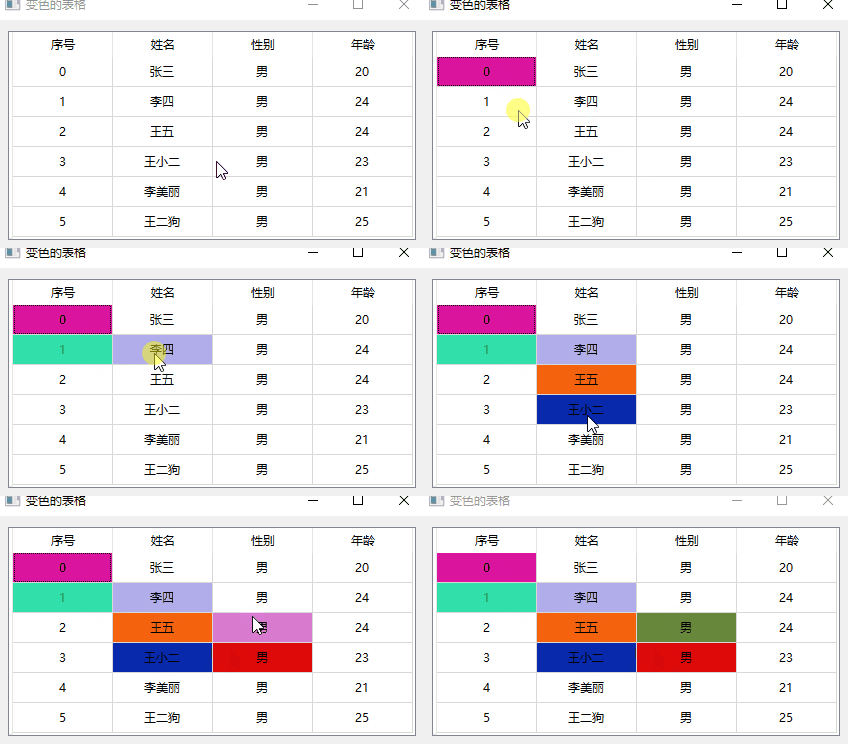
需求:鼠标左键点击表格后,对应的单元格背景颜色发生变化。
实现:(1)使用Qt的model-view模式生成表格视图。
(2)重写表格的点击事件。
(3)设置表格的背景颜色。
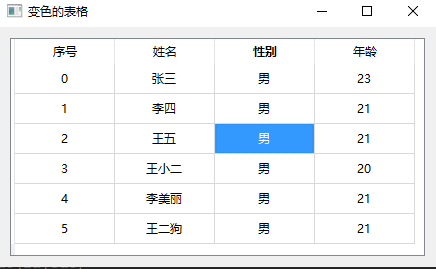
正常情况下,当用户选中单元格之后单元格背景颜色变为蓝色,如下图所示:
如果觉得这样表格过于单调,那么我们就用鼠标为它涂上颜色。
代码块:
View部分。
class MyTableView(QTableView):

    """View"""

    SelectedCellSignal = pyqtSignal(QModelIndex)

    def __init__(self):

        super(MyTableView, self).__init__()

    def mousePressEvent(self, e):

        """重写鼠标点击事件。"""

        if e.button() == Qt.RightButton:

            return super().mousePressEvent(e)

        # :获取鼠标点击的索引

        index = self.indexAt(e.pos())

        return self.SelectedCellSignal.emit(index)
Model部分。
class MyTableModel(QAbstractTableModel):

    """Model"""

    def __init__(self):

        super(MyTableModel, self).__init__()

        self._data = []

        self._background_color = []

        self._headers = ['序号', '姓名', '性别', '年龄']

        self._generate_data()

    def _generate_data(self):

        """填充表格数据"""

        name_list = ['张三', '李四', '王五', '王小二', '李美丽', '王二狗']

        for id_num, name in enumerate(name_list):

            self._data.append([str(id_num), name, '男', str(random.randint(20, 25))])

            # :默认单元格颜色为白色

            self._background_color.append([QColor(255, 255, 255) for i in range(4)])

    def rowCount(self, parent=QModelIndex()):

        """返回行数量。"""

        return len(self._data)

    def columnCount(self, parent=QModelIndex()):

        """返回列数量。"""

        return len(self._headers)

    def headerData(self, section, orientation, role):

        """设置表格头"""

        if role == Qt.DisplayRole and orientation == Qt.Horizontal:

            return self._headers[section]

    def data(self, index, role):

        """显示表格中的数据。"""

        if not index.isValid() or not 0 <= index.row() < self.rowCount():

            return QVariant()

        row = index.row()

        col = index.column()

        if role == Qt.DisplayRole:

            return self._data[row][col]

        elif role == Qt.BackgroundColorRole:

            return self._background_color[row][col]

        elif role == Qt.TextAlignmentRole:

            return Qt.AlignCenter

        return QVariant()

    def cellPaint(self, index, color):

        """给单元格填充颜色。"""

        row = index.row()

        col = index.column()

        self._background_color[row][col] = QColor(color)

        self.layoutChanged.emit()
窗体绘制:
class ColorfulTable(QWidget):

    def __init__(self):

        super().__init__()

        self.setWindowTitle('变色的表格')

        self.tableView = MyTableView()

        self.tableModel = MyTableModel()

        self.tableView.setModel(self.tableModel)

        self.tableView.SelectedCellSignal.connect(self.selectedCell)

        layout = QHBoxLayout()

        layout.addWidget(self.tableView)

        self.setLayout(layout)

    def selectedCell(self, index):

        """鼠标点击事件槽函数。"""

        # :生成颜色字符串形如:#FFFFFF

        color = '#{}'.format(''.join([hex(random.randint(0, 256))[2:].rjust(2, '0') for i in range(3)]))

        self.tableModel.cellPaint(index, color)
Pyqt5——变色的表格的更多相关文章
- css选择器,用来处理隔行变色的表格
CSS3 :nth-last-child() 选择器,可以用来处理隔行变色的表格,详情请参考网上资料.
- css3表格隔行变色和表格选中变颜色代码
<!DOCTYPE html PUBLIC "-//W3C//DTD XHTML 1.0 Transitional//EN" "http://www.w3.org/ ...
- [ PyQt入门教程 ] PyQt5中数据表格控件QTableWidget使用方法
如果你想让你开发的PyQt5工具展示的数据显得整齐.美观.好看,显得符合你的气质,可以考虑使用QTableWidget控件.之前一直使用的是textBrowser文本框控件,数据展示还是不太美观.其中 ...
- Javascript:DOM表格操作
需求说明: /* *需求说明: *获取元素:tBodies,tHead,tFoot,rows,cells *表格的创建 *数据添加 *隔行变色 *删除操作,剩余表格重新计算,实现隔行变色 */ HTM ...
- Jquery表单与表格的运用
1,表单的应用: a. 单行文本框的应用 多行文本框的应用 b.复选框的框的应用 c.下拉框的应用 d.表单验证 2,表格的应用: a. 表格变色 b.表格展开关闭 d.表格内容筛选 3,多行文本框 ...
- (8)css表格
用css设置表格样式 *<table></table> 标签定义 HTML 表格. * tr 元素定义表格的行:th 元素定义表格的表头:td 元素定义表格中的单元格:capt ...
- 测开之路一百零八:bootstrap表格
引入bootstrap和jquery 普通表格 html自带的边框线 bootstrap表格属性 bootstrap表格 边框线 鼠标经过变色 压缩表格,减小密度 自适应屏幕 隔行突出(变色) 表格里 ...
- BootStrap_02之全局样式及组件
1.BootStrap指定的四种屏幕尺寸: ①超大PC屏幕--lg(large):w>=1200px: ②中等PC屏幕--md(medium):1200px>w>=992px: ③P ...
- Boostrap全局CSS样式
1.Bootstrap提供的CSS Reset * { box-sizing: border-box; } body { font ...; color: #333; background: ...; ...
随机推荐
- The Preliminary Contest for ICPC Asia Shenyang 2019 D. Fish eating fruit(树形dp)
题意:求一棵树上所有路径和模3分别为0 1 2 的权值的和 思路:树形dp 增加一个记录儿子节点满足条件的个数的数组 不要放在一起dp不然答案跟新会有问题 #include <bits/stdc ...
- Codeforces 1355 D. Game With Array
传送门:D - Game With Array 题意:让你构造一个长度为n的序列,并且n个数的和为S,问能不能找到一个1~n的数k,使得数组里找不出一个子序列的和为k或者n-k: 题解:最简单的想法肯 ...
- Codeforces Round #641 (Div. 2) D. Orac and Medians (贪心)
题意:有一个长度为\(n\)的数组,问能否通过多次使某个区间的所有元素变成这个区间的中位数,来使整个数组变成题目所给定的\(k\). 题解:首先这个\(k\)一定要在数组中存在,然后我们对中位数进行考 ...
- Link/Cut Tree CodeForces - 614A 暴力+爆 long long 处理
题意: 给你一个区间[l,r],让你从小到大输出k^x,设y=k^x,要保证y在区间[l,r]中 题解: 就算k是最小的2也不需要枚举多少次就到long long的极限了,所以暴力没商量,根本不会TL ...
- UVA 10480 Sabotage (最大流) 最小割边
题目 题意: 编写一个程序,给定一个网络规范和破坏每个连接的成本,确定要切断哪个连接,以便将首都和最大的城市分离到尽可能低的成本. 分割-------------------------------- ...
- 行业动态 | 腾讯合作商Babylon使用Cassandra保护患者数据并提高医疗效果
医疗世界正在快速朝向个性化和低成本的方向发展,Babylon Health看到了这样的机会--通过开创性的云端应用来大幅扩张和改进他们所提供的服务. 通过使用基于Apache Cassandra的 ...
- 2019牛客多校第二场E MAZE(线段树 + 矩阵)题解
题意: n * m的矩阵,为0表示可以走,1不可以走.规定每走一步只能向下.向左.向右走.现给定两种操作: 一.1 x y表示翻转坐标(x,y)的0.1. 二.2 x y表示从(1,x)走到(n,y) ...
- 买车交税 All In One
中国买车交税 All In One 消费税 增值税 车辆购置税 车船税 关税 refs xgqfrms 2012-2020 www.cnblogs.com 发布文章使用:只允许注册用户才可以访问! 原 ...
- 2020 Google 开发者大会
2020 Google 开发者大会 Google Developer Summit https://developersummit.googlecnapps.cn/ Flutter | Web | M ...
- 阅文集团 招聘官网 bug
阅文集团 招聘官网 bug https://join.yuewen.com/ 前端开发 zxx.jpg 张鑫旭 https://qidian.gtimg.com/yuewen/join/css/ima ...