
php 图片上传预览(转)
网上找的图片上传预览:
<!DOCTYPE html PUBLIC "-//W3C//DTD XHTML 1.0 Transitional//EN" "http://www.w3.org/TR/xhtml1/DTD/xhtml1-transitional.dtd">

<?php

header("content-Type: text/html; charset=gb2312");

$uptypes=array('image/jpg', //上传文件类型列表

'image/jpeg',

'image/png',

'image/pjpeg',

'image/gif',

'image/bmp',

'application/x-shockwave-flash',

'image/x-png',

'application/msword',

'audio/x-ms-wma',

'audio/mp3',

'application/vnd.rn-realmedia',

'application/x-zip-compressed',

'application/octet-stream');

$max_file_size=10000000; //上传文件大小限制, 单位BYTE

$path_parts=pathinfo($_SERVER['PHP_SELF']); //取得当前路径

$destination_folder="up/"; //上传文件路径

$watermark=0; //是否附加水印(1为加水印,0为不加水印);

$watertype=1; //水印类型(1为文字,2为图片)

$waterposition=2; //水印位置(1为左下角,2为右下角,3为左上角,4为右上角,5为居中);

$waterstring="www.yinao.tk"; //水印字符串

$waterimg="xplore.gif"; //水印图片

$imgpreview=1; //是否生成预览图(1为生成,0为不生成);

$imgpreviewsize=1/1; //缩略图比例

?>

<html xmlns="undefined">

<head>

<title>图片上传储存</title>

<LINK rel="Bookmark" href="http://www.yinao.tk/ico.ico" >

<LINK rel="Shortcut Icon" href="http://www.yinao.tk/ico.ico" />

<meta http-equiv="Content-Type" content="text/html; charset=gb2312">

<meta name="description" content="亿脑网盘_免费网络无限大图片上传储存" />

<style type="text/css">

body,td{font-family:tahoma,verdana,arial;font-size:11px;line-height:15px;background-color:white;color:#666666;

strong{font-size:12px;}

a:link{color:#0066CC;}

a:hover{color:#FF6600;}

a:visited{color:#003366;}

a:active{color:#9DCC00;}

a{TEXT-DECORATION:none}

td.irows{height:20px;background:url("index.php?i=dots") repeat-x bottom}

</style>

</head>

<script type="text/javascript">function oCopy(obj){obj.select();js=obj.createTextRange();js.execCommand("Copy");};function sendtof(url){window.clipboardData.setData('Text',url);alert('复制地址成功,粘贴给你好友一起分享。');};function select_format(){var on=document.getElementById('fmt').checked;document.getElementById('site').style.display=on?'none':'';document.getElementById('sited').style.display=!on?'none':'';};var flag=false;function DrawImage(ImgD){var image=new Image();image.src=ImgD.src;if(image.width>0&&image.height>0){flag=true;if(image.width/image.height>=120/80){if(image.width>120){ImgD.width=120;ImgD.height=(image.height*120)/image.width;}else {ImgD.width=image.width;ImgD.height=image.height;};ImgD.alt=image.width+"×"+image.height;}else {if(image.height>80){ImgD.height=80;ImgD.width=(image.width*80)/image.height;}else {ImgD.width=image.width;ImgD.height=image.height;};ImgD.alt=image.width+"×"+image.height;}};};function FileChange(Value){flag=false;document.all.uploadimage.width=10;document.all.uploadimage.height=10;document.all.uploadimage.alt="";document.all.uploadimage.src=Value;};</script>

<body bgcolor="#FFFFFF">

<center>

<form enctype="multipart/form-data" method="post" name="upform">

<table border="1" width="55%" id="table1" cellspacing=0>

<tr>

<td colspan="2"><p align="center">最大文件限制1M </td>

</tr>

<tr>

<td width="10%"><div style="width:120px; height:80px;overflow:hidden;text-align: center;" ><IMG id=uploadimage height=0 width=0 src="" onload="javascript:DrawImage(this);" ></div></td>

<td width="71%"><div style="width:361px; height:80px;overflow:hidden;text-align: center;padding:30px; " >

<input style="width:208;border:1 solid #9a9999; font-size:9pt; background-color:#ffffff; height:18" size="17" name=upfile type=file

onchange="javascript:FileChange(this.value);">

<input type="submit" value="上传" style="width:60;border:1 solid #9a9999; font-size:9pt; background-color:#ffffff; height:18" size="17"></td>

</tr>

</table>

允许上传的文件类型为:jpg|jpeg|gif|bmp|png|swf|mp3|wma|zip|rar|doc</form>

<?php

if ($_SERVER['REQUEST_METHOD'] == 'POST')

{

if (@!is_uploaded_file($_FILES["upfile"][tmp_name]))

//是否存在文件

{

echo "<font color='red'>文件不存在!</font>";

exit;

}

$file = $_FILES["upfile"];

if($max_file_size < $file["size"])

//检查文件大小

{

echo "<font color='red'>文件太大!</font>";

exit;

}

if(!in_array($file["type"], $uptypes))

//检查文件类型

{

echo "<font color='red'>不能上传此类型文件!</font>";

exit;

}

if(!file_exists($destination_folder))

mkdir($destination_folder);

$filename=$file["tmp_name"];

$image_size = getimagesize($filename);

$pinfo=pathinfo($file["name"]);

$ftype=@$pinfo[extension];

$destination = $destination_folder.time().".".$ftype;

if (file_exists($destination) && $overwrite != true)

{

echo "<font color='red'>同名文件已经存在了!</a>";

exit;

}

if(!move_uploaded_file ($filename, $destination))

{

echo "<font color='red'>移动文件出错!</a>";

exit;

}

$pinfo=pathinfo($destination);

$fname=@$pinfo[basename];

echo " <font color=red>成功上传,鼠标移动到地址栏自动复制</font><br><table width=\"348\" cellspacing=\"0\" cellpadding=\"5\" border=\"0\" class=\"table_decoration\" align=\"center\"><tr><td><input type=\"checkbox\" id=\"fmt\" onclick=\"select_format()\"/>图片UBB代码<br/><div id=\"site\"><table border=\"0\"><tr><td valign=\"top\">文件地址:</td><td><input type=\"text\" onclick=\"sendtof(this.value)\" onmouseover=\"oCopy(this)\" style=font-size=9pt;color:blue size=\"44\" value=\"http://".$_SERVER['SERVER_NAME'].$path_parts["dirname"]."/".$destination_folder.$fname."\"/>

</td></tr></table></div><div id=\"sited\" style=\"display:none\"><table border=\"0\"><tr><td valign=\"top\">文件地址:</td><td><input type=\"text\" onclick=\"sendtof(this.value)\" onmouseover=\"oCopy(this)\" style=font-size=9pt;color:blue size=\"44\" value=\"[img]http://".$_SERVER['SERVER_NAME'].$path_parts["dirname"]."/".$destination_folder.$fname."[/img]\"/></td></tr></table></div></td></tr></table>";

echo " 宽度:".$image_size[0];

echo " 长度:".$image_size[1];

if($watermark==1)

{

$iinfo=getimagesize($destination,$iinfo);

$nimage=imagecreatetruecolor($image_size[0],$image_size[1]);

$white=imagecolorallocate($nimage,255,255,255);

$black=imagecolorallocate($nimage,0,0,0);

$red=imagecolorallocate($nimage,255,0,0);

imagefill($nimage,0,0,$white);

switch ($iinfo[2])

{

case 1:

$simage =imagecreatefromgif($destination);

break;

case 2:

$simage =imagecreatefromjpeg($destination);

break;

case 3:

$simage =imagecreatefrompng($destination);

break;

case 6:

$simage =imagecreatefromwbmp($destination);

break;

default:

die("<font color='red'>不能上传此类型文件!</a>");

exit;

}

imagecopy($nimage,$simage,0,0,0,0,$image_size[0],$image_size[1]);

imagefilledrectangle($nimage,1,$image_size[1]-15,80,$image_size[1],$white);

switch($watertype)

{

case 1: //加水印字符串

imagestring($nimage,2,3,$image_size[1]-15,$waterstring,$black);

break;

case 2: //加水印图片

$simage1 =imagecreatefromgif("xplore.gif");

imagecopy($nimage,$simage1,0,0,0,0,85,15);

imagedestroy($simage1);

break;

}

switch ($iinfo[2])

{

case 1:

//imagegif($nimage, $destination);

imagejpeg($nimage, $destination);

break;

case 2:

imagejpeg($nimage, $destination);

break;

case 3:

imagepng($nimage, $destination);

break;

case 6:

imagewbmp($nimage, $destination);

//imagejpeg($nimage, $destination);

break;

}

//覆盖原上传文件

imagedestroy($nimage);

imagedestroy($simage);

}

if($imgpreview==1)

{

echo "<br>图片预览:<br>";

echo "<a href=\"".$destination."\" target='_blank'><img src=\"".$destination."\" width=".($image_size[0]*$imgpreviewsize)." height=".($image_size[1]*$imgpreviewsize);

echo " alt=\"图片预览:\r文件名:".$fname."\r上传时间:".date('m/d/Y h:i')."\" border='0'></a>";

}

}

?>

</center>

</body>

</html>
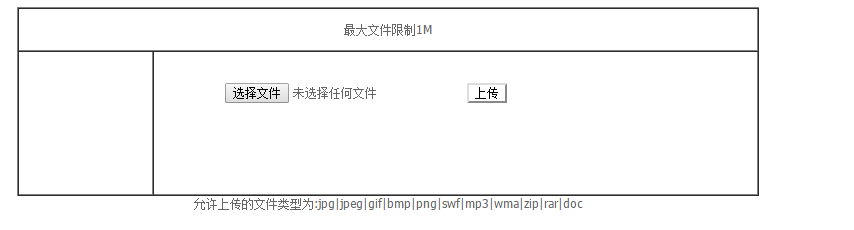
运行后的界面:
php 图片上传预览(转)的更多相关文章
- 兼容好的JS图片上传预览代码
转 : http://www.codefans.net/articles/1395.shtml 兼容好的JS图片上传预览代码 (谷歌,IE11) <html xmlns="http:/ ...
- Jquery图片上传预览效果
uploadPreview.js jQuery.fn.extend({ uploadPreview: function (opts) { var _self = this, _this = $(thi ...
- [前端 4] 使用Js实现图片上传预览
导读:今天做图片上传预览,刚开始的做法是,先将图片上传到Nginx,然后重新加载页面才能看到这个图片.在这个过程中,用户一直都看不到自己上传的文件是什么样子.Ps:我发现我真的有强迫症了,都告诉我说不 ...
- Javascript之图片上传预览
使用Javascript之图片上传预览,我们无需上传到服务器中,兼容所有浏览器. 关键方法是使用微软库filter:progid:DXImageTransform.Microsoft.AlphaIma ...
- HTML5 图片上传预览
<!DOCTYPE html> <html lang="zh-cn"> <head> <meta charset="utf-8& ...
- ASP.NET工作笔记之一:图片上传预览及无刷新上传
转自:http://www.cnblogs.com/sibiyellow/archive/2012/04/27/jqueryformjs.html 最近项目里面涉及到无刷新上传图片的功能,其实也就是上 ...
- js实现图片上传预览及进度条
原文js实现图片上传预览及进度条 最近在做图片上传的时候,由于产品设计的比较fashion,上网找了比较久还没有现成的,因此自己做了一个,实现的功能如下: 1:去除浏览器<input type= ...
- html 图片上传预览
Html5 upload img 2012年12月27日 20:36 <!DOCTYPE HTML> <html> <head> <meta http-equ ...
- js前端实现多图图片上传预览
<html xmlns="http://www.w3.org/1999/xhtml"> <head> <meta http-equiv="C ...
随机推荐
- BufferedOutputStream
package file; import java.io.BufferedOutputStream; import java.io.File; import java.io.FileOutputStr ...
- Solr自动生成ID
在Solr中,每一个索引,都要有一个唯一的ID,类似于关系型数据库表中的主键.为了方便创建索引,需要配置自动生成的ID,即UUID. 一.配置schema.xml文件 添加uuid字段类型,修改字段i ...
- 转:【创龙TMS320C6748开发板试用】相关软件的安装与基本设置+CCS安装失败分析
http://bbs.elecfans.com/jishu_542000_1_1.html
- HttpClient3.1 警告: Cookie rejected:
四月 , :: 下午 org.apache.commons.httpclient.HttpMethodBase processCookieHeaders 警告: Cookie rejected: : ...
- ASP.NET 表单认证与角色授权
参考 : http://hi.baidu.com/iykqqlpugocfnqe/item/e132329bdea22acbb6253105 ASP.NET中处理请求的流程图 http://www. ...
- 虚拟机LUN扩大后,重新分区
[root@ywcrmdb ~]# fdisk -l Disk /dev/sda: 751.6 GB, 751619276800 bytes 255 heads, 63 sectors/track, ...
- 【转】Java 多线程(四) 多线程访问成员变量与局部变量
原文网址:http://www.cnblogs.com/mengdd/archive/2013/02/16/2913659.html 先看一个程序例子: public class HelloThrea ...
- HDU_2036——多边形面积,行列式计算
Problem Description “ 改革春风吹满地, 不会AC没关系; 实在不行回老家, 还有一亩三分地. 谢谢!(乐队奏乐)”话说部分学生心态极好,每天就知道游戏,这次考试如此简单的题目,也 ...
- 单网卡多IP导致的socket connect 10060超时错误
问题: 接管别人代码时遗留的一个bug,在win7下,给一个网卡设置多个ip时,发现无法连接上服务器了.XP下就不会,这多个ip为192.168.1.127,172.1.1.13,10.0.0.1. ...
- 教你正确地利用Netty建立连接池
一.问题描述 Netty是最近非常流行的高性能异步通讯框架,相对于Java原生的NIO接口,Netty封装后的异步通讯机制要简单很多. 但是小K最近发现并不是所有开发人员在使用的过程中都了解其内部实现 ...