
MKMapView and Zoom Levels: A Visual Guide
原帖:http://troybrant.net/blog/2010/01/mkmapview-and-zoom-levels-a-visual-guide/
So, how exactly does the code provided in the previous post work? What follows is a visual explanation of Google Maps, zoom levels, and how you go about adding support for zoom levels to the MKMapView class.
Round to Flat
This is planet Earth:
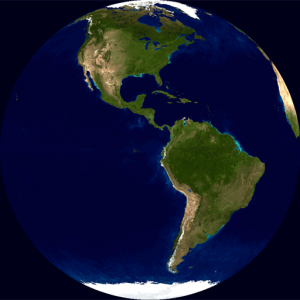
As you may know, it is round.
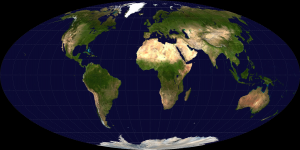
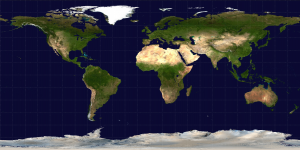
To create a map of the Earth, the curved surface must be projected onto a flat surface. There are many map projections that attempt to flatten the Earth. There are distortions inherent to every projection, but each map projection aims to preserve at least one quality from the original curved representation.
Some projections preserve area, such as the Mollweide projection:
Equirectangluar projections preserve distance between the meridians:
The Mercator projection stretches out the poles in order to preserve locally measured angles:
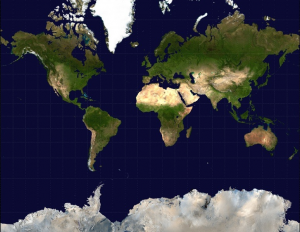
Google uses the Mercator projection to render Google Maps:
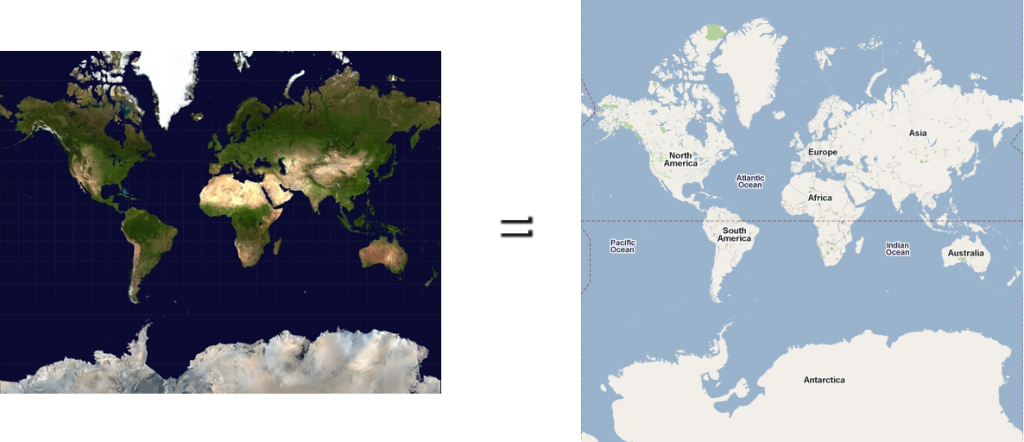
Mercator Math
The Mercator projection converts latitude (φ) and longitude (λ) coordinates to pixel values. It uses math:

You don’t have to understand the math; just know that it converts latitudes and longitudes to pixels.
But, where are these pixels? Well, it depends on your zoom level.
Zoom Levels
At zoom level 0, Google displays the world in a single 256 pixel by 256 pixel tile:

At zoom level 1, Google doubles the area of the map while keeping the tile size constant. So, the map grows to 512 pixels by 512 pixels and uses four tiles:

At zoom level 2, Google doubles the area again. The map grows to 1024 pixels by 1024 pixels and uses sixteen tiles:

The pixel area continues to double at each zoom level, and when zoom level 20 is reached, the map is 536,870,912 pixels by 536,870,912 pixels. It has so many tiles we won’t bother to count them:
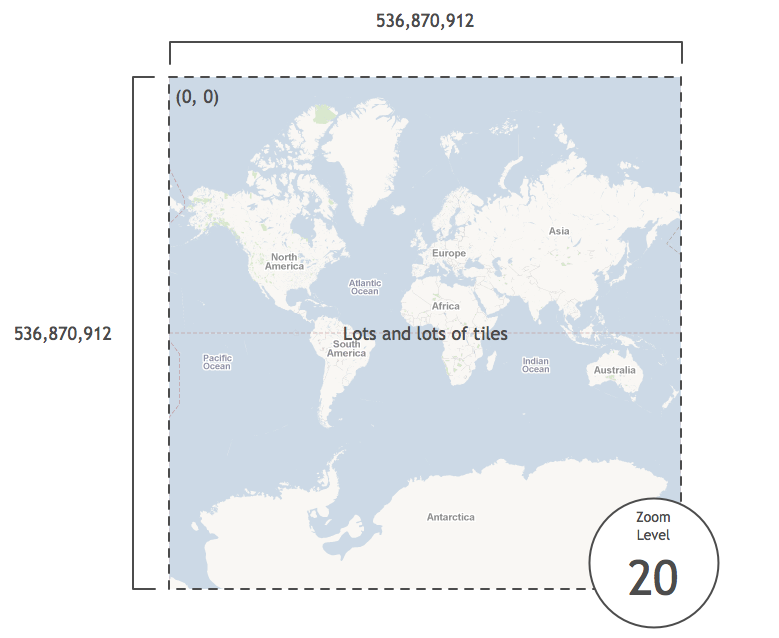
Latitudes and Longitudes to Pixels
As part of the PHP Static Maps project, Mike Tuupola wrote some code that converts latitudes and longitudes to pixels at zoom level 20. The code is easily ported to Objective-C:
#define MERCATOR_OFFSET 268435456 /* (total pixels at zoom level 20) / 2 */
#define MERCATOR_RADIUS 85445659.44705395 /* MERCATOR_OFFSET / pi */
x = round(MERCATOR_OFFSET + MERCATOR_RADIUS * longitude * M_PI / 180.0);
y = round(MERCATOR_OFFSET - MERCATOR_RADIUS * logf((1 + sinf(latitude * M_PI / 180.0)) / (1 - sinf(latitude * M_PI / 180.0))) / 2.0);
To be honest, I haven’t taken the time to wrap my head around how this code works. But, knowing that it does
work, we can now take any latitude and longitude and figure out its
pixel coordinates at zoom level 20. For instance, here are the pixel
coordinates of several cities around the world:

Add an iPhone
Say we place an iPhone on top of Anchorage, Alaska at zoom level 20:

In the iPhone shown above, the map size is 320 pixels by 460 pixels.
Since we know the map dimensions and center coordinate in pixels, we can
easily compute the pixel coordinates of the top-left corner relative to
the center pixel coordinate:

We can find the relative position of the top-right and bottom-left pixel coordinates as well:

The PHP Static Maps code also provides code to go from pixels at zoom level 20 to latitudes and longitudes:
latitude = (M_PI / 2.0 - 2.0 * atan(exp((round(pixelY) - MERCATOR_OFFSET) / MERCATOR_RADIUS))) * 180.0 / M_PI;
longitude = ((round(pixelX) - MERCATOR_OFFSET) / MERCATOR_RADIUS) * 180.0 / M_PI;
We can use this code to convert the corners from pixel coordinates to latitudes and longitudes:
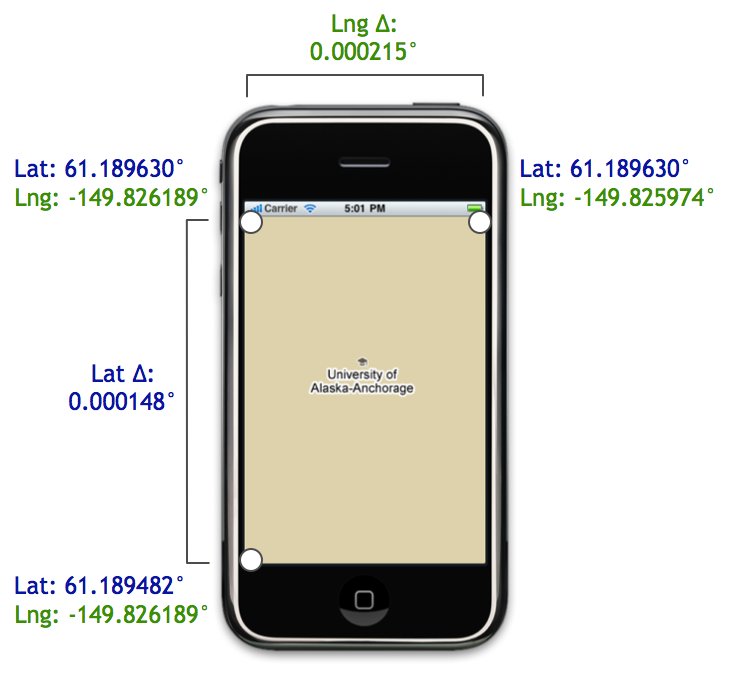
As shown above, using the corner coordinates, we can compute the
latitudinal and longitudinal distances. These distances are exactly what
we need to construct an MKCoordinateSpan. That span, in turn, is used to initialize the region property of an MKMapView:
MKCoordinateSpan span = MKCoordinateSpanMake(latitudeDelta, longitudeDelta);
MKCoordinateRegion region = MKCoordinateRegionMake(centerCoordinate, span);
[mapView setRegion:region animated:NO];
And you’re done!…That is, if you want to see zoom level 20. What do
you do when your user wants to see the map at zoom level 19 instead of
20?
Scaling using Zoom Levels
Relative to zoom level 20, zooming out one level doubles the area visible on the map.
For example, consider the image below. On the left is Anchorage at
zoom level 19, and on the right are the 4 iPhones at zoom level 20 it
would take to display the same amount of area:
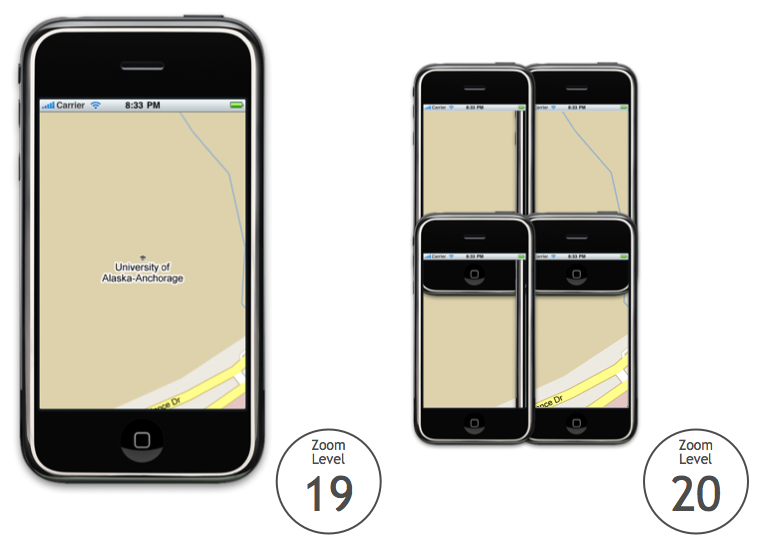
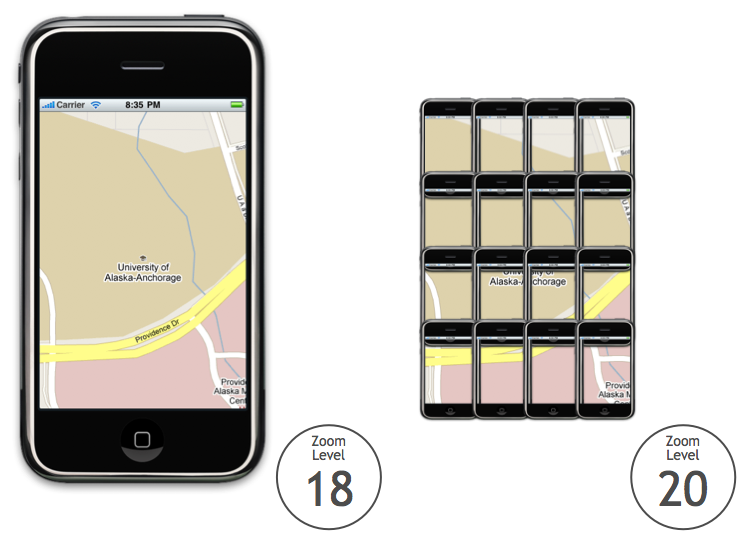
If we move up another level, the area doubles again. Consider the
following image. On the left is Anchorage at zoom level 18, and on the
right are the 16 iPhones at zoom level 20 it would take to display the
same amount of area:
Since the area doubles at each zoom level, we can define the
following exponential relationship between the zoom level and the area
covered by the map:
NSInteger zoomExponent = 20 - zoomLevel;
double zoomScale = pow(2, zoomExponent);
double scaledMapWidth = mapSizeInPixels.width * zoomScale;
double scaledMapHeight = mapSizeInPixels.height * zoomScale;
For instance, here is Anchorage at zoom levels 20, 19, and 18. The map’s width and height in pixels are unaltered:
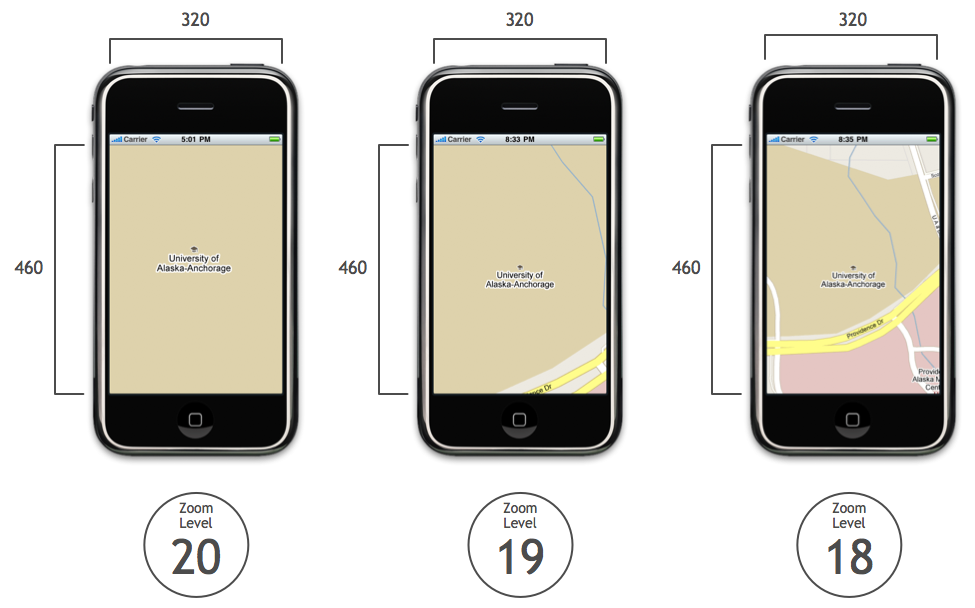
After computing the zoom scale factor, we can apply it to each map to determine its dimensions at zoom level 20:

After we compute these new dimensions, we plug them into the algorithm for finding the coordinates of the map corners.
An Example: Zoom Level 18
For instance, say we take the map at zoom level 18:
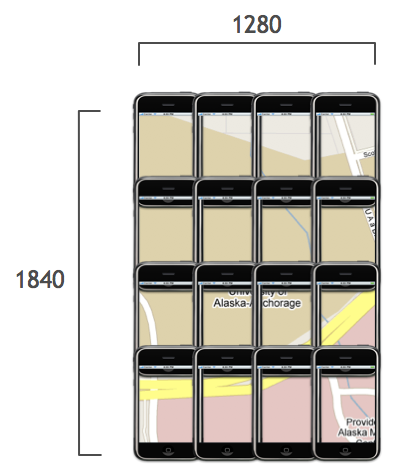
Let’s drop the matrix of phones but keep the scaled width and height:
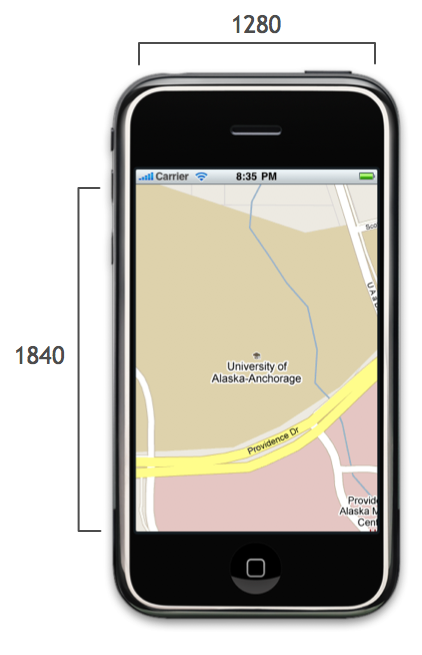
We find the top-left corner just like we did before, except now we use the scaled width and height:

Similarly, we use the scaled width and height for finding the top-right and bottom-left corners as well:

Using the pixel and latitude and pixel and longitude helper methods,
we can compute the coordinates of the corners and the distance between
them:
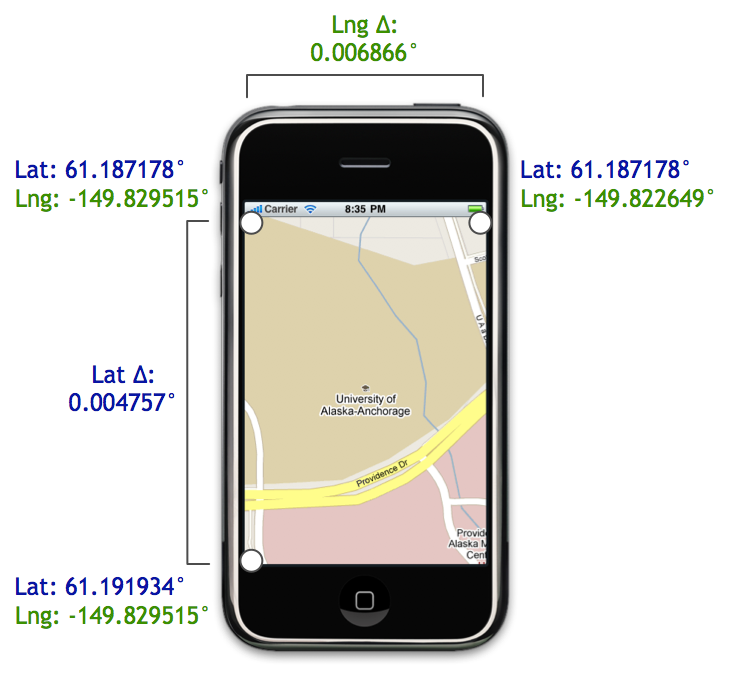
These delta values are used to initialize the map’s region property, and the map zooms to the level you specify.
That’s a Wrap
Be sure to check out the previous post for the full code that adds support for zoom levels to MKMapView.
If you are interested in learning more from someone much smarter than I am, check out these posts from Charlie Savage, a programmer and cartographer extraordinaire:
Much of what I know about maps is from these articles, and I highly
recommended checking them out if you want to learn more about how Google
Maps works under the hood.
MKMapView and Zoom Levels: A Visual Guide的更多相关文章
- [Forward]Visual Guide: Setting up My Sites in SharePoint 2013
from http://blog.sharedove.com/adisjugo/index.php/2012/07/25/visual-guide-setting-up-my-sites-in-sh ...
- A SIMPLE LIBRARY TO BUILD A DEEP ZOOM IMAGE
My current project requires a lot of work with Deep Zoom images. We recently received some very high ...
- leaflet地图库
an open-source JavaScript libraryfor mobile-friendly interactive maps Overview Tutorials Docs Downlo ...
- Android Weekly Notes Issue #221
Android Weekly Issue #221 September 4th, 2016 Android Weekly Issue #221 ARTICLES & TUTORIALS And ...
- less 基础+ flex
1.less 中的变量 @ 符号 引入 /*普通变量*/ @color:pinker; .styles{ color:@color; } /*选择器变量*/ @I:img; @{I}{ width: ...
- Flex 布局教程:语法篇
作者: 阮一峰 网页布局(layout)是CSS的一个重点应用. 布局的传统解决方案,基于盒状模型,依赖 display属性 + position属性 + float属性.它对于那些特殊布局非常不方便 ...
- TileJSON
TileJSON TileJSON is an open standard for representing map metadata. License The text of this specif ...
- MBTiles
MBTiles Specification MBTiles is a specification for storing tiled map data in SQLite databases for ...
- 【转】Flex 布局语法教程
网页布局(layout)是CSS的一个重点应用. 布局的传统解决方案,基于盒状模型,依赖 display属性 + position属性 + float属性.它对于那些特殊布局非常不方便,比如,垂直居中 ...
随机推荐
- C# 网络编程之网页简单下载实现
这是根据<C#网络编程实例教程>中学到的知识实现的一个C#网页简单下载器,其中涉及到的知识主要是HTTP协议编程中相关类:HttpWebRequest类.HttpWebResponse类. ...
- nginx 3.nginx+fastcgi
死磕nginx 3.nginx+fastcgi 互联网服务器有个非常典型的架构lamp(linux+apache+mysql+php),由于其开源和强大的兼容性而风靡一时,不过随着nginx的横空出世 ...
- c#委托中另外一种用法
在c#委托中,经常可能遇到函数重载的情况,可是又需要在一个函数中调用这些函数,一般我都是根据多个函数重载个数,也写上这么多个函数重载.比如 public double T1(int r) { retu ...
- webform 复杂点的服务器控件
1 , dropdownlist: 下拉框 属性items 列表集合, 里面的每一个元素是一个 listitem . 联动的时候注意要 设置属性 .Autopostback 为ture: 注注 ...
- 转载-- C/S 与 B/S 区别
C/S 与 B/S 区别 C/S结构,即Client/Server(客户机/服务器)结构,是大家熟知的软件系统体系结构,通过将任务合理分配到Client端和Server端,降低了系统的通讯开销,可 ...
- Highcharts 设置折线图的显示与隐藏
1.初始化隐藏某条曲线 series 配置如: [ {name:"发帖", postCountData}, {name:"删帖帖", deleteCountDa ...
- 制作ado开发辅助工具类SqlHelper
public static class SqlHelper { //通过配置文件获取连接字符创 private static readonly string constr = Configuratio ...
- spring 配置触发器 (类似于定时任务)
为什么会看这个? 发现项目中有的service中的方法没有地方调用.经查,发现在web.xml中加载的spring的配置文件中配置了这个方法, 经查这种方式是触发器,会定时执行,只需要配置一下.可以设 ...
- 【转】深入理解Java内存模型(七)——总结
处理器内存模型 顺序一致性内存模型是一个理论参考模型,JMM和处理器内存模型在设计时通常会把顺序一致性内存模型作为参照.JMM和处理器内存模型在设计时会对顺序一致性模型做一些放松,因为如果完全按照顺序 ...
- 用C#实现的条形码和二维码编码解码器
本文主要介绍可以在C#中使用的1D/2D编码解码器.条形码的应用已经非常普遍,几乎所有超市里面的商品上面都印有条形码:二维码也开始应用到很多场合,如火车票有二维码识别.网易的首页有二维码图标,用户只需 ...